Homepage Blank Ust 1 Ohio PDF Form
Content Overview

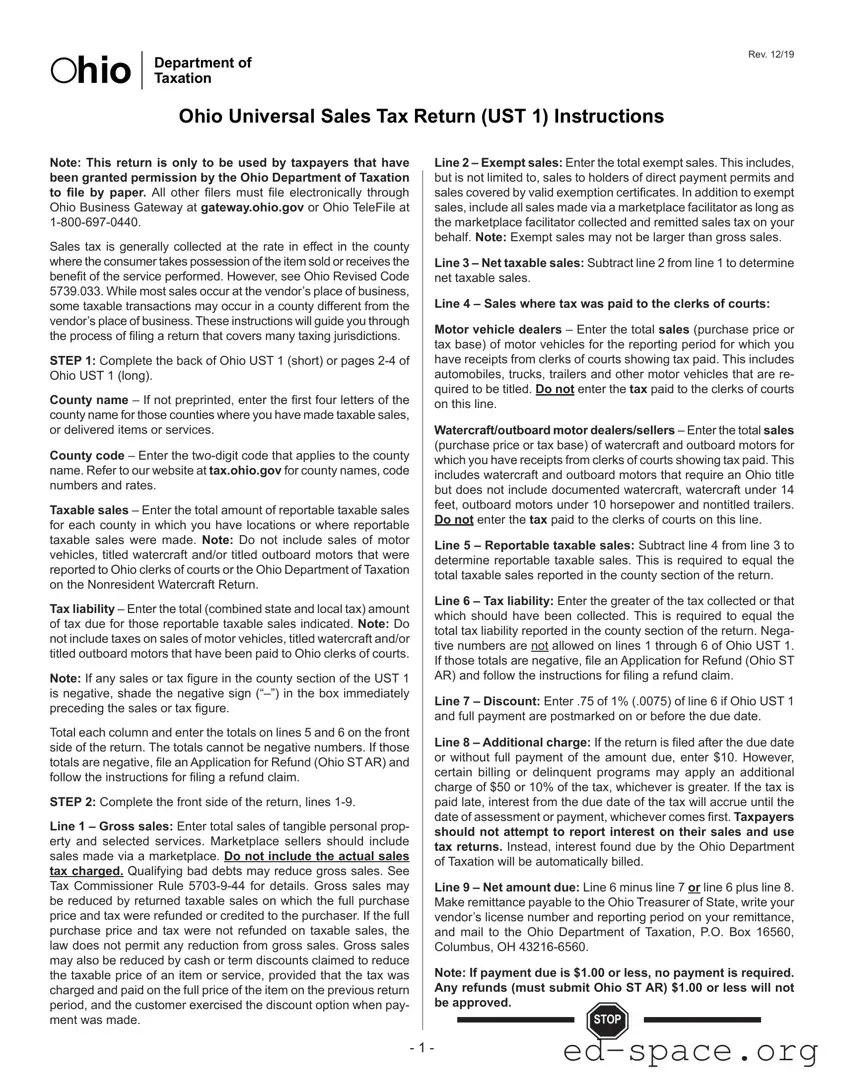
The UST 1 Ohio form serves as a crucial tool for businesses operating in the state, facilitating the reporting and payment of sales tax obligations. Designed specifically for taxpayers granted permission by the Ohio Department of Taxation to file by paper, this form is not for those required to file electronically. The UST 1 form requires businesses to report taxable sales based on the county where the sales occurred, which can sometimes differ from the vendor's location. Instructions are provided to help filers navigate through various sections, including gross sales, exempt sales, and net taxable sales. Additionally, the form outlines how to calculate tax liability, which encompasses both state and local taxes. Important steps include detailing sales made, determining any exemptions, and ensuring accurate tax calculations. Businesses must also be aware of the implications of negative figures and the necessity of filing an Application for Refund if needed. Completing the UST 1 form accurately is essential for compliance and to avoid potential penalties, making it important for businesses to follow the guidelines closely.


Document Preview

Note: This return is only to be used by taxpayers that have
been granted permission by the Ohio Department of Taxation
to le by paper. All other lers must le electronically through
Ohio Business Gateway at gateway.ohio.gov or Ohio TeleFile at
1-800-697-0440.
Sales tax is generally collected at the rate in e󰀨ect in the county
where the consumer takes possession of the item sold or receives the
benet of the service performed. However, see Ohio Revised Code
5739.033. While most sales occur at the vendor’s place of business,
some taxable transactions may occur in a county di󰀨erent from the
vendor’s place of business. These instructions will guide you through
the process of ling a return that covers many taxing jurisdictions.
STEP 1: Complete the back of Ohio UST 1 (short) or pages 2-4 of
Ohio UST 1 (long).
County name – If not preprinted, enter the rst four letters of the
county name for those counties where you have made taxable sales,
or delivered items or services.
County code – Enter the two-digit code that applies to the county
name. Refer to our website at tax.ohio.gov for county names, code
numbers and rates.
Taxable sales – Enter the total amount of reportable taxable sales
for each county in which you have locations or where reportable
taxable sales were made. Note: Do not include sales of motor
vehicles, titled watercraft and/or titled outboard motors that were
reported to Ohio clerks of courts or the Ohio Department of Taxation
on the Nonresident Watercraft Return.
Tax liability – Enter the total (combined state and local tax) amount
of tax due for those reportable taxable sales indicated. Note: Do
not include taxes on sales of motor vehicles, titled watercraft and/or
titled outboard motors that have been paid to Ohio clerks of courts.
Note: If any sales or tax gure in the county section of the UST 1
is negative, shade the negative sign (“–”) in the box immediately
preceding the sales or tax gure.
Total each column and enter the totals on lines 5 and 6 on the front
side of the return. The totals cannot be negative numbers. If those
totals are negative, le an Application for Refund (Ohio ST AR) and
follow the instructions for ling a refund claim.
STEP 2: Complete the front side of the return, lines 1-9.
Line 1 – Gross sales: Enter total sales of tangible personal prop-
erty and selected services. Marketplace sellers should include
sales made via a marketplace. Do not include the actual sales
tax charged. Qualifying bad debts may reduce gross sales. See
Tax Commissioner Rule 5703-9-44 for details. Gross sales may
be reduced by returned taxable sales on which the full purchase
price and tax were refunded or credited to the purchaser. If the full
purchase price and tax were not refunded on taxable sales, the
law does not permit any reduction from gross sales. Gross sales
may also be reduced by cash or term discounts claimed to reduce
the taxable price of an item or service, provided that the tax was
charged and paid on the full price of the item on the previous return
period, and the customer exercised the discount option when pay-
ment was made.
Ohio Universal Sales Tax Return (UST 1) Instructions
Line 2 – Exempt sales: Enter the total exempt sales. This includes,
but is not limited to, sales to holders of direct payment permits and
sales covered by valid exemption certicates. In addition to exempt
sales, include all sales made via a marketplace facilitator as long as
the marketplace facilitator collected and remitted sales tax on your
behalf. Note: Exempt sales may not be larger than gross sales.
Line 3 – Net taxable sales: Subtract line 2 from line 1 to determine
net taxable sales.
Line 4 – Sales where tax was paid to the clerks of courts:
Motor vehicle dealers – Enter the total sales (purchase price or
tax base) of motor vehicles for the reporting period for which you
have receipts from clerks of courts showing tax paid. This includes
automobiles, trucks, trailers and other motor vehicles that are re-
quired to be titled. Do not enter the tax paid to the clerks of courts
on this line.
Watercraft/outboard motor dealers/sellers – Enter the total sales
(purchase price or tax base) of watercraft and outboard motors for
which you have receipts from clerks of courts showing tax paid. This
includes watercraft and outboard motors that require an Ohio title
but does not include documented watercraft, watercraft under 14
feet, outboard motors under 10 horsepower and nontitled trailers.
Do not enter the tax paid to the clerks of courts on this line.
Line 5 – Reportable taxable sales: Subtract line 4 from line 3 to
determine reportable taxable sales. This is required to equal the
total taxable sales reported in the county section of the return.
Line 6 – Tax liability: Enter the greater of the tax collected or that
which should have been collected. This is required to equal the
total tax liability reported in the county section of the return. Nega-
tive numbers are not allowed on lines 1 through 6 of Ohio UST 1.
If those totals are negative, le an Application for Refund (Ohio ST
AR) and follow the instructions for ling a refund claim.
Line 7 – Discount: Enter .75 of 1% (.0075) of line 6 if Ohio UST 1
and full payment are postmarked on or before the due date.
Line 8 – Additional charge: If the return is led after the due date
or without full payment of the amount due, enter $10. However,
certain billing or delinquent programs may apply an additional
charge of $50 or 10% of the tax, whichever is greater. If the tax is
paid late, interest from the due date of the tax will accrue until the
date of assessment or payment, whichever comes rst. Taxpayers
should not attempt to report interest on their sales and use
tax returns. Instead, interest found due by the Ohio Department
of Taxation will be automatically billed.
Line 9 – Net amount due: Line 6 minus line 7 or line 6 plus line 8.
Make remittance payable to the Ohio Treasurer of State, write your
vendor’s license number and reporting period on your remittance,
and mail to the Ohio Department of Taxation, P.O. Box 16560,
Columbus, OH 43216-6560.
Note: If payment due is $1.00 or less, no payment is required.
Any refunds (must submit Ohio ST AR) $1.00 or less will not
be approved.
hio
Department of
Taxation
Rev. 12/19
STOP
- 1 -
STEP 3 – Proceed only if you are required to make payment by
electronic funds transfer (EFT) and have made the proper acceler-
ated payments. If payment of balance due is made by EFT, place
an X in the EFT box to indicate how the payment was made.
Line 10 Accelerated payments made: Enter the amount of the
accelerated payment made for the month of the reporting period.
Line 11 – Accelerated payment for next reporting period: Enter
the amount of the accelerated payment needed for the next reporting
period (the period after the period of the current return). For example,
if you are ling the January return in February, you are making the
accelerated payment for February. This amount must be included
in the payment on line 12 and will be credited to that month.
Tip: You still have the option to make the accelerated payment
separate from the balance due for the tax return. If you do so, do not
complete line 11. Any amount stated on this line will be transferred
to the next period, which may leave the current return underpaid and
result in the issuance of a billing notice. For example, if the acceler-
ated payment and the balance due for the tax return are paid by one
EFT transfer, then line 11 needs to be lled out with the amount of
the accelerated payment intended for the next reporting period. If,
on the other hand, the accelerated payment and the balance due
for the tax return are paid by two separate EFT transfers, then line
11 should be left blank.
Line 12 – Balance due: The amount on line 9, less the amount on
line 10, plus the amount on line 11. Pay this electronically by using
one of the several payment options below.
You can pay your balance due by:
Paper check submitted with the paper return (unless required
to pay by EFT)
Ohio Business Gateway, with the filing of the return
(gateway.ohio.gov)
EFT through the Ohio Treasurer of State (eft.tos.ohio.gov)
Ohio Telele 1-800-697-0440. Refer to TeleFile instructions.
You can make accelerated payments electronically by:
Ohio Business Gateway (gateway.ohio.gov)
EFT through the Ohio Treasurer of State (eft.tos.ohio.gov)
Ohio TeleFile 1-800-697-0440. Refer to TeleFile instructions.
For Cumulative Filers Only
It is important to note that cumulative lers are still required to ob-
tain and maintain an active vendor’s license for each xed place
of business. Cumulative lers must report taxable sales and tax
liability on a county-by-county basis, not on a location-by-location
basis. However, your records must include a location-by-location
breakdown of sales and tax activity for audit purposes.
Amended Returns
If an amended return is necessary due to a change in the informa-
tion provided on the original return, check the box on the front of
the return to signify that this is an amended return. If you need
to le an amended return for a period that contained an acceler-
ated payment on line 11, you cannot change the amount originally
stated on this line.
If an amended return creates an overpayment on the return period,
you must complete an Application for Refund, Ohio ST AR. The
refund application with the amended return and back-up docu-
mentation should be sent to the address on the refund application.
Proper Completion of Your Returns
To ensure that your sales and tax information is properly captured
and that your account is properly credited, follow these guidelines
when preparing your returns.
1. Use blue or black ink. Do not use pencil.
2. Make hand-written characters as close to the following example
as possible.
3. If you had no sales for the reporting period, indicate this by show-
ing zeros (00) in the cents column of line 1. Do not use straight
lines. Tax returns must be timely led even if no tax is due.
4. Other than as stated in number three, above, leave other lines
blank if they do not apply.
- 2 -

Form Specifications

Fact Name Detail
Form Purpose The UST 1 form is used for reporting sales tax in Ohio.
Filing Method This form is for taxpayers permitted to file by paper; others must file electronically.
Governing Law Ohio Revised Code 5739.033 governs the collection of sales tax.
Sales Tax Rate The sales tax rate is based on the county where the consumer takes possession of the item.
Negative Figures Negative numbers are not allowed on certain lines; if they occur, file an Application for Refund.
Exempt Sales Exempt sales include those to direct payment permit holders and sales via marketplace facilitators.
Discount Eligibility A discount of 0.75% applies if the form and payment are postmarked by the due date.
Late Payment Charge A $10 charge applies if the return is filed late or without full payment.
Cumulative Filers Cumulative filers must report sales and tax liability by county, not by location.

Ust 1 Ohio: Usage Guidelines

Filling out the UST 1 Ohio form is a straightforward process, but it requires attention to detail. Each section of the form must be completed accurately to ensure compliance with state tax regulations. After filling out the form, you will submit it to the Ohio Department of Taxation, along with any required payment, if applicable.

  1. Complete the back of the Ohio UST 1 (short) or pages 2-4 of the Ohio UST 1 (long).
  2. For each county where taxable sales were made, enter the first four letters of the county name and the corresponding two-digit county code.
  3. Input the total amount of reportable taxable sales for each county, excluding motor vehicles and certain watercraft.
  4. Calculate and enter the total tax liability for those reportable taxable sales.
  5. If any sales or tax figure is negative, shade the negative sign in the box preceding the figure.
  6. Total each column and enter the totals on lines 5 and 6 on the front side of the return. Ensure totals are not negative.
  7. Complete the front side of the return, starting with line 1 for gross sales, including all tangible personal property and selected services.
  8. On line 2, enter the total exempt sales, ensuring it does not exceed gross sales.
  9. Calculate net taxable sales by subtracting line 2 from line 1 on line 3.
  10. For line 4, enter the total sales of motor vehicles or watercraft for which tax was paid to clerks of courts.
  11. Determine reportable taxable sales on line 5 by subtracting line 4 from line 3.
  12. On line 6, enter the greater of the tax collected or that which should have been collected.
  13. For line 7, if applicable, enter the discount amount based on the tax liability.
  14. On line 8, enter any additional charge if the return is filed late.
  15. Calculate the net amount due on line 9 by adjusting line 6 for the discount or additional charge.
  16. Proceed to line 10 only if required to make payment by electronic funds transfer (EFT) and enter any accelerated payments made.
  17. On line 11, enter the amount needed for the next reporting period, if applicable.
  18. Calculate the balance due on line 12 by adjusting line 9 based on accelerated payments.
  19. Make payment as instructed, ensuring to write your vendor’s license number and reporting period on the remittance.

Your Questions, Answered

What is the UST 1 Ohio form used for?

The UST 1 Ohio form is used to report sales tax collected by businesses in Ohio. It is specifically for taxpayers who have received permission from the Ohio Department of Taxation to file a paper return. Most businesses are required to file electronically, but this form serves those who qualify for paper filing. It allows businesses to report taxable sales and calculate the tax liability due to the state.

Who needs to file the UST 1 Ohio form?

How do I complete the UST 1 Ohio form?

What should I do if I have no sales for the reporting period?

What happens if I file the UST 1 Ohio form late?

How can I make a payment for the amount due on the UST 1 Ohio form?

Common mistakes

  1. Incorrect County Information: Many individuals fail to enter the correct county name or code. Ensure you provide the first four letters of the county name and the corresponding two-digit code. Double-check this information against the official list available on the Ohio Department of Taxation's website.

  2. Omitting Non-Taxable Sales: Some filers mistakenly include non-taxable sales in their total taxable sales. Remember, sales of motor vehicles and certain watercraft should not be included in the taxable sales figures reported on the form.

  3. Negative Totals: Entering negative numbers in the sales or tax liability sections is a common error. If you find yourself with a negative figure, you must file an Application for Refund instead of reporting it directly on the UST 1 form.

  4. Improper Gross Sales Calculation: Failing to accurately calculate gross sales can lead to significant issues. Be cautious to include only the total sales of tangible personal property and selected services, excluding any sales tax charged.

  5. Missing Required Signatures: Some taxpayers neglect to sign their returns. A missing signature can delay processing. Always ensure that you sign and date the form before submission.

  6. Incorrect Payment Method: Individuals often misinterpret the payment options available. If you are required to pay electronically, ensure that you select the appropriate method and indicate it clearly on the form.

Documents used along the form

The UST 1 Ohio form is a crucial document for businesses that need to report their sales tax obligations to the Ohio Department of Taxation. However, it is often accompanied by other important forms and documents that help ensure compliance and accurate reporting. Here’s a brief overview of some of these additional forms and documents.

  • Application for Refund (Ohio ST AR): This form is used to request a refund of overpaid sales tax. If a business realizes it has overpaid, submitting this application allows for the recovery of those funds.
  • Exemption Certificate: This document is essential for businesses that sell items exempt from sales tax. It must be provided by the buyer to validate the tax-exempt status of the sale.
  • Nonresident Watercraft Return: Specifically for sales involving watercraft, this form is used to report sales tax for nonresidents. It ensures that proper tax obligations are met for specific transactions.
  • Vendor’s License Application: Businesses must obtain a vendor’s license to legally collect sales tax in Ohio. This application initiates the process of becoming a registered vendor.
  • Sales Tax Worksheet: A helpful internal document, this worksheet assists businesses in tracking their sales and calculating the sales tax owed before filing the UST 1 form.
  • Amended Return: If a business needs to correct information from a previously filed UST 1 form, it must submit an amended return. This ensures that the tax records are accurate and up to date.
  • Payment Confirmation Receipt: After making a payment, businesses should keep this receipt as proof of payment for their records. It can be useful in case of discrepancies or audits.

Understanding these forms and documents is essential for any business operating in Ohio. They not only facilitate compliance but also help prevent potential issues with tax authorities. By ensuring that all necessary paperwork is completed accurately and submitted on time, businesses can focus on what they do best—serving their customers.

Similar forms

The UST 1 Ohio form is a crucial document for sales tax reporting in Ohio. Several other forms share similarities with it, particularly in their purpose or structure. Below are eight documents that are comparable to the UST 1 Ohio form, along with explanations of their similarities:

  • Sales Tax Return (Form ST-3): Like the UST 1, this form is used to report sales tax collected by businesses. Both require detailed reporting of taxable sales and exemptions.
  • Monthly Sales Tax Return (Form ST-1): This form is similar in that it is filed monthly and requires businesses to report total sales, taxable sales, and tax liability, much like the UST 1.
  • Application for Refund (Form ST AR): When errors occur on sales tax returns, both the UST 1 and ST AR allow taxpayers to address overpayments or incorrect filings.
  • Use Tax Return (Form ST-4): This document serves a similar purpose for use tax, requiring the reporting of taxable purchases made outside of Ohio, akin to the reporting requirements of the UST 1.
  • Annual Sales Tax Report (Form ST-12): Businesses may use this form to summarize their annual sales tax obligations, paralleling the annual reporting aspect found in the UST 1.
  • Vendor’s License Application (Form ST-1): While not a return, this application is essential for businesses to collect sales tax, similar to the UST 1's requirement for a vendor’s license.
  • Tax Exemption Certificate (Form ST-2): This form allows taxpayers to claim exemptions from sales tax, which is a key aspect also addressed in the UST 1.
  • Marketplace Facilitator Tax Return: This form is used by marketplace sellers to report sales made through online platforms, similar to how the UST 1 addresses sales made by vendors.

Dos and Don'ts

When filling out the UST 1 Ohio form, there are important dos and don'ts to keep in mind. Following these guidelines can help ensure that your submission is accurate and complete.

  • Do use blue or black ink when completing the form. Avoid using pencil.
  • Do enter the correct county name and code for each location where taxable sales occurred.
  • Do include all reportable taxable sales, but exclude sales of motor vehicles and certain watercraft as specified.
  • Do check that your total sales and tax liability figures are not negative; if they are, file an Application for Refund.
  • Do ensure that you indicate zero sales correctly if applicable, by showing "00" in the cents column on line 1.
  • Don't use straight lines to indicate zero sales; this can lead to confusion.
  • Don't include taxes on sales of motor vehicles or titled watercraft in your totals.
  • Don't leave lines blank that require information; only leave them blank if they do not apply, as indicated in the instructions.
  • Don't forget to sign and date your return before submission.
  • Don't submit your return late; even if no tax is due, timely filing is required.

Misconceptions

When it comes to the Ohio Universal Sales Tax Return (UST 1), there are several misconceptions that can lead to confusion for taxpayers. Here are six common misunderstandings:

  • Only electronic filing is allowed. Many people believe that the UST 1 form can only be filed electronically. In reality, this form is specifically for those who have received permission from the Ohio Department of Taxation to file by paper.
  • Sales tax is always collected at the vendor's location. It's a common belief that sales tax is collected based solely on where the vendor operates. However, the tax is actually based on where the consumer takes possession of the item or receives the service, which can differ from the vendor's location.
  • All sales are taxable. Some individuals think that every sale is subject to sales tax. In fact, there are numerous exempt sales, including those made to holders of direct payment permits or covered by valid exemption certificates.
  • Negative numbers can be reported. A frequent misconception is that taxpayers can report negative sales or tax figures. However, the UST 1 does not allow negative numbers on certain lines, and if a negative figure occurs, a different process must be followed.
  • Late payments incur a flat fee. Many assume that any late payment will incur a standard fee. In truth, the additional charge for late payments can vary significantly, being either a flat fee or a percentage of the tax owed, depending on the situation.
  • Refunds are automatically processed. Some taxpayers mistakenly believe that if they overpay, they will automatically receive a refund. To receive a refund, they must complete an Application for Refund and follow specific procedures.

Understanding these misconceptions can help ensure that you file your UST 1 form correctly and avoid potential issues with the Ohio Department of Taxation.

Key takeaways

  • Eligibility: The UST 1 Ohio form is exclusively for taxpayers authorized by the Ohio Department of Taxation to file by paper. If you haven’t received this permission, you must file electronically.
  • County Information: When filling out the form, accurately enter the county name and code for every location where taxable sales occurred. This ensures the correct tax rates are applied.
  • Sales Tax Calculation: Be precise when reporting taxable sales. Remember to exclude sales of motor vehicles and certain watercraft that were reported separately.
  • Negative Figures: If you encounter negative sales or tax figures, you must shade the negative sign and cannot submit negative totals on key lines. Instead, file for a refund if necessary.
  • Payment Details: Ensure that your payment is made on time. If filed late, additional charges may apply, and interest will accrue on unpaid taxes.
  • Amended Returns: If you need to amend your return, check the appropriate box on the front of the form. However, you cannot alter any accelerated payment amounts reported previously.