Homepage Blank Transmittal PDF Form
Content Overview

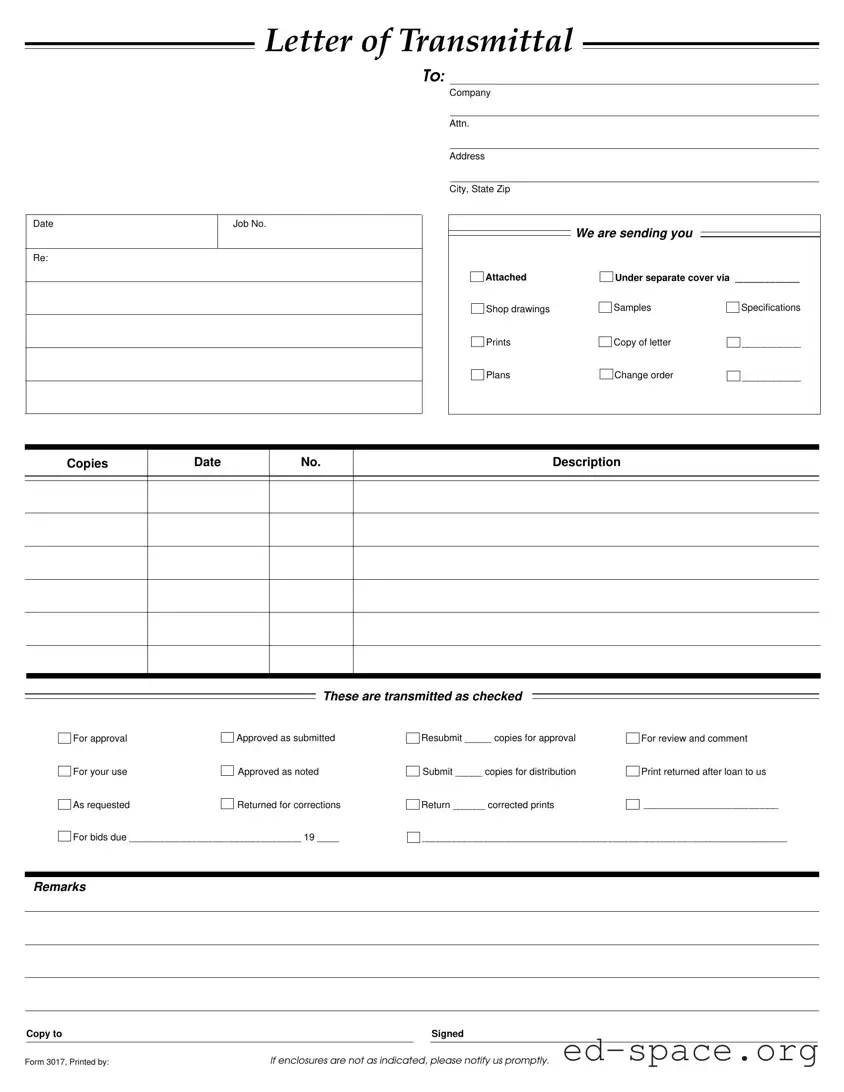
The Transmittal form serves as a vital communication tool in various business and construction projects, facilitating the organized transfer of documents and materials between parties. This form typically includes essential details such as the date, job number, and recipient information, ensuring clarity and accountability. It outlines the specific items being sent, which may range from shop drawings and samples to specifications and plans. The sender can indicate the purpose of the transmission, whether it is for approval, review, or corrections, thereby streamlining the workflow. Additionally, the form provides space for remarks and instructions, allowing for further clarification. By documenting the items transmitted and their status—such as "approved as submitted" or "returned for corrections"—the Transmittal form plays a crucial role in maintaining an organized record of project communications. It is important for all parties involved to be aware of the contents of the form, as any discrepancies in the enclosures should be promptly addressed to avoid misunderstandings or delays.
Document Preview

We are sending you
Letter of Transmittal
To:
Attn.
Company
Address
City, State Zip
Job No.Date
Re:
Copies
Date Description
No.
Shop drawings
Prints
Plans
Attached
Specifications
___________
___________
Samples
Under separate cover via ____________
If enclosures are not as indicated, please notify us promptly.
Copy to Signed
Remarks
For approval
For your use
As requested
Approved as submitted
Approved as noted
Resubmit _____ copies for approval
Return ______ corrected prints
For review and comment
Print returned after loan to us
____________________________________________________________________
These are transmitted as checked
Copy of letter
Change order
Returned for corrections
Submit _____ copies for distribution
_________________________
For bids due ________________________________ 19 ____
Form 3017, Printed by:

Form Specifications

Fact Name Description Governing Law
Purpose The Transmittal Form is used to send documents and materials between parties. N/A
Contents It includes fields for the date, job number, company details, and a list of attached items. N/A
Approval Status Users can indicate the status of the documents as approved, for review, or needing corrections. N/A
Notification Requirement If enclosures are incorrect, the recipient must notify the sender promptly. N/A
Resubmission The form includes a section for resubmitting copies for approval or further review. N/A
Distribution It allows for the distribution of copies to multiple parties as needed. N/A

Transmittal: Usage Guidelines

Filling out the Transmittal form is a straightforward process that ensures clear communication between parties involved in a project. After completing the form, it will be sent to the designated recipient, along with any accompanying documents. This step is crucial for maintaining organization and clarity throughout the project lifecycle.

  1. Begin by entering the date at the top of the form.
  2. In the To: section, write the name of the recipient or company.
  3. Fill in the Job No. and Company fields with the relevant information.
  4. In the Attn. section, specify the name of the person to whom the documents are directed.
  5. Complete the Address, City, State, and Zip fields with the recipient's address.
  6. List the items being sent in the Attached section. Indicate how each item is being sent, using the space provided for Under separate cover via.
  7. Mark the appropriate boxes next to the items being transmitted, such as Shop drawings, Samples, or Specifications.
  8. Fill in the Copies section with the number of copies being sent for each item.
  9. In the Remarks section, provide any additional information or comments that may be necessary.
  10. Sign the form in the Signed section.
  11. Finally, ensure that the Copy to section is filled out if applicable, and note the Form 3017, Printed by: section.

Once completed, review the form for accuracy before sending it along with the necessary documents. This careful attention to detail will help facilitate a smooth exchange of information.

Your Questions, Answered

What is a Transmittal Form?

A Transmittal Form is a document used to accompany materials being sent from one party to another. It provides essential information about the contents being transmitted, including details such as the sender's and recipient's information, the date, and a description of the items included. This form ensures clarity and helps maintain a record of what has been sent and received.

When should I use a Transmittal Form?

You should use a Transmittal Form whenever you are sending important documents, such as shop drawings, specifications, or plans, to another party. It is particularly useful in construction and engineering projects, where multiple documents are exchanged. Using this form helps ensure that all parties are on the same page regarding what has been sent and what is expected in return.

What information do I need to include on the Transmittal Form?

When filling out a Transmittal Form, include the date, job number, company name, and the name of the person to whom you are sending the documents. Additionally, list the specific documents being transmitted, such as shop drawings or change orders. It is also important to indicate the purpose of the transmission, whether for approval, review, or another reason.

How do I indicate the status of the transmitted documents?

The Transmittal Form includes options to indicate the status of the documents being sent. You can check the appropriate box to show whether the documents are for approval, have been approved as submitted, are for your use, or require corrections. This helps clarify the recipient's responsibilities and expectations regarding the documents.

What should I do if the enclosures do not match what is indicated on the Transmittal Form?

If the enclosures you receive do not match what is indicated on the Transmittal Form, it is important to notify the sender promptly. This ensures that any discrepancies can be addressed quickly, and it helps maintain clear communication between both parties. Prompt action can prevent misunderstandings and delays in the project.

Can I send multiple types of documents using one Transmittal Form?

Yes, you can send multiple types of documents using a single Transmittal Form. Just make sure to clearly list each type of document in the designated section. This includes shop drawings, samples, specifications, and any other relevant materials. Clarity in your listings will help the recipient understand what they are receiving and what actions are required.

Is there a specific format I need to follow for the Transmittal Form?

While there may not be a strict format required, it is essential to follow a clear and organized structure. The Transmittal Form should include all necessary information, such as sender and recipient details, a description of the documents, and the status of each document. Using a standard template can help ensure that you include all relevant information consistently.

Common mistakes

  1. Failing to include the date in the designated field. This can lead to confusion about when the documents were sent.

  2. Not specifying the job number. Without this, it can be difficult for the recipient to track the project.

  3. Leaving the company name or attn. name blank. This can cause delays in processing as the recipient may not know who the documents are for.

  4. Omitting the address details. An incomplete address can result in misdelivery or non-delivery of important documents.

  5. Not checking the appropriate transmittal options. If the boxes are left unchecked, the recipient may not understand the purpose of the documents.

  6. Failing to include remarks when necessary. This section provides important context and clarifications for the recipient.

  7. Neglecting to sign the form. A missing signature can render the transmittal invalid and may require resending.

  8. Forgetting to notify if enclosures are not as indicated. Prompt notification helps maintain clear communication and avoid misunderstandings.

Documents used along the form

The Transmittal form is a key document used in various professional settings, particularly in construction and project management. It serves as a cover letter that outlines what is being sent and the purpose of the transmission. Along with the Transmittal form, several other documents are commonly utilized to ensure clarity and proper communication. Below is a list of these documents, each accompanied by a brief description.

  • Cover Letter: This letter accompanies the Transmittal form and provides additional context or instructions regarding the documents being sent. It often includes a summary of the contents and any important deadlines.
  • Shop Drawings: Detailed drawings created by contractors or manufacturers that illustrate how specific components will be fabricated and installed. These are essential for ensuring that the project meets design specifications.
  • Specifications: A document that outlines the technical requirements for materials, products, and workmanship. It serves as a guide for contractors and suppliers to understand project standards.
  • Change Orders: Formal documents that modify the original contract. They detail changes in scope, costs, or timelines and require approval from relevant parties before implementation.
  • Plans: Architectural or engineering drawings that depict the layout and details of a project. These plans are crucial for guiding construction and ensuring compliance with design intent.
  • Samples: Physical examples of materials or products intended for use in the project. They allow stakeholders to assess quality and aesthetics before final approval.

Each of these documents plays a vital role in the overall communication process, ensuring that all parties involved in a project are informed and aligned. Proper use of these forms can significantly enhance project efficiency and reduce misunderstandings.

Similar forms

  • Cover Letter: Similar to a transmittal form, a cover letter accompanies documents and provides a brief overview of the contents. It often includes the sender's contact information and the purpose of the correspondence.
  • Delivery Receipt: This document confirms that specific items were delivered to a recipient. Like the transmittal form, it serves as proof of delivery and outlines what was sent.
  • Shipping Manifest: A shipping manifest details the contents of a shipment. It is comparable to the transmittal form in that it lists items being sent and may include tracking information.
  • Invoice: An invoice provides a detailed account of goods or services provided. It parallels the transmittal form by documenting what is being sent, along with any associated costs.
  • Purchase Order: A purchase order is a document issued by a buyer to a seller. It specifies items being purchased and is similar to a transmittal form in that it outlines specific details about the transaction.
  • Project Update Report: This report summarizes the status of a project. It shares similarities with the transmittal form by conveying important information about project components and timelines.
  • Change Order: A change order modifies an existing agreement. Like the transmittal form, it communicates changes and provides details about the adjustments being made.
  • Meeting Minutes: Meeting minutes document discussions and decisions made during a meeting. They are similar to the transmittal form in that they provide a record of what was discussed and any actions to be taken.
  • Submission Form: A submission form collects information for a specific purpose. It resembles the transmittal form by requiring details about what is being submitted and to whom.

Dos and Don'ts

When filling out the Transmittal form, it is important to follow specific guidelines to ensure clarity and accuracy. Here are six things to do and avoid:

  • Do fill in all required fields completely, including the date, job number, and company information.
  • Do check the boxes that accurately reflect the purpose of the transmission, such as "For approval" or "Returned for corrections."
  • Do list all attached documents clearly, ensuring each item is noted, such as "Shop drawings" or "Specifications."
  • Do include any remarks that may provide additional context or instructions.
  • Don't leave any sections blank unless they are not applicable; this can lead to confusion.
  • Don't forget to sign the form before sending it, as this confirms your acknowledgment of the contents.

Misconceptions

Misconceptions about the Transmittal form can lead to confusion in communication and project management. Here are nine common misunderstandings:

  • It is only for sending documents. Many believe the Transmittal form is solely for document transmission. In reality, it serves as a cover sheet that summarizes the contents and purpose of the items being sent.
  • All items must be sent at once. Some think that the Transmittal form requires all documents to be sent together. However, it can be used for partial submissions or to indicate items sent under separate cover.
  • It is not legally binding. There is a misconception that the Transmittal form has no legal weight. While it is primarily a communication tool, it can be referenced in disputes regarding what was sent and received.
  • Only one copy is needed. Many assume that a single copy of the Transmittal form suffices. In practice, multiple copies may be necessary for all parties involved to ensure clear communication.
  • It does not require signatures. Some believe that signatures are optional. In fact, having a signature can provide confirmation of receipt and acknowledgment of the contents.
  • It is interchangeable with other forms. Some people think the Transmittal form can replace other forms, such as invoices or contracts. Each form serves a distinct purpose and should not be confused with one another.
  • It is only for internal use. A common belief is that the Transmittal form is only for internal communication. It is often used to communicate with clients, subcontractors, and other external parties.
  • It is not necessary for small projects. Some individuals think smaller projects do not require a Transmittal form. Regardless of project size, using this form can enhance organization and clarity.
  • It has no specific format. There is a misconception that the Transmittal form can be any format. While it can vary, following a standard format helps ensure all necessary information is included and understood.

Key takeaways

Filling out and using the Transmittal form is a crucial step in ensuring effective communication and documentation in project management. Here are some key takeaways to keep in mind:

  • Accuracy is essential. Ensure that all fields are completed correctly to avoid confusion and delays.
  • Specify attachments clearly. Clearly indicate what documents you are sending, such as shop drawings or specifications, to provide clarity to the recipient.
  • Check the purpose of transmission. Use the checkboxes to indicate whether the documents are for approval, for your use, or for review and comment.
  • Keep track of copies. Note the number of copies you are sending and whether any need to be resubmitted for approval.
  • Provide remarks when necessary. Use the remarks section to add any additional information that may help the recipient understand the context of the documents.
  • Follow up if needed. If enclosures are not as indicated, promptly notify the sender to resolve any discrepancies.

By following these guidelines, you can ensure that your use of the Transmittal form is effective and that all parties involved are on the same page.