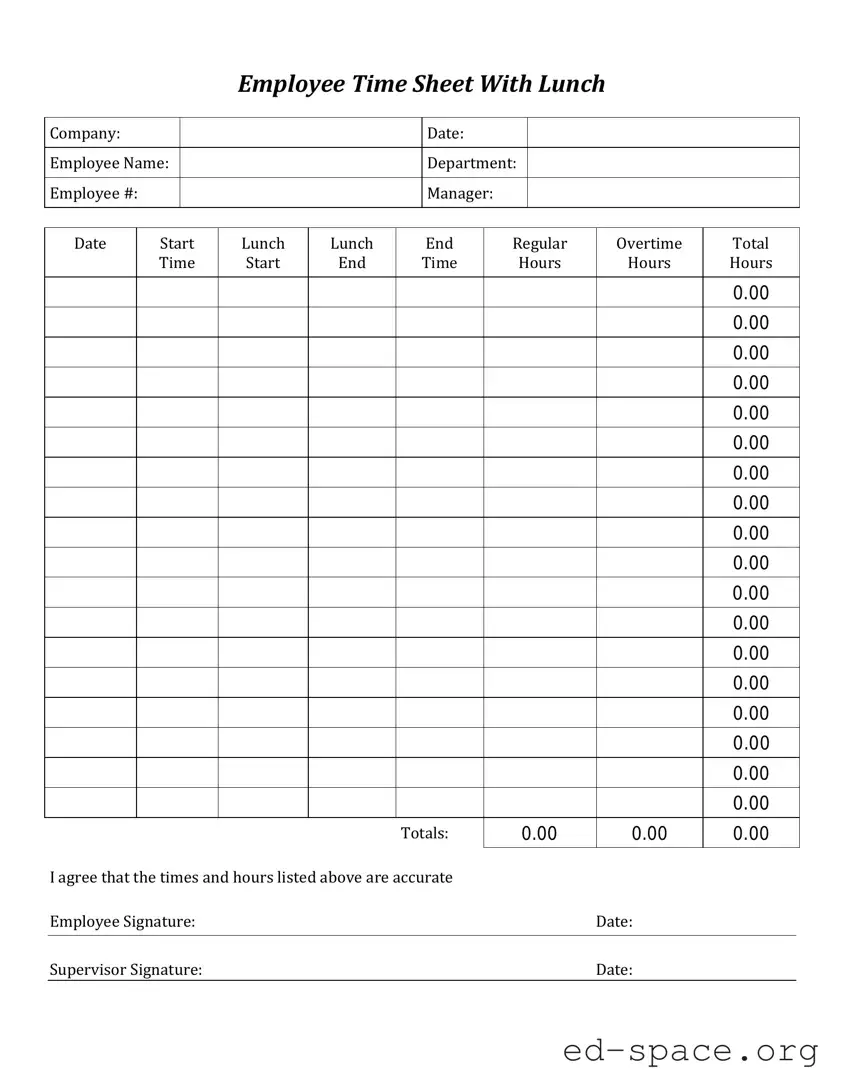
The Time Card form plays a crucial role in the workplace, serving as a vital tool for tracking employee hours and ensuring accurate payroll processing. It typically includes sections for recording the date, start and end times of shifts, and any breaks taken throughout the workday. This form not only aids in maintaining compliance with labor laws but also helps employers monitor attendance and manage workforce efficiency. Employees fill out their time cards, often on a weekly basis, providing a clear record of hours worked that can be easily verified. Moreover, many organizations have moved towards digital time card systems, which streamline the process and reduce errors associated with manual entry. Understanding the intricacies of the Time Card form can empower both employees and employers to foster a transparent and efficient work environment.

| Fact Name | Description |
|---|---|
| Purpose | The Time Card form is used to record the hours worked by employees, ensuring accurate payroll processing. |
| State-Specific Forms | Some states may require specific formats or additional information on the Time Card, governed by state labor laws. |
| Submission Frequency | Employees typically submit Time Cards on a weekly or bi-weekly basis, aligning with the payroll schedule of the employer. |
| Record Keeping | Employers must retain Time Card records for a specified period, as mandated by federal and state labor regulations. |
Filling out the Time Card form is an important task that ensures accurate tracking of hours worked. Once you have completed the form, it will be submitted to your supervisor for review and processing. Follow these steps carefully to ensure that all necessary information is provided.
What is a Time Card form?
A Time Card form is a document used by employees to record the hours they have worked during a specific period. It typically includes fields for the employee's name, date, hours worked each day, and total hours for the week. This form helps both employees and employers keep track of work hours for payroll purposes, ensuring that everyone is compensated accurately for their time. It may also be used for tracking overtime, sick leave, or vacation hours.
How do I fill out a Time Card form correctly?
To fill out a Time Card form, start by entering your name and the pay period dates at the top. Each day of the week should have a space where you can write down the hours you worked. Be sure to record the time you start and finish each day, including breaks if required. At the end of the week, add up the total hours worked and write that number in the designated area. Double-check your entries for accuracy before submitting the form to your supervisor or payroll department.
What should I do if I made a mistake on my Time Card?
If you notice an error after submitting your Time Card, don’t panic. First, notify your supervisor or the payroll department as soon as possible. They can guide you on the next steps, which may involve correcting the mistake on a new form or adjusting the payroll records. Always keep a copy of your original Time Card, as this can help clarify any discrepancies that may arise later.
When is the Time Card due?
Time Card submission deadlines can vary by employer, so it’s important to check with your company’s payroll policy. Typically, Time Cards are due at the end of each pay period, which could be weekly, bi-weekly, or monthly. Make sure to submit your Time Card on time to avoid any delays in receiving your paycheck. If you’re unsure about the deadline, ask your supervisor for clarification.
Not including the correct employee ID. This number is essential for tracking hours accurately.
Forgetting to sign the time card. A signature verifies that the hours reported are accurate and approved.
Miscalculating total hours worked. Double-checking calculations helps avoid discrepancies in pay.
Using incorrect codes for time off or overtime. Each code has specific implications for payroll processing.
Neglecting to report breaks. Failing to document breaks can lead to issues with compliance and pay.
Submitting the time card late. Timeliness is crucial for ensuring that payroll is processed on schedule.
Writing in illegible handwriting. Clear and legible entries prevent misunderstandings and errors.
Not following the correct format for dates. Consistency in date format ensures clarity and accuracy.
Overlooking required fields. Missing information can delay processing and payment.
Failing to keep a copy for personal records. Having a backup can be helpful in case of disputes or questions.
The Time Card form is an essential document used by employees to record their working hours. However, several other forms and documents often accompany it to facilitate payroll processing, time tracking, and compliance with labor regulations. Below is a list of related documents commonly used alongside the Time Card form.
These documents work together to create a comprehensive system for managing employee hours, ensuring that payroll is processed smoothly and in accordance with company policies and labor laws.
Pay Stub: Like the Time Card form, a pay stub details hours worked and wages earned. It provides a summary of earnings, deductions, and net pay for a specific period.
Employee Attendance Record: This document tracks an employee's attendance, similar to the Time Card. It records days worked, absences, and tardiness, helping employers manage attendance effectively.
Timesheet: A timesheet is another document that records hours worked by an employee. It often includes project codes or tasks, making it useful for billing clients or tracking productivity.
Payroll Register: This document summarizes the payroll for all employees in a given period. It includes total hours worked and wages, similar to how a Time Card aggregates individual employee data.
Work Schedule: A work schedule outlines when employees are expected to work. While the Time Card records hours worked, the schedule sets the expectations for those hours.
When filling out a Time Card form, attention to detail is crucial. Here are some important dos and don'ts to keep in mind:
Understanding the Time Card form is crucial for both employees and employers. However, several misconceptions can lead to confusion and errors. Here are eight common misconceptions about the Time Card form:
Many believe that only hourly employees need to fill out time cards. In reality, salaried employees may also need to track their hours for various reasons, such as project billing or compliance with company policies.
Some think that filling out time cards is a matter of personal choice. However, accurate time tracking is often a requirement for payroll processing and can affect employee compensation and benefits.
Submitting time cards late can cause significant delays in payroll processing. This can lead to employees not receiving their pay on time, which can create financial stress.
While it may seem that any format will do, companies usually have specific time card formats that must be followed. Using the correct format ensures that all necessary information is captured accurately.
Many assume that time cards only track hours worked. In fact, they can also include information about breaks, overtime, and specific tasks completed, which are important for accurate record-keeping.
It is a misconception that managers can skip reviewing time cards. Regular review helps catch errors early and ensures compliance with labor laws and company policies.
Some employees believe that filling out time cards takes too much time. However, with a streamlined process, it can be a quick and efficient task that takes only a few minutes.
While payroll is a primary function of time cards, they also serve other purposes, such as tracking project hours, analyzing productivity, and ensuring compliance with labor regulations.
By addressing these misconceptions, employees and employers can work together to ensure accurate time tracking and a smoother payroll process.
Understanding how to fill out and use a Time Card form is essential for accurate tracking of hours worked. Here are some key takeaways to consider: