Homepage Blank Texas Sos Payment 807 PDF Form
Content Overview

The Texas SOS Payment 807 form serves as a crucial tool for individuals and businesses seeking to submit various documents to the Secretary of State's office. This form allows users to request different processing options, including expedited handling for urgent submissions, although expedited services are not available for authentication services or trademark applications. When filling out the form, it is essential to provide detailed information about the submitter, including their name, address, and contact information. Additionally, the form requires specific details about the document being filed, such as the type of document and the number of pages. Payment options are clearly outlined, allowing for credit card transactions or checks, with a small convenience fee for credit card payments. To ensure timely processing, submitters must also include a return address for document delivery. Overall, the Texas SOS Payment 807 form streamlines the submission process, making it easier for users to navigate the requirements of the Secretary of State's office.
Document Preview

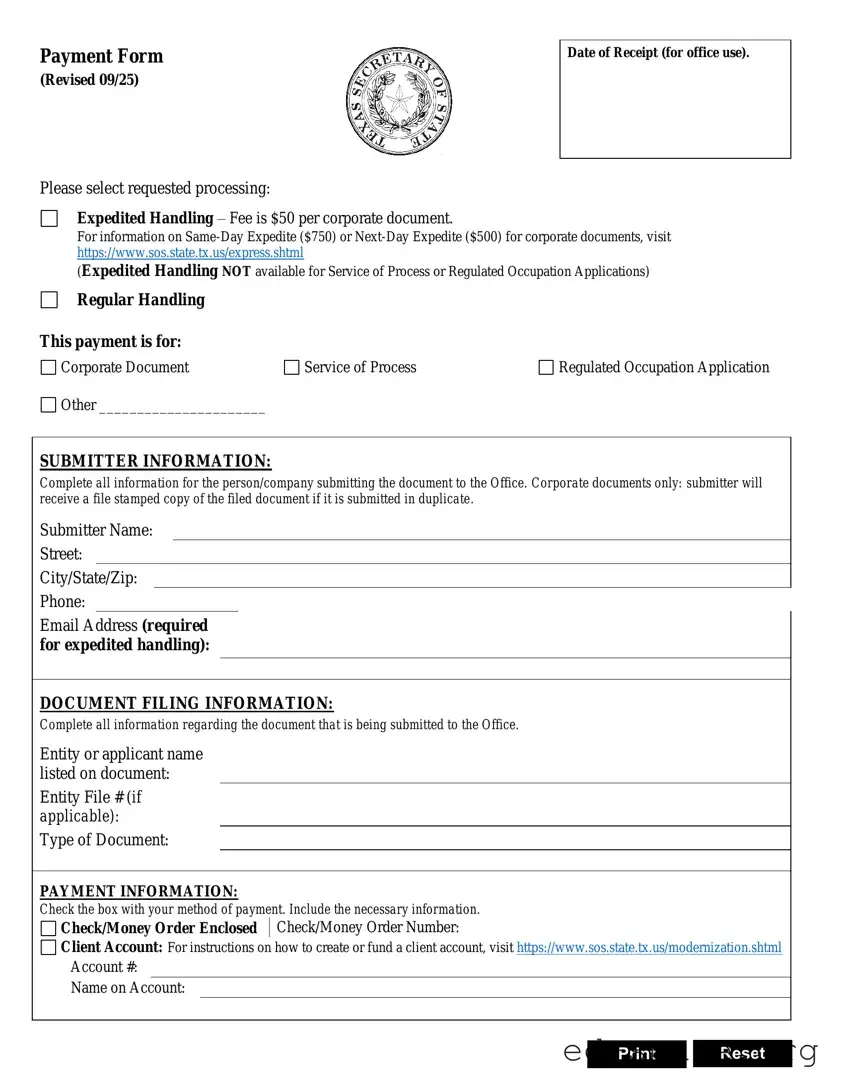
Payment Form
(Revised 09/25)
Date of Receipt (for office use).
Please select requested processing:
Expedited Handling Fee is $50 per corporate document.
For information on Same-Day Expedite ($750) or Next-Day Expedite ($500) for corporate documents, visit
https://www.sos.state.tx.us/express.shtml
(Expedited Handling NOT available for Service of Process or Regulated Occupation Applications)
Regular Handling
Service of Process
Regulated Occupation Application
SUBMITTER INFORMATION:
Complete all information for the person/company submitting the document to the Office. Corporate documents only: submitter will
receive a file stamped copy of the filed document if it is submitted in duplicate.
Submitter Name:
Street:
City/State/Zip:
Phone:
Email Address (required
for expedited handling):
DOCUMENT FILING INFORMATION:
Complete all information regarding the document that is being submitted to the Office.
Entity or applicant name
listed on document:
Entity File # (if
applicable):
Type of Document:
PAYMENT INFORMATION:
Check the box with your method of payment. Include the necessary information.
Check/Money Order Enclosed
Check/Money Order Number:
Client Account: For instructions on how to create or fund a client account, visit https://www.sos.state.tx.us/modernization.shtml
Account #:
Name on Account:
Print
Reset

Form Specifications

Fact Name Description
Form Title The form is titled "Payment Form" and was revised on June 16.
Processing Options Submitters can choose between expedited handling and regular handling.
Expedited Fees Expedited handling costs $25 for corporate documents, $10 for copies, and $15 for UCC filings.
Submitter Information Submitters must provide complete information, including name, address, and contact details.
Payment Methods Accepted payment methods include credit cards (Visa, Mastercard, Discover, American Express) and checks.
Convenience Fee A convenience fee of 2.7% applies to credit card payments.
Return Address Submitters must include a return address for document delivery, or check the box if it is the same as the submitter's address.
Document Filing Information Submitters must provide detailed information about the document being filed, including the type and number of pages.
Governing Law This form is governed by Texas state law regarding document filings and payment processing.

Texas Sos Payment 807: Usage Guidelines

Completing the Texas SOS Payment 807 form is a straightforward process. After filling out the form, you will be able to submit it to the appropriate office for processing. Ensure that all required fields are completed accurately to avoid any delays in handling your request.

  1. Select the processing type: Indicate whether you want expedited handling or regular handling. Note that expedited handling is not available for Authentication Services or Trademark Applications.
  2. Fill out submitter information: Provide your name, company or firm name (if applicable), street address, city, state, and zip code. Include your phone number, fax number, and email address.
  3. Document filing information: Enter the name listed on the document, file number (if applicable), type of document, and the number of pages being submitted.
  4. Provide payment information: Choose your method of payment by checking the appropriate box. Fill in the necessary credit card information if applicable, including the card number, expiration date, security code, and the name on the card.
  5. Include billing address: If the billing address is different from the submitter's address, provide the billing address, including city, state, and zip code.
  6. Return address: Specify where the documents should be returned. If it is the same as the submitter's address, check the corresponding box.
  7. Sign the form: Ensure you sign the form to validate your request.
  8. Review the form: Before submitting, double-check all entries for accuracy and completeness.

Your Questions, Answered

What is the Texas SOS Payment 807 form used for?

The Texas SOS Payment 807 form is utilized for submitting payments related to various document filings with the Texas Secretary of State. This includes fees for corporate documents, copies of documents, and UCC filings. It helps ensure that your payment is processed correctly and efficiently when you are filing documents.

What types of payment processing options are available?

You can choose between expedited handling and regular handling. Expedited handling is available for most corporate documents and incurs an additional fee. However, it is not available for Authentication Services or Trademark Applications. Regular handling does not come with the extra charge, but it may take longer to process your request.

How do I fill out the submitter information section?

In the submitter information section, you need to provide details about the individual or company submitting the documents. This includes your name, address, phone number, fax number, and email address. Make sure all fields are filled out completely to avoid any delays in processing.

What information is required for document filing?

For document filing information, you must specify the name listed on the document, the file number if applicable, the type of document you are submitting, and the number of pages. This ensures that the Secretary of State can accurately process your request and associate it with the correct documents.

What payment methods are accepted?

The form accepts several payment methods, including credit cards (Visa, Mastercard, Discover, and American Express) as well as checks or money orders. If you choose to pay by credit card, you will need to provide the card number, expiration date, and security code. Note that a convenience fee of 2.7% will apply to credit card payments.

Do I need to provide a return address?

Yes, you must include a return address where the documents should be sent after processing. If the return address is the same as the submitter's address, you can simply check the box indicating that. Providing a correct return address is crucial for ensuring that you receive your documents promptly.

What should I do if I have questions while filling out the form?

If you have questions while completing the Texas SOS Payment 807 form, it is advisable to reach out to the Texas Secretary of State's office directly. They can provide assistance and clarify any uncertainties you may have about the form or the filing process.

Common mistakes

  1. Incomplete Information: One common mistake is not filling out all required fields. Ensure that every section is completed, including the submitter's information and document filing details.

  2. Incorrect Payment Method: Selecting the wrong payment method can lead to delays. Be sure to check the appropriate box for your chosen payment option and provide all necessary details.

  3. Missing Security Code: Failing to include the security code for credit card payments is another frequent error. This code is essential for processing your payment securely.

  4. Not Specifying Document Type: It is vital to clearly indicate the type of document being submitted. This helps ensure that your request is handled correctly and promptly.

  5. Ignoring Return Address: Forgetting to include a return address can result in your documents not being sent back to you. Always provide a complete return address or check the box if it is the same as the submitter's address.

  6. Failure to Double-Check Information: Many individuals overlook the importance of reviewing their entries. A quick double-check can help catch mistakes before submission.

Documents used along the form

The Texas SOS Payment 807 form is commonly used for various document filings. Alongside this form, several other documents and forms may be required for different purposes. Below is a list of these forms, each described briefly for clarity.

  • Certificate of Formation: This document is necessary for creating a new business entity in Texas. It outlines the basic information about the company, such as its name, address, and purpose.
  • Application for Certificate of Authority: If a business from another state wants to operate in Texas, this application must be submitted. It allows the foreign entity to legally conduct business within Texas.
  • Annual Franchise Tax Report: Texas businesses must file this report annually to maintain good standing. It includes financial information and is used to calculate the franchise tax owed.
  • Assumed Name Certificate: Also known as a "DBA" (Doing Business As), this document is required if a business operates under a name different from its legal name.
  • Statement of Information: This document provides current information about a corporation, including its address and the names of its officers and directors. It may be required for certain filings.
  • UCC Financing Statement: Used to secure a loan with collateral, this form is filed to give public notice of a secured party's interest in the collateral.
  • Change of Registered Agent Form: If a business needs to change its registered agent, this form must be filed to update the state’s records.
  • Bylaws: While not always required to be filed with the state, bylaws outline the internal rules for managing a corporation. They are crucial for governance and compliance.
  • Nonprofit Registration Form: Nonprofits must file this form to register with the state and gain tax-exempt status. It includes information about the organization’s mission and structure.
  • Withdrawal Form for Foreign Entities: If a foreign business decides to stop operating in Texas, this form must be filed to formally withdraw its registration.

These forms and documents are essential for various legal and business processes in Texas. Ensuring that each is completed accurately will help maintain compliance and facilitate smooth operations.

Similar forms

The Texas SOS Payment 807 form is essential for submitting documents to the Texas Secretary of State. Several other documents serve similar purposes in various contexts. Here are seven documents that share similarities with the Texas SOS Payment 807 form:

  • Form 501 - Application for Certificate of Formation: This form is used to establish a new business entity in Texas. Like the Payment 807 form, it requires detailed information about the submitting party and the entity being formed.
  • Form 130 - Application for Assumed Name: This document is necessary for registering a business name that differs from the owner's legal name. Both forms require payment information and submission details.
  • Form 802 - Certificate of Good Standing: This form requests a certificate proving that a business is in compliance with state regulations. Similar to the Payment 807, it includes payment options and return address information.
  • Form 803 - Application for Registration of a Foreign Entity: Used by businesses incorporated outside Texas wishing to operate within the state, this form also mandates submitter details and payment methods.
  • Form 804 - Statement of Change of Registered Office or Agent: This document allows businesses to update their registered office or agent information. Both forms require precise information about the submitter and the entity.
  • Form 805 - Amendment to Certificate of Formation: This form is used to make changes to an existing entity's formation documents. Like the Payment 807, it involves payment and submission details.
  • Form 806 - Withdrawal of Foreign Entity: This document is used when a foreign entity wishes to withdraw from Texas. It similarly includes sections for submitter information and payment processing.

Dos and Don'ts

When filling out the Texas SOS Payment 807 form, it’s essential to follow specific guidelines to ensure a smooth process. Here’s a list of things you should and shouldn’t do:

  • Do select the appropriate processing request clearly.
  • Do provide complete and accurate submitter information.
  • Do include a return address for the documents.
  • Do check your payment method and fill out the necessary details.
  • Do verify the security code based on your credit card type.
  • Don't forget to include your email address if you are requesting expedited handling.
  • Don't use electronic checks; only checks or money orders are accepted.

By adhering to these guidelines, you can help ensure that your submission is processed efficiently and without unnecessary delays.

Misconceptions

Here are some common misconceptions about the Texas SOS Payment 807 form:

  • Expedited handling is available for all services. This is not true. Expedited handling is not available for Authentication Services or Trademark Applications.
  • You can use an electronic check as a payment method. The form specifically states that electronic checks are not accepted. Only checks or money orders are allowed.
  • The convenience fee applies to all payment methods. The convenience fee of 2.7% only applies to credit card payments, not to checks or money orders.
  • You don’t need to provide a return address. A return address is required unless you check the box indicating it is the same as the submitter's address.
  • All credit cards are treated the same. Different credit cards have different security code requirements. For example, American Express requires a four-digit code on the front of the card.
  • Filing information can be incomplete. It is crucial to completely fill out all sections regarding the document being submitted to avoid delays.
  • There is no need for a signature. A signature is mandatory on the form to authorize the payment method selected.
  • Any name can be used on the account. The name on the card must match the name listed on the document being submitted.

Key takeaways

Here are key takeaways regarding the Texas SOS Payment 807 form:

  • Choose Processing Type: Indicate whether you require expedited or regular handling for your document submission.
  • Complete Submitter Information: Fill out all required details about the individual or company submitting the documents, including name, address, and contact information.
  • Document Filing Details: Provide accurate information about the document being filed, including the name listed on the document and the file number, if applicable.
  • Payment Method: Select your payment option and ensure you include all necessary payment information, including credit card details or check/money order.
  • Security Code: Remember to provide the correct security code for credit card payments; this varies by card type.
  • Return Address: Include a return address for document delivery. If it’s the same as the submitter's address, simply check the designated box.
  • Signature Required: Ensure that the form is signed where indicated to validate the submission and payment.