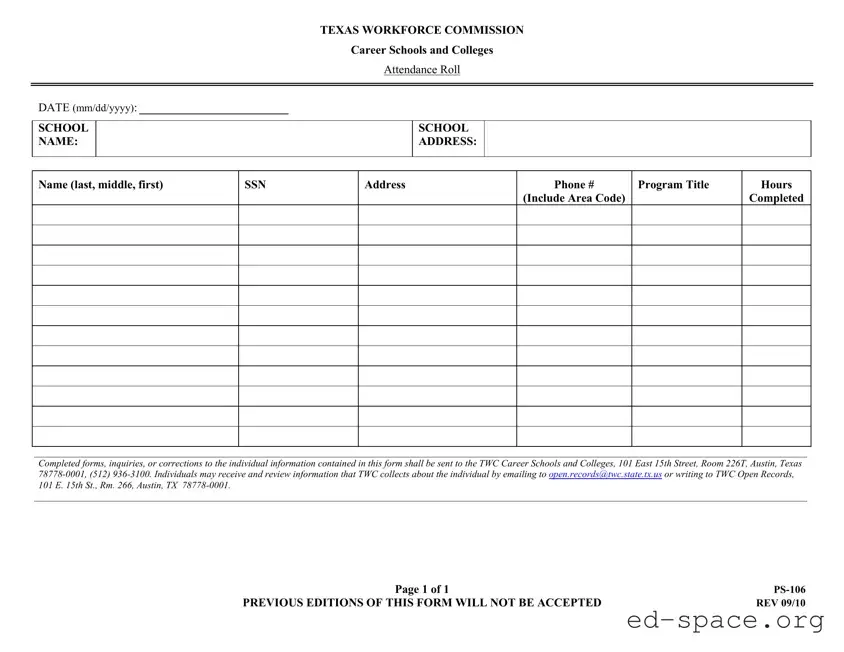
The Texas PS 106 form serves as an essential tool for career schools and colleges in the state of Texas, facilitating the accurate tracking of student attendance. This form is designed to capture critical information such as the student's name, Social Security number, address, and contact details, as well as the program title and hours completed. By requiring schools to document attendance meticulously, the PS 106 form helps ensure compliance with state regulations and supports the integrity of educational programs. Completed forms must be submitted to the Texas Workforce Commission (TWC) at their designated address in Austin, allowing for centralized record-keeping and oversight. For any inquiries or corrections related to the information provided, individuals can reach out to the TWC directly. Additionally, the form emphasizes the right of individuals to access their records, promoting transparency and accountability in the educational process. It is important to note that outdated versions of the form will not be accepted, highlighting the necessity for institutions to utilize the most current edition to remain in good standing.

| Fact Name | Description |
|---|---|
| Form Purpose | The Texas PS 106 form is used to track attendance for students enrolled in career schools and colleges. |
| Governing Law | This form is governed by the Texas Education Code, specifically Chapter 132, which regulates private postsecondary educational institutions. |
| Submission Details | Completed forms must be sent to the Texas Workforce Commission (TWC) at the specified address in Austin, Texas. |
| Contact Information | For inquiries or corrections, contact TWC at (512) 936-3100. |
| Information Review | Individuals have the right to review the information collected about them by the TWC. |
| Email for Records | To access personal information, individuals can email [email protected]. |
| Form Validity | Only the current version of the PS 106 form is accepted; previous editions will be rejected. |
| Form Revision Date | The most recent revision of the PS 106 form was made in September 2010. |
Filling out the Texas Ps 106 form requires careful attention to detail. This form is essential for documenting attendance at career schools and colleges in Texas. Follow these steps to ensure that you complete the form accurately.
After completing the form, it is important to submit it correctly. Send the finished forms, along with any inquiries or corrections, to the Texas Workforce Commission at the specified address. This ensures that all information is processed efficiently.
What is the Texas PS 106 form used for?
The Texas PS 106 form is used by career schools and colleges to maintain an attendance roll. It captures essential information about students, including their names, social security numbers, addresses, phone numbers, program titles, and hours completed. This form helps ensure that the Texas Workforce Commission (TWC) has accurate records of student attendance and progress.
Who needs to fill out the Texas PS 106 form?
Students enrolled in career schools and colleges in Texas must have their attendance recorded on the Texas PS 106 form. It is the responsibility of the school to complete this form accurately for each student, ensuring that all required information is included. Schools must also submit this form to the TWC as part of their compliance with state regulations.
How can I correct information on the Texas PS 106 form?
If you need to correct any information on the Texas PS 106 form, you should contact the school that submitted the form. They are responsible for making any necessary corrections and resubmitting the updated information to the Texas Workforce Commission. Completed forms, inquiries, or corrections should be sent to the TWC Career Schools and Colleges at the specified address in the form.
How can I access my information collected by the TWC?
You can access and review the information that the Texas Workforce Commission collects about you by emailing [email protected]. Alternatively, you can write to TWC Open Records at 101 E. 15th St., Room 266, Austin, TX 78778-0001. This allows you to verify the accuracy of your records and ensure that your personal information is correct.
What happens if I submit an outdated version of the Texas PS 106 form?
Submitting an outdated version of the Texas PS 106 form will result in rejection. The TWC only accepts the most current version of the form, which is indicated on the form itself. Always ensure that you are using the latest version to avoid delays or complications in processing your attendance records.
Incorrect Date Format: People often forget to use the correct date format (mm/dd/yyyy) when filling out the date section. This can lead to confusion and delays in processing.
Missing School Name: Failing to include the school name is a common mistake. Without this information, the form cannot be properly attributed to the correct institution.
Incomplete Personal Information: Individuals sometimes leave out crucial details such as their full name, Social Security Number (SSN), or contact information. Each of these elements is essential for identification.
Incorrect Program Title: Entering the wrong program title can lead to issues with record-keeping. Ensure the program title matches what is officially recognized by the school.
Omitting Hours Completed: Failing to indicate the number of hours completed in the program is another frequent error. This information is vital for accurate record-keeping.
Neglecting to Sign: Some individuals forget to sign the form. A signature is necessary for the form to be valid and processed.
Not Sending to the Correct Address: Submitting the form to the wrong address can result in delays. Always double-check that it is sent to the TWC Career Schools and Colleges in Austin, Texas.
Using Previous Editions: Submitting a previous edition of the PS-106 form is a mistake that can lead to rejection. Always use the most current version, as indicated on the form.
The Texas Ps 106 form is an important document used by career schools and colleges to track student attendance. However, several other forms and documents often accompany it to ensure compliance and maintain accurate records. Below is a brief overview of these related documents.
Understanding these documents can help ensure that all necessary information is accurately reported and maintained. This attention to detail supports both students and educational institutions in navigating their responsibilities effectively.
The Texas Ps 106 form is an important document used by career schools and colleges to track student attendance. It has similarities with several other forms commonly used in educational and employment contexts. Here are seven documents that share characteristics with the Texas Ps 106 form:
Each of these documents plays a role in the educational process, helping institutions maintain accurate records and support students in their learning journeys.
When filling out the Texas PS 106 form, it’s important to be thorough and accurate. Below is a list of things you should and shouldn’t do to ensure your form is completed correctly.
By following these guidelines, you can help ensure that your submission is processed smoothly and efficiently.
Many people hold misconceptions about the Texas Ps 106 form, which is used by career schools and colleges to track student attendance. Here are five common misunderstandings:
Understanding these misconceptions can help students and educators navigate the requirements associated with the Texas Ps 106 form more effectively.
When filling out the Texas Ps 106 form, it is essential to pay attention to several key points to ensure accuracy and compliance. Here are some important takeaways:
By following these guidelines, individuals can ensure that their submissions are processed smoothly and efficiently.