Homepage Blank Texas Ps 1040R PDF Form
Content Overview

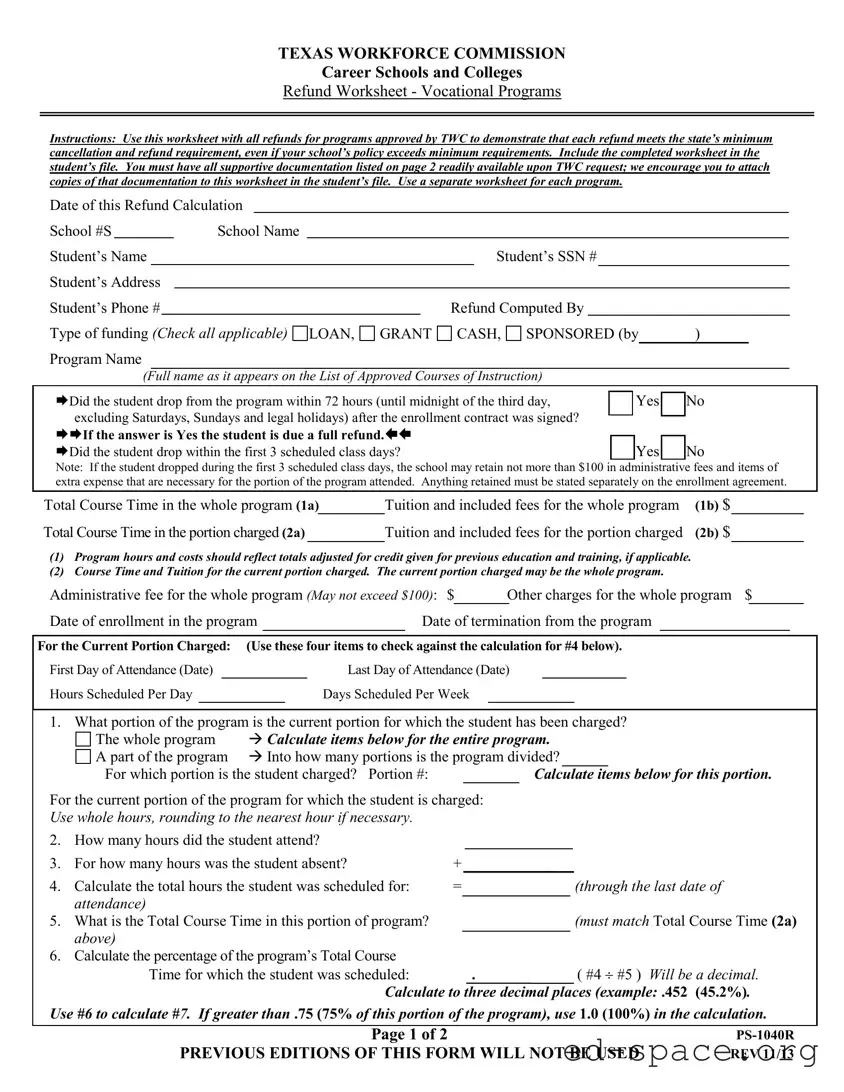
The Texas Ps 1040R form serves as an essential tool for career schools and colleges in Texas, particularly when it comes to processing refunds for vocational programs. Designed to ensure compliance with the Texas Workforce Commission's minimum cancellation and refund requirements, this form outlines the necessary steps for calculating refunds due to students who withdraw from their programs. Each school must complete a separate worksheet for every program, detailing key information such as the student's name, enrollment dates, and the type of funding received. The form also prompts schools to assess whether a student dropped out within specific time frames, which directly influences the refund amount. Important calculations on the form include total course time, tuition fees, and administrative charges, all of which play a vital role in determining the final refund owed to the student. Additionally, schools are encouraged to maintain supportive documentation alongside the completed worksheet to provide transparency and accountability in the refund process. By adhering to these guidelines, educational institutions can foster trust and maintain a positive relationship with their students.


Document Preview

TEXAS WORKFORCE COMMISSION
Career Schools and Colleges
Refund Worksheet - Vocational Programs
Page 1 of 2 PS-1040R
PREVIOUS EDITIONS OF THIS FORM WILL NOT BE USED REV 11/13
Instructions: Use this worksheet with all refunds for programs approved by TWC to demonstrate that each refund meets the state’s minimum
cancellation and refund requirement, even if your school’s policy exceeds minimum requirements. Include the completed worksheet in the
student’s file. You must have all supportive documentation listed on page 2 readily available upon TWC request; we encourage you to attach
copies of that documentation to this worksheet in the student’s file. Use a separate worksheet for each program.
Date of this Refund Calculation
School #S School Name
Student’s Name Student’s SSN #
Student’s Address
Student’s Phone # Refund Computed By
Type of funding (Check all applicable)
LOAN, GRANT CASH, SPONSORED (by )
Program Name
(Full name as it appears on the List of Approved Courses of Instruction)
Did the student drop from the program within 72 hours (until midnight of the third day, Yes No
excluding Saturdays, Sundays and legal holidays) after the enrollment contract was signed?
If the answer is Yes the student is due a full refund.
Did the student drop within the first 3 scheduled class days? Yes No
Note: If the student dropped during the first 3 scheduled class days, the school may retain not more than $100 in administrative fees and items of
extra expense that are necessary for the portion of the program attended. Anything retained must be stated separately on the enrollment agreement.
Total Course Time in the whole program (1a) Tuition and included fees for the whole program (1b) $
Total Course Time in the portion charged (2a) Tuition and included fees for the portion charged (2b) $
(1) Program hours and costs should reflect totals adjusted for credit given for previous education and training, if applicable.
(2) Course Time and Tuition for the current portion charged. The current portion charged may be the whole program.
Administrative fee for the whole program (May not exceed $100): $ Other charges for the whole program $
Date of enrollment in the program Date of termination from the program
For the Current Portion Charged: (Use these four items to check against the calculation for #4 below).
First Day of Attendance (Date)
Last Day of Attendance (Date)
Hours Scheduled Per Day Days Scheduled Per Week
1. What portion of the program is the current portion for which the student has been charged?
The whole program Calculate items below for the entire program.
A part of the program Into how many portions is the program divided?
For which portion is the student charged? Portion #: Calculate items below for this portion.
For the current portion of the program for which the student is charged:
Use whole hours, rounding to the nearest hour if necessary.
2. How many hours did the student attend?
3. For how many hours was the student absent? +
4. Calculate the total hours the student was scheduled for: = (through the last date of
attendance)
5. What is the Total Course Time in this portion of program? (must match Total Course Time (2a)
above)
6. Calculate the percentage of the program’s Total Course
Time for which the student was scheduled: . ( #4 ÷ #5 ) Will be a decimal.
Calculate to three decimal places (example: .452 (45.2%).
Use #6 to calculate #7. If greater than .75 (75% of this portion of the program), use 1.0 (100%) in the calculation.
Page 2 of 2 PS-1040R
PREVIOUS EDITIONS OF THIS FORM WILL NOT BE USED REV 11/13
7. Calculate tuition and included fees earned by the school for the current portion charged:
Tuition and included fees for current portion charged $ (2b from previous page)
#6 (From previous page)
× . = $
8. Total of tuition and fees earned from prior (How many? ) portions charged $
Earned fees and supplies for the whole program:
9. Administrative fees earned, but not included in tuition (not to exceed $100.00) $
10. Chargeable* books not included in tuition (receipts required): $
11. Chargeable* supplies and other fees not included in tuition (receipts required): + $
*Must be necessary for portion of program attended & separately stated in enrollment agreement
12. Total earned by school for the whole program (items 7 + 8 + 9 + 10 + 11) = $
13. Total amount paid towards #12 on behalf of student (Fees, Tuition, Books, Supplies) $
14. Refund due (if #13 is greater than Item #12) = $
15. Balance due school (if #13 is less than Item #12) $
Documentation:
The following documents must be readily available, preferably attached to this Refund Worksheet in the
Student’s file:
1. Enrollment Agreement
2. Record of Previous Education & Training (PS-010)
3. Complete attendance record
4. Complete progress record w/status changes
5. LOA/make-up requests (if applicable)
6. Ledger
7. Book & supply receipts (if applicable)
8. Proof of consummation of refund
For questions concerning Texas Workforce Commission Career Schools and Colleges Cancellation and
Refund Policy, please consult the form series PS-023; law governing Career Schools and Colleges, Title 3,
Texas Education Code, Section 132.061 and 132.0611; and the Texas Career Schools and Colleges Rules,
Title 40, Texas Administrative Code, Sections 807.261 through 807.264.
___________________________________________________________________________________________________________________________
Completed forms, inquiries, or corrections to the individual information contained in this form shall be sent to the TWC Career Schools and Colleges, 101
East 15th Street, Room 226T, Austin, Texas 78778-0001, (512) 936-3100. Individuals may receive and review information that TWC collects about the
individual by emailing to open.record[email protected]tate.tx.us
or writing to TWC Open Records, 101 E. 15th St., Rm. 266, Austin, TX 78778-0001.
___________________________________________________________________________________________________________________________

Form Specifications

Fact Name Description
Purpose The Texas PS 1040R form is a Refund Worksheet used by career schools and colleges to calculate refunds for students in vocational programs.
Governing Laws This form is governed by Title 3 of the Texas Education Code, specifically Sections 132.061 and 132.0611.
Administrative Fees Schools may retain an administrative fee not exceeding $100 if a student drops within the first three scheduled class days.
Documentation Requirements Schools must keep supportive documentation readily available for TWC upon request, and it is encouraged to attach copies to the worksheet.
Refund Eligibility If a student drops within 72 hours of signing the enrollment contract, they are entitled to a full refund.
Calculation Details The form includes detailed calculations for tuition and fees earned based on attendance and absence hours.
Contact Information For inquiries or corrections, individuals should contact the Texas Workforce Commission at 101 East 15th Street, Room 226T, Austin, Texas 78778-0001.

Texas Ps 1040R: Usage Guidelines

Completing the Texas PS 1040R form is essential for processing refunds related to vocational programs. This form requires careful attention to detail to ensure compliance with state regulations. Gather all necessary information and documentation before starting to fill out the form.

  1. Begin by entering the Date of this Refund Calculation.
  2. Fill in the School #S and School Name.
  3. Provide the Student’s Name, Student’s SSN #, Student’s Address, and Student’s Phone #.
  4. Indicate who Refund Computed By is.
  5. Check all applicable types of funding: LOAN, GRANT, CASH, SPONSORED.
  6. Enter the Program Name as it appears on the List of Approved Courses of Instruction.
  7. Answer the question: Did the student drop from the program within 72 hours after the enrollment contract was signed?
  8. If the answer is Yes, the student is due a full refund. If No, proceed to the next question.
  9. Answer: Did the student drop within the first 3 scheduled class days?
  10. Note the Total Course Time in the whole program (1a) and Tuition and included fees for the whole program (1b).
  11. Document the Total Course Time in the portion charged (2a) and Tuition and included fees for the portion charged (2b).
  12. Enter the Administrative fee for the whole program (not to exceed $100) and Other charges for the whole program.
  13. Fill in the Date of enrollment in the program and Date of termination from the program.
  14. For the Current Portion Charged, provide the First Day of Attendance and Last Day of Attendance.
  15. Document Hours Scheduled Per Day and Days Scheduled Per Week.
  16. Calculate the total hours the student was scheduled for and document it.
  17. Complete the calculations for the tuition and included fees earned by the school for the current portion charged.
  18. List the Total of tuition and fees earned from prior portions charged.
  19. Document any Administrative fees earned, Chargeable books, and Chargeable supplies and other fees.
  20. Calculate the Total earned by school for the whole program.
  21. Provide the Total amount paid towards the earned amount.
  22. Calculate the Refund due and Balance due school.
  23. Ensure all necessary documentation is attached to the Refund Worksheet.

Once completed, ensure the form is submitted to the appropriate office for processing. Keep a copy for your records and be prepared to provide any additional documentation if requested.

Your Questions, Answered

1. What is the purpose of the Texas PS 1040R form?

The Texas PS 1040R form is used by vocational programs approved by the Texas Workforce Commission (TWC) to calculate refunds for students who withdraw from their courses. It ensures that the refund process meets state requirements, even if the school's policies are more generous. The form must be completed for each program and included in the student's file.

2. When is a student eligible for a full refund?

A student is eligible for a full refund if they drop from the program within 72 hours after signing the enrollment contract. This time frame excludes weekends and legal holidays. If a student drops within this period, the school must issue a complete refund without retaining any fees.

3. What fees can a school retain if a student drops within the first three scheduled class days?

If a student drops within the first three scheduled class days, the school may retain an administrative fee of no more than $100. Additionally, they can charge for any necessary items of extra expense that were incurred for the portion of the program attended. These fees must be clearly stated in the enrollment agreement.

4. What documentation is required to support the refund calculation?

Schools must have several documents readily available to support the refund calculation. This includes the enrollment agreement, attendance records, progress records, and any receipts for books and supplies. It is recommended to attach these documents to the Refund Worksheet in the student's file for easy access during TWC audits.

5. How is the refund amount calculated?

The refund amount is calculated by determining the total tuition and fees for the current portion charged, then calculating the percentage of the program that the student attended. If the student attended more than 75% of the program, they are not entitled to a refund. The school must then subtract any fees earned from the total amount paid by the student to determine the refund due.

6. What happens if a student has paid more than what the school has earned?

If the total amount paid by the student exceeds the total earned by the school, a refund is due to the student. This is calculated by subtracting the total earned by the school from the total amount paid. The school is then responsible for issuing the appropriate refund to the student.

7. How can individuals access their information collected by the TWC?

Individuals can access their information collected by the Texas Workforce Commission by emailing [email protected] or writing to the TWC Open Records office. The mailing address is 101 E. 15th St., Rm. 266, Austin, TX 78778-0001. This allows individuals to review the information that TWC holds about them.

Common mistakes

  1. Neglecting to Attach Required Documentation: Many individuals overlook the importance of including all necessary documents with the Texas Ps 1040R form. This includes the enrollment agreement, attendance records, and proof of refund. Without these, the form may be deemed incomplete.

  2. Incorrectly Calculating Refund Amounts: A common error is miscalculating the refund due. It is crucial to accurately compute the total tuition and fees earned by the school, as well as the total amount paid by the student. Errors in arithmetic can lead to significant discrepancies.

  3. Failing to Identify the Correct Portion of the Program: Some people mistakenly do not clarify whether the refund calculation pertains to the entire program or just a portion. This distinction is vital, as it influences the refund amount and the calculations that follow.

  4. Ignoring Administrative Fees: Individuals often forget to account for administrative fees, which can be retained by the school. These fees should not exceed $100 and must be clearly stated in the enrollment agreement. Failing to mention these can lead to confusion and disputes later on.

  5. Not Following Up with TWC: After submitting the form, some fail to follow up with the Texas Workforce Commission. It is advisable to ensure that all aspects of the refund process are being addressed and to confirm that the submitted form has been received and processed appropriately.

Documents used along the form

The Texas PS 1040R form is essential for documenting refunds for vocational programs. To support this process, several other forms and documents are often required. Below is a list of these documents, each serving a specific purpose in the refund procedure.

  • Enrollment Agreement: This document outlines the terms and conditions of the student's enrollment, including payment details and refund policies. It serves as the foundational agreement between the student and the school.
  • Record of Previous Education & Training (PS-010): This record provides information about the student's prior education and training. It is important for determining eligibility for credit or refunds based on previous coursework.
  • Complete Attendance Record: This document tracks the student's attendance throughout the program. It is crucial for calculating the refund amount based on the hours attended versus the total hours scheduled.
  • Complete Progress Record: This record includes the student's academic progress and any status changes during the program. It assists in verifying the student's completion status and eligibility for refunds.

Having these documents readily available not only facilitates the refund process but also ensures compliance with state regulations. Each document plays a vital role in accurately assessing the student's situation and determining the appropriate refund amount.

Similar forms

The Texas PS 1040R form is used for refund calculations in vocational programs approved by the Texas Workforce Commission. Several other documents share similarities with this form in terms of purpose and structure. Below is a list of those documents:

  • Enrollment Agreement: This document outlines the terms of the student's enrollment, including tuition fees and refund policies, similar to how the PS 1040R calculates refunds based on attendance and fees.
  • Refund Policy Form: Like the PS 1040R, this form provides guidelines for refund eligibility and amounts based on program attendance and administrative fees.
  • Course Completion Certificate: This document confirms the completion of a program, paralleling the PS 1040R's focus on attendance and participation in the course.
  • Student Attendance Record: This record tracks a student's attendance, which is crucial for refund calculations in the PS 1040R, reflecting how attendance impacts financial responsibilities.
  • Financial Aid Disbursement Form: This form details the financial aid awarded to a student, similar to how the PS 1040R accounts for different funding types when calculating refunds.
  • Withdrawal Notification Form: This document is used when a student withdraws from a program. It serves a similar purpose as the PS 1040R in determining refund eligibility based on withdrawal timing.
  • Tuition Payment Agreement: This agreement outlines payment terms for tuition, akin to the PS 1040R’s focus on tuition and fees associated with the program for refund calculations.

Dos and Don'ts

When filling out the Texas PS 1040R form, it is important to follow specific guidelines to ensure accuracy and compliance. Here is a list of things you should and shouldn't do:

  • Do use the correct form version; previous editions will not be accepted.
  • Do include all required documentation with the refund worksheet.
  • Do check all dates carefully, including enrollment and termination dates.
  • Do calculate tuition and fees accurately, rounding to the nearest hour when necessary.
  • Do keep a copy of the completed worksheet for your records.
  • Don't forget to use a separate worksheet for each program.
  • Don't omit any administrative fees or other charges that are necessary.
  • Don't leave any sections blank; provide all requested information.
  • Don't submit the form without verifying that all calculations are correct.

Misconceptions

Misconceptions about the Texas PS 1040R form can lead to confusion and mistakes in the refund process. Here are six common misunderstandings:

  • All programs are eligible for refunds regardless of timing. Many believe that refunds can be issued at any time. However, specific timelines apply. If a student drops within 72 hours, a full refund is due. Beyond that, conditions change.
  • The school can keep the entire tuition if a student drops. This is not true. If a student withdraws within the first three scheduled class days, the school may retain up to $100 for administrative fees. Anything beyond that must be refunded.
  • Documentation is not necessary for refunds. Some think that refunds can be processed without supporting documents. In fact, it’s crucial to have all necessary paperwork, like the enrollment agreement and attendance records, readily available for verification.
  • Refund calculations are straightforward and do not require detailed tracking. Many assume that refund calculations are simple. In reality, they involve multiple steps, including tracking attendance and calculating hours attended versus scheduled hours.
  • The PS 1040R form is the only document needed for refunds. This is misleading. While the PS 1040R is essential, it should be accompanied by various supporting documents to ensure compliance with state requirements.
  • Refund policies are the same for all schools. Each school may have different policies, even if they adhere to the minimum state requirements. Always check the specific school’s policy for any additional stipulations.

Understanding these misconceptions can help students and schools navigate the refund process more effectively, ensuring that all parties are informed and compliant with state regulations.

Key takeaways

Key Takeaways for Filling Out and Using the Texas PS 1040R Form

  • Complete a separate worksheet for each program. This ensures that all refund calculations are specific to the program in question.
  • Document all required information accurately. Include the student’s name, SSN, and program details to avoid processing delays.
  • Understand refund eligibility. If a student drops out within 72 hours, they are entitled to a full refund. Dropping within the first three class days may incur a maximum administrative fee of $100.
  • Gather supporting documentation. Keep all necessary documents, such as the enrollment agreement and attendance records, readily available for Texas Workforce Commission (TWC) review.