Homepage Blank Texas Ifta PDF Form
Content Overview

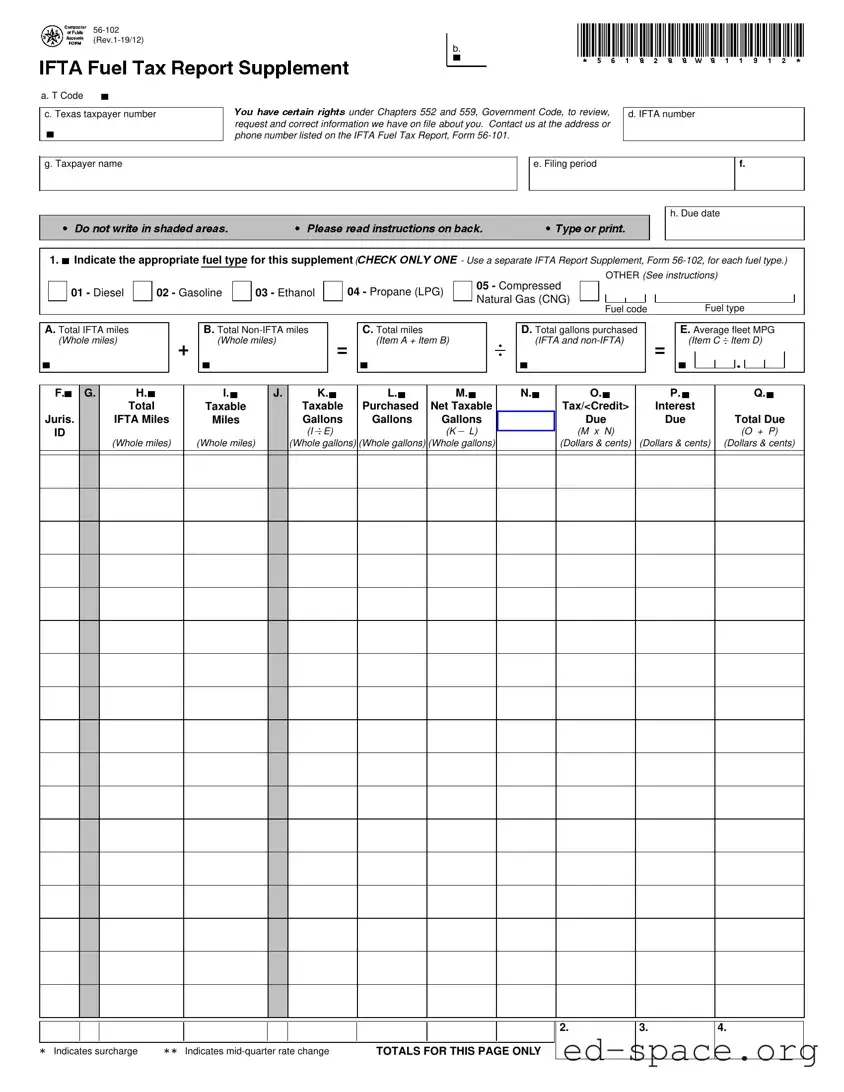
The Texas IFTA Form, specifically Form 56-102, serves as a crucial document for businesses engaged in interstate transportation, particularly those utilizing qualified motor vehicles. This form is designed to facilitate the reporting of fuel usage across jurisdictions, ensuring compliance with the International Fuel Tax Agreement (IFTA). Key components of the form include the identification of fuel types, such as diesel, gasoline, and compressed natural gas, which must be clearly marked for accurate reporting. Additionally, users are required to provide detailed mileage information, differentiating between IFTA miles and non-IFTA miles, as well as total gallons of fuel purchased. The form also necessitates calculations related to average fleet miles per gallon, taxable miles, and the corresponding tax rates for each jurisdiction. It is essential for filers to account for any surcharges applicable in certain jurisdictions and to report any changes in tax rates that may occur within a quarter. The final sections of the form summarize the total tax due or credits applicable, along with any interest accrued from late filings. Accurate completion of Form 56-102 is vital for maintaining regulatory compliance and avoiding potential penalties.

Document Preview

2. 3. 4.
*
Indicates surcharge
**
Indicates mid-quarter rate change
TOTALS FOR THIS PAGE ONLY
A. Total IFTA miles B. Total Non-IFTA miles C. Total miles D. Total gallons purchased E. Average fleet MPG
.
(Whole miles) (Whole miles) (Item A + Item B)
.
(IFTA and non-IFTA) (Item C Item D)
.
+ =
.
=
.
b b b b b
OTHER (
1. Indicate the appropriate fuel type for this supplement (
CHECK ONLY ONE
- Use a separate IFTA Report Supplement, Form 56-102, for each fuel type.)
b
See instructions)
05 - Compressed
01 - Diesel 02 - Gasoline 03 - Ethanol
04 - Propane (LPG)
Natural Gas (CNG)
Fuel code
Fuel type
h. Due date
g. Taxpayer name e. Filing period f.
d. IFTA numberc. Texas taxpayer number
b
F. G. H.
I.
J. K. L. M. N. O. P. Q.
b b
b b b b bb b b b
Total
Taxable
Taxable Purchased Net Taxable Tax/<Credit> Interest
Juris. IFTA Miles
Miles
Gallons Gallons Gallons Tax Rate Due Due Total Due
.
ID
(I E). (K L) (M x N) (O + P)
(Whole miles)
(Whole miles)
(Whole gallons) (Whole gallons) (Whole gallons) (Dollars & cents) (Dollars & cents) (Dollars & cents)
b.
b
*5610200W011912*
AB
CD
56-102
(Rev.1-19/12)
IFTA Fuel Tax Report Supplement
a. T Code
56100
b
You have certain rights
under Chapters 552 and 559, Government Code, to review,
request and correct information we have on file about you. Contact us at the address or
phone number listed on the IFTA Fuel Tax Report, Form 56-101.
I
Do not write in shaded areas.
I
Please read instructions on back.
I
Type or print.
Form 56-102 (Rev.1-19/12)(Back)
IFTA Fuel Tax Report Supplement Instructions
Item 1 - Indicate the appropriate fuel type if it is not preprinted. Place an
"X" in the applicable box for Diesel, Gasoline, Ethanol, Propane
or Compressed Natural Gas. For OTHER fuel types, place an
"X" in the last box and enter the fuel code and fuel type as
listed below:
FUEL CODE FUEL TYPE FUEL CODE FUEL TYPE
06 A-55 11 Methanol
07 E-85 12 Biodiesel
08 M-85 13 Electricity
09 Gasohol 14 Hydrogen
10 LNG
Use a separate Form 56-102 for each fuel type. Go to
www.comptroller.texas.gov/taxes/fuels/docs/biodiesel.pdf for
additional information on reporting biodiesel.
Item A -
Total IFTA miles - Enter the total miles traveled in IFTA
jurisdictions by all qualified motor vehicles in your fleet using
the fuel type indicated. Report all miles traveled whether the
miles are taxable or nontaxable. For IFTA jurisdictions with a
surcharge, include miles traveled only once for that juris-
diction. The total in Column H for all pages must equal item A.
Round mileage to the nearest whole mile.
Item B - Total non-IFTA miles - For each fuel type include total miles
traveled in non-IFTA jurisdictions of Northwest Territories and
Yukon Territory of Canada, Mexico, Alaska and the District of
Columbia by all qualified motor vehicles in the fleet. Report all
mileage traveled whether the mileage is taxable or
non-taxable.
Round mileage to the nearest whole mile.
Item C - Total miles - Add the amount in Item A and the amount in
Item B to determine the total miles traveled by all qualified
motor vehicles in your fleet.
Item D - Total Gallons Purchased - Enter the total gallons of fuel
purchased in both IFTA and non-IFTA jurisdictions by all
qualified motor vehicles in your fleet using the fuel type
indicated.
Round gallons to the nearest whole gallon.
(Note:
Fuel is considered "purchased" when it is pumped into your
qualified vehicle.)
Item E - Average Fleet MPG - Divide Item C by Item D. Round to 2
decimal places.
Column F - Jurisdiction ID - Preprinted are all IFTA member jurisdic-
tions in which you have indicated operations during the
previous four quarters. If you did not operate in a jurisdic-
tion listed, make no entries for that jurisdiction. If you oper-
ated in any jurisdiction other than those listed, enter the
jurisdiction's two letter abbreviation from the table below.
Column H - Total IFTA Miles - Enter the total miles (taxable and
nontaxable) traveled in each IFTA jurisdiction for this fuel
type only.
(For lines where surcharges are reported, this
column should be left blank.)
Column I - Taxable Miles - Enter the IFTA taxable miles for each
jurisdiction. Trip permit miles are not considered taxable in
any jurisdiction.
Column K - Taxable Gallons - Divide the amount in Column I by the
amount in Item E to determine the total taxable gallons of
fuel consumed in each jurisdiction.
Column L - Purchased Gallons - Enter the total gallons of fuel
purchased tax paid in each IFTA jurisdiction. Keep your
receipts for each purchase claimed. When using bulk
storage, report only gallons removed for use in your
qualified motor vehicles. Fuel remaining in storage cannot
be claimed until it is used. Column L cannot be greater
than Item D.
(For lines where surcharges are reported,
this column should be left blank.)
Column M - Net Taxable Gallons - Subtract Column L from Column K
for each jurisdiction.
- If Column K is greater than Column L, enter the taxable
gallons.
- If Column L is greater than Column K, enter the credit
gallons. Use brackets < > to indicate credit gallons.
Column N - Tax Rate - The tax rate is listed for each preprinted IFTA
jurisdiction on your report. If the tax rate is not preprinted,
enter the tax rate for the appropriate fuel type from the
enclosed tax rate chart. Refer to the IFTA, Inc. web page
(www.iftach.org) for tax rate footnotes and exchange rate.
FUEL TAX SURCHARGES - Some jurisdictions impose an
additional charge on each taxable gallon of fuel used in
that jurisdiction. This surcharge is not paid at the pump or
upon withdrawal from bulk storage facilities; the surcharge
is collected on the quarterly IFTA report. If you have
traveled in any of the jurisdictions that impose a
surcharge, you must calculate and pay the surcharge on
this report. To calculate the amount due for the surcharge,
multiply the number of taxable gallons (K) used in that
jurisdiction by the surcharge rate. Fuel tax surcharges
need to be reported on separate lines of the report
supplements.
RATE CHANGES WITHIN A QUARTER - Sometimes
jurisdictions change their tax rate during a quarter. When
this occurs, it is necessary to separate the miles traveled
during each rate period and report them on separate lines
of the report supplement. If you traveled in a jurisdiction
that had a mid-quarter rate change, that jurisdiction should
be listed multiple times on the supplement. If you did not
incur travel during one of the rate periods, show zeros for
that period.
Column O - Tax <Credit> Due - Multiply the amount in Column M by
the tax rate for that jurisdiction in Column N to determine
the tax or credit. Enter credit amount in brackets < >.
Column P - Interest Due - If you file late, compute interest on the tax
due for each jurisdiction for each fuel type. Interest is com-
puted on tax due from the due date of the report until the
date the payment is postmarked. For current interest rate,
refer to www.comptroller.texas.gov/taxes/fuels/ifta.php.
Reports must be postmarked no later than the last day
of the month following the end of the quarter to be timely.
If the last day of the month falls on a Saturday, Sunday or
national holiday, the due date will be the next business
day.
Column Q - Total Due - For each jurisdiction add the amounts in
Column O and Column P, and enter the total dollar
amount due or credit amount. Enter credit amount in
brackets < >.
Item 2 - Enter the total of amounts in Column O for all jurisdictions
listed on this page for the fuel type indicated.
Item 3 - Enter the total of amounts in Column P for all jurisdictions
listed on this page for the fuel type indicated.
Item 4 - Enter the total of amounts in Column Q for all jurisdictions
listed on this page for the fuel type indicated. This total is
necessary to calculate the fuel type totals reported on the
corresponding line of the International Fuel Tax Agreement
(IFTA) Quarterly Fuel Tax Report, Form 56-101.
JURISDICTION ABBREVIATIONS
AL Alabama
AK Alaska
AZ Arizona
AR Arkansas
CA California
CO Colorado
CT Connecticut
DE Delaware
DC Dist. of Columbia
FL Florida
GA Georgia
ID Idaho
IL Illinois
IN Indiana
IA Iowa
KS Kansas
KY Kentucky
LA Louisiana
ME Maine
MD Maryland
MA Massachusetts
MI Michigan
MN Minnesota
MS Mississippi
MO Missouri
MT Montana
NE Nebraska
NV Nevada
NH New Hampshire
NJ New Jersey
NM New Mexico
NY New York
NC North Carolina
ND North Dakota
OH Ohio
OK Oklahoma
OR Oregon
PA Pennsylvania
RI Rhode Island
SC South Carolina
SD South Dakota
TN Tennessee
TX Texas
UT Utah
VT Vermont
VA Virgina
WA Washington
WV West Virginia
WI Wisconsin
WY Wyoming
CANADIAN PROVINCES
AB Alberta
BC British Columbia
MB Manitoba
NB New Brunswick
NL Newfoundland
NT Northwest Territories
NS Nova Scotia
ON Ontario
PE Prince Edward Island
QC Quebec
SK Saskatchewan
YT Yukon

Form Specifications

Fact Name Description
Form Number The Texas IFTA form is officially designated as Form 56-102.
Purpose This form is used to report fuel tax information for vehicles operating under the International Fuel Tax Agreement.
Filing Frequency Taxpayers must file this report quarterly to remain compliant with state and federal regulations.
Due Date The due date for filing is the last day of the month following the end of each quarter.
Fuel Types Reportable fuel types include Diesel, Gasoline, Ethanol, Propane, and Compressed Natural Gas, among others.
Tax Calculation Tax is calculated based on the taxable gallons consumed and the applicable tax rate for each jurisdiction.
Interest on Late Payments If filed late, interest will accrue on the tax due from the report's due date until payment is made.
Governing Laws This form is governed by Chapters 552 and 559 of the Texas Government Code.

Texas Ifta: Usage Guidelines

Filling out the Texas IFTA form requires careful attention to detail. Each section must be completed accurately to ensure compliance with state regulations. Follow these steps to fill out the form correctly.

  1. Type or print your taxpayer name in the designated area.
  2. Enter your Texas taxpayer number.
  3. Provide your IFTA number.
  4. Indicate the filing period and due date.
  5. In Item 1, check the appropriate box for the fuel type you are reporting. If it is not preprinted, mark the "OTHER" box and enter the fuel code and type.
  6. In Item A, report the total IFTA miles traveled by all qualified motor vehicles using the indicated fuel type.
  7. In Item B, enter the total non-IFTA miles traveled in non-IFTA jurisdictions.
  8. Calculate the total miles in Item C by adding Item A and Item B.
  9. In Item D, report the total gallons purchased for the fuel type indicated.
  10. Calculate the average fleet MPG in Item E by dividing Item C by Item D, rounding to two decimal places.
  11. In Column F, verify the jurisdiction ID for each IFTA jurisdiction where operations occurred.
  12. Enter the total IFTA miles in Column H for each jurisdiction.
  13. In Column I, report the taxable miles for each jurisdiction.
  14. Calculate the taxable gallons in Column K by dividing Column I by Item E.
  15. In Column L, report the purchased gallons for each jurisdiction.
  16. Calculate net taxable gallons in Column M by subtracting Column L from Column K.
  17. Enter the tax rate for each jurisdiction in Column N.
  18. Calculate the tax or credit due in Column O by multiplying Column M by Column N.
  19. If applicable, compute interest due in Column P for late filings.
  20. In Column Q, calculate the total due by adding Columns O and P.
  21. Complete Items 2, 3, and 4 by entering totals from Columns O, P, and Q for all jurisdictions listed.

Your Questions, Answered

What is the Texas IFTA Form 56-102 used for?

The Texas IFTA Form 56-102 is used to report fuel consumption and mileage for vehicles operating under the International Fuel Tax Agreement (IFTA). This form helps track fuel usage and ensures that taxes are paid appropriately based on the miles traveled in different jurisdictions. It is essential for maintaining compliance with state and federal tax regulations related to fuel use.

How do I fill out the fuel type section on Form 56-102?

When filling out the fuel type section, you need to indicate the appropriate fuel type by checking the corresponding box. The options include Diesel, Gasoline, Ethanol, Propane, and Compressed Natural Gas. If your fuel type is not listed, check the "OTHER" box and provide the specific fuel code and type. Remember, a separate Form 56-102 is required for each fuel type you use.

What information is required for reporting mileage on the form?

You must report total IFTA miles, total non-IFTA miles, and total miles traveled. Total IFTA miles include all miles traveled in IFTA jurisdictions by qualified vehicles using the indicated fuel type. Total non-IFTA miles cover miles traveled in jurisdictions not part of IFTA. The total miles is simply the sum of both IFTA and non-IFTA miles. Accurate reporting is crucial for tax calculations.

What should I do if I operated in jurisdictions with different tax rates during the quarter?

If you traveled in jurisdictions that changed their tax rates mid-quarter, you will need to report the miles traveled during each rate period separately on the form. This means listing the jurisdiction multiple times on the supplement for each rate change. If you did not travel during a specific rate period, you should enter zeros for that period to ensure accurate reporting.

What happens if I file my IFTA report late?

If you file your IFTA report after the due date, you will incur interest on the tax due for each jurisdiction. The interest is calculated from the due date until the payment is postmarked. To avoid penalties, ensure that your report is postmarked by the last day of the month following the end of the quarter. If this date falls on a weekend or holiday, the deadline extends to the next business day.

Common mistakes

  1. Incorrect Fuel Type Selection: One common mistake is failing to accurately indicate the appropriate fuel type. It is crucial to check only one box for the fuel type being reported. Using the wrong fuel type can lead to incorrect calculations and potential penalties.

  2. Missing Jurisdiction Entries: Another frequent error involves leaving out jurisdictions where travel occurred. All jurisdictions where miles were driven must be reported, even if no tax is owed. Failing to include this information can result in discrepancies.

  3. Inaccurate Mileage Reporting: People often miscalculate total miles. It is essential to report both IFTA miles and non-IFTA miles accurately. The total miles must reflect all travel, as errors can lead to tax issues.

  4. Omitting Taxable Gallons: Some individuals forget to calculate and report the taxable gallons consumed in each jurisdiction. This oversight can significantly affect the total tax due and lead to complications with tax authorities.

  5. Failure to Keep Receipts: Not retaining fuel purchase receipts is a common mistake. Receipts are essential for verifying the gallons purchased and must be kept for all claimed purchases to avoid disputes.

  6. Ignoring Rate Changes: Some filers neglect to account for mid-quarter tax rate changes. If a jurisdiction's tax rate changes during the quarter, it is necessary to report the miles traveled under each rate separately.

  7. Late Filing and Interest Calculation: Lastly, individuals often file late without considering the interest due on unpaid taxes. It is important to file on time to avoid additional charges and accurately calculate any interest owed.

Documents used along the form

When dealing with the Texas IFTA form, several other documents often accompany it to ensure compliance with tax regulations and accurate reporting. Each of these forms serves a specific purpose, aiding in the collection and reporting of fuel taxes for commercial vehicles. Here’s a brief overview of the key documents you might encounter alongside the Texas IFTA form.

  • IFTA Quarterly Fuel Tax Report (Form 56-101): This is the primary form used to report total miles traveled and fuel purchased in IFTA jurisdictions. It summarizes the data collected from the IFTA report supplements and calculates the tax due or credits owed.
  • IFTA Report Supplement (Form 56-102): This form is used to report details for each fuel type separately. It allows for the breakdown of miles and gallons used by different fuel types, ensuring accurate tax calculations for each category.
  • Fuel Purchase Receipts: Keeping detailed receipts for all fuel purchases is essential. These documents provide proof of fuel bought and are necessary for substantiating claims made on the IFTA forms.
  • Trip Logs: Maintaining a trip log helps track the miles traveled in each jurisdiction. This record supports the information reported on the IFTA forms and is crucial for audits or inquiries.
  • Jurisdictional Tax Rate Charts: These charts provide current tax rates for each IFTA jurisdiction. They are vital for calculating the correct tax amounts owed based on the gallons consumed in each area.

Understanding these documents can streamline the filing process and help ensure compliance with IFTA regulations. Keeping organized records not only simplifies your reporting but also protects you in case of an audit. By being proactive and thorough, you can navigate the complexities of fuel tax reporting with confidence.

Similar forms

The Texas IFTA form, specifically Form 56-102, shares similarities with several other important documents related to fuel taxes and vehicle operations. Here’s a breakdown of six such documents:

  • IFTA Quarterly Fuel Tax Report (Form 56-101): This is the main report that summarizes all fuel tax activities for a quarter. Like Form 56-102, it tracks miles traveled and fuel purchased, but it provides a broader overview of total tax liabilities across jurisdictions.
  • Fuel Tax Permit Application: This document is necessary for obtaining a permit to operate commercial vehicles across state lines. It requires similar information about the vehicle and the operator, including fuel types and intended jurisdictions.
  • State Fuel Tax Return: Each state may require a separate fuel tax return. This document captures similar data about fuel consumption and miles traveled within that state, just like the Texas IFTA form does for IFTA jurisdictions.
  • International Registration Plan (IRP) Application: This application is used to register commercial vehicles for travel across multiple states. It includes information about the vehicle’s mileage and fuel consumption, paralleling the data collected in the Texas IFTA form.
  • Fuel Purchase Receipts: While not a formal report, these receipts are essential for documenting fuel purchases. They support the information reported on the IFTA forms by providing proof of fuel bought, similar to how Form 56-102 requires total gallons purchased.
  • Trip Permit Application: This document is required for vehicles operating in states where they are not registered. It collects similar details about miles traveled and fuel types, much like the IFTA forms, to ensure compliance with state regulations.

Dos and Don'ts

When filling out the Texas IFTA form, there are important guidelines to follow. Here’s a list of things to do and avoid:

  • Do: Type or print clearly to ensure readability.
  • Do: Indicate the appropriate fuel type by checking only one box.
  • Do: Include all miles traveled, whether they are taxable or non-taxable.
  • Do: Keep receipts for all fuel purchases claimed on the report.
  • Do: Report any surcharges for jurisdictions that impose them.
  • Do: Submit the form by the due date to avoid late fees.
  • Do: Double-check calculations to ensure accuracy before submission.
  • Don't: Write in shaded areas of the form.
  • Don't: Forget to report all jurisdictions where travel occurred.
  • Don't: Use the same form for different fuel types; use separate forms instead.
  • Don't: Ignore any changes in tax rates during the quarter.
  • Don't: Leave out any required information, as it may delay processing.
  • Don't: Assume that mileage from trip permits is taxable; it is not.
  • Don't: Submit the report late; ensure it is postmarked on time.

Misconceptions

Understanding the Texas IFTA form can be challenging, and several misconceptions often arise. Here are eight common misunderstandings about the Texas IFTA form, along with clarifications:

  • Misconception 1: The IFTA form is only for diesel fuel.
  • This is incorrect. The Texas IFTA form is applicable to various fuel types, including gasoline, ethanol, propane, and compressed natural gas. Each fuel type requires a separate report supplement.

  • Misconception 2: You can submit the form without all the required information.
  • Submitting the form without complete information can lead to delays or penalties. It's crucial to ensure all sections are filled out accurately before submission.

  • Misconception 3: Non-IFTA miles do not need to be reported.
  • All miles traveled, including non-IFTA miles, must be reported on the form. This includes travel in jurisdictions outside of IFTA member states.

  • Misconception 4: You do not need to keep fuel purchase receipts.
  • This is a misunderstanding. Keeping receipts is essential for verifying fuel purchases claimed on the form. Without them, you may face challenges during audits.

  • Misconception 5: The tax rate is the same for all jurisdictions.
  • Tax rates vary by jurisdiction. It's important to check the current rates for each area where fuel was purchased and report them accurately.

  • Misconception 6: You can ignore interest if you file late.
  • Filing late incurs interest on the tax due. It's important to calculate this interest and include it in your total amount due on the form.

  • Misconception 7: You can report all taxable gallons in one line.
  • If there are mid-quarter rate changes, you must report taxable gallons separately for each rate period. This ensures accurate tax calculations.

  • Misconception 8: The IFTA form is only due quarterly.
  • While the IFTA form is typically filed quarterly, it must be postmarked by the last day of the month following the end of each quarter to avoid penalties.

Key takeaways

  • Ensure accurate completion of the Texas IFTA form by providing your taxpayer name and IFTA number ID. Do not write in shaded areas.

  • Indicate the fuel type by checking only one box. Use a separate Form 56-102 for each fuel type.

  • Report all miles traveled in both IFTA and non-IFTA jurisdictions. This includes both taxable and non-taxable miles.

  • Keep all receipts for fuel purchases. Only gallons removed for use in qualified vehicles can be claimed.

  • Be aware of fuel tax surcharges that may apply in certain jurisdictions. These surcharges must be calculated and reported on the form.

  • Submit the form by the due date to avoid penalties. Reports must be postmarked no later than the last day of the month following the end of the quarter.