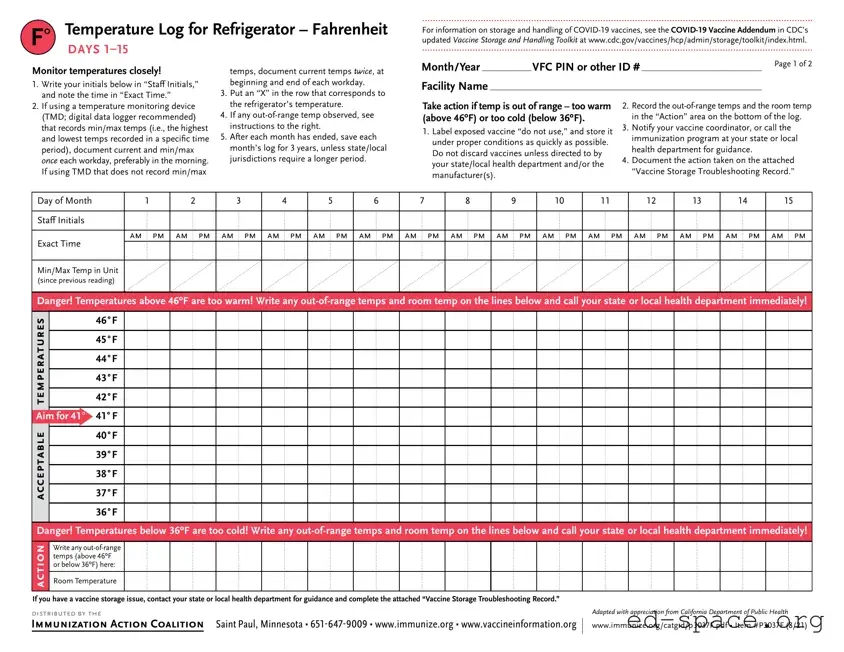
The Refrigerator Temperature Log form is a crucial tool for healthcare facilities that store vaccines, particularly in the context of ensuring the safety and efficacy of these vital medications. This form allows staff to monitor the temperature of refrigerators where vaccines are stored, documenting readings twice a day to ensure compliance with recommended storage guidelines. It emphasizes the importance of maintaining temperatures between 36°F and 46°F, as temperatures outside this range can jeopardize vaccine integrity. Each log entry includes sections for staff initials, exact times, and both current and minimum/maximum temperature readings. In case of out-of-range temperatures, the form provides clear action steps to safeguard vaccines, such as labeling them as "do not use" and notifying the appropriate health authorities. The log also requires facilities to retain records for a minimum of three years, ensuring accountability and traceability. By diligently using the Refrigerator Temperature Log form, healthcare providers can better protect public health and maintain the effectiveness of the vaccines they administer.
F° |
Temperature Log for Refrigerator – Fahrenheit |
DAYS |
For information on storage and handling of
Monitor temperatures closely!
temps, document current temps twice, at
Month/Year |
|
VFC PIN or other ID # |
|
Page 1 of 2 |
|
|
|
1.Write your initials below in “Staff Initials,” and note the time in “Exact Time.”
2.If using a temperature monitoring device
(TMD; digital data logger recommended) that records min/max temps (i.e., the highest and lowest temps recorded in a specific time period), document current and min/max once each workday, preferably in the morning. If using TMD that does not record min/max
beginning and end of each workday.
3.Put an “X” in the row that corresponds to the refrigerator’s temperature.
4.If any
5.After each month has ended, save each month’s log for 3 years, unless state/local jurisdictions require a longer period.
Facility Name
Take action if temp is out of range – too warm (above 46ºF) or too cold (below 36ºF).
1.Label exposed vaccine “do not use,” and store it under proper conditions as quickly as possible. Do not discard vaccines unless directed to by your state/local health department and/or the manufacturer(s).
2.Record the
3.Notify your vaccine coordinator, or call the immunization program at your state or local health department for guidance.
4.Document the action taken on the attached
“Vaccine Storage Troubleshooting Record.”
Day of Month |
1 |
|
2 |
|
3 |
|
4 |
|
5 |
|
6 |
|
7 |
|
8 |
|
9 |
|
10 |
|
11 |
|
12 |
|
13 |
|
14 |
|
15 |
Staff Initials |
|
|
|
|
|
|
|
|
|
|
|
|
|
|
|
|
|
|
|
|
|
|
|
|
|
|
|
|
|
am |
pm |
am |
pm |
am |
pm |
am |
pm |
am |
pm |
am |
pm |
am |
pm |
am |
pm |
am |
pm |
am |
pm |
am |
pm |
am |
pm |
am |
pm |
am |
pm |
am |
pm |
Exact Time |
|
|
|
|
|
|
|
|
|
|
|
|
|
|
|
|
|
|
|
|
|
|
|
|
|
|
|
|
|
Min/Max Temp in Unit |
|
|
|
|
|
|
|
|
|
|
|
|
|
|
|
|
|
|
|
|
|
|
|
|
|
|
|
|
|
(since previous reading) |
|
|
|
|
|
|
|
|
|
|
|
|
|
|
|
|
|
|
|
|
|
|
|
|
|
|
|
|
|
Danger! Temperatures above 46ºF are too warm! Write any
temperatures
Aim for 41º
acceptable
46˚F
45˚F
44˚F
43˚F
42˚F
41˚F
40˚F
39˚F
38˚F
37˚F
36˚F
Danger! Temperatures below 36ºF are too cold! Write any
action
Write any
Room Temperature
If you have a vaccine storage issue, contact your state or local health department for guidance and complete the attached “Vaccine Storage Troubleshooting Record.”
DISTRIBUTED BY THE
IMMUNIZATION ACTION COALITION Saint Paul, Minnesota •
Adapted with appreciation from California Department of Public Health
www.immunize.org/catg.d/p3037F.pdf • Item #P3037F (8/21)
F° |
Temperature Log for Refrigerator – Fahrenheit |
DAYS 16 |
For information on storage and handling of
Monitor temperatures closely!
temps, document current temps twice, at
Month/Year |
|
VFC PIN or other ID # |
|
Page 2 of 2 |
1.Write your initials below in “Staff Initials,” and note the time in “Exact Time.”
2.If using a temperature monitoring device
(TMD; digital data logger recommended) that records min/max temps (i.e., the highest and lowest temps recorded in a specific time period), document current and min/max once each workday, preferably in the morning. If using TMD that does not record min/max
beginning and end of each workday.
3.Put an “X” in the row that corresponds to the refrigerator’s temperature.
4.If any
5.After each month has ended, save each month’s log for 3 years, unless state/local jurisdictions require a longer period.
Facility Name
Take action if temp is out of range – too warm (above 46ºF) or too cold (below 36ºF).
1.Label exposed vaccine “do not use,” and store it under proper conditions as quickly as possible. Do not discard vaccines unless directed to by your state/local health department and/or the manufacturer(s).
2.Record the
3.Notify your vaccine coordinator, or call the immunization program at your state or local health department for guidance.
4.Document the action taken on the attached
“Vaccine Storage Troubleshooting Record.”
Day of Month |
16 |
|
17 |
|
18 |
|
19 |
|
20 |
|
21 |
|
22 |
|
23 |
|
24 |
|
25 |
|
26 |
|
27 |
|
28 |
|
29 |
|
30 |
|
31 |
Staff Initials |
|
|
|
|
|
|
|
|
|
|
|
|
|
|
|
|
|
|
|
|
|
|
|
|
|
|
|
|
|
|
|
am |
pm |
am |
pm |
am |
pm |
am |
pm |
am |
pm |
am |
pm |
am |
pm |
am |
pm |
am |
pm |
am |
pm |
am |
pm |
am |
pm |
am |
pm |
am |
pm |
am |
pm |
am |
pm |
Exact Time |
|
|
|
|
|
|
|
|
|
|
|
|
|
|
|
|
|
|
|
|
|
|
|
|
|
|
|
|
|
|
|
Min/Max Temp in Unit |
|
|
|
|
|
|
|
|
|
|
|
|
|
|
|
|
|
|
|
|
|
|
|
|
|
|
|
|
|
|
|
(since previous reading) |
|
|
|
|
|
|
|
|
|
|
|
|
|
|
|
|
|
|
|
|
|
|
|
|
|
|
|
|
|
|
|
Danger! Temperatures above 46ºF are too warm! Write any
temperatures
Aim for 41º
acceptable
46˚F
45˚F
44˚F
43˚F
42˚F
41˚F
40˚F
39˚F
38˚F
37˚F
36˚F
Danger! Temperatures below 36ºF are too cold! Write any
action
Write any
Room Temperature
If you have a vaccine storage issue, contact your state or local health department for guidance and complete the attached “Vaccine Storage Troubleshooting Record.”
DISTRIBUTED BY THE
IMMUNIZATION ACTION COALITION Saint Paul, Minnesota •
Adapted with appreciation from California Department of Public Health
www.immunize.org/catg.d/p3037F.pdf • Item #P3037F (8/21)
Vaccine Storage Troubleshooting Record
(check one) □Refrigerator □Freezer
Use this form to document any unacceptable vaccine storage event, such as exposure of refrigerated vaccines to temperatures that are outside the manufacturers’ recommended storage ranges.
A fillable pdf of this form is available at www.immunize. org/catg.d/p3041.pdf
Date & Time of Event |
Storage Unit Temperature |
Room Temperature |
Person Completing Report |
|
|
If multiple, related events occurred, |
at the time the problem was discovered |
at the time the problem was discovered |
|
|
|
see Description of Event below. |
|
|
|
|
|
|
|
|
|
|
|
Date: |
Temp when discovered: |
|
Temp when discovered: |
Name: |
|
|
|
|
|
|
|
Time: |
Minimum temp: |
Maximum temp: |
Comment (optional): |
Title: |
Date: |
|
|
|
|
|
|
Description of Event (If multiple, related events occurred, list each date, time, and length of time out of storage.)
•General description (i.e., what happened?)
•Estimated length of time between event and last documented reading of storage temperature in acceptable range (2o to 8oC [36o to 46oF] for refrigerator;
• Inventory of affected vaccines, including (1) lot #s and (2) whether purchased with public (for example, VFC) or private funds (Use separate sheet if needed, but maintain the inventory with this troubleshooting record.)
•At the time of the event, what else was in the storage unit? For example, were there water bottles in the refrigerator and/or frozen coolant packs in the freezer?
•Prior to this event, have there been any storage problems with this unit and/or with the affected vaccine?
•Include any other information you feel might be relevant to understanding the event.
Action Taken (Document thoroughly. This information is critical to determining whether the vaccine might still be viable!)
•When were the affected vaccines placed in proper storage conditions? (Note: Do not discard the vaccine. Store exposed vaccine in proper conditions and label it “do not use” until after you can discuss with your state/ local health department and/or the manufacturer[s].)
•Who was contacted regarding the incident? (For example, supervisor, state/local health department,
•IMPORTANT: What did you do to prevent a similar problem from occurring in the future?
Results
• What happened to the vaccine? Was it able to be used? If not, was it returned to the distributor? (Note: For
DISTRIBUTED BY THE
IMMUNIZATION ACTION COALITION Saint Paul, Minnesota •
www.immunize.org/catg.d/p3041.pdf • Item #P3041 (8/21)
Vaccine Storage Troubleshooting Record (check one) |
◯ |
◯ |
◯ |
Refrigerator |
Freezer |
Use this form to document any unacceptable vaccine storage event, such as exposure of refrigerated vaccines to temperatures that are outside the manufacturers' recommended storage ranges.
Date & Time of Event |
Storage Unit Temperature |
Room Temperature |
Person Completing Report |
|
|
If multiple, related events occurred, |
at the time the problem was discovered |
at the time the problem was discovered |
|
|
|
see Description of Event below. |
|
|
|
|
|
|
|
|
|
|
|
Date: (see below) |
Temp when discovered: |
45º F |
Temp when discovered: 77º F |
Name: Natalie Nurse |
|
|
|
|
|
|
|
Time: (see below) |
Minimum temp: 38º F |
Maximum temp: 53º F |
Comment (optional):temp is approx. |
Title: VFC Coordinator |
Date: 6/29/21 |
Description of Event (If multiple, related events occurred, list each date, time, and length of time out of storage.)
•General description (i.e., what happened?)
•Estimated length of time between event and last documented reading of storage temperature in acceptable range (2o to 8oC [36o to 46oF] for refrigerator;
• Inventory of affected vaccines, including (1) lot #s and (2) whether purchased with public (for example, VFC) or private funds (Use separate sheet if needed, but maintain the inventory with this troubleshooting record.)
•At the time of the event, what else was in the storage unit? For example, were there water bottles in the refrigerator and/or frozen coolant packs in the freezer?
•Prior to this event, have there been any storage problems with this unit and/or with the affected vaccine?
•Include any other information you feel might be relevant to understanding the event.
At 8 am on Tuesday (6/29/21) morning when clinic opened, identified 4 temperature excursions over the weekend in refrigerator with readings as high as 54°, 50°, 49° & 53°F in primary vaccine storage unit #1. Recordings taken every 15 min on calibrated digital data logger overnight. Data logger probe in glycol located in middle of refrigerator with vaccines.
Total time out of range: approximately 3 hrs — maximum temp 53°F (see attached document of continuous temp readings)
Inventory of vaccines: see attached
Water bottles in refrigerator door. No vaccine stored in freezer. No problems with storage unit prior to Saturday night. Thunderstorms in area over weekend may have affected power.
Action Taken (Document thoroughly. This information is critical to determining whether the vaccine might still be viable!)
•When were the affected vaccines placed in proper storage conditions? (Note: Do not discard the vaccine. Store exposed vaccine in proper conditions and label it “do not use” until after you can discuss with your state/ local health department and/or the manufacturer[s].)
•Who was contacted regarding the incident? (For example, supervisor, state/local health department,
•IMPORTANT: What did you do to prevent a similar problem from occurring in the future?
Vaccines currently stored appropriately at 41ºF. Refrigerator and vaccines labeled "Do Not Use."
My State Immunization Program contacted at 8:30 am. Spoke with Victor Vaccine. Provided Victor with details of event and list of vaccines. Vaccine to remain quarantined until we hear back from Victor.
Called electric company and confirmed 2 short power outages during weekend. Checked refrigerator seals called refrigerator maintenance company to replace seals.
Checked plug on unit placed tape over plug to prevent inadvertent dislodging. Plan to purchase plug guard.
Plan to follow up with Immunization Program on data loggers with alarms that could be sent to coordinator and
Results
• What happened to the vaccine? Was it able to be used? If not, was it returned to the distributor? (Note: For
Late on Monday, I talked with Victor regarding continued use of vaccine. Victor had checked with manufacturers which confirmed that vaccine is acceptable for use. He told me that vaccine could therefore be removed from quarantine. I discussed the entire situation with Susie Supervisor and Dr. Director (clinic medical director) who agreed that we could put vaccine back in use.
DISTRIBUTED BY THE
IMMUNIZATION ACTION COALITION Saint Paul, Minnesota •
www.immunize.org/catg.d/p3041.pdf • Item #P3041 (8/21)
Vaccine Storage Troubleshooting Record (check one) |
◯ |
◯ |
◯ |
Refrigerator |
Freezer |
Use this form to document any unacceptable vaccine storage event, such as exposure of refrigerated vaccines to temperatures that are outside the manufacturers' recommended storage ranges.
Date & Time of Event |
Storage Unit Temperature |
Room Temperature |
Person Completing Report |
|
|
If multiple, related events occurred, |
at the time the problem was discovered |
at the time the problem was discovered |
|
|
|
see Description of Event below. |
|
|
|
|
|
|
|
|
|
|
|
Date:7/13/2021 |
Temp when discovered: |
28º F |
Temp when discovered: 77º F |
Name: Natalie Nurse |
|
|
|
|
|
|
|
Time: 8:00 am |
Minimum temp: 28º F |
Maximum temp: 42º F |
Comment (optional):temp is approx. |
Title: VFC Coordinator |
Date: 7/13/21 |
Description of Event (If multiple, related events occurred, list each date, time, and length of time out of storage.)
•General description (i.e., what happened?)
•Estimated length of time between event and last documented reading of storage temperature in acceptable range (2o to 8oC [36o to 46oF] for refrigerator;
• Inventory of affected vaccines, including (1) lot #s and (2) whether purchased with public (for example, VFC) or private funds (Use separate sheet if needed, but maintain the inventory with this troubleshooting record.)
•At the time of the event, what else was in the storage unit? For example, were there water bottles in the refrigerator and/or frozen coolant packs in the freezer?
•Prior to this event, have there been any storage problems with this unit and/or with the affected vaccine?
•Include any other information you feel might be relevant to understanding the event.
When checked main clinic fridge (in lab) at 8:00 am on Tuesday, 7/13/2021, digital readout on data logger read 28ºF. Data logger located in center of fridge with probe in glycol . Review of computer readings (taken every 15 minutes) showed steady drop in temps from 42ºF at 8:15 pm (7/12/2021) to 28ºF reading discovered when arrived at clinic on Tuesday morning (7/13/2021). Readings hit 34ºF at 11 pm (7/12) and 32ºF at 2 am (7/13). Total time out of recommended storage temps = 9 hours, with 6 hours at freezing or below (see attached document of continuous temp readings). Inventory of vaccines attached.
Water bottles in refrigerator door and crisper area. No vaccines stored in freezer. No recent adjustments to temp controls and no previous temp excursions noted with this refrigerator before 7/13.
Action Taken (Document thoroughly. This information is critical to determining whether the vaccine might still be viable!)
•When were the affected vaccines placed in proper storage conditions? (Note: Do not discard the vaccine. Store exposed vaccine in proper conditions and label it “do not use” until after you can discuss with your state/ local health department and/or the manufacturer[s].)
•Who was contacted regarding the incident? (For example, supervisor, state/local health department,
•IMPORTANT: What did you do to prevent a similar problem from occurring in the future?
Upon discovery, vaccines marked “Do Not Use” and stored in 2nd clinic fridge (in exam room #3 at 41ºF). Also placed “Do Not Use” note on main fridge in lab. Notified Susie Supervisor about the issue. Contacted Victor Vaccine at My State Immunization Program at 8:30 am. Provided Victor with details of event and list of vaccines in fridge. Victor said to maintain vaccines in 2nd fridge and that he would check with manufacturers to determine next steps.
Called Jim’s Appliance Repair to examine fridge. Repairman found and replaced faulty thermostat in unit. Reset data logger on center shelf in fridge with probe in glycol .
Results
• What happened to the vaccine? Was it able to be used? If not, was it returned to the distributor? (Note: For
After fridge thermostat repaired, monitored temps in empty fridge for 1 week, per state requirements. Fridge maintained
DISTRIBUTED BY THE
IMMUNIZATION ACTION COALITION Saint Paul, Minnesota •
www.immunize.org/catg.d/p3041.pdf • Item #P3041 (8/21)
| Fact Name | Details |
|---|---|
| Temperature Monitoring | The Refrigerator Temperature Log requires temperatures to be documented twice daily to ensure vaccines are stored within acceptable ranges. |
| Out-of-Range Actions | If temperatures exceed 46°F or drop below 36°F, immediate action is required, including labeling affected vaccines as "do not use." |
| Retention Period | Logs must be saved for a minimum of three years, unless state or local regulations mandate a longer retention period. |
| State-Specific Guidelines | In California, the California Department of Public Health oversees vaccine storage guidelines, which may differ from other states. |
| Monitoring Device Recommendation | A digital data logger is recommended for accurate temperature readings, capturing minimum and maximum temperatures throughout the day. |
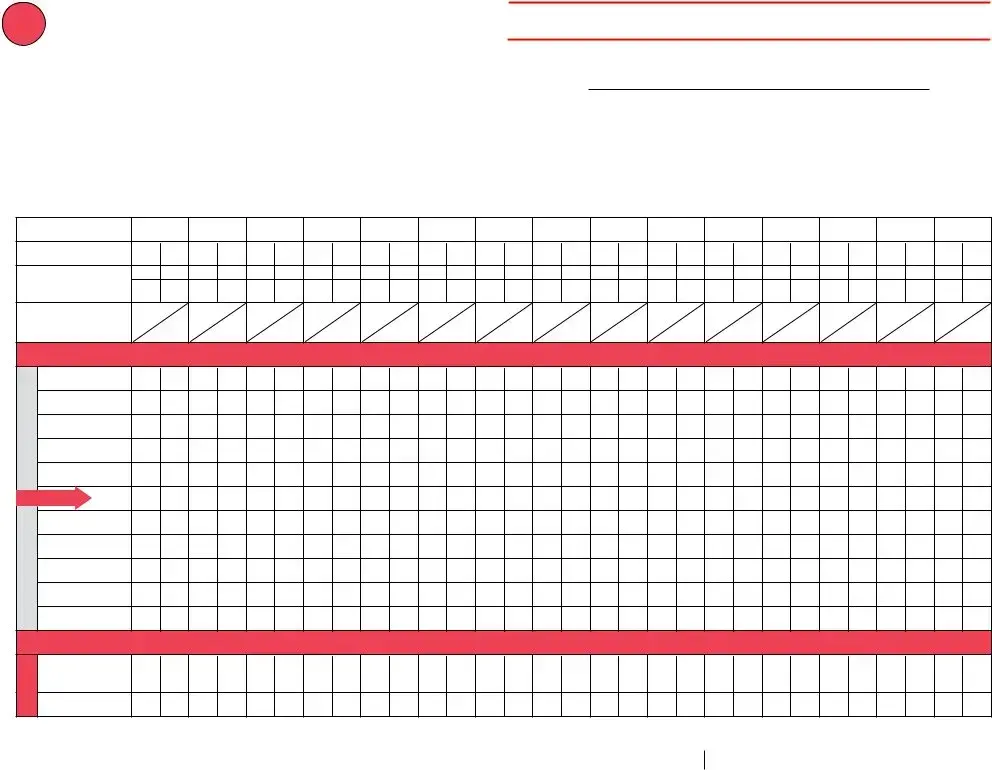
Filling out the Refrigerator Temperature Log form requires attention to detail and consistency. This process ensures that the temperatures are monitored and recorded accurately, which is crucial for maintaining vaccine efficacy. Follow these steps to complete the form correctly.
What is the purpose of the Refrigerator Temperature Log form?
The Refrigerator Temperature Log form is designed to help healthcare facilities monitor and document the temperatures of refrigerators storing vaccines. Maintaining the proper temperature is crucial for ensuring the effectiveness of vaccines. This log allows staff to record temperatures regularly and take action if temperatures fall outside the acceptable range.
How often should temperatures be recorded on the log?
Temperatures should be documented at least twice each workday, preferably in the morning. If using a digital temperature monitoring device that records minimum and maximum temperatures, staff should record the current temperature along with the min/max readings. If the device does not record min/max, staff should note the beginning and end temperatures for each workday.
What should be done if the temperature is out of range?
If the recorded temperature is above 46ºF or below 36ºF, immediate action is required. First, label any exposed vaccines as “do not use” and store them under proper conditions. Document the out-of-range temperatures and room temperature in the log. Next, notify your vaccine coordinator or contact your local health department for guidance. Finally, record the actions taken on the Vaccine Storage Troubleshooting Record.
How long should the temperature logs be kept?
Each month’s log should be saved for a minimum of three years. However, some state or local jurisdictions may have different requirements, so it’s important to check local regulations to ensure compliance.
What kind of temperature monitoring device is recommended?
A digital data logger is recommended for monitoring temperatures in vaccine refrigerators. These devices provide accurate readings and can record both minimum and maximum temperatures over a specific time period, which is essential for maintaining vaccine viability.
What information is required on the log?
The log requires several key pieces of information, including the date, staff initials, exact time of the temperature reading, and the recorded min/max temperatures. Additionally, if any out-of-range temperatures are noted, staff must document those along with the room temperature and any actions taken in response.
What should be done if multiple temperature excursions occur?
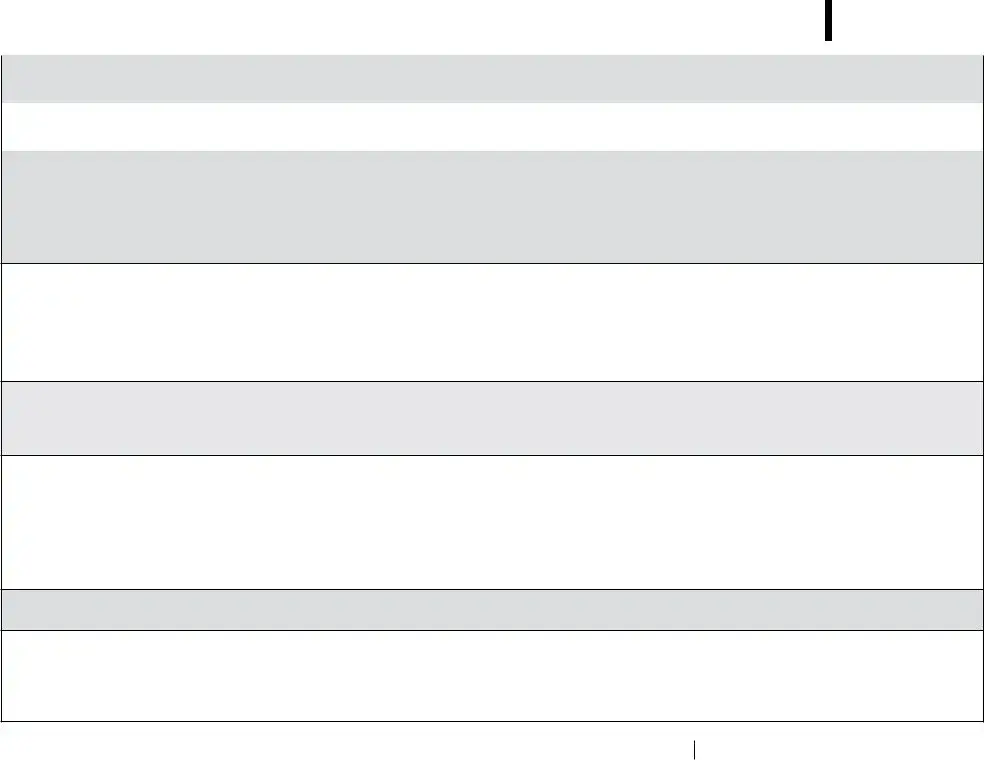
In the event of multiple temperature excursions, each incident should be documented thoroughly. This includes noting the date and time of each event, the temperatures recorded, and any actions taken. It’s important to provide a general description of what happened and to keep an inventory of affected vaccines. This information is crucial for determining the viability of the vaccines and for future prevention efforts.
Who should be notified in case of a temperature issue?
In case of a temperature issue, the vaccine coordinator should be notified immediately. Additionally, contacting the immunization program at your state or local health department is essential for guidance on how to handle the situation and to ensure compliance with health regulations.
Omitting Initials and Time: Many individuals forget to write their initials in the “Staff Initials” section or fail to note the exact time in the “Exact Time” field. This can lead to confusion about who recorded the temperatures and when they were taken.
Incorrect Temperature Recordings: Some users mistakenly record temperatures that do not accurately reflect the readings from their temperature monitoring device. This can occur if they do not double-check the readings or if they misinterpret the data from a digital logger.
Failing to Document Out-of-Range Temperatures: A common mistake is not recording any out-of-range temperatures in the designated “Action” area. This omission can hinder proper response actions and documentation of potential vaccine exposure issues.
Not Using an “X” to Indicate Temperatures: Some people neglect to put an “X” in the row that corresponds to the refrigerator’s temperature. This can create ambiguity about whether the temperature was recorded accurately.
Ignoring Action Steps: When temperatures are out of range, individuals sometimes overlook the necessary action steps outlined in the log. This includes labeling affected vaccines and notifying the vaccine coordinator, which is crucial for maintaining vaccine integrity.
Improper Storage of Logs: After the month ends, some individuals fail to save the logs for the required three years. This can lead to issues with compliance and accountability in vaccine storage practices.
The Refrigerator Temperature Log form is a crucial document for monitoring the storage conditions of vaccines. It helps ensure that vaccines are kept at the appropriate temperatures, which is vital for their efficacy. Alongside this form, there are several other documents that are commonly used in conjunction with it to maintain proper vaccine storage protocols and address any issues that may arise.
These documents work together to create a robust system for managing vaccine storage effectively. By using them in conjunction with the Refrigerator Temperature Log form, healthcare facilities can ensure that they are adhering to best practices and maintaining the integrity of their vaccine supply.
When filling out the Refrigerator Temperature Log form, there are important steps to follow to ensure accuracy and compliance. Here’s a list of what you should and shouldn’t do:
This is incorrect. The log is essential for monitoring the temperature of all vaccines stored in the refrigerator, not just COVID-19 vaccines. Proper temperature management is crucial for the efficacy of all vaccines.
In reality, the log requires temperatures to be documented twice each workday, preferably in the morning. This helps ensure accurate monitoring of temperature fluctuations throughout the day.
This is misleading. Vaccines should not be discarded without consulting your state or local health department. They will provide guidance on how to handle out-of-range temperatures and whether the vaccines are still viable.
This is not true. Each month’s log must be saved for three years, or longer if required by local regulations. Keeping these records is vital for compliance and tracking any potential issues with vaccine storage.
Filling out and using the Refrigerator Temperature Log form is crucial for maintaining the integrity of vaccines. Here are five key takeaways to keep in mind: