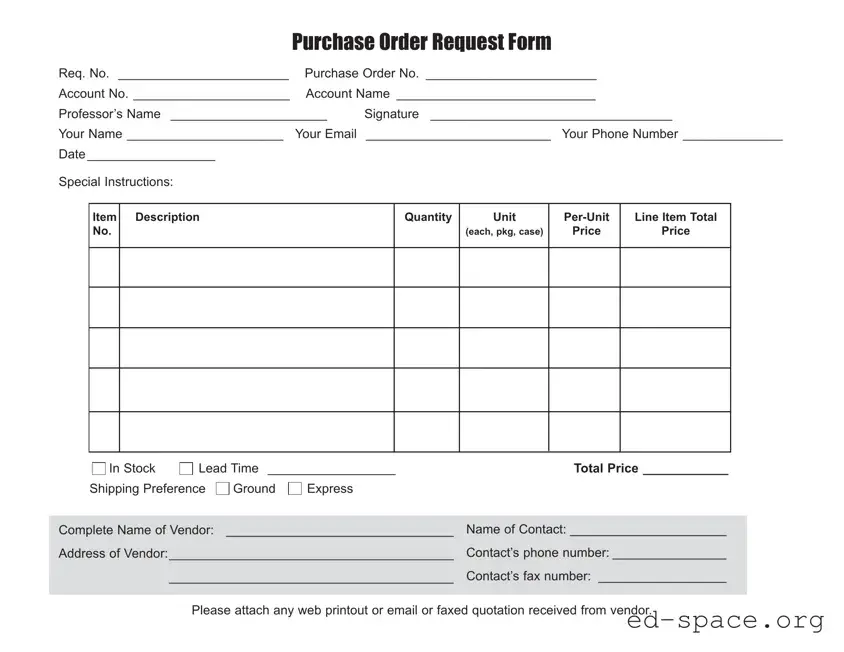
When organizations need to acquire goods or services, a Purchase Request form plays a crucial role in streamlining the process. This essential document helps ensure that all purchases are properly authorized and aligned with the company's budget. Typically, the form captures vital information such as the description of the item or service, the quantity required, and the estimated cost. Additionally, it often includes sections for the requester’s details and approval signatures from relevant authorities. By standardizing the purchasing process, the Purchase Request form not only promotes accountability but also aids in tracking expenses and managing resources effectively. Understanding how to fill out this form correctly can lead to smoother transactions and help prevent unnecessary delays in procurement.

Purchase Order Request Form
Req. No. ________________________ |
Purchase Order No. ________________________ |
|
Account No. ______________________ |
Account Name ____________________________ |
|
Professor’s Name ______________________ |
Signature __________________________________ |
|
Your Name ______________________ |
Your Email |
__________________________ Your Phone Number ______________ |
Date__________________ |
|
|
Special Instructions: |
|
|
Item Description No.
Quantity
Unit
(each, pkg, case)
Price
Line Item Total
Price
In Stock |
Lead Time __________________ |
Total Price ____________ |
||
Shipping Preference |
Ground |
Express |
|
|
|
|
|
||
Complete Name of Vendor: |
________________________________ |
Name of Contact: ______________________ |
||
Address of Vendor:________________________________________ |
Contact’s phone number: ________________ |
|||
|
________________________________________ |
Contact’s fax number: __________________ |
||
|
|
|
|
|
Please attach any web printout or email or faxed quotation received from vendor.
| Fact Name | Description |
|---|---|
| Purpose | The Purchase Request form is used to formally request the purchase of goods or services within an organization. |
| Approval Process | This form typically requires approval from designated authorities before any purchases can be made. |
| State-Specific Regulations | In some states, such as California, the form must comply with the California Public Contract Code. |
| Record Keeping | Organizations often maintain copies of Purchase Request forms for auditing and financial tracking purposes. |
Once you have gathered all necessary information, you can proceed to fill out the Purchase Request form. Ensure that all details are accurate to avoid delays in processing.
After completing the form, review all entries for accuracy. Submit the form to the appropriate department for further processing.
What is a Purchase Request form?
A Purchase Request form is a document used by individuals or departments within an organization to formally request the purchase of goods or services. It serves as a record of the request and helps ensure that the purchasing process is organized and efficient. By submitting this form, employees communicate their needs to the procurement team, allowing for proper budget management and approval workflows.
Who needs to fill out a Purchase Request form?
Any employee or department that wishes to acquire goods or services for work-related purposes should fill out a Purchase Request form. This includes requests for office supplies, equipment, software, or any other items necessary for the operation of the organization. It is essential that all requests go through this formal process to maintain accountability and transparency.
What information is required on the Purchase Request form?
The Purchase Request form typically requires several key pieces of information. This includes the requester’s name, department, and contact information. Additionally, details about the requested items or services, such as descriptions, quantities, and estimated costs, should be included. If applicable, the form may also ask for justification for the purchase and any preferred vendors.
How is the Purchase Request form submitted?
Submission methods for the Purchase Request form can vary by organization. Generally, forms can be submitted electronically through an internal system or via email. In some cases, a physical copy may be required. It is crucial to follow the specific submission guidelines outlined by your organization to ensure that the request is processed promptly.
What happens after I submit a Purchase Request form?
Once submitted, the Purchase Request form typically goes through an approval process. This may involve review by a supervisor, the procurement team, or finance department, depending on the organization’s policies. The requester may receive updates regarding the status of the request, including whether it has been approved or denied, and any next steps that may be required.
How long does it take to get a response after submitting the form?
The response time for a Purchase Request can vary based on several factors, including the organization’s workflow, the complexity of the request, and the urgency of the need. Generally, requests are processed within a few business days. However, it is advisable to check with your procurement department for specific timelines and to follow up if you have not received a response within a reasonable period.
What should I do if my Purchase Request is denied?
If your Purchase Request is denied, it is important to review the feedback provided by the approver. Understanding the reasons for the denial can help you address any concerns or provide additional information. If necessary, consider discussing the matter with your supervisor or the procurement team to explore alternative solutions or to submit a revised request that aligns with the organization’s needs and budget.
Incomplete Information: Many individuals fail to provide all necessary details. Missing fields can delay the approval process and lead to confusion.
Incorrect Item Descriptions: Some people do not accurately describe the items they wish to purchase. This can result in ordering the wrong products or services.
Improper Authorization: It's common for individuals to submit requests without the required approvals. This oversight can lead to rejections and wasted time.
Failure to Justify Purchases: A lack of clear justification for the requested items can hinder approval. Providing a rationale is essential for transparency.
Ignoring Budget Constraints: Some requests overlook budget limits. Submitting a request that exceeds the budget can lead to automatic disapproval.
When submitting a Purchase Request form, several other documents may accompany it to ensure a smooth purchasing process. These documents provide additional context, approval, or necessary details related to the request. Below is a list of commonly used forms and documents that often accompany a Purchase Request.
These documents work together to create a comprehensive purchasing process. Having them organized and readily available can help streamline approvals and ensure that all necessary information is accounted for during the purchase. Proper documentation contributes to transparency and accountability in financial transactions.
Purchase Order: This document is a formal request to a supplier to provide goods or services. Like the Purchase Request form, it outlines specific items needed, quantities, and pricing. However, it is typically issued after the Purchase Request has been approved.
Requisition Form: Similar to a Purchase Request, a requisition form is used internally to request the purchase of goods or services. It serves as a preliminary document before a Purchase Order is created, detailing the items and justifying the need.
Invoice: An invoice is a bill issued by a seller to a buyer. While the Purchase Request initiates the purchasing process, the invoice confirms the transaction and includes details such as the amount owed and payment terms.
Contract: A contract is a legally binding agreement between parties. It outlines the terms of the purchase, including price, delivery, and responsibilities. The Purchase Request may lead to the creation of a contract, ensuring both parties understand their obligations.
Quote: A quote is a document provided by a supplier that outlines the estimated costs for specific goods or services. Like the Purchase Request, it helps organizations budget and plan for expenses, but it is typically more detailed regarding pricing.
Expense Report: An expense report is used to track and document expenditures. While the Purchase Request focuses on future purchases, an expense report accounts for past transactions, providing a record of spending for reimbursement or accounting purposes.
Approval Form: This document is used to obtain authorization for a purchase. Similar to the Purchase Request, it ensures that the necessary approvals are obtained before proceeding with a transaction, helping to maintain budgetary control.
When filling out a Purchase Request form, it is important to follow certain guidelines to ensure the process goes smoothly. Here are five things to keep in mind:
When it comes to the Purchase Request form, there are several common misconceptions that can lead to confusion. Understanding these myths can help streamline the purchasing process and ensure everyone is on the same page. Here are nine misconceptions to consider:
This is not true. Any purchase, regardless of size, may need a Purchase Request form to ensure proper approval and tracking.
While submitting the form is a necessary step, it does not automatically mean the request will be approved. Approval is subject to review and budget considerations.
In reality, these forms can be used for a wide range of purchases, including services, equipment, and software.
Many organizations allow changes to be made to a Purchase Request before it is approved. Check your organization’s policy for specifics.
This is a misconception. Even existing vendors may require a Purchase Request for new orders or services.
Typically, employees at various levels can submit requests, depending on the organization's policy. It’s important to know your specific guidelines.
While they may add a step, Purchase Requests actually help streamline the process by ensuring all necessary approvals are in place before a purchase is made.
Most organizations have systems in place to track Purchase Requests, which helps in budgeting and accountability.
Processing order can vary based on urgency, budget availability, and departmental priorities, not just the order of submission.
By dispelling these misconceptions, individuals can better navigate the Purchase Request process and contribute to a more efficient purchasing system.
Filling out and using a Purchase Request form is a crucial step in the procurement process. Here are key takeaways to ensure a smooth experience:
By adhering to these guidelines, you can streamline the purchase request process and contribute to efficient procurement practices.