Homepage Blank Ohio Sd 100 PDF Form
Content Overview

The Ohio SD 100 form serves as a crucial document for individuals who need to file their School District Income Tax Return. Each taxpayer must complete a separate SD 100 for every school district they resided in during the taxable year. This form requires essential information such as the taxpayer's Social Security number, the school district number, and details regarding residency status. Taxpayers must indicate whether they are full-year residents, part-year residents, or non-residents of the school district. The form also includes sections for income information, tax type, and filing status, which should align with the Ohio income tax return. It is important to avoid using staples, tape, or glue when submitting the form, as these can interfere with processing. Additionally, taxpayers should ensure that they provide accurate payment information and include any necessary supporting documents. The SD 100 form is a vital step in ensuring compliance with local tax regulations, and understanding its requirements can help streamline the filing process.


Document Preview

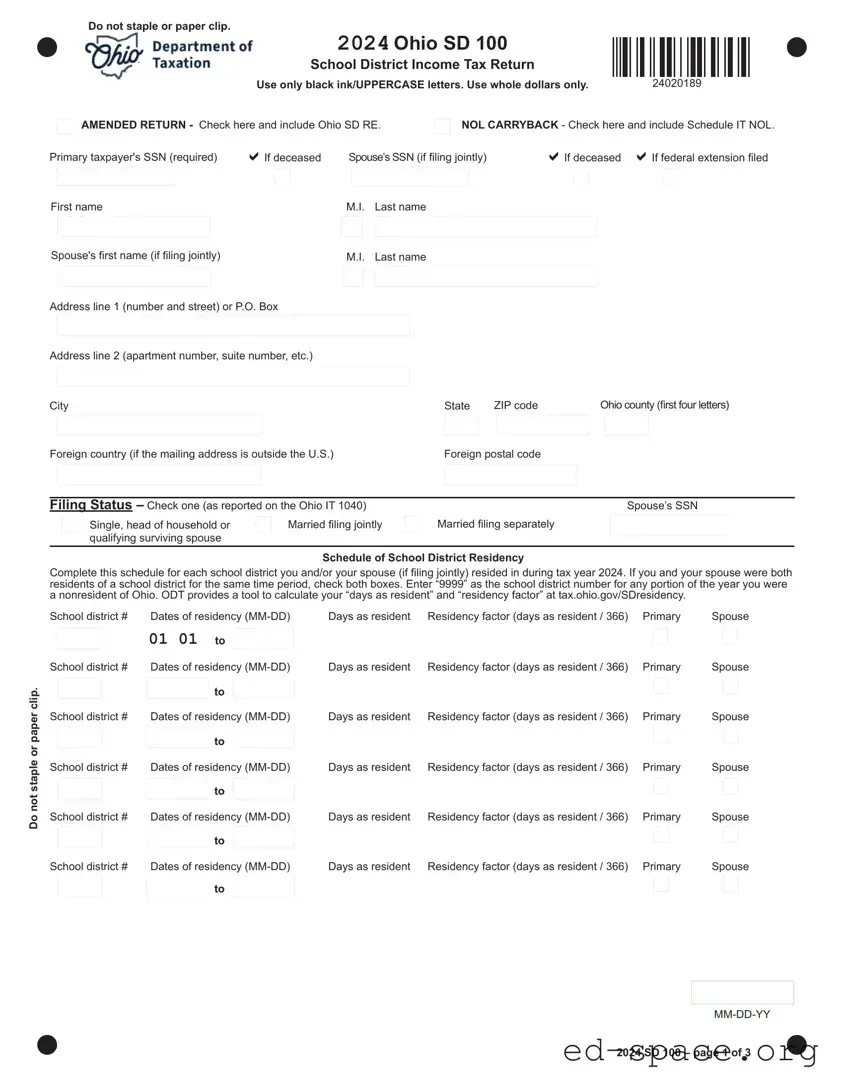
First name Last nameM.I.
Spouse's rst name (if ling jointly)
Last nameM.I.
StateCity
ZIP code
Ohio county (rst four letters)
Address line 1 (number and street) or P.O. Box
Foreign country (if the mailing address is outside the U.S.) Foreign postal code
Address line 2 (apartment number, suite number, etc.)
Do not staple or paper clip.
2024 SD 100 – page 1 of 3
AMENDED RETURN - Check here and include Ohio SD RE. NOL CARRYBACK - Check here and include Schedule IT NOL.
If deceased
Primary taxpayer's SSN (required)
Spouse’s SSN (if ling jointly)
If deceased
MM-DD-YY
Filing Status – Check one (as reported on the Ohio IT 1040)
Single, head of household or
qualifying surviving spouse
Spouse’s SSN
Schedule of School District Residency
Complete this schedule for each school district you and/or your spouse (if ling jointly) resided in during tax year 2024. If you and your spouse were both
residents of a school district for the same time period, check both boxes. Enter “9999” as the school district number for any portion of the year you were
a nonresident of Ohio. ODT provides a tool to calculate your “days as resident” and “residency factor” at tax.ohio.gov/SDresidency.
School district # Dates of residency (MM-DD) Days as resident Residency factor (days as resident / 366) Primary Spouse
to
to
to
to
to
Married ling jointly
Married ling separately
01 01
to
If federal extension led
24020189
2024 Ohio SD 100
School District Income Tax Return
Use only black ink/UPPERCASE letters. Use whole dollars only.
Do not staple or paper clip.
1. Ohio adjusted gross income (from Ohio IT 1040, line 3) ................................................................ 1.
2. Business income deduction add-back (from the Ohio Schedule of Adjustments, line 13) ....................... 2.
3. Modied adjusted gross income (line 1 plus line 2; if negative enter zero) ......................................... 3.
4. Exemption amount (from Ohio IT 1040, line 4) ........................................................................................ 4.
5. Modied adjusted gross income less exemptions (line 3 minus line 4; if negative, enter zero) ........ 5.
6. Total tax from traditional tax base districts (from line 29) ..........................................................................................6.
7. Total tax from earned income tax base districts (from line 39) ......................................................................................7.
8. School district income tax liability after credits (line 6 plus line 7). ............................................................................ 8.
9. Interest penalty on underpayment of estimated tax (include Ohio IT/SD 2210) ............................................................... 9.
10. Total school district income tax liability before withholding or estimated payments (line 8 plus line 9) ............................10.
11. School district income tax withheld – Schedule of School District Withholding, part A, line 1 (include
schedule and income statements) ......................................................................................................................11.
12. Estimated and extension payments, and credit carryforward from last year’s returns ........................................................12.
13. Amended return only – amount previously paid with original and/or amended return ..............................................13.
14. Total school district income tax payments (add lines 11, 12, and 13) .....................................................................14.
15. Amended return only – overpayment previously requested on original and/or amended return ..........................15.
16. Line 14 minus line 15. Place a “-” in the box if negative ............................................................................... .16.
17. Tax due (line 10 minus line 16). If line 16 is negative, ignore the “-” and add line 16 to line 10 .............................. 17.
18. Interest due on late payment of tax (see instructions) ............................................................................................18.
19. TOTAL AMOUNT DUE (line 17 plus line 18). Pay electronically at tax.ohio.gov/pay or include the
Ohio Universal Payment Coupon (OUPC) and your check ................................................................ AMOUNT DUE19.
20. Overpayment (line 16 minus line 10) ......................................................................................................................20.
21. Original return only – amount of line 20 to be credited toward next year’s school district income tax liability .....21.
22. REFUND (line 20 minus line 21) ............................................................................................. YOUR REFUND22.
Residents of taxing school districts: Complete the applicable schedule(s) on page 3 to determine the line 6
and/or line 7 amounts. Full-year nonresidents of taxing school districts: Skip to line 11.
NO Payment Included Mail to:
Ohio Department of Taxation
P.O. Box 182197
Columbus, OH 43218-2197
Payment Included Mail to:
Ohio Department of Taxation
P.O. Box 182389
Columbus, OH 43218-2389
If your refund is $1.00 or less, no refund will be issued.
If you owe $1.00 or less, no payment is necessary.
Sign Here (required): I declare under penalties of perjury that this return or claim (including any accompanying
schedules and statements) has been examined by me and to the best of my knowledge and belief is a true, correct, and
complete return and report.
If line 16 is MORE THAN line 10, go to line 20. OTHERWISE, continue to line 17.
Preparer's printed name Phone number
Primary signature Phone number
Spouse’s signature Date
Authorize your preparer to
discuss this return
PTIN:Non-paid preparer
SSN:
2024 SD 100 – page 2 of 3
24020289
2024 Ohio SD 100
School District Income Tax Return
Traditional Tax Base Schedule
Complete this schedule for each traditional tax base school district in which you resided during the year, starting with Column A. If you resided in more
than two traditional tax base school districts, complete additional copies of this page.
23. Enter the portion of line 5 received while a resident of
the school district above. If negative, enter zero ...... 23.
24. Enter the lesser of line 5 or line 23 ........................... 24.
25. Enter the tax rate for the school district above (see
instructions) ...........................................................................25.
26. School district tax (line 24 times line 25) ...............................26.
27. Senior citizen credit (you must be 65 or older to claim
this credit; limit $50 per district) .............................................27.
28. Tax after credits (line 26 minus line 27; if negative,
enter zero) .............................................................................28.
29. Sum of all line 28 amounts above as well as any additional
Traditional Tax Base Schedules. Enter here and on line 6 .................................................................................... 29.
Earned Income Tax Base Schedule
Complete this schedule for each earned income tax base school district in which you resided during the year, starting with Column A. If you resided in
more than two earned income tax base school districts, complete additional copies of this page.
30. Enter wages reported on your federal return and
received while a resident of the school district
above ........................................................................30.
31. Enter self-employment income reported on your
federal return and received while a resident of the
school district above. Place a “-” in the
box if negative ............................................... . 31.
32. Line 30 plus line 31. If negative, enter zero .............. 32.
33. Enter the portion of line 3 received while a resident
of the school district above. If negative, enter zero .. 33.
34. Enter the lesser of line 32 or line 33 ......................... 34.
35. Enter the tax rate for the school district above (see
instructions) ...........................................................................35.
36. School district tax (line 34 times line 35)................................36.
37. Senior citizen credit (you must be 65 or older to claim
this credit; limit $50 per district) .............................................37.
38. Tax after credits (line 36 minus line 37; if negative,
enter zero) .............................................................................38.
39. Sum of all line 38 amounts above as well as any additional
Earned Income Tax Base Schedules. Enter here and on line 7 ............................................................................ 39.
2024 SD 100 – page 3 of 3
School district # School district #
(A) (B)
(A) (B)
SSN:
24020389
2024 Ohio SD 100
School District Income Tax Return
Part A - Total Withholding
1. Total of all school district income tax withheld for all school districts. Enter here and on line 11 of your SD 100 ............ 1.
2024 Schedule of SD Withholding – page 1 of 1
List your and your spouse’s (if ling jointly) W-2 and 1099-R forms only if they have school district withholding. In the “P/S” box, if the income statement
belongs to the primary taxpayer, enter “P”; if the income statement belongs to the spouse, enter “S”. If the Ohio ID number on a statement has 9 digits,
enter only the rst 8 digits. Complete additional copies of this schedule if necessary. Include copies of your income statements that show the school district
withholding information. Note: On occasion, employers will report school district withholding in box 14 of the W-2 instead of the “local” boxes.
Part B - W-2s
Box 2 - Federal income tax withheldBox 1 - Wages, tips, etc.
P/S Box b - EIN
Box 15 - Employer’s Ohio ID number Box 18 - School district wages Box 19 - School district tax
Box 2 - Federal income tax withheldBox 1 - Wages, tips, etc.
P/S Box b - EIN
Box 15 - Employer’s Ohio ID number Box 18 - School district wages Box 19 - School district tax
Box 2 - Federal income tax withheldBox 1 - Wages, tips, etc.
P/S Box b - EIN
Box 15 - Employer’s Ohio ID number Box 18 - School district wages Box 19 - School district tax
Box 2 - Federal income tax withheldBox 1 - Wages, tips, etc.
P/S Box b - EIN
Box 15 - Employer’s Ohio ID number Box 18 - School district wages Box 19 - School district tax
Box 2 - Federal income tax withheldBox 1 - Wages, tips, etc.
P/S Box b - EIN
Box 15 - Employer’s Ohio ID number Box 18 - School district wages Box 19 - School district tax
Box 4 - Federal income tax withheldBox 1 - Gross distribution
P/S Payer’s TIN
Box 15 - Payer’s Ohio number Box 19 - School district distribution Box 17 - School district tax
Part C - 1099-Rs
Use only black ink/UPPERCASE letters. Use whole dollars only.
School district #
School district #
School district #
School district #
School district #
School district #
1.
2.
3.
4.
5.
1.
2024 Schedule of School
District Withholding
Primary taxpayer’s SSN
24360189
Federal Privacy Act Notice
Because we require you to provide us with a Social Security number, the Federal Privacy Act of 1974 requires us to inform you that providing
us with your Social Security number is mandatory. Ohio Revised Code sections 5703.05, 5703.057 and 5747.08 authorize us to request this
information. We need your Social Security number in order to administer this tax.
Cut on the dotted lines. Use only black ink.
Ohio Universal Payment Coupon (SD)
Include the coupon below with your Ohio school district income tax payment.
Important
Make payment payable to: School District Income Tax
Include the tax year, “SD 100”, the last four digits of your SSN, and the school district
number on the “Memo” line of your payment.
If you are ling for multiple districts on page 3 of the SD 100, use the rst school
district number from Column A.
Do not send cash.
Do not use this coupon to make a payment for an individual income tax return.
Electronic Payment Options
You can make your payment electronically even if you le by paper. To pay by electronic
check, credit card, or debit card, visit tax.ohio.gov/pay OR scan with your phone.
Taxpayer’s SSN
Amount of
Payment
Using UPPERCASE letters,
print the rst three letters of
the taxpayer’s last name.
Tax Year
ID Type Coupon Type
Ohio Universal Payment Coupon (OUPC)
Return Payment
$
Note: Pay online at tax.ohio.gov/pay
School District Income Tax
Make payment payable to: School District Income Tax
Mail to: Ohio Department of Taxation,
P.O. Box 182389, Columbus, OH 43218-2389
441
01 54
School district
number
,
89
2024
11 24 25

Form Specifications

Fact Name Description
Form Purpose The Ohio SD 100 form is used to file a School District Income Tax Return.
Filing Requirement Taxpayers must file a separate SD 100 for each school district they lived in during the taxable year.
Taxpayer Information Social Security numbers are required for the taxpayer and spouse (if filing jointly).
Filing Status Taxpayers must select a filing status that matches their Ohio income tax return.
Submission Guidelines Do not use staples, tape, or glue when submitting the form and any accompanying documents.
Tax Types Taxpayers must check the appropriate box for the type of school district income tax they are filing.
Governing Law The Ohio Revised Code, Section 5748 governs the School District Income Tax.

Ohio Sd 100: Usage Guidelines

Completing the Ohio SD 100 form requires careful attention to detail. Once the form is filled out, you will need to submit it along with any necessary documents to ensure timely processing. Follow the steps below to complete the form correctly.

  1. Use only black ink and do not use staples, tape, or glue.
  2. Enter your Social Security number in the designated space. If filing jointly, include your spouse’s Social Security number.
  3. Fill in your name using UPPERCASE letters, including your first name, middle initial, and last name.
  4. Locate and enter the school district number for this return. Refer to pages SD 7-8 for the correct number.
  5. Provide your mailing address, including city, state, and ZIP code. For faster processing, use a street address.
  6. If your home address differs from your mailing address, fill that in as well, without including the city or state.
  7. Indicate your residency status by checking the appropriate box for full-year or part-year resident or nonresident.
  8. If applicable, enter the date you ceased residency in the school district.
  9. Select your filing status by checking one of the options: Single, Head of Household, Qualifying Widow(er), Married Filing Jointly, or Married Filing Separately.
  10. Complete the income information section, starting with your taxable income from the appropriate Ohio tax form.
  11. Calculate your school district taxable income by subtracting any non-resident income from your total taxable income.
  12. Determine your school district tax rate from pages SD 7-8 and apply it to your taxable income.
  13. If eligible, enter any senior citizen credit.
  14. Calculate your total tax due and any penalties for underpayment, if applicable.
  15. List any school district income tax withheld from your W-2 forms.
  16. Add any additional payments or credits from previous years.
  17. Determine if you have an overpayment or amount due based on your calculations.
  18. Sign and date the form, ensuring all information is accurate and complete.
  19. Attach any required documents such as W-2s and forms for payments or credits.
  20. Mail your completed form to the appropriate address based on whether you are enclosing a payment or not.

Your Questions, Answered

What is the Ohio SD 100 form?

The Ohio SD 100 form is the School District Income Tax Return. It is used by residents to report income and pay taxes to their respective school districts. Each taxpayer must file a separate SD 100 form for each school district they lived in during the taxable year.

Who needs to file the Ohio SD 100 form?

Any individual who resides in an Ohio school district that imposes an income tax must file the SD 100 form. This includes full-year residents, part-year residents, and nonresidents who earned income in a taxing school district. If you lived in multiple districts during the year, you must file a separate form for each district.

What information is required to complete the form?

To complete the Ohio SD 100 form, you will need your Social Security number, your spouse’s Social Security number (if filing jointly), and details about your income. This includes W-2 forms and any 1099 forms if tax was withheld. Additionally, you must provide your mailing address and indicate your residency status in the school district.

How should I submit the Ohio SD 100 form?

Submit the completed form by mailing it to the appropriate address based on whether you are enclosing payment or not. Do not use staples, tape, or glue. For faster processing, use a street address for your mailing address. Ensure that all required documents, including W-2s and any payment, are included with your submission.

What if I lived in more than one school district during the year?

If you lived in multiple school districts, you must file a separate SD 100 form for each district. Make sure to accurately report your income and residency status for each district to avoid any penalties or issues with your tax return.

What happens if I owe money or am due a refund?

If you owe money, the amount due will be calculated on the form. Make your check payable to School District Income Tax and include the SD 40P form if you are sending a payment. If you are due a refund, the form will guide you on how to claim it. Note that if your refund is less than $1.01, no refund will be issued.

Can I file the Ohio SD 100 form electronically?

Yes, you can file the Ohio SD 100 form electronically. The Ohio Department of Taxation offers a service called Ohio I-File, which allows for electronic filing. This method is often faster and can expedite your refund.

What should I do if I have questions while filling out the form?

If you have questions while completing the Ohio SD 100 form, refer to the instructions provided with the form or visit the Ohio Department of Taxation's website. You can also contact their office for assistance. It’s important to ensure that your form is filled out correctly to avoid delays or penalties.

Common mistakes

  1. Not filing separate forms for each school district: If you lived in more than one school district during the taxable year, you must file a separate Ohio form SD 100 for each district. Failing to do so can lead to processing delays or incorrect tax assessments.

  2. Incorrect Social Security numbers: Ensure that you enter the correct Social Security number for yourself and your spouse (if filing jointly). An error here can result in significant delays in processing your return.

  3. Using non-black ink: The form must be filled out using only black ink. Using any other color can cause the form to be unreadable by processing machines, leading to potential issues with your return.

  4. Ignoring residency status: It’s essential to check the correct residency box. Indicating the wrong residency status can affect your tax rate and ultimately the amount you owe or are refunded.

  5. Not including necessary attachments: If you have W-2s or other relevant documents, they must be included with your return. Failing to attach these documents can delay processing and may result in additional penalties.

Documents used along the form

The Ohio SD 100 form is essential for filing school district income taxes. However, several other forms and documents are often used in conjunction with it. Each of these documents serves a specific purpose in the tax filing process, ensuring that taxpayers meet their obligations accurately and efficiently.

  • Ohio IT 1040: This is the individual income tax return form for Ohio. It reports total income and calculates the state income tax liability. It is crucial for determining the taxable income that may be relevant for school district taxes.
  • Ohio SD 40P: This form is used to request an extension for filing the school district income tax return. Taxpayers must file this form if they need more time to prepare their SD 100.
  • W-2 Form: Issued by employers, this form reports an employee's annual wages and the taxes withheld. It is necessary for accurately completing the SD 100.
  • 1099-R Form: This form reports distributions from pensions, annuities, retirement plans, or IRAs. If tax was withheld, it should be included with the SD 100.
  • Ohio SD 100ES: This is the estimated tax payment form for school district income taxes. Taxpayers use it to make quarterly estimated tax payments if they expect to owe taxes.
  • Ohio IT/SD 2210: This form calculates penalties for underpayment of estimated taxes. If a taxpayer owes a penalty, this form must be submitted along with the SD 100.
  • Schedule A: This schedule is specifically for earned income only tax base school districts. It details income sources and adjustments required for proper reporting.
  • Taxpayer Identification Number (TIN): This number is often required for various tax forms and is used to identify taxpayers uniquely within the tax system.
  • Federal Extension Confirmation: If a taxpayer has filed for a federal extension, they should include a copy or confirmation number with their SD 100 to avoid penalties.
  • Supporting Documents: Any additional documents or statements that support the information reported on the SD 100 should be included to substantiate claims and deductions.

Understanding these forms and documents can significantly ease the filing process. Each plays a vital role in ensuring compliance with tax laws and maximizing potential refunds or minimizing liabilities. Proper preparation and attention to detail can lead to a smoother experience during tax season.

Similar forms

The Ohio SD 100 form is a specific document used for filing school district income tax. It shares similarities with several other tax-related documents. Here are six forms that are comparable to the Ohio SD 100, along with their similarities:

  • Ohio IT 1040: This is the standard individual income tax return for Ohio residents. Like the SD 100, it requires detailed income information and supports various filing statuses. Both forms necessitate accurate reporting of income and may include additional schedules for specific tax situations.
  • Ohio IT 1040EZ: This simplified version of the IT 1040 is for individuals with straightforward tax situations. Similar to the SD 100, it allows for a more concise reporting process, but is limited to specific income types and filing statuses.
  • Ohio SD 40P: This form is used for school district income tax extension requests. Like the SD 100, it is essential for ensuring compliance with school district tax obligations and must be filed if additional time is needed to complete the SD 100.
  • IRS Form 1040: The federal income tax return form shares similarities with the SD 100 in that both require personal information, income details, and tax calculations. Each form also allows for various deductions and credits that can affect the final tax liability.
  • Ohio IT/SD 2210: This form is used to calculate penalties for underpayment of estimated taxes. Like the SD 100, it addresses specific tax obligations and ensures that taxpayers are aware of potential penalties for late payments.
  • IRS Form W-2: This document reports wages and tax withholding for employees. It is similar to the SD 100 in that it provides necessary income information required for accurate tax reporting, which is essential for completing the SD 100 form correctly.

Dos and Don'ts

When filling out the Ohio SD 100 form, it is important to follow specific guidelines to ensure accuracy and compliance. Here are some key dos and don'ts:

  • Do use only black ink when completing the form.
  • Do file a separate Ohio form SD 100 for each school district where you lived during the taxable year.
  • Do use UPPERCASE letters for all entries on the form.
  • Do place your W-2(s) and any payment on top of your return.
  • Do check the appropriate boxes for your filing status and residency.
  • Don't use staples, tape, or glue when submitting the form.
  • Don't forget to include the Social Security number of the taxpayer and spouse (if applicable).
  • Don't leave any required fields blank; ensure all necessary information is provided.
  • Don't forget to sign the form before submitting it.

Misconceptions

Misconceptions about the Ohio SD 100 form can lead to confusion and errors in filing. Here are eight common misunderstandings:

  • Only one SD 100 form is needed for multiple districts. Many believe they can file a single form for all school districts they lived in during the taxable year. In reality, a separate SD 100 form is required for each district.
  • Stapling documents is acceptable. Some people think it is fine to staple their W-2s or other documents to the SD 100 form. However, the instructions clearly state that no staples, tape, or glue should be used.
  • Black ink is not mandatory. A misconception exists that any color ink can be used. The form specifically requires the use of black ink for all entries.
  • Filing status does not need to match the Ohio income tax return. Some individuals assume they can choose any filing status. It is essential that the filing status on the SD 100 matches that of the Ohio income tax return.
  • Residency status is optional. Some taxpayers may think they can skip indicating their residency status. It is crucial to check the appropriate box for full-year or part-year residency.
  • Refunds are issued regardless of the amount. There is a belief that any overpayment will result in a refund. However, if the refund is less than $1.01, no refund will be issued.
  • Additional forms are not necessary. Many people think they can submit the SD 100 without any supporting documents. If tax was withheld, forms W-2G and 1099-R must be included as well.
  • Filing electronically is not beneficial. Some taxpayers believe that filing on paper is just as effective. In fact, electronic filers typically receive their refunds faster, often within 5-7 business days.

Key takeaways

When filling out the Ohio SD 100 form, consider the following key points:

  • Use black ink only. Avoid using staples, tape, or glue when submitting the form.
  • Complete a separate SD 100 form for each school district where you resided during the taxable year.
  • Provide your Social Security number. If filing jointly, include your spouse's number as well.
  • Use uppercase letters for all entries to ensure clarity and readability.
  • Indicate your residency status accurately: full-year resident, part-year resident, or nonresident.
  • Include all necessary documents, such as W-2 forms and any relevant 1099 forms, with your return.
  • Ensure the school district number on your W-2 matches the number on the SD 100 form.
  • Check the appropriate tax type box and filing status to align with your Ohio income tax return.

These guidelines will help ensure that your form is completed correctly and processed efficiently.