Homepage Blank Ohio It Ar PDF Form
Content Overview

The Ohio IT AR form serves as a crucial tool for taxpayers seeking to reclaim overpaid income or school district taxes. This application can only be submitted after the completion of an Ohio income tax return, specifically the Ohio IT 1040 or the SD 100. Individuals must provide their Social Security number, along with their spouse's if applicable, as well as their names and contact information. The form requires the taxpayer to specify the type of tax they are addressing—either individual income or school district income. It includes a detailed section for calculating the refund amount, where taxpayers will input figures such as the total tax withheld, estimated payments, and any refundable credits. Additionally, the applicant must clarify the reasons for their refund request and may attach supporting documentation if necessary. Signing the form is a vital step, as it affirms the accuracy of the information provided under penalties of perjury. Finally, the completed application must be mailed to the Ohio Department of Taxation, ensuring that all necessary attachments accompany it. Understanding the nuances of the Ohio IT AR form is essential for anyone looking to navigate the refund process effectively.
Document Preview

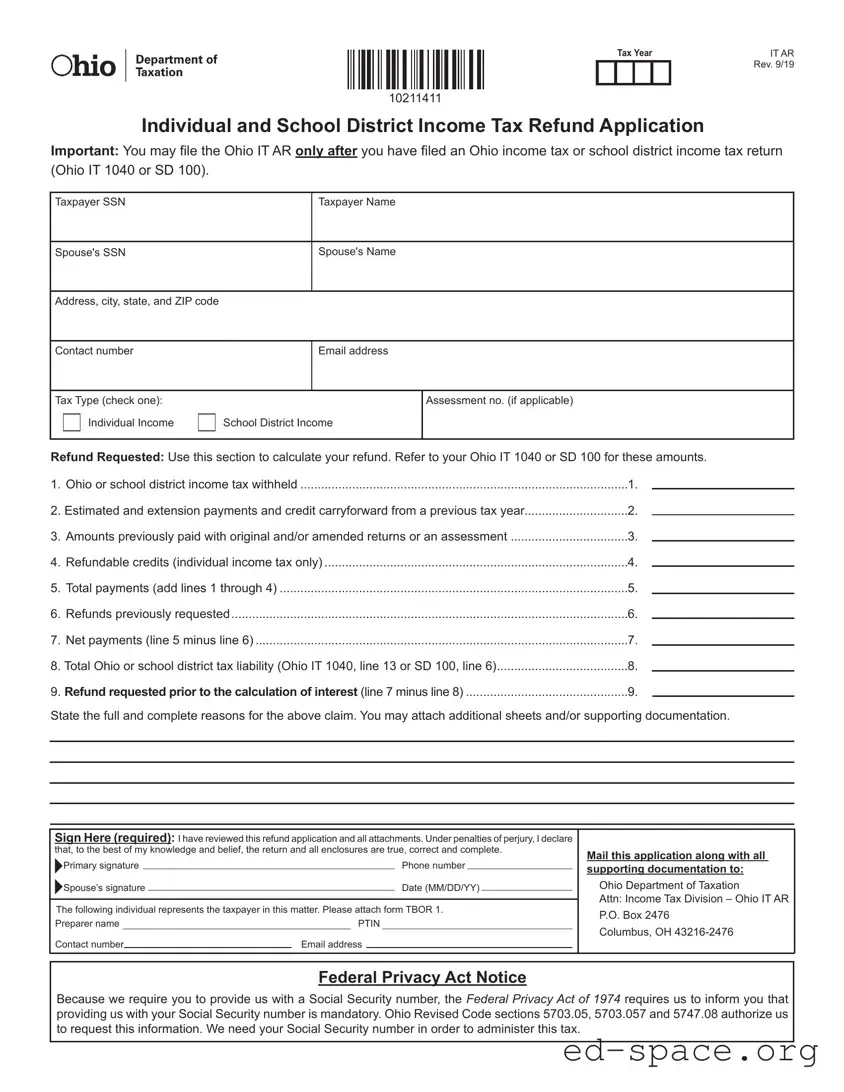
IT AR
Rev. 9/19
Individual and School District Income Tax Refund Application
Important: You may le the Ohio IT AR only after you have led an Ohio income tax or school district income tax return
(Ohio IT 1040 or SD 100).
Federal Privacy Act Notice
Because we require you to provide us with a Social Security number, the Federal Privacy Act of 1974 requires us to inform you that
providing us with your Social Security number is mandatory. Ohio Revised Code sections 5703.05, 5703.057 and 5747.08 authorize us
to request this information. We need your Social Security number in order to administer this tax.
10211411
Mail this application along with all
supporting documentation to:
Ohio Department of Taxation
Attn: Income Tax Division – Ohio IT AR
P.O. Box 2476
Columbus, OH 43216-2476
Primary signature Phone number
Spouse’s signature Date (MM/DD/YY)
Sign Here (required): I have reviewed this refund application and all attachments. Under penalties of perjury, I declare
that, to the best of my knowledge and belief, the return and all enclosures are true, correct and complete.
Preparer name PTIN
Contact number Email address
The following individual represents the taxpayer in this matter. Please attach form TBOR 1.
1. Ohio or school district income tax withheld ...............................................................................................1.
2. Estimated and extension payments and credit carryforward from a previous tax year..............................2.
3. Amounts previously paid with original and/or amended returns or an assessment ..................................3.
4. Refundable credits (individual income tax only) ........................................................................................4.
5. Total payments (add lines 1 through 4) .....................................................................................................5.
6. Refunds previously requested ...................................................................................................................6.
7. Net payments (line 5 minus line 6) ............................................................................................................7.
8. Total Ohio or school district tax liability (Ohio IT 1040, line 13 or SD 100, line 6) ......................................8.
9. Refund requested prior to the calculation of interest (line 7 minus line 8) ...............................................9.
State the full and complete reasons for the above claim. You may attach additional sheets and/or supporting documentation.
Refund Requested: Use this section to calculate your refund. Refer to your Ohio IT 1040 or SD 100 for these amounts.
Tax Year
Taxpayer SSN Taxpayer Name
Spouse's SSN
Spouse's Name
Address, city, state, and ZIP code
Contact number Email address
Tax Type (check one): Assessment no. (if applicable)
Individual Income School District Income

Form Specifications

Fact Name Description
Eligibility to File The Ohio IT AR form can only be submitted after filing an Ohio income tax return (IT 1040) or a school district income tax return (SD 100).
Required Information Taxpayers must provide personal details such as Social Security numbers, names, and contact information, along with the tax type being claimed.
Refund Calculation Taxpayers must calculate their refund based on several factors, including taxes withheld and prior payments, as detailed on the form.
Governing Laws The form is governed by Ohio Revised Code sections 5703.05, 5703.057, and 5747.08.

Ohio It Ar: Usage Guidelines

Completing the Ohio IT AR form is essential for individuals seeking a tax refund after filing their income tax return. Follow these steps to ensure accurate submission.

  1. Gather necessary documents, including your Ohio IT 1040 or SD 100, to reference amounts needed for the refund calculation.
  2. Enter the taxpayer's Social Security Number (SSN) in the designated field.
  3. If applicable, provide the spouse's SSN.
  4. Fill in the taxpayer's full name and the spouse's name, if applicable.
  5. Complete the address section with your street address, city, state, and ZIP code.
  6. Provide a contact number where you can be reached.
  7. Include your email address for any follow-up communications.
  8. Select the tax type by checking either "Individual Income" or "School District Income."
  9. If applicable, enter the assessment number.
  10. Calculate the refund by filling out the amounts for lines 1 through 4 based on your previous tax return. This includes:
    • Ohio or school district income tax withheld (line 1)
    • Estimated and extension payments and credit carryforward from a previous tax year (line 2)
    • Amounts previously paid with original and/or amended returns or an assessment (line 3)
    • Refundable credits (individual income tax only) (line 4)
  11. Add the totals from lines 1 through 4 and enter the result on line 5.
  12. If you have requested refunds previously, enter that amount on line 6.
  13. Calculate the net payments by subtracting line 6 from line 5 and enter the result on line 7.
  14. Determine your total Ohio or school district tax liability from your Ohio IT 1040 or SD 100 and enter it on line 8.
  15. Calculate the refund requested prior to the calculation of interest by subtracting line 8 from line 7 and enter that amount on line 9.
  16. Clearly state the reasons for your refund claim in the provided section. Attach any additional sheets or supporting documents as needed.
  17. Sign and date the application. Ensure both the taxpayer and spouse (if applicable) sign where indicated.
  18. Mail the completed application along with all supporting documentation to the Ohio Department of Taxation, Attn: Income Tax Division – Ohio IT AR, P.O. Box 2476, Columbus, OH 43216-2476.

Your Questions, Answered

What is the Ohio IT AR form?

The Ohio IT AR form is an application for a refund of individual or school district income tax. Taxpayers can file this form after submitting their Ohio income tax return (IT 1040) or school district income tax return (SD 100). It allows individuals to claim refunds for overpayments or excess credits from previous tax years.

Who can file the Ohio IT AR form?

Any individual who has filed an Ohio income tax return or a school district income tax return may file the IT AR form. This includes both taxpayers and their spouses if applicable. It is essential to have completed the necessary tax returns before submitting this refund application.

What information is required to complete the Ohio IT AR form?

To complete the Ohio IT AR form, you will need to provide personal information such as your Social Security number, your spouse's Social Security number (if applicable), names, addresses, contact numbers, and email addresses. Additionally, you must include details about the tax type, refund calculations, and any supporting documentation related to your claim.

How do I calculate the refund amount on the Ohio IT AR form?

Calculating your refund involves several steps. First, gather the relevant amounts from your Ohio IT 1040 or SD 100. You will need to add up the total payments made, including taxes withheld, estimated payments, and refundable credits. After calculating your total payments, subtract any refunds previously requested to determine your net payments. Finally, subtract your total tax liability from your net payments to find the refund amount.

Where should I send the completed Ohio IT AR form?

The completed Ohio IT AR form, along with any supporting documentation, should be mailed to the Ohio Department of Taxation, specifically to the Income Tax Division at P.O. Box 2476, Columbus, OH 43216-2476. Ensure that all required signatures are included before sending the application.

What happens after I submit my Ohio IT AR form?

Once you submit your Ohio IT AR form, the Ohio Department of Taxation will review your application and any attached documents. They may take some time to process your request. If additional information is needed, they will contact you. Otherwise, you will receive your refund through the method you selected in your application.

Is there a deadline for filing the Ohio IT AR form?

Yes, there is a deadline for filing the Ohio IT AR form. Generally, you must file your refund application within four years from the original due date of the tax return for which you are requesting a refund. It is important to adhere to this timeline to ensure that you receive your refund.

What should I do if I need assistance with the Ohio IT AR form?

If you require assistance with the Ohio IT AR form, you may consider reaching out to a tax professional or contacting the Ohio Department of Taxation directly. They can provide guidance and answer any questions you may have regarding the completion and submission of the form.

Common mistakes

  1. Not filing the required tax return first. Before submitting the Ohio IT AR form, ensure that you have already filed your Ohio income tax return (Ohio IT 1040) or school district income tax return (SD 100). This is a crucial step that many overlook.

  2. Incorrectly entering Social Security numbers. Double-check that the Social Security numbers for both the taxpayer and spouse are accurate. A simple mistake can delay the processing of your refund.

  3. Omitting necessary contact information. Include all relevant contact details, such as your phone number and email address. This information is vital for any follow-up communication regarding your application.

  4. Failing to calculate refund amounts correctly. Carefully follow the instructions to calculate your refund. Ensure that you accurately add and subtract the amounts from each section to avoid discrepancies.

  5. Not providing supporting documentation. If your claim requires additional explanation or evidence, attach any necessary documents. This can help substantiate your claim and expedite the review process.

  6. Neglecting to sign the application. Remember to sign the application. Without a signature, your application will not be considered valid, and it may be returned.

  7. Ignoring the deadline for submission. Be aware of any deadlines for filing the Ohio IT AR form. Submitting your application late can result in losing your refund altogether.

  8. Not keeping copies of submitted documents. Always make copies of your completed form and any attachments before sending them. This ensures you have a record of what you submitted in case of any future inquiries.

Documents used along the form

The Ohio IT AR form is essential for requesting a refund of individual or school district income tax. However, several other documents often accompany it to ensure a smooth process. Here’s a brief overview of those forms and documents.

  • Ohio IT 1040: This is the standard individual income tax return form. Taxpayers must complete this form before filing the IT AR, as it provides the necessary income details.
  • SD 100: This form is used for school district income tax returns. Similar to the IT 1040, it must be filed before the IT AR to establish the taxpayer's income and tax obligations.
  • TBOR 1: This is the Taxpayer Authorization form. If someone else is representing the taxpayer, this form must be attached to authorize them to act on behalf of the taxpayer.
  • W-2 Forms: These forms report the amount of income earned and taxes withheld for the year. They are crucial for verifying the income and tax withheld when applying for a refund.
  • 1099 Forms: Similar to W-2s, these forms report various types of income received. They are important for taxpayers who have non-wage income and need to demonstrate their total earnings.
  • Supporting Documentation: This includes any additional papers that support the refund claim, such as receipts or records of tax payments made during the year.
  • Proof of Identity: Taxpayers may need to provide identification documents, such as a driver’s license or Social Security card, to verify their identity when submitting the refund request.
  • Contact Information: Providing accurate contact details, including phone numbers and email addresses, ensures that the tax department can reach the taxpayer if further information is needed.

Gathering these documents can make the refund process smoother and more efficient. Having everything ready can help avoid delays and ensure that taxpayers receive their refunds promptly.

Similar forms

The Ohio IT AR form is an important document for taxpayers seeking refunds for overpaid income or school district taxes. Several other forms share similarities with the Ohio IT AR, primarily in their purpose and structure. Below is a list of nine documents that resemble the Ohio IT AR form:

  • IRS Form 1040X: This is the U.S. Individual Income Tax Return Amended form. Like the Ohio IT AR, it allows taxpayers to claim refunds for overpayments after filing their original tax return.
  • Ohio IT 1040: This is the standard individual income tax return form in Ohio. It serves as the basis for calculating refunds, similar to how the IT AR uses the IT 1040 for refund calculations.
  • Ohio SD 100: This is the school district income tax return form. It is used by taxpayers to report income and calculate taxes owed, paralleling the function of the IT AR for school district tax refunds.
  • IRS Form 843: This form is used to claim a refund or request an abatement of certain taxes. It shares the refund request purpose with the Ohio IT AR.
  • Ohio IT 1040EZ: This simplified version of the Ohio income tax return is for eligible taxpayers. It serves a similar function as the IT AR in terms of filing for refunds.
  • IRS Form 8862: This form is used to claim the Earned Income Credit after disallowance. It can be related to refund claims, much like the Ohio IT AR.
  • Ohio IT 1040NR: This form is for non-resident individuals filing an Ohio income tax return. It also allows for refund requests, similar to the IT AR.
  • IRS Form 8888: This form is used to allocate refunds to multiple accounts. It has a similar refund-oriented purpose, akin to the Ohio IT AR.
  • Ohio IT 1040X: This is the amended version of the Ohio IT 1040. It allows taxpayers to correct errors and claim refunds, paralleling the Ohio IT AR's function.

Each of these forms is designed to facilitate the process of claiming refunds or correcting tax filings, reflecting the shared objective of ensuring taxpayers receive the appropriate amounts owed to them.

Dos and Don'ts

When filling out the Ohio IT AR form, there are important dos and don’ts to keep in mind. Following these guidelines can help ensure your application is processed smoothly.

  • Do double-check your Social Security Number (SSN) for accuracy.
  • Do ensure that you have filed your Ohio income tax return or school district income tax return first.
  • Do calculate your refund carefully, using the amounts from your Ohio IT 1040 or SD 100.
  • Do sign the application before mailing it to the Ohio Department of Taxation.
  • Do attach any necessary supporting documentation to strengthen your claim.
  • Don’t leave any sections of the form blank; complete all required fields.
  • Don’t forget to include your contact number and email address for communication.
  • Don’t submit the form without reviewing it for errors or omissions.
  • Don’t use outdated forms; ensure you have the latest version of the Ohio IT AR.
  • Don’t miss the deadline for filing your refund application.

Misconceptions

  • Misconception 1: The Ohio IT AR form can be filed without submitting an Ohio income tax return first.

    This is incorrect. Taxpayers must first file either the Ohio IT 1040 or the SD 100 before they can submit the IT AR form. The refund application is contingent upon having filed a tax return.

  • Misconception 2: Anyone can file for a refund using the Ohio IT AR form.

    Only individuals who have paid Ohio or school district income tax and are eligible for a refund may use this form. It is specifically designed for those who have overpaid their taxes.

  • Misconception 3: The Ohio IT AR form does not require supporting documentation.

    In fact, taxpayers are encouraged to attach any necessary supporting documents to substantiate their claims. This may include proof of payments or other relevant information.

  • Misconception 4: Filing the Ohio IT AR form guarantees a refund.

    Filing the form does not automatically ensure a refund. The amount refunded will depend on the calculations provided on the form and the taxpayer's overall tax liability.

Key takeaways

Filling out the Ohio IT AR form can be straightforward if you keep a few key points in mind. Here are some essential takeaways to help you navigate the process:

  • Eligibility: You can only file the Ohio IT AR after submitting your Ohio income tax return (IT 1040) or school district income tax return (SD 100).
  • Personal Information: Ensure that you provide accurate details, including your Social Security number, names, and contact information.
  • Tax Type Selection: Clearly indicate whether your refund request pertains to individual income tax or school district income tax by checking the appropriate box.
  • Calculating Refund: Use the designated section to calculate your refund. Refer to your previously filed tax return for accurate amounts.
  • Supporting Documentation: Attach any necessary documents to substantiate your claim. This may include previous tax returns or proof of payments.
  • Signature Requirement: Don’t forget to sign the application. Your signature confirms that you have reviewed the information and believe it to be accurate.
  • Mailing Instructions: Send your completed form and attachments to the Ohio Department of Taxation, ensuring it reaches the correct address for processing.
  • Privacy Notice: Be aware that providing your Social Security number is mandatory for processing your tax refund application.

By keeping these points in mind, you can streamline the process of filing your Ohio IT AR form and ensure that you receive any refunds you are entitled to in a timely manner.