Homepage Blank Ohio It 942 PDF Form
Content Overview

The Ohio IT 942 form plays a crucial role in the state's tax reporting system, specifically for employers and businesses that need to manage withholding accounts. This form is designed to help users maintain accurate records of their withholding tax obligations. It includes sections for adding and deleting accounts, which is essential for keeping up-to-date with any changes in company structure or employee status. The form also provides detailed instructions for completing various tasks, such as associating a withholding account number with a specific company or updating school district information. Additionally, it features a quarterly information section that allows businesses to report their withholding tax payments accurately. Users will find field descriptions that clarify the information required for each part of the form, ensuring that they can navigate the process with ease. The IT 942 also includes a review section, which allows for double-checking entries before submission, helping to minimize errors and streamline compliance with state regulations.


Document Preview

Table of Contents
W .......................3
........................ 3
........................ 4
........................ 5
5
.............. 5
........................ 8
O .....................10
..................... 11
...................... 12
...................... 12
13
...................... 13
...................... 14
O .....................15
...................... 15
...................... 16
...................... 17
...................... 18
...................... 18
... 19
... 19
...................... 20
...................... 21
...................... 22
...................... 23
.....................24
...................... 24
...................... 25
...................... 26
Descriptions.................................................................................................................................. 27
...................... 27
...................... 28
...................... 28
Instructions ........................................................................................................................................... 29
IT942REVIEW ............................................................................................................................................ 30
FieldDescriptions.................................................................................................................................. 31
Instructions ........................................................................................................................................... 31
IT9424
TH
QUARTERLY/ANNUALRECONCILIATION...............................................................................33
FieldDescriptions.................................................................................................................................. 33
Instructions ........................................................................................................................................... 34
ITHHOLDINGACCOUNTMAINTENANCE.......................................................................
FieldDescriptions............................................................................................................
Instructions .....................................................................................................................
A
DDINGANACCOUNT ..............................................................................................................
RulesforAddingAccounts ......................................................................................................................
Instructions ...............................................................................................................................
D
ELETEANACCOUNT ...............................................................................................................
HIOIT‐501WIZARD ....................................................................................................
IT‐501...........................................................................................................................
FieldDescriptions............................................................................................................
Instructions .....................................................................................................................
IT
501REVIEWFILINGINFORAMTIONPAGE .....................................................................................................
FieldDescriptions............................................................................................................
Instructions .....................................................................................................................
HIOIT–941WIZARD .....................................................................................................
FieldDescriptions............................................................................................................
Instructions .....................................................................................................................
IT
9 ONTHLYINFORMATION.............................................................................................41M
FieldDescriptions............................................................................................................
Instructions .....................................................................................................................
IT
941BALANCEDUE...............................................................................................................................
FieldDescriptions...............................................................................................................................
Instructions .....................................................................................................................
IT
EVIEW .........................................................................................................941 R ...........
FieldDescriptions............................................................................................................
Instructions .....................................................................................................................
OHIOIT942WIZARD......................................................................................................
FieldDescriptions............................................................................................................
Instructions .....................................................................................................................
IT942
QUARTERLYINFORMATION .............................................................................................
Field
Instructions .....................................................................................................................
IT942
BALANCEDUE..............................................................................................................
FieldDescriptions............................................................................................................
User Guide Withholding 6/20/2007
IT9424
TH
QUARTERINFORMATION................................................................................................................. 35
...................... 36
...................... 36
...................... 37
...................... 37
...................... 38
...................... 40
...................... 41
............ 42
O .....................44
...................... 44
...................... 45
...................... 46
...................... 47
...................... 48
...................... 49
...................... 50
...................... 51
.....................52
...................... 52
............ 53
O .....................56
...................... 56
...................... 57
...................... 59
...................... 60
...................... 61
...................... 63
...................... 64
...................... 66
M .....................67
...................... 67
...................... 67
Instructions ........................................................................................................................................... 68
ASSESSMENTPAYMENT .................................................................................................................................. 69
FieldDescriptions.................................................................................................................................. 69
Instructions ........................................................................................................................................... 70
PAYMENTONLY ............................................................................................................................................ 71
FieldDescriptions.................................................................................................................................. 71
Instructions ........................................................................................................................................... 72
FieldDescriptions............................................................................................................
Instructions .....................................................................................................................
TH
IT9424 QUARTERBALANCEDUE ...........................................................................................
FieldDescriptions............................................................................................................
Instructions .....................................................................................................................
IT942
4
TH
QUARTERREVIEW....................................................................................................
FieldDescriptions............................................................................................................
Instructions ...............................................................................................................................
HIOSD101WIZARD.....................................................................................................
FieldDescriptions............................................................................................................
Instructions .....................................................................................................................
SD101
WITHHOLDINGINFORMATION .......................................................................................
FieldDescriptions............................................................................................................
Instructions .....................................................................................................................
SD101
REVIEW .....................................................................................................................
FieldDescriptions............................................................................................................
Instructions .....................................................................................................................
ADDING/REMOVINGSCHOOLDISTRICTS ........................................................................
FieldDescriptions............................................................................................................
Instructions ...............................................................................................................................
HIOSD141WIZARD.....................................................................................................
FieldDescriptions............................................................................................................
Instructions .....................................................................................................................
SD141
WITHHOLDINGINFORMATION .......................................................................................
FieldDescriptions............................................................................................................
Instructions .....................................................................................................................
SD141
REVIEW .....................................................................................................................
FieldDescriptions............................................................................................................
Instructions .....................................................................................................................
AKINGPAYMENTS.......................................................................................................
B
ILLINGNOTICEPAYMENT ........................................................................................................
FieldDescriptions............................................................................................................
Table of Contents Page 2
User Guide Withholding 6/20/2007
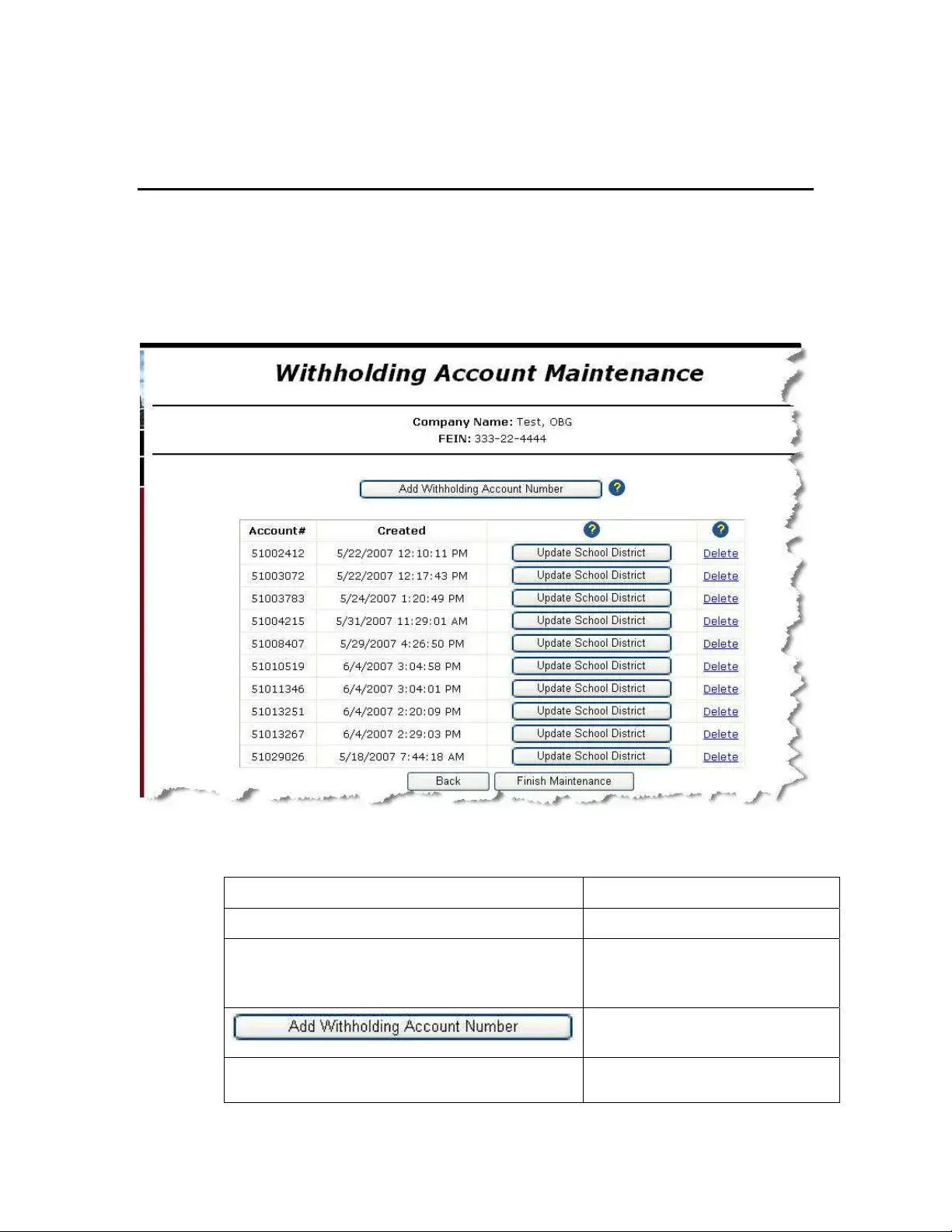
Withholding Account Maintenance
Use the Withholding Account Maintenance page to:
Associate a withholding account number to a specific Company/FEIN
Update School District information
Review existing withholding account information
Field Descriptions
Field Name Description
Company Name f the company. The name o
FEIN Federal Employer Identification
Number associated with the
company name.
Opens the Withholding Account Set
Up Wizard.
Account # A list of account numbers
currently associated with the
Withholding Account Maintenance Page 3
User Guide Withholding 6/20/2007
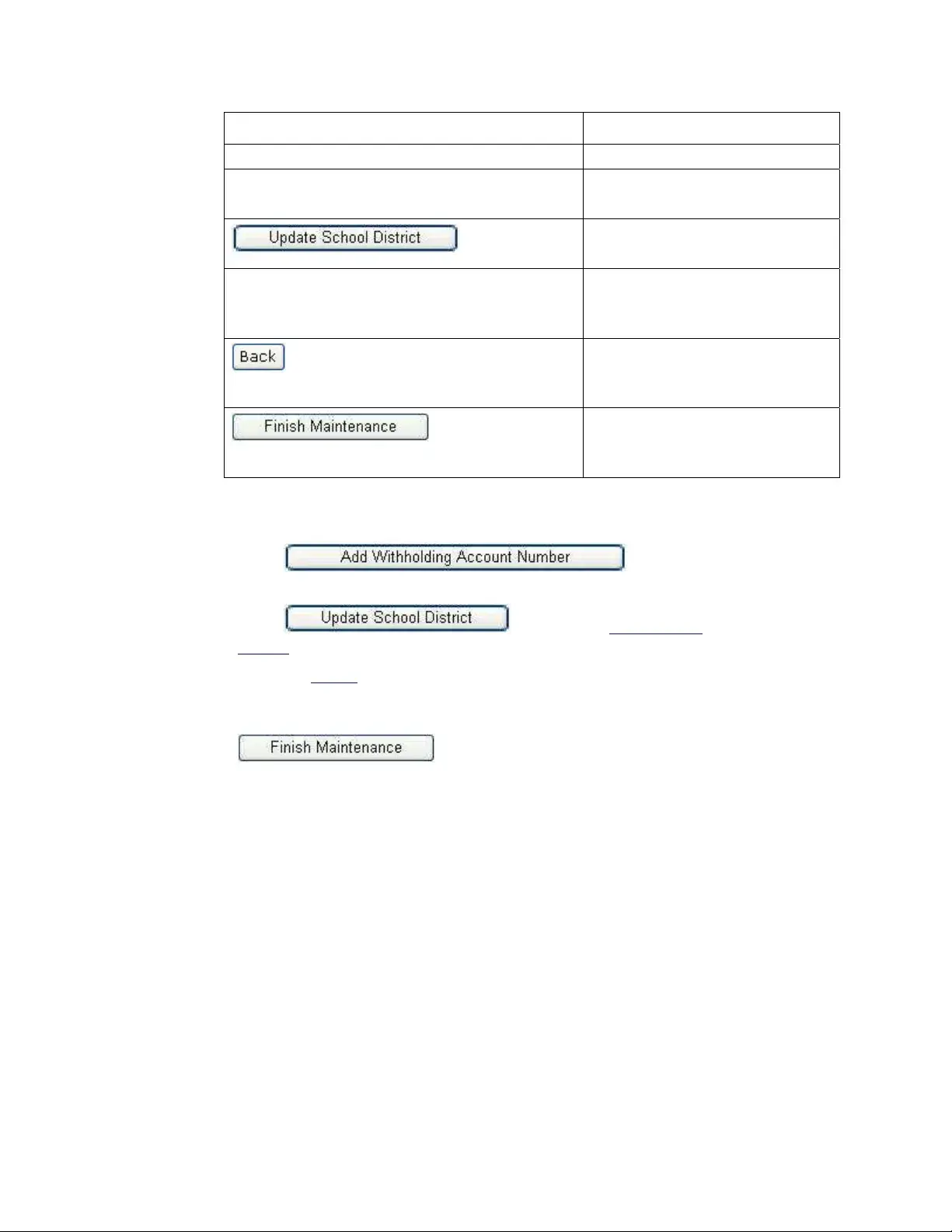
Field Name scription De
Company Name.
Created e on which the account
d.
The dat
number was create
Opens the Update School
page.
District
Delete en selected, this link removes
ber from the
Wh
the account num
Company profile.
Returns to the Ohio
Progress Page without updating any
informatio
Withholding
n.
Saves the information on the page
and returns to the Ohio
Withholding Progress Page.
Instru
Select
ctions
to display the
Withholding Account Set-up Wizard.
to display the Update School Select
Districts page (see page 52 for instructions).
Select the
Delete link to emove an r account from the list. The system
displays the Confirm Delete Account page.
When you are finished making changes to your company profile click
. The system saves the information and
lding Progress Page.
returns to the Ohio Withho
Withholding Account Maintenance Page 4
User Guide Withholding 6/20/2007
Adding an Account
Use the Withholding Account Set-up Wizard to associate a withholding acco
with a specific Company Na
unt number
me/FEIN (dipslayed at the top of the web page). Only the
Ohio Department of Taxation can issue a new account number. Contact ODT to obtain
a new withholding account number.
Rules for Adding Accounts
Every account must be at least 8 characters in length.
ated with it to
Instructions
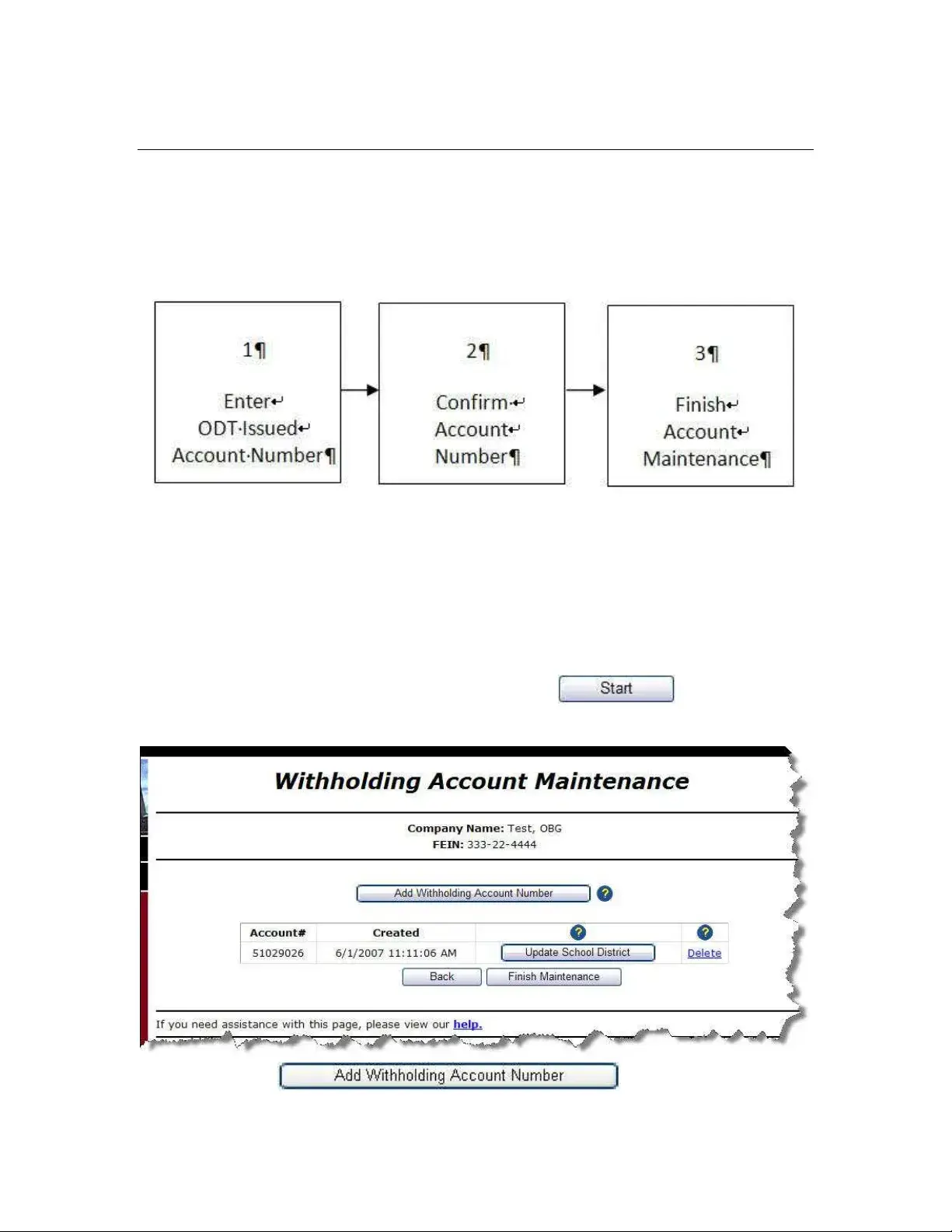
Select “Maintain Withholding Account Number” from the drop down list
on the Ohio Withholding Progress Page and click
Every Company/FEIN must have at least one account associ
file withholding reports.
. The
system displays the Withholding Account Maintenan
ce page.
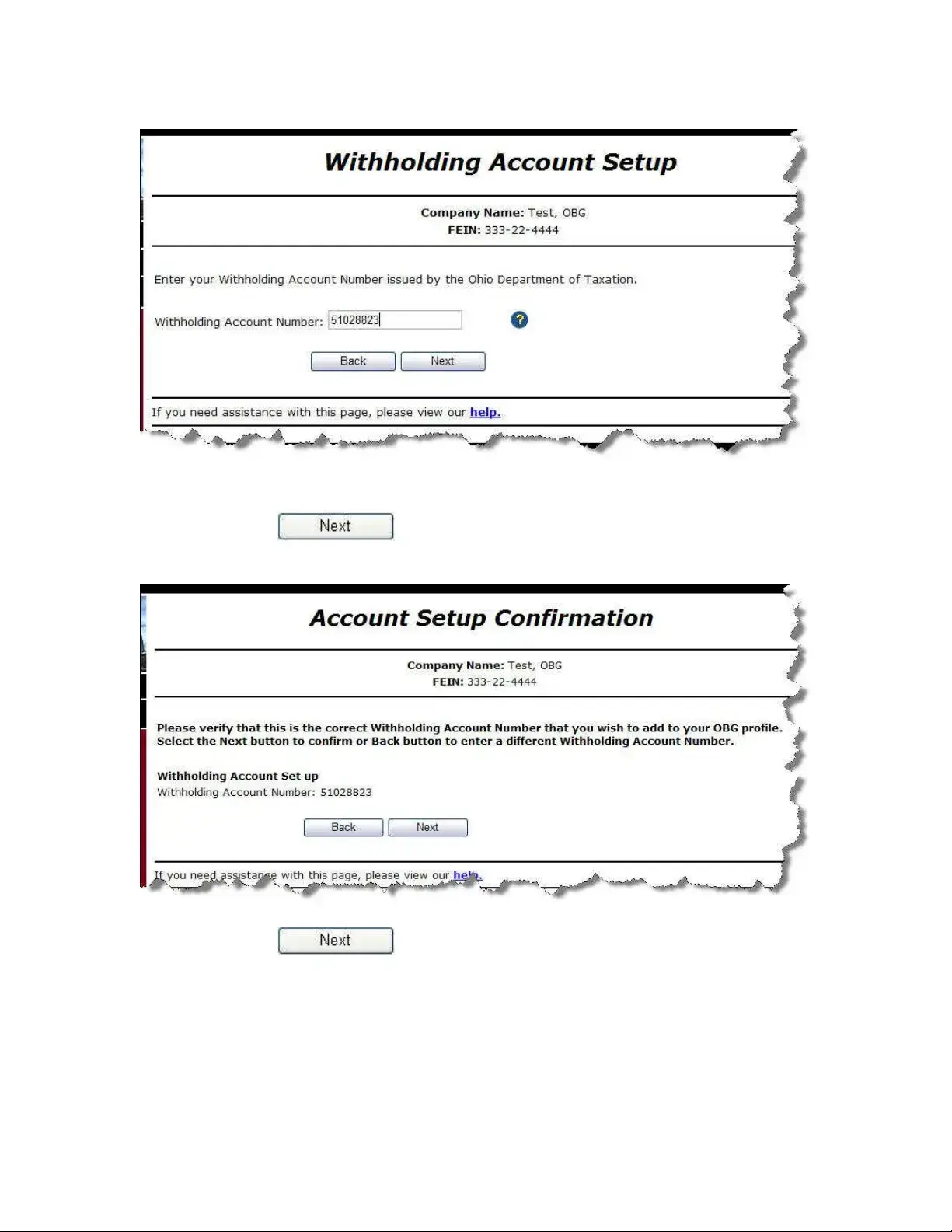
Click . The system
displays the Withholding Account Setup page.
Withholding Account Maintenance Page 5
User Guide Withholding 6/20/2007
Enter the Withholding Account Number you want to add.
Click
. The system asks you to verify that you want to
add this account number to your profile.
Click
to verify that you want to add this account number
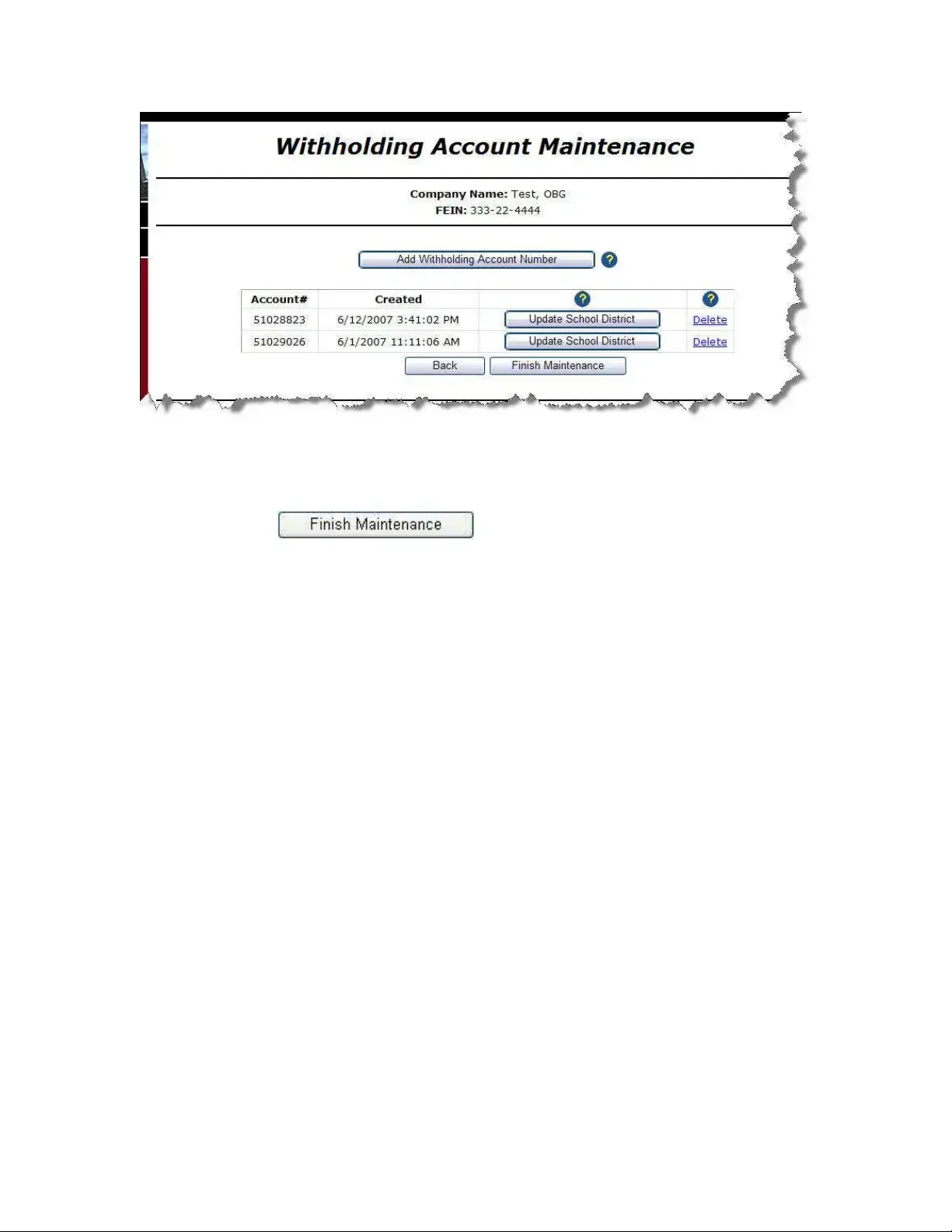
to your profile. The system returns to the Withholding Account
lays the added account number in your list of
ounts.
Maintenance page and disp
profile acc
Withholding Account Maintenance Page 6
User Guide Withholding 6/20/2007
ify that the is the account
you want to add to the Company Name/ FEIN shown at the top
of the page.
Click
Ver account number displayed on the page
number
to return to the Ohio Withholding
Progress Page.
Withholding Account Maintenance Page 7
User Guide Withholding 6/20/2007
Withholding Account Maintenance Page 8
Delete an Account
You may remove a withholding account from your Company profile usin
Withholding Account Maintenance page. Removing the account from
dele
g the
your profile does not
te the account completely, it only removes it from your filings with the OBG. You
may only delete/cancel an account permanently during the final withholding filing
process.
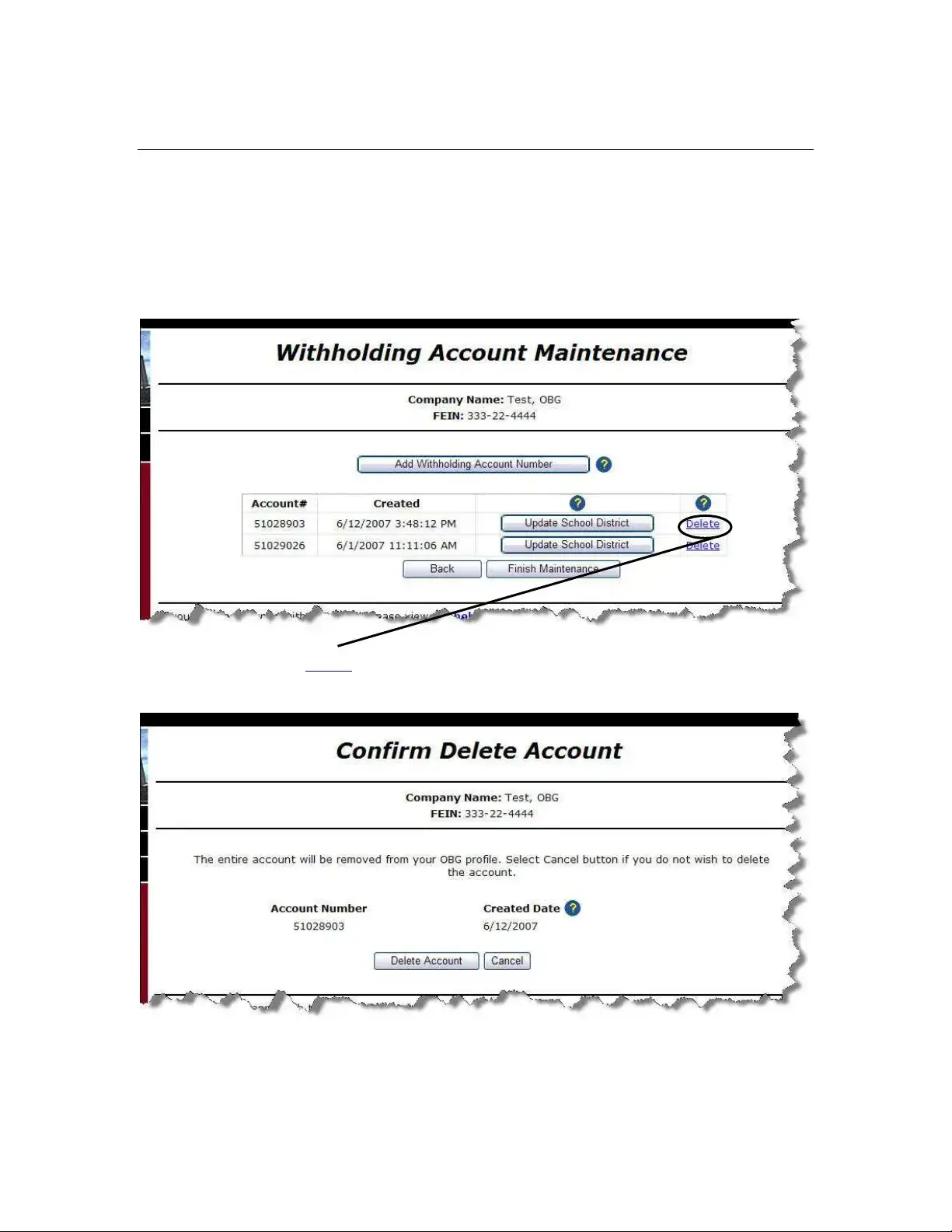
Click the Delete link on the Withholding Account Maintenance page. The
system displays the Confirm Delete Account page.
Verify that the information displayed on the Confirm Delete Account page is
correct.
User Guide Withholding 6/20/2007
Action Result
The system removes the account from the Withholding
Account Maintenance page.
The system does not remove the account and returns
to the Withholding Account Maintenance page.
Withholding Account Maintenance Page 9
User Guide Withholding 6/20/2007
Ohio IT - 501 Wizard
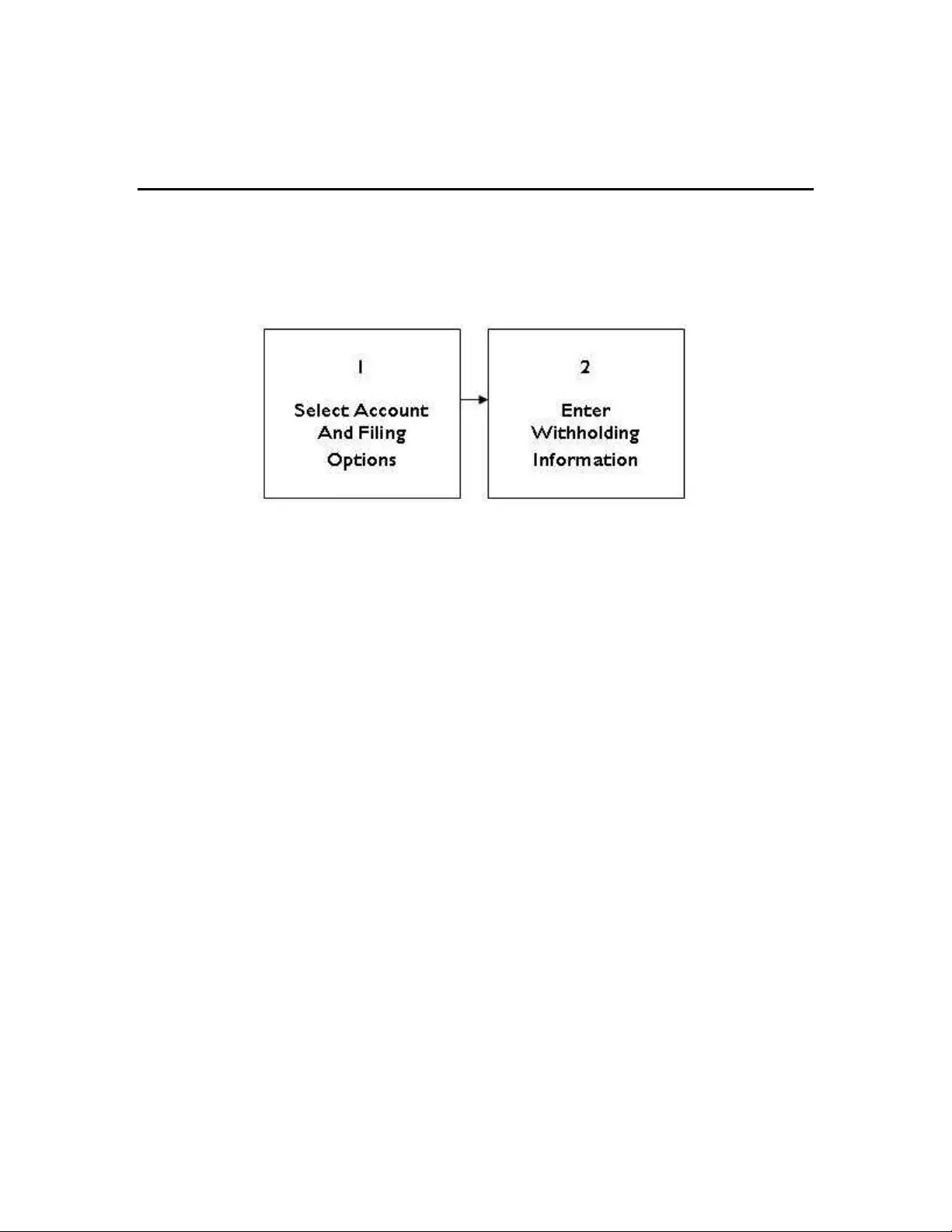
The OBG system uses a “Wizard” process to make the IT - 501 form eaier to complete.
This Wizrd steps you through the process of answering a few simple questions and
filling in the blanks provided. The Wizard follows the following process:
Ohio IT - 501 Wizard Page 10

Form Specifications

Fact Name Description
Purpose The Ohio IT-942 form is used for reporting and paying withholding taxes on a quarterly basis for employers in Ohio.
Filing Frequency This form must be filed quarterly, reflecting the withholding amounts for each quarter of the calendar year.
Governing Law The use and requirements of the IT-942 form are governed by the Ohio Revised Code, particularly sections related to income tax withholding.
Account Maintenance Employers must maintain accurate withholding account information, which includes updating company names and Federal Employer Identification Numbers (FEIN).
Account Creation Only the Ohio Department of Taxation has the authority to issue new withholding account numbers, ensuring proper tracking and management.
Quarterly Reconciliation The form includes a section for the 4th quarter reconciliation, allowing employers to reconcile their total withholding for the year.
Field Descriptions Each section of the form provides detailed field descriptions to guide employers in accurately reporting their withholding amounts.
Instructions Comprehensive instructions accompany the form, detailing how to complete each section and submit the form correctly.
Compliance Failure to file the IT-942 form on time may result in penalties, emphasizing the importance of compliance for employers.

Ohio It 942: Usage Guidelines

Filling out the Ohio IT 942 form is an essential step for businesses to report their withholding tax information accurately. Once you have completed the form, you will be ready to submit it for processing. This ensures that you remain compliant with Ohio tax regulations and helps avoid any penalties.

  1. Start by downloading the Ohio IT 942 form from the Ohio Department of Taxation website.
  2. Open the form and locate the section for your company information. Enter your Company Name and Federal Employer Identification Number (FEIN).
  3. Proceed to the section labeled Quarterly Information. Fill in the required details for the quarter you are reporting.
  4. Next, move to the Balance Due section. Calculate any amounts owed based on your withholding data and enter that information.
  5. Review the 4th Quarterly/Annual Reconciliation section. Ensure all figures are accurate and complete.
  6. Finally, double-check all entries for accuracy. Once confirmed, print the form for your records and submit it as instructed.

Your Questions, Answered

What is the Ohio IT 942 form?

The Ohio IT 942 form is a quarterly tax form used by employers in Ohio to report and pay withholding taxes on employee wages. It helps ensure that the correct amount of state income tax is withheld from employees' paychecks and submitted to the state. This form is important for compliance with Ohio tax laws.

Who needs to file the Ohio IT 942 form?

Employers who withhold Ohio income tax from their employees' wages are required to file the IT 942 form. This includes businesses of all sizes, as long as they have employees subject to Ohio income tax withholding. If your business has employees, it is crucial to stay compliant by filing this form quarterly.

When is the Ohio IT 942 form due?

The IT 942 form is due on the last day of the month following the end of each quarter. For example, the due dates are typically April 30 for the first quarter, July 31 for the second quarter, October 31 for the third quarter, and January 31 for the fourth quarter. Make sure to submit the form on time to avoid penalties.

How do I add an account for the Ohio IT 942 form?

To add an account, you will need to use the Withholding Account Set-up Wizard. This process associates a withholding account number with your specific Company Name and Federal Employer Identification Number (FEIN). Only the Ohio Department of Taxation can issue new account numbers, so contact them if you need one.

What information is required to complete the Ohio IT 942 form?

When filling out the IT 942 form, you will need to provide several pieces of information, including your company name, FEIN, total wages paid, and the total amount of Ohio income tax withheld. This information is crucial for accurate reporting and compliance with state tax regulations.

Can I delete an account associated with the Ohio IT 942 form?

Yes, you can delete an account associated with your withholding profile. To do this, you will select the delete option next to the account you wish to remove. The system will prompt you to confirm the deletion before it is finalized. Make sure you really want to delete the account, as this action cannot be undone easily.

What happens if I do not file the Ohio IT 942 form on time?

If you fail to file the IT 942 form by the due date, you may face penalties and interest on any unpaid tax. It is important to file on time to avoid these additional costs. If you are unable to file on time, consider reaching out to the Ohio Department of Taxation for guidance.

Where can I find instructions for completing the Ohio IT 942 form?

Instructions for completing the IT 942 form can typically be found on the Ohio Department of Taxation's website. The form itself will also include instructions to help guide you through the process. If you have questions, do not hesitate to reach out to a tax professional for assistance.

What should I do if I have questions about the Ohio IT 942 form?

If you have questions regarding the IT 942 form, you can contact the Ohio Department of Taxation directly. They can provide specific guidance and answer any concerns you may have. Additionally, consulting with a tax professional can be beneficial for more complex inquiries.

Common mistakes

  1. Failing to provide accurate Company Name information. This can lead to processing delays or rejections.

  2. Not including the correct Federal Employer Identification Number (FEIN). This number is essential for identification purposes.

  3. Using an incorrect account number. Each account must be unique and properly associated with the Company/FEIN.

  4. Neglecting to ensure that the account number is at least 8 characters long. This is a requirement for all accounts.

  5. Overlooking the need to associate at least one account with the Company/FEIN. Without this, withholding reports cannot be filed.

  6. Not following the instructions provided for the Withholding Account Setup Wizard. Each step is critical for proper submission.

  7. Failing to save changes before exiting the page. This can result in lost information and necessitate re-entry.

  8. Ignoring the Confirm Delete Account prompt when removing an account. This could lead to accidental deletions.

  9. Not reviewing existing withholding account information before making changes. Verification helps prevent errors.

  10. Submitting the form without checking for typos or inaccuracies. Simple mistakes can cause significant issues down the line.

Documents used along the form

The Ohio IT 942 form is an essential document for reporting withholding tax information. However, it is often accompanied by other forms and documents that facilitate various aspects of tax reporting and compliance. Below is a list of related forms commonly used alongside the Ohio IT 942 form.

  • Ohio IT-501 Wizard: This form helps employers report employee withholding information for state income taxes. It provides a streamlined process for filing and managing withholding accounts.
  • Ohio IT-941 Wizard: This document is used for monthly or quarterly withholding tax reporting. Employers submit this form to report the amounts withheld from employees' wages.
  • Ohio SD-101 Wizard: This form is specific to school district income tax withholding. It allows employers to report and remit taxes withheld for employees residing in specific school districts.
  • Ohio SD-141 Wizard: Similar to the SD-101, this form is used for reporting withholding information related to school district taxes but may cater to different requirements or circumstances.
  • IT-941 Monthly Information: This section of the IT-941 Wizard provides detailed information about the monthly withholding amounts, ensuring accurate reporting and payment.
  • IT-942 Quarterly Information: This part of the IT-942 form offers a breakdown of quarterly withholding data, which is crucial for reconciling tax payments.
  • Assessment Payment: This document is used when making payments for any assessments related to withholding tax obligations, ensuring compliance with state regulations.
  • Payment Only: This form is utilized for making payments without filing a return. It is beneficial for employers who need to remit taxes without additional reporting.
  • Billing Notice Payment: This document is generated when there are outstanding amounts due. It provides details on how to make payments and settle any tax liabilities.

Using these forms in conjunction with the Ohio IT 942 can help ensure compliance with state tax regulations. Each document serves a specific purpose and contributes to a comprehensive approach to tax reporting and management.

Similar forms

The Ohio IT 942 form is a crucial document for managing withholding accounts. Several other forms share similarities with the IT 942 in terms of purpose and functionality. Below is a list of seven documents that are comparable to the Ohio IT 942 form:

  • Ohio IT-501 Form: This form is used for annual withholding reconciliations. Similar to the IT 942, it requires detailed information about withholdings and helps ensure compliance with state tax regulations.
  • Ohio IT-941 Form: This document serves as a monthly withholding report. Like the IT 942, it collects information on withholdings but on a more frequent basis, allowing for timely reporting and adjustments.
  • Ohio SD-101 Form: This form is specifically for school district income tax withholdings. It shares the IT 942's focus on withholding information and requires similar details for accurate reporting.
  • Ohio SD-141 Form: This document is another school district withholding form. It parallels the IT 942 in that it collects withholding data but is tailored for specific school district requirements.
  • Ohio IT-4 Form: This form is used for employee withholding allowances. While it is more focused on individual employees, it impacts the overall withholding process, similar to how the IT 942 impacts employer reporting.
  • Ohio IT-1040 Form: This is the individual income tax return form. It is related to the IT 942 in that both forms ultimately contribute to the state’s tax revenue, although they serve different audiences.
  • Ohio IT-150 Form: This form is used for the declaration of estimated income tax. Like the IT 942, it requires careful calculation of tax obligations, although it focuses on estimated payments rather than withholdings.

Dos and Don'ts

When filling out the Ohio IT 942 form, it’s essential to be thorough and accurate. Here’s a helpful list of things to keep in mind:

  • Do: Double-check your company name and FEIN for accuracy. Mistakes can lead to processing delays.
  • Do: Ensure that all account numbers are at least 8 characters long. This is a requirement!
  • Do: Review existing withholding account information before making changes. It saves time and prevents errors.
  • Do: Follow the instructions carefully. Each section of the form has specific guidelines that are crucial for proper submission.
  • Do: Save your progress frequently to avoid losing any information you’ve entered.
  • Don't: Skip the review of the Withholding Account Maintenance page. Overlooking this can lead to missing important details.
  • Don't: Forget to associate at least one account with your Company/FEIN. Without this, you cannot file withholding reports.
  • Don't: Use outdated information. Make sure all details are current and reflect any recent changes.
  • Don't: Rush through the form. Taking your time ensures accuracy and compliance.
  • Don't: Hesitate to contact the Ohio Department of Taxation if you need assistance. They’re there to help!

By keeping these tips in mind, you’ll navigate the Ohio IT 942 form with confidence and ease. Happy filing!

Misconceptions

Understanding the Ohio IT 942 form can be challenging, and several misconceptions often arise. Here are four common misunderstandings that people have about this important tax document:

  • The IT 942 form is only for large businesses. Many believe that only large corporations need to file this form. In reality, any business that has employees in Ohio and withholds state income tax must file the IT 942, regardless of its size.
  • Filing the IT 942 is optional. Some individuals think that submitting this form is optional if they don't have a significant amount of withholding. However, filing is mandatory for all employers who withhold Ohio income tax, even if the amount is minimal.
  • The IT 942 form is the same as the IT 941. While both forms relate to withholding taxes, they serve different purposes. The IT 941 is a monthly or quarterly report of withheld taxes, whereas the IT 942 is a quarterly reconciliation of those withholdings. Confusing the two can lead to filing errors.
  • Once filed, the IT 942 cannot be amended. Some people think that once they submit the IT 942, they cannot make any changes. In fact, if an error is discovered after filing, it is possible to amend the form. Employers should follow the appropriate procedures to correct any mistakes.

Being aware of these misconceptions can help ensure compliance with Ohio tax regulations and avoid potential penalties. Understanding the nuances of the IT 942 form is essential for all employers in Ohio.

Key takeaways

The Ohio IT 942 form is essential for employers to report and reconcile withholding tax information. Here are key takeaways regarding its use:

  • Purpose: The IT 942 form is used to report quarterly withholding tax information and reconcile any balances due at the end of the year.
  • Account Maintenance: Employers must maintain their withholding account information accurately, including the Company Name and Federal Employer Identification Number (FEIN).
  • Adding Accounts: Each employer must associate at least one withholding account with their Company/FEIN. New account numbers can only be issued by the Ohio Department of Taxation.
  • Filing Requirements: The form must be completed accurately to avoid penalties. It is crucial to ensure all fields are filled out as required.
  • Review Process: After completing the IT 942 form, employers should review the information to ensure accuracy before submission to the Ohio Department of Taxation.