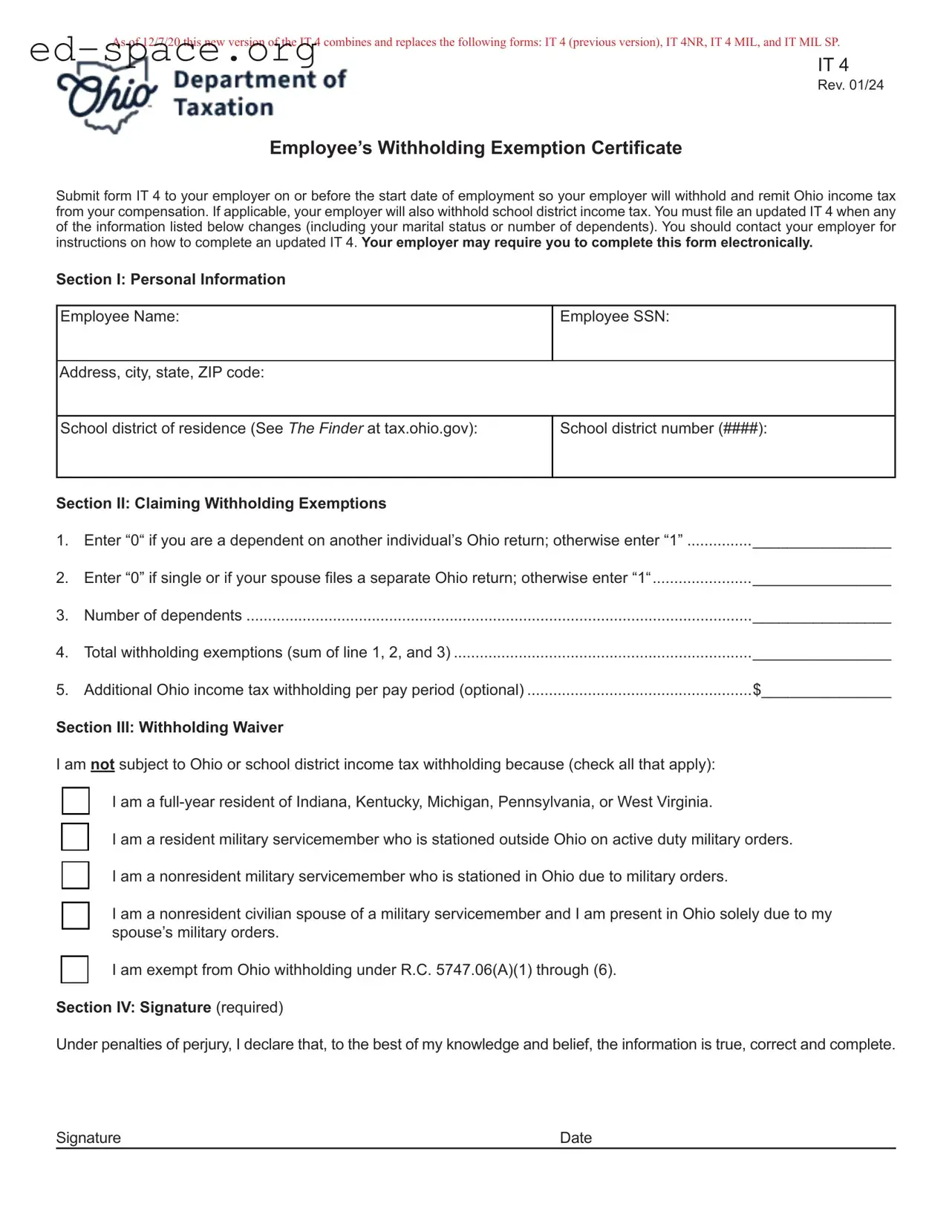
The Ohio IT 4 form serves as an essential tool for employees in Ohio, ensuring that the correct amount of state income tax is withheld from their paychecks. Introduced on December 7, 2020, this updated version of the IT 4 combines several previous forms, including the IT 4NR, IT 4 MIL, and IT MIL SP, streamlining the process for both employees and employers. When starting a new job, employees must submit the IT 4 to their employer before their first paycheck. This form collects personal information, such as the employee's name, Social Security number, and school district of residence. It also allows employees to claim withholding exemptions based on their marital status and number of dependents, which can significantly affect the amount withheld. If an employee's situation changes—like a change in marital status or the birth of a child—they must update their IT 4 promptly. Additionally, the form includes a section for individuals who may be exempt from Ohio income tax withholding, such as military personnel and certain residents of neighboring states. Understanding the IT 4 is crucial for employees to ensure compliance with tax regulations while optimizing their take-home pay.
As of 12/7/20 this new version of the IT 4 combines and replaces the following forms: IT 4 (previous version), IT 4NR, IT 4 MIL, and IT MIL SP.
IT 4
Rev. 01/24
Employee’s Withholding Exemption Certificate
Submit form IT 4 to your employer on or before the start date of employment so your employer will withhold and remit Ohio income tax from your compensation. If applicable, your employer will also withhold school district income tax. You must file an updated IT 4 when any of the information listed below changes (including your marital status or number of dependents). You should contact your employer for instructions on how to complete an updated IT 4. Your employer may require you to complete this form electronically.
Section I: Personal Information
Employee Name:
Employee SSN:
Address, city, state, ZIP code:
School district of residence (See The Finder at tax.ohio.gov):
School district number (####):
Section II: Claiming Withholding Exemptions |
|
|
1. |
Enter “0“ if you are a dependent on another individual’s Ohio return; otherwise enter “1” |
________________ |
2. |
Enter “0” if single or if your spouse files a separate Ohio return; otherwise enter “1“ |
________________ |
3. |
Number of dependents |
________________ |
4. |
Total withholding exemptions (sum of line 1, 2, and 3) |
________________ |
5. |
Additional Ohio income tax withholding per pay period (optional) |
$_______________ |
Section III: Withholding Waiver
I am not subject to Ohio or school district income tax withholding because (check all that apply):
I am a
I am a resident military servicemember who is stationed outside Ohio on active duty military orders.
I am a nonresident military servicemember who is stationed in Ohio due to military orders.
I am a nonresident civilian spouse of a military servicemember and I am present in Ohio solely due to my spouse’s military orders.
I am exempt from Ohio withholding under R.C. 5747.06(A)(1) through (6).
Section IV: Signature (required)
Under penalties of perjury, I declare that, to the best of my knowledge and belief, the information is true, correct and complete.
Signature |
Date |
As of 12/7/20 this new version of the IT 4 combines and replaces the following forms: IT 4 (previous version), IT 4NR, IT 4 MIL, and IT MIL SP.
IT 4 Instructions
Most individuals are subject to Ohio income tax on their wages, salaries, or other compensation. To ensure this tax is paid, employers maintaining an office or transacting business in Ohio must withhold Ohio income tax, and school district income tax if applicable, from each individual who is an employee.
Such employees who are subject to Ohio income tax (and school district income tax, if applicable) should complete sections I, II, and IV of the IT 4 to have their employer withhold the appropriate Ohio taxes from their compensation. If the employee does not complete the IT 4 and return it to his/her employer, the employer:
zWill withhold Ohio tax based on the employee claiming zero exemptions, and
zWill not withhold school district income tax, even if the employee lives in a taxing school district.
An individual may be subject to an interest penalty for underpayment of estimated taxes (on form IT/SD 2210) based on
Certain employees may be exempt from Ohio withholding because their income is not subject to Ohio tax. Such employees should complete sections I, III, and IV of the IT
4only.
The IT 4 does not need to be filed with the Department of Taxation. Your employer must maintain a copy as part of its records.
R.C. 5747.06(A) and Ohio Adm.Code
Section I
Enter the
If you move during the tax year, complete an updated IT 4 immediately reflecting your new address and/ or school district of residence.
Section II
Line 1: If you can be claimed on someone else’s Ohio income tax return as a dependent, then you are to enter “0” on this line. Everyone else may enter “1”.
Line 2: If you are single, enter “0” on this line. If you are married and you and your spouse file separate Ohio Income tax returns as “Married filing Separately” then enter “0” on this line.
Line 3: You are allowed one exemption for each dependent. Your dependents for Ohio income tax purposes are the same as your dependents for federal income tax purposes. See R.C. 5747.01(O).
Line 5: If you expect to owe more Ohio income tax than the amount withheld from your compensation, you can request that your employer withhold an additional amount of Ohio income tax. This amount should be reported in whole dollars.
Note: If you do not request additional withholding from your compensation, you may need to make estimated income tax payments using form IT 1040ES or estimated school district income tax payments using the SD 100ES. Individuals who commonly owe more in Ohio income taxes than what is withheld from their compensation include:
zSpouses who file a joint Ohio income tax return and both report income, and
zIndividuals who have multiple jobs, all of which are subject to Ohio withholding.
Section III
This section is for individuals whose income is deductible or excludable from Ohio income tax, and thus employer withholding is not required. Such employee should check the appropriate box to indicate which exemption applies to him/her. Checking the box will cause your employer to not withhold Ohio income tax and/or school district income tax. The exemptions include:
zReciprocity Exemption: If you are a resident of Indiana, Kentucky, Pennsylvania, Michigan or West Virginia and you work in Ohio, you do not owe Ohio income tax on your compensation. Instead, you should have your employer withhold income tax for your resident state. R.C. 5747.05(A)(2).
zResident Military Servicemember Exemption: If you are an Ohio resident and a member of the United States Army, Air Force, Navy, Marine Corps, or Coast Guard (or the reserve components of these branches of the military) or a member of the National Guard, you do not owe Ohio income tax or school district income tax on your active duty military pay and allowances received while stationed outside of Ohio.
This exemption does not apply to compensation for nonactive duty status or received while you are stationed in Ohio.
R.C. 5747.01(A)(21).
zNonresident Military Servicemember Exemption: If
you are a nonresident of Ohio and a member of the uniformed services (as defined in 10 U.S.C. §101), you do not owe Ohio income tax or school district income tax on your military pay and allowances.
zNonresident Civilian Spouse of a Military Servicemember Exemption: If you are the civilian spouse of a military servicemember, your pay may be exempt from Ohio income tax and school district income tax if all of the following are true:
yYour spouse is stationed in Ohio on military orders; and
yYou are present in Ohio solely to be with your spouse.
You must provide a copy of the employee’s spousal military
identification card issued to the employee by the Department
of Defense when completing the IT 4.
As of 12/7/20 this new version of the IT 4 combines and replaces the following forms: IT 4 (previous version), IT 4NR, IT 4 MIL, and IT MIL SP.
Note: For more information on taxation of military servicemembers and their civilian spouses, see 50 U.S.C.A. 4001 and tax.ohio.gov/military.
zStatutory Withholding Exemptions: Compensation earned in any of the following circumstances is not subject to Ohio income tax or school district income tax withholding:
y Agricultural labor (as defined in 26 U.S.C. §3121(g)); y Domestic service in a private home, local college club, or local chapter of a college fraternity or
sorority;
y Services performed by an employee who is regularly employed by an employer to perform such service if she or he earns less than $300 during a calendar quarter;
yNewspaper or shopping news delivery or distribution directly to a consumer, performed by an individual under the age of 18;
yServices performed for a foreign government or an international organization; and
yServices performed outside the employer’s trade or business if paid in any medium other than cash.
*These exemptions are not common.
Note: While the employer is not required to withhold on these amounts, the income is still subject to Ohio income tax and school district income tax (if applicable). As such, you may need to make estimated income tax payments using form IT 1040ES and/or estimated school district income tax payments using form SD 100ES.
See R.C. 5747.06(A)(1) through (6).
| Fact Name | Details |
|---|---|
| Form Purpose | The IT 4 form is an Employee’s Withholding Exemption Certificate used to determine Ohio income tax withholding from employee compensation. |
| Form Replacement | As of December 7, 2020, the IT 4 replaces previous forms including IT 4, IT 4NR, IT 4 MIL, and IT MIL SP. |
| Submission Deadline | Employees must submit the IT 4 to their employer before starting employment to ensure proper withholding of Ohio income tax. |
| Updating Information | Any changes in personal information, such as marital status or number of dependents, require filing an updated IT 4 with the employer. |
| Governing Law | The IT 4 is governed by Ohio Revised Code R.C. 5747.06(A) and Ohio Administrative Code 5703-7-10. |
Filling out the Ohio IT 4 form is an essential step for employees to ensure the correct amount of state income tax is withheld from their paychecks. Once you complete the form, submit it to your employer. They will use the information provided to determine the appropriate withholding amounts. It's important to keep this form updated whenever your personal circumstances change.
What is the Ohio IT 4 form?
The Ohio IT 4 form is an Employee’s Withholding Exemption Certificate that allows individuals to inform their employers about the appropriate amount of Ohio income tax to withhold from their wages. This form combines and replaces several previous forms, including the IT 4 (previous version), IT 4NR, IT 4 MIL, and IT MIL SP. It is essential for ensuring that the correct amount of state and, if applicable, school district income tax is withheld from an employee's compensation.
When should I submit the IT 4 form?
It is crucial to submit the IT 4 form to your employer on or before your employment start date. Doing so ensures that your employer can withhold and remit the appropriate Ohio income tax from your paychecks. If you fail to submit the form, your employer will withhold taxes based on you claiming zero exemptions, which may not reflect your actual tax situation.
What information do I need to provide on the IT 4 form?
The IT 4 form requires you to provide personal information, including your name, Social Security Number, address, and school district of residence. Additionally, you will need to indicate your withholding exemptions, which include your dependency status, marital status, and the number of dependents you claim. Finally, you must sign the form to certify that the information is accurate.
How do I determine my school district number?
Your school district number can be found using the FINDER tool available at tax.ohio.gov. If you are unsure, you may also contact your county auditor or the county board of elections for assistance. It is important to provide the correct school district number to ensure proper tax withholding.
What if my personal circumstances change after I submit the IT 4 form?
If any of your information changes, such as your marital status or the number of dependents, you must file an updated IT 4 form. Promptly notifying your employer of these changes helps ensure that the correct amount of tax is withheld from your paychecks moving forward.
Who is exempt from Ohio income tax withholding?
Certain individuals may be exempt from Ohio income tax withholding. This includes full-year residents of states like Indiana, Kentucky, Michigan, Pennsylvania, or West Virginia, as well as military servicemembers stationed outside Ohio. Nonresident military servicemembers and their civilian spouses may also qualify for exemptions. To claim an exemption, you must check the appropriate box on the IT 4 form and provide any required documentation.
What happens if I do not submit the IT 4 form?
If you do not submit the IT 4 form, your employer will withhold Ohio income tax based on the assumption that you are claiming zero exemptions. This may result in higher tax withholding than necessary. Additionally, you may face penalties for underpayment of estimated taxes if your withholding does not accurately reflect your tax liability.
Can I request additional withholding on the IT 4 form?
Yes, you can request additional Ohio income tax withholding on the IT 4 form. If you anticipate owing more in taxes than what will be withheld from your compensation, you can specify an additional amount for your employer to withhold per pay period. This option can help you avoid underpayment penalties at tax time.
Do I need to submit the IT 4 form to the Ohio Department of Taxation?
No, the IT 4 form does not need to be submitted to the Ohio Department of Taxation. Instead, your employer is responsible for maintaining a copy of the form as part of their records. It is essential to keep your information accurate and up-to-date to ensure proper tax withholding throughout your employment.
Not Submitting on Time: Failing to submit the IT 4 form to your employer before your employment start date can lead to your employer withholding taxes incorrectly.
Incorrect Personal Information: Providing inaccurate information such as your name, Social Security number, or address can cause issues with tax withholding and reporting.
Ignoring School District Information: Not entering your school district number can lead to incorrect withholding of school district income tax.
Misunderstanding Exemptions: Miscalculating your withholding exemptions can result in too much or too little tax being withheld from your paycheck.
Failing to Update Information: Not submitting an updated IT 4 form when your marital status or number of dependents changes can lead to incorrect tax withholding.
Overlooking Signature Requirement: Forgetting to sign the form means it will not be considered valid, which can lead to complications for both you and your employer.
Neglecting Additional Withholding: If you expect to owe more taxes than what is withheld, failing to request additional withholding can lead to unexpected tax bills.
Not Understanding Residency Rules: Misunderstanding your residency status and its implications for tax withholding can result in improper filing.
Using Incorrect Exemption Codes: Checking the wrong boxes for withholding waivers can lead to incorrect tax withholding, impacting your overall tax liability.
Ignoring Employer Instructions: Not following your employer's specific instructions for completing the IT 4, especially if they require electronic submission, can cause delays or errors.
When completing the Ohio IT 4 form, you may find it helpful to have several other forms and documents on hand. Each of these serves a specific purpose related to tax withholding, exemptions, or income reporting. Below is a list of commonly used forms that complement the IT 4.
Having these forms ready can streamline your tax preparation process. Each document plays a role in ensuring that your tax obligations are met accurately and efficiently. If you have questions about any of these forms, consider reaching out to a tax professional for assistance.
The Ohio IT 4 form is similar to several other forms related to employee withholding exemptions. Here are four documents that share similarities with the IT 4:
When filling out the Ohio IT 4 form, it’s important to ensure that you provide accurate and complete information. Here’s a list of things to keep in mind:
Understanding the Ohio IT 4 form can be challenging, and there are several misconceptions that often arise. Here are eight common misunderstandings:
Being aware of these misconceptions can help you navigate the tax process more effectively and ensure that you are compliant with Ohio tax regulations.
Here are key takeaways for filling out and using the Ohio IT 4 form: