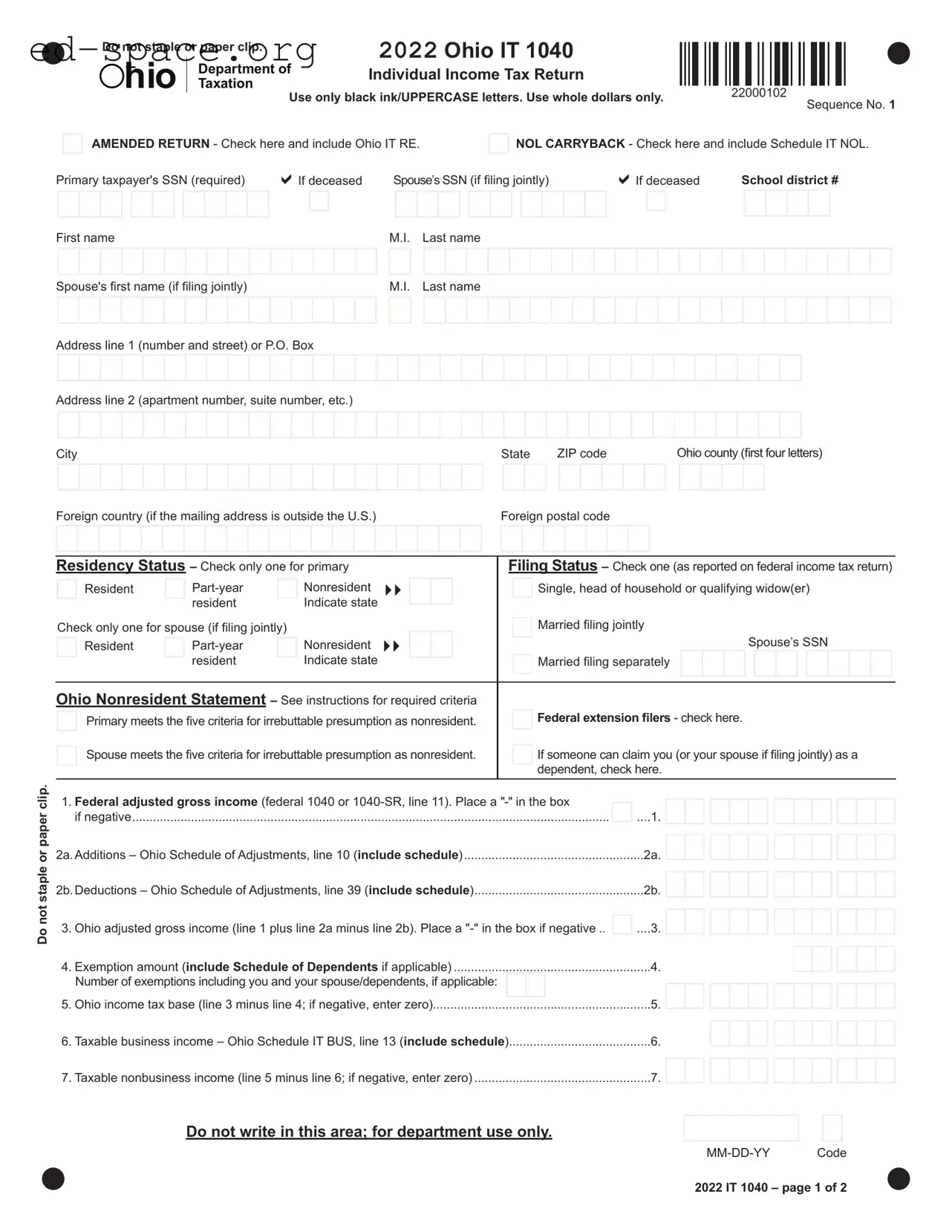
Filing taxes can often feel overwhelming, especially when navigating state-specific forms like the Ohio IT 1040EZ. This form is designed for individual income tax returns in Ohio, catering primarily to residents with simpler tax situations. It allows taxpayers to report their income, claim exemptions, and calculate their tax liability in a straightforward manner. The form requires basic personal information, including Social Security numbers and residency status, ensuring that the state can accurately assess tax obligations. Additionally, taxpayers will need to account for any additions or deductions to their income, which can significantly affect the final tax calculation. Importantly, the IT 1040EZ also addresses situations like amended returns and nonresident filings, providing clear pathways for those who may need to adjust their submissions. Understanding how to properly complete this form is crucial for ensuring compliance with Ohio tax laws and maximizing potential refunds or minimizing tax dues.

Do not staple or paper clip. |
|
2022 Ohio IT 1040 |
||
hio |
|
Department of |
Individual Income Tax Return |
|
|
||||
|
Taxation |
Use only black ink/UPPERCASE letters. Use whole dollars only. |
||
|
||||
22000102
Sequence No. 1
AMENDED RETURN - Check here and include Ohio IT RE.
NOL CARRYBACK - Check here and include Schedule IT NOL.
Primary taxpayer's SSN (required) |
|
If deceased |
Spouse’s SSN (if filing jointly) |
|
|
If deceased |
School district # |
|||||||||||||||||||||||||||
|
|
|
|
|
|
|
|
|
|
|
|
|
|
|
|
|
|
|
|
|
|
|
|
|
|
|
|
|
|
|
|
|
|
|
|
|
|
|
|
|
|
|
|
|
|
|
|
|
|
|
|
|
|
|
|
|
|
|
|
|
|
|
|
|
|
|
|
|
|
Do not staple or paper clip.
First name |
|
|
|
|
|
|
|
M.I. |
Last name |
||||||||||||||||||||||||||||||
|
|
|
|
|
|
|
|
|
|
|
|
|
|
|
|
|
|
|
|
|
|
|
|
|
|
|
|
|
|
|
|
|
|
|
|
|
|
|
|
Spouse's first name (if filing jointly) |
|
|
|
|
|
|
|
M.I. |
Last name |
||||||||||||||||||||||||||||||
|
|
|
|
|
|
|
|
|
|
|
|
|
|
|
|
|
|
|
|
|
|
|
|
|
|
|
|
|
|
|
|
|
|
|
|
|
|
|
|
Address line 1 (number and street) or P.O. Box
Address line 2 (apartment number, suite number, etc.)
City |
|
|
|
|
|
|
|
|
|
|
|
|
|
|
|
|
|
|
|
|
|
|
|
State |
|
ZIP code |
|
|
|
|
|
Ohio county (first four letters) |
|||||||||||||||||||||||||||||||||||||||
|
|
|
|
|
|
|
|
|
|
|
|
|
|
|
|
|
|
|
|
|
|
|
|
|
|
|
|
|
|
|
|
|
|
|
|
|
|
|
|
|
|
|
|
|
|
|
|
|
|
|
|
|
|
|
|
|
|
|
|
|
|
|
|
|
|
|
|
|
|
|
|
Foreign country (if the mailing address is outside the U.S.) |
|
Foreign postal code |
|
|
|
|
|
|
|
|
|
|
|
|
|
|
|
|
|
|
|
|
|
|
|
|
|
|
|
|
|
|
|||||||||||||||||||||||||||||||||||||||
|
|
|
|
|
|
|
|
|
|
|
|
|
|
|
|
|
|
|
|
|
|
|
|
|
|
|
|
|
|
|
|
|
|
|
|
|
|
|
|
|
|
|
|
|
|
|
|
|
|
|
|
|
|
|
|
|
|
|
|
|
|
|
|
|
|
|
|
|
|
|
|
|
|
|
|
|
|
|
|
|
|
|
|
|
|
|
|
|
|
|
|
|
|
|
|
|
|
|
|
|
|
|
|
|
|
|
|
|
|
|
|
|
|
|
|
|
|
|
|
|
|
|
|
|
|
|
|
|
|
|
|
|
|
|
|
|
|
|
|
|
|
|
|
Residency Status – Check only one for primary |
|
|
Filing Status – Check one (as reported on federal income tax return) |
||||||||||||||||||||||||||||||||||||||||||||||||||||||||||||||||||||
|
|
Resident |
|
|
|
Nonresident |
|
|
|
|
|
|
|
|
|
|
|
|
Single, head of household or qualifying widow(er) |
||||||||||||||||||||||||||||||||||||||||||||||||||||
|
|
|
|
|
|
|
resident |
|
|
Indicate state |
|
|
|
|
|
|
|
|
Married filing jointly |
||||||||||||||||||||||||||||||||||||||||||||||||||||
|
|
|
|
|
|
|
|
|
|
|
|
|
|
|
|
|
|
|
|
|
|||||||||||||||||||||||||||||||||||||||||||||||||||
|
|
|
|
|
|
|
|
|
|
|
|
|
|
|
|||||||||||||||||||||||||||||||||||||||||||||||||||||||||
Check only one for spouse (if filing jointly) |
|
|
|
|
|
|
|
|
|
|
|
|
|
|
|
|
|
|
|
||||||||||||||||||||||||||||||||||||||||||||||||||||
|
|
|
|
|
|
|
|
|
|
|
|
|
|
|
|
|
|
|
|||||||||||||||||||||||||||||||||||||||||||||||||||||
|
|
Resident |
|
|
|
|
Nonresident |
|
|
|
|
|
|
|
|
|
|
|
|
|
|
|
|
|
|
|
|
|
|
|
|
|
|
|
|
|
|
|
|
|
|
|
Spouse’s |
|
SSN |
|
|
|
|
||||||||||||||||||||||
|
|
|
|
|
|
|
resident |
|
|
|
Indicate state |
|
|
|
|
|
|
|
|
Married filing separately |
|
|
|
|
|
|
|
|
|
|
|
|
|||||||||||||||||||||||||||||||||||||||
|
|
|
|
|
|
|
|
|
|
|
|
|
|
|
|
|
|
||||||||||||||||||||||||||||||||||||||||||||||||||||||
|
|
|
|
|
|
|
|
|
|
|
|
|
|
|
|
|
|
|
|
|
|
|
|
|
|
|
|
|
|
|
|
|
|
|
|
|
|
|
|
|
|
|
|
|
|
|
|
|
|
|
|
|
|
|
|
|
|
|
|
|
|
|
|
|
|
|
|
|
|
|
|
|
|
|
|
|
|
|
|
|
|
|
|
|
|
|
|
|
|
|
|
|
|
|
|
|
|
|
|
|
|
|
|
|
|
|
|
|
|
|
|
|
|
|
|
|
|
|
|
|
|
|
|
|
|
|
|
|
|
|
|
|
|
|
|
|
|
|
|
|
|
|
|
|
|
|
|
|
|
|
|
|
|
|
|
|
|
|
|
|
|
|
|
|
|
|
|
|
|
|
|
|
|
|
|
|
|
|
|
|
|
|
|
|
|
|
|
|
|
|
|
|
|
|
|
|
|
|
|
|
|
|
|
|
|
|
|
|
|
|
|
|
|
|
|
Ohio Nonresident Statement – See instructions for required criteria |
|
|
|
|
|
Federal extension filers - check here. |
|||||||||||||||||||||||||||||||||||||||||||||||||||||||||||||||||
|
|
Primary meets the five criteria for irrebuttable presumption as nonresident. |
|
|
|
|
|
||||||||||||||||||||||||||||||||||||||||||||||||||||||||||||||||
|
|
Spouse meets the five criteria for irrebuttable presumption as nonresident. |
|
|
|
|
|
If someone can claim you (or your spouse if filing jointly) as a |
|||||||||||||||||||||||||||||||||||||||||||||||||||||||||||||||
|
|
|
|
|
|
|
|||||||||||||||||||||||||||||||||||||||||||||||||||||||||||||||||
|
|
|
|
|
|
|
|
|
|
|
|
|
|
|
|
|
|
|
|
|
|
|
|
|
|
|
|
|
|
|
|
|
dependent, check here. |
||||||||||||||||||||||||||||||||||||||
|
|
|
|
|
|
|
|
|
|
|
|
|
|
|
|
|
|
|
|
|
|
|
|
|
|
|
|
|
|
|
|
|
|||||||||||||||||||||||||||||||||||||||
|
1. Federal adjusted gross income (federal 1040 or |
|
|
|
|
|
|
|
|
|
|
|
|
|
|
|
|
|
|
|
|
|
|
|
|
|
|
|
|
|
|
|
|||||||||||||||||||||||||||||||||||||||
|
|
|
|
|
|
|
|
|
|
|
|
|
|
|
|
|
|
|
|
|
|
|
|
|
|
|
|
|
|
|
|
||||||||||||||||||||||||||||||||||||||||
|
if negative |
|
|
|
|
|
|
|
|
|
|
|
|
|
|
|
|
|
|
|
|
|
|
|
|
|
|
|
|
|
|
|
|
|
|
|
|
|
.....1. |
|
|
|
|
|
|
|
|
|
|
|
|
|
|
|
|
|
|
|
|
|
|
|
|
|
|||||||
2a.Additions – Ohio Schedule of Adjustments, line 10 (include schedule) |
|
|
|
|
|
|
|
|
|
|
|
|
|
|
|
|
|
|
|
|
|
|
|
|
|
|
|
|
|
|
|
|
|
|
|
|
|
|
|
|
|
|
|
||||||||||||||||||||||||||||
|
|
|
|
|
|
|
|
|
|
|
|
|
|
|
|
|
|
|
|
|
|
|
|
|
|
|
|
|
|
||||||||||||||||||||||||||||||||||||||||||
|
|
|
|
|
|
|
|
|
|
|
|
|
|
|
|
2a. |
|
|
|
|
|
|
|
|
|
|
|
|
|
|
|
|
|
|
|
|
|
|
|
|
|
||||||||||||||||||||||||||||||
|
|
|
|
|
|
|
|
|
|
|
|
|
|
|
|
|
|
|
|
|
|
|
|
|
|
|
|
|
|
|
|
|
|
|
|
|
|
|
|
|
|
||||||||||||||||||||||||||||||
2b.Deductions – Ohio Schedule of Adjustments, line 39 (include schedule) |
|
|
|
|
|
|
|
|
|
|
|
|
|
|
|
|
|
|
|
|
|
|
|
|
|
|
|
|
|
|
|||||||||||||||||||||||||||||||||||||||||
|
|
|
|
|
|
|
|
|
|
|
|
|
|
|
|
2b. |
|
|
|
|
|
|
|
|
|
|
|
|
|
|
|
|
|
|
|
|
|
|
|
|
|
||||||||||||||||||||||||||||||
|
|
|
|
|
|
|
|
|
|
|
|
|
|
|
|
|
|
|
|
|
|
|
|
|
|
|
|
|
|
|
|
|
|
|
|
|
|
|
|
|
|
||||||||||||||||||||||||||||||
|
3. Ohio adjusted gross income (line 1 plus line 2a minus line 2b). Place a |
|
|
|
....3. |
|
|
|
|
|
|
|
|
|
|
|
|
|
|
|
|
|
|
|
|
|
|
|
|
|
|||||||||||||||||||||||||||||||||||||||||
|
|
|
|
|
|
|
|
|
|
|
|
|
|
|
|
|
|
|
|
|
|
|
|
|
|
|
|
||||||||||||||||||||||||||||||||||||||||||||
|
..........................................................4. Exemption amount (include Schedule of Dependents if applicable) |
|
|
|
|
|
|
|
|
|
|
|
|
|
4. |
|
|
|
|
|
|
|
|
|
|
|
|
|
|
|
|
|
|
|
|
|
|
|
|
|
|||||||||||||||||||||||||||||||
|
|
|
|
|
|
|
|
|
|
|
|
|
|
|
|
|
|
|
|
|
|
|
|
|
|
|
|
|
|
|
|
|
|
|
|
|
|
|
|
||||||||||||||||||||||||||||||||
|
|
|
|
|
|
|
|
|
|
|
|
|
|
|
|
|
|
|
|
|
|
|
|
|
|
|
|
|
|
|
|
|
|
|
|
|
|
|
|
||||||||||||||||||||||||||||||||
|
Number of exemptions including you and your spouse/dependents, if applicable: |
|
|
|
|
|
|
|
|
|
|
|
|
|
|
|
|
|
|
|
|
|
|
|
|
|
|
|
|
|
|
|
|
|
|
|
|
|
|
|
|
|
|
|
|
||||||||||||||||||||||||||
|
|
|
|
|
|
|
|
|
|
|
|
|
|
|
|
|
|
|
|
|
|
|
|
|
|
|
|
|
|
|
|
|
|
|
|
|
|
|
|
|
|
|
|
|
|||||||||||||||||||||||||||
|
5. Ohio income tax base (line 3 minus line 4; if negative, enter zero) |
|
|
|
|
|
|
|
|
|
|
|
|
|
|
5. |
|
|
|
|
|
|
|
|
|
|
|
|
|
|
|
|
|
|
|
|
|
|
|
|
|
||||||||||||||||||||||||||||||
|
|
|
|
|
|
|
|
|
|
|
|
|
|
|
|
|
|
|
|
|
|
|
|
|
|
|
|
|
|
|
|
|
|
|
|
|
|
|
|||||||||||||||||||||||||||||||||
|
6. Taxable business income – Ohio Schedule IT BUS, line 13 (include schedule) |
|
|
|
|
|
|
|
|
|
6. |
|
|
|
|
|
|
|
|
|
|
|
|
|
|
|
|
|
|
|
|
|
|
|
|
|
|||||||||||||||||||||||||||||||||||
|
|
|
|
|
|
|
|
|
|
|
|
|
|
|
|
|
|
|
|
|
|
|
|
|
|
|
|
|
|
|
|
|
|
|
|||||||||||||||||||||||||||||||||||||
|
7. Taxable nonbusiness income (line 5 minus line 6; if negative, enter zero) |
|
|
|
|
|
|
|
|
|
|
|
|
|
7. |
|
|
|
|
|
|
|
|
|
|
|
|
|
|
|
|
|
|
|
|
|
|
|
|
|
|||||||||||||||||||||||||||||||
|
|
|
|
|
|
|
|
|
|
|
|
|
|
|
|
|
|
|
|
|
|
|
|
|
|
|
|
|
|
|
|
|
|
|
|
|
|
|
|||||||||||||||||||||||||||||||||
Do not write in this area; for department use only.
2022 IT 1040 – page 1 of 2
| Fact Name | Description |
|---|---|
| Form Purpose | The Ohio IT 1040EZ form is designed for residents of Ohio to file their individual income tax returns. It simplifies the process for eligible taxpayers. |
| Eligibility Criteria | Taxpayers must meet specific income and residency requirements to use the IT 1040EZ form. Generally, it is for those with straightforward tax situations. |
| Filing Deadline | The form must be filed by the tax deadline, typically April 15th of the following year, unless an extension is requested. |
| Governing Laws | The Ohio IT 1040EZ is governed by Ohio Revised Code (R.C.) 5747, which outlines the state's income tax regulations. |
| Amended Returns | If a taxpayer needs to make changes after filing, they can check the "Amended Return" box and include the Ohio IT RE form to correct their return. |
Filling out the Ohio IT 1040EZ form is an essential step in ensuring compliance with state tax obligations. This process requires careful attention to detail, as accurate information is crucial for the successful submission of your tax return. Below are the steps to guide you through completing the form effectively.
What is the Ohio IT 1040EZ form?
The Ohio IT 1040EZ form is a simplified income tax return used by residents of Ohio. It is designed for individuals who have straightforward tax situations, typically involving a single source of income and no complex deductions or credits. This form allows taxpayers to report their income, calculate their tax liability, and claim any refunds or payments due in a streamlined manner.
Who can use the Ohio IT 1040EZ form?
Taxpayers who meet certain criteria can use the Ohio IT 1040EZ form. Generally, this includes individuals with a federal adjusted gross income below a specified threshold, those who do not claim any dependents, and those who have no adjustments to income or additional schedules to file. It is ideal for single filers or married couples filing jointly with simple tax situations.
How do I fill out the Ohio IT 1040EZ form?
To complete the Ohio IT 1040EZ form, you should start by using black ink and uppercase letters. Fill in your personal information, including your Social Security number and address. Next, report your federal adjusted gross income from your federal tax return. Then, follow the instructions to calculate your Ohio adjusted gross income by adding any necessary adjustments. Finally, determine your tax liability and any credits you may be eligible for, and sign the form before submitting it.
What are the key sections of the Ohio IT 1040EZ form?
The form includes several important sections. You will find areas for personal information, income reporting, and tax calculations. Key lines include your federal adjusted gross income, adjustments for Ohio, the exemption amount, and the final tax liability. Each section is clearly labeled, making it easier to navigate through the form.
What if I need to amend my Ohio IT 1040EZ form?
If you need to amend your Ohio IT 1040EZ form, you must check the box indicating that this is an amended return and include the Ohio IT RE form. It’s essential to provide accurate information about the changes you are making. Be sure to include any additional documentation that supports your amendments.
Can I file the Ohio IT 1040EZ form electronically?
Yes, you can file the Ohio IT 1040EZ form electronically. Many tax preparation software programs support e-filing for Ohio state taxes. Electronic filing can expedite the processing of your return and any potential refund. However, ensure that you have all the necessary information and documentation ready before starting the e-filing process.
What should I do if I owe taxes?
If you owe taxes, the Ohio IT 1040EZ form will guide you on how to calculate your total tax liability. You will need to submit payment along with your return. If you cannot pay the full amount, consider contacting the Ohio Department of Taxation to discuss payment options or potential installment agreements.
What happens if I miss the filing deadline for the Ohio IT 1040EZ form?
Missing the filing deadline for the Ohio IT 1040EZ form can result in penalties and interest on any taxes owed. It is advisable to file your return as soon as possible, even if you cannot pay the full amount. If you believe you have a valid reason for the delay, you may apply for an extension, but be aware that this does not extend the time to pay any taxes due.
Not Using Black Ink or Uppercase Letters: Many individuals overlook the instruction to use only black ink and uppercase letters. This can lead to processing delays or even rejections of the form.
Failure to Use Whole Dollars: Some taxpayers mistakenly include cents in their calculations. The form specifically requires amounts to be rounded to whole dollars, which is crucial for accuracy.
Neglecting to Include Required Schedules: When reporting additions or deductions, it is essential to include the necessary schedules. Failing to do so can result in incomplete information and potential penalties.
Incorrectly Reporting Filing Status: Selecting the wrong filing status can significantly affect tax calculations. It's important to choose the status that accurately reflects the taxpayer's situation.
Not Checking for Dependents: Taxpayers often forget to indicate if someone can claim them or their spouse as a dependent. This can impact the exemption amount and overall tax liability.
Ignoring Residency Status: Misclassifying residency status can lead to incorrect tax calculations. Taxpayers should carefully check their residency status to ensure compliance with Ohio tax laws.
Omitting Signature and Date: A common oversight is failing to sign and date the form. Without a signature, the form is considered incomplete and may be rejected.
Not Mailing to the Correct Address: Sending the form to the wrong address can cause delays in processing. Taxpayers must ensure they are mailing their return to the appropriate Ohio Department of Taxation address.
The Ohio IT 1040EZ form is a simplified tax return for individuals filing their state income taxes. However, several other forms and documents often accompany it to provide necessary details and support for the information reported. Here’s a list of those forms and documents, along with brief descriptions of each.
Filing taxes can be complex, but understanding the forms that accompany the Ohio IT 1040EZ can make the process smoother. Each form serves a specific purpose and helps ensure that taxpayers meet their obligations while maximizing any potential benefits.
The Ohio IT 1040EZ form shares similarities with several other tax documents. Here are four documents that are comparable:
When filling out the Ohio IT 1040EZ form, there are several important guidelines to keep in mind. Here’s a list of things you should and shouldn’t do to ensure your tax return is accurate and complete.
By following these dos and don’ts, you can help ensure that your Ohio IT 1040EZ form is processed smoothly and accurately. Remember, attention to detail is key in tax preparation!
Understanding the Ohio IT 1040EZ form can be challenging, and several misconceptions often arise. Here are five common misunderstandings about this tax form:
In reality, the IT 1040EZ is specifically designed for individual taxpayers with simple tax situations. If your income exceeds certain thresholds or if you have complex financial situations, you may need to use the standard IT 1040 form instead.
This is not true. The Ohio Department of Taxation explicitly requires that you use only black ink when filling out the IT 1040EZ form. This ensures that your information is clearly legible and can be processed without issues.
Many people mistakenly believe that attaching documents with staples or paper clips is acceptable. However, the instructions clearly state that you should not staple or paper clip the form, as this can interfere with processing.
It is essential to report all income, regardless of the amount. Even if your income is below the taxable threshold, you may still be required to file the IT 1040EZ to claim certain credits or refunds.
While many taxpayers do receive refunds, filing the IT 1040EZ does not guarantee one. The amount of your refund depends on various factors, including your total income, tax liability, and any credits for which you may qualify.
When filling out the Ohio IT 1040EZ form, keep these key takeaways in mind:
Following these guidelines will help streamline the process and reduce the chances of errors or delays in processing your tax return.