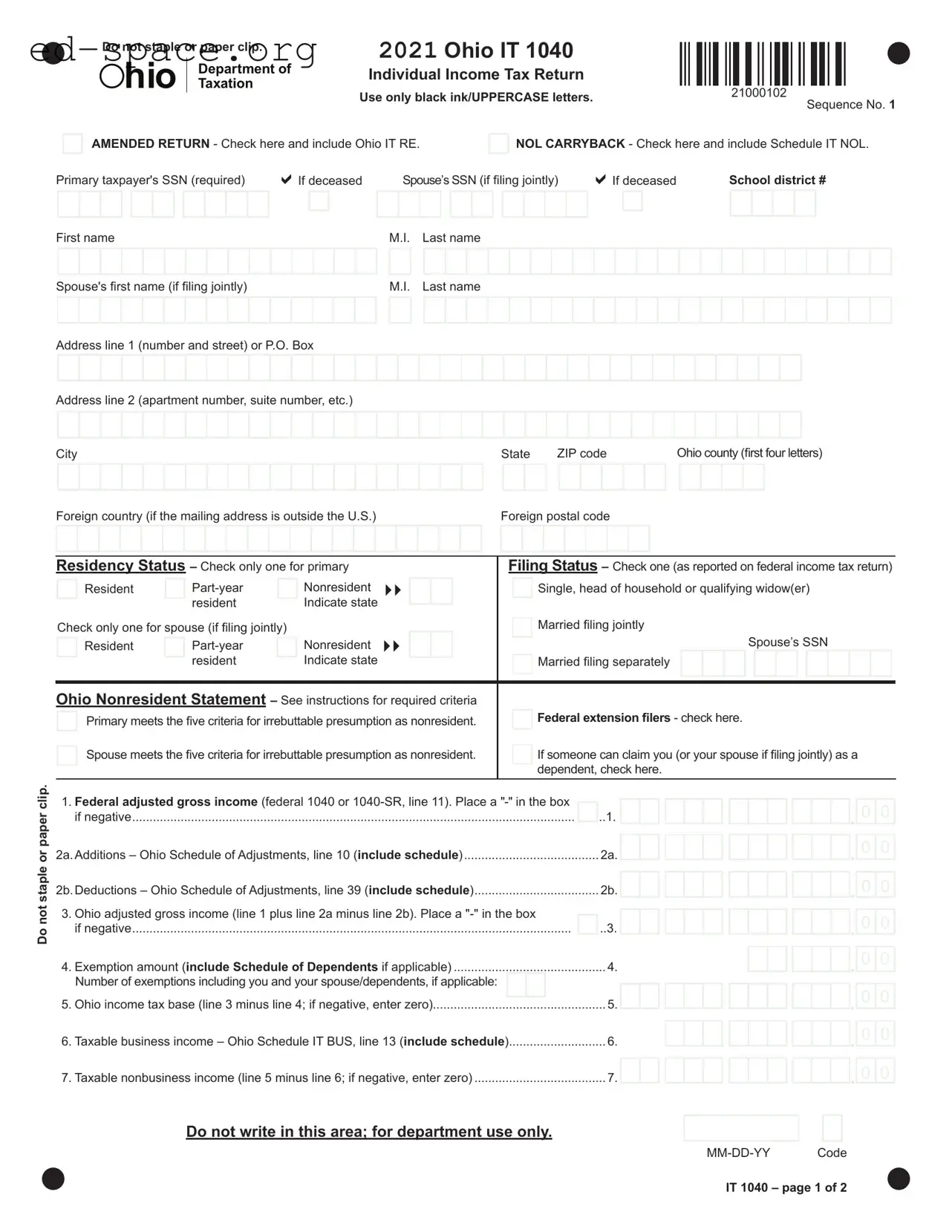
The Ohio IT 1040 form is a crucial document for individuals filing their state income tax returns. This form serves multiple purposes, including the reporting of income, calculating tax liabilities, and claiming various deductions and credits. Taxpayers must accurately fill out their personal information, such as Social Security numbers and residency status, to ensure compliance with state regulations. The form requires taxpayers to report their federal adjusted gross income, along with any additions or deductions specific to Ohio. Additionally, it allows for the declaration of exemptions, which can impact the overall tax liability. The IT 1040 also includes sections for nonbusiness and business income, enabling taxpayers to determine their taxable income effectively. Tax credits, payments, and potential refunds are addressed within the form, guiding individuals through the process of settling their state tax obligations. Proper completion of the Ohio IT 1040 is essential for avoiding penalties and ensuring that taxpayers receive any refunds they may be entitled to.

Do not staple or paper clip. |
2021 Ohio IT 1040 |
|
|
|
|
|
|
|
|
|
|
|
|
|
|
|
|
|
|
|
|
|
|
|
|
|
|
|
|
|
|
|
|
|
||
|
|
|
|
|
|
|
|
|
|
|
|
|
|
|
|
|
|
|
|
|
|
|
|
|
|
|
|
|
|
|
|
|
|
|||
hio |
|
Department of |
Individual Income Tax Return |
|
|
|
|
|
|
|
|
|
|
|
|
|
|
|
|
|
|
|
|
|
|
|
|
|
|
|
|
|
|
|
|
|
|
|
|
|
|
|
|
|
|
|
|
|
|
|
|
|
|
|
|
|
|
|
|
|
|
|
|
|
|
|
|
|
|
|
|||
|
Taxation |
|
|
|
|
|
|
|
|
|
|
|
|
|
|
|
|
|
|
|
|
|
|
|
|
|
|
|
|
|
|
|
|
|
||
|
Use only black ink/UPPERCASE letters. |
21000102 |
|
|
|
Sequence No. 1 |
||||||||||||||||||||||||||||||
|
|
|
|
|
|
|||||||||||||||||||||||||||||||
|
|
|
|
|
|
|
|
|
|
|
|
|
|
|
|
|
|
|
|
|
|
|
|
|
|
|
||||||||||
|
|
|
|
|
|
|
|
|
|
|
|
|
|
|
|
|
|
|
|
|
|
|
|
|
|
|
|
|||||||||
AMENDED RETURN - Check here and include Ohio IT RE.
NOL CARRYBACK - Check here and include Schedule IT NOL.
Primary taxpayer's SSN (required) |
|
If deceased |
|
|
Spouse’s SSN (if filing jointly) |
|
|
If deceased |
|
|
|
|
School district # |
|
|
|
|||||||||||||||||||||||||||||||||||||||||||||||||||||||||||||||
|
|
|
|
|
|
|
|
|
|
|
|
|
|
|
|
|
|
|
|
|
|
|
|
|
|
|
|
|
|
|
|
|
|
|
|
|
|
|
|
|
|
|
|
|
|
|
|
|
|
|
|
|
|
|
|
|
|
|
|
|
|
|
|
|
|
|
|
|
|
|
|
|
|
|
|
|
|
|
|
|
|
|
|
|
|
|
|
|
|
|
|
|
|
|
|
|
|
|
|
|
|
|
|
|
|
|
|
|
|
|
|
|
|
|
|
|
|
|
|
|
|
|
|
|
|
|
|
|
|
|
|
|
|
|
|
|
|
|
|
|
|
|
|
|
|
|
|
|
|
|
|
|
|
|
|
|
|
|
|
First name |
|
|
|
|
|
|
|
|
|
|
|
|
|
|
|
|
M.I. |
|
Last name |
|
|
|
|
|
|
|
|
|
|
|
|
|
|
|
|
|
|
|
|
|
|
|
|
|
|
|
|
|
|
|
|
|
|
|
|
|
|
|
|
|
|||||||||||||||||||
|
|
|
|
|
|
|
|
|
|
|
|
|
|
|
|
|
|
|
|
|
|
|
|
|
|
|
|
|
|
|
|
|
|
|
|
|
|
|
|
|
|
|
|
|
|
|
|
|
|
|
|
|
|
|
|
|
|
|
|
|
|
|
|
|
|
|
|
|
|
|
|
|
|
|
|
|
|
|
|
Spouse's first name (if filing jointly) |
|
|
|
|
|
|
|
|
M.I. |
|
Last name |
|
|
|
|
|
|
|
|
|
|
|
|
|
|
|
|
|
|
|
|
|
|
|
|
|
|
|
|
|
|
|
|
|
|
|
|
|
|
|
|
|
|||||||||||||||||||||||||||
|
|
|
|
|
|
|
|
|
|
|
|
|
|
|
|
|
|
|
|
|
|
|
|
|
|
|
|
|
|
|
|
|
|
|
|
|
|
|
|
|
|
|
|
|
|
|
|
|
|
|
|
|
|
|
|
|
|
|
|
|
|
|
|
|
|
|
|
|
|
|
|
|
|
|
|
|
|
|
|
Address line 1 |
(number and street) or P.O. Box |
|
|
|
|
|
|
|
|
|
|
|
|
|
|
|
|
|
|
|
|
|
|
|
|
|
|
|
|
|
|
|
|
|
|
|
|
|
|
|
|
|
|
|
|
|
|
|
|
|
|
|
|
|
|
|
|
|
|
|
|||||||||||||||||||
|
|
|
|
|
|
|
|
|
|
|
|
|
|
|
|
|
|
|
|
|
|
|
|
|
|
|
|
|
|
|
|
|
|
|
|
|
|
|
|
|
|
|
|
|
|
|
|
|
|
|
|
|
|
|
|
|
|
|
|
|
|
|
|
|
|
|
|
|
|
|
|
|
|
|
|
|
|
|
|
Address line 2 |
(apartment number, suite number, etc.) |
|
|
|
|
|
|
|
|
|
|
|
|
|
|
|
|
|
|
|
|
|
|
|
|
|
|
|
|
|
|
|
|
|
|
|
|
|
|
|
|
|
|
|
|
|
|
|
|
|
|
|
|
|
|
|
|
|
|
|
|||||||||||||||||||
|
|
|
|
|
|
|
|
|
|
|
|
|
|
|
|
|
|
|
|
|
|
|
|
|
|
|
|
|
|
|
|
|
|
|
|
|
|
|
|
|
|
|
|
|
|
|
|
|
|
|
|
|
|
||||||||||||||||||||||||||
|
|
|
|
|
|
|
|
|
|
|
|
|
|
|
|
|
|
|
|
|
|
|
|
|
|
|
|
|
|
|
|
|
|
|
|
|
|
|
|
|
|
|
|
|
|
|
|
|
|
|
|
|
|
|
|
|
|
|
|
|
|
|
|
|
|
|
|
|
|
|
|
|
|
|
|
|
|
|
|
City |
|
|
|
|
|
|
|
|
|
|
|
|
|
|
|
|
|
|
|
|
|
|
|
|
|
|
|
|
|
|
State |
|
|
ZIP code |
Ohio county (first four letters) |
|
|
|
|||||||||||||||||||||||||||||||||||||||||
|
|
|
|
|
|
|
|
|
|
|
|
|
|
|
|
|
|
|
|
|
|
|
|
|
|
|
|
|
|
|
|
|
|
|
|
|
|
|
|
|
|
|
|
|
|
|
|
|
|
|
|
|
|
|
|
|
|
|
|
|
|
|
|
|
|
|
|
|
|
|
|
|
|
|
|
|
|
|
|
Foreign country (if the mailing address is outside the U.S.) |
|
|
|
|
|
|
|
|
|
|
|
|
|
|
|
Foreign postal code |
|
|
|
|
|
|
|
|
|
|
|
|
|
|
|
|
|
|
|
|
|
||||||||||||||||||||||||||||||||||||||||||
|
|
|
|
|
|
|
|
|
|
|
|
|
|
|
|
|
|
|
|
|
|
|
|
|
|
|
|
|
|
|
|
|
|
|
|
|
|
|
|
|
|
|
|
|
|
|
|
|
|
|
|
|
|
|
|
|
|
|
|
|
|
|
|
|
|
|
|
|
|
|
|
|
|
|
|
|
|
|
|
Do not staple or paper clip.
Residency Status – Check only one for primary |
|
|
|
|
|
|
|
Filing Status – Check one (as reported on federal income tax return) |
||||||||||||||||||||||||||||||||||||||
|
Resident |
|
|
Nonresident |
|
|
|
|
|
|
|
|
|
|
|
|
|
|
|
|
|
|
|
|
|
|
|
|
|
|
|
|
|
|
|
|
|
|
|
|
||||||
|
|
|
|
|
|
|
|
|
|
|
|
|
|
Single, head of household or qualifying widow(er) |
|
|
|
|
|
|||||||||||||||||||||||||||
|
|
|
|
resident |
|
Indicate state |
|
|
|
|
|
|
|
|
|
|
Married filing jointly |
|
|
|
|
|
||||||||||||||||||||||||
|
|
|
|
|
|
|
|
|
|
|
|
|
|
|
|
|
|
|
|
|||||||||||||||||||||||||||
|
|
|
|
|
|
|
|
|
|
|
|
|
|
|
|
|
|
|
||||||||||||||||||||||||||||
Check only one for spouse (if filing jointly) |
|
|
|
|
|
|
|
|
|
|
|
|
|
|
|
|
|
|||||||||||||||||||||||||||||
|
|
|
|
|
|
|
|
|
|
|
|
|
|
|
|
|
||||||||||||||||||||||||||||||
|
Resident |
|
|
|
|
Nonresident |
|
|
|
|
|
|
|
|
|
|
|
|
|
|
|
|
|
|
|
|
|
|
|
|
|
Spouse’s |
|
SSN |
|
|
|
|
|
|||||||
|
|
|
|
resident |
|
|
Indicate state |
|
|
|
|
|
|
|
|
|
|
Married filing separately |
|
|
|
|
|
|
|
|
|
|
|
|
|
|||||||||||||||
|
|
|
|
|
|
|
|
|
|
|
|
|
|
|
|
|
|
|
|
|
|
|
|
|
|
|
|
|
|
|
|
|
|
|
|
|
|
|
|
|
|
|
|
|
||
|
|
|
|
|
|
|
|
|
|
|
|
|
|
|
|
|
|
|
|
|
|
|
|
|
|
|
|
|
|
|
|
|
|
|
|
|
|
|
|
|
|
|
|
|
|
|
|
|
|
|
|
|
|
|
|
|
|
|
|
|
|
|
|
|
|
|
|
|
|
|
|
|
|
|
|
|
|
|
|
|
|
|
|
|
|
|
|
|
|
|
|
|
|
Ohio Nonresident Statement – See instructions for required criteria |
|
|
|
|
|
|
|
|
|
|
|
|
|
|
|
|
|
|
|
|
|
|
|
|
|
|
|
|
|
|
|
|
|
|
||||||||||||
|
Primary meets the five criteria for irrebuttable presumption as nonresident. |
|
|
|
|
|
|
Federal extension filers - check here. |
|
|
|
|
|
|||||||||||||||||||||||||||||||||
|
Spouse meets the five criteria for irrebuttable presumption as nonresident. |
|
|
|
|
|
|
If someone can claim you (or your spouse if filing jointly) as a |
||||||||||||||||||||||||||||||||||||||
|
|
|
|
|
|
|
||||||||||||||||||||||||||||||||||||||||
|
|
|
|
|
|
|
|
|
|
|
|
|
|
|
|
|
|
|
dependent, check here. |
|
|
|
|
|
||||||||||||||||||||||
|
|
|
|
|
|
|
|
|
|
|
|
|
|
|
|
|
|
|
|
|
|
|
|
|||||||||||||||||||||||
1. Federal adjusted gross income (federal 1040 or |
|
|
|
|
|
|
|
|
|
|
|
|
|
|
|
|
|
|
|
|
|
|
|
|
|
|
||||||||||||||||||||
|
|
|
|
|
|
|
|
|
|
|
|
|
|
|
|
|
|
|
|
|
|
. |
0 |
|
0 |
|||||||||||||||||||||
if negative |
|
|
|
|
|
|
|
|
|
|
|
|
|
|
|
|
|
|
..1. |
|
|
|
|
|
|
|
|
|
|
|
|
|
|
|
|
|
|
|
|
|
||||||
|
|
|
|
|
|
|
|
|
|
|
|
|
|
|
|
|
|
|||||||||||||||||||||||||||||
|
|
|
|
|
|
|
|
|
|
|
|
|
|
|
|
|
|
|
|
|
|
|
|
|
|
|
|
|
|
|
|
|
|
|
|
|
|
|
|
|
|
|||||
|
|
|
|
|
|
|
|
|
|
|
|
|
|
|
|
|
|
|
||||||||||||||||||||||||||||
2a. Additions – Ohio Schedule of Adjustments, line 10 (include schedule) |
|
|
2a. |
|
|
|
|
|
|
|
|
|
|
|
|
|
|
|
|
|
|
|
|
. |
0 |
|
0 |
|||||||||||||||||||
|
|
|
|
|
|
|
|
|
|
|
|
|
|
|
|
|
|
|
|
|
|
|
|
|
||||||||||||||||||||||
|
|
|
|
|
|
|
|
|
|
|
|
|
|
|
|
|
|
|
||||||||||||||||||||||||||||
2b. Deductions – Ohio Schedule of Adjustments, line 39 (include schedule) |
|
|
2b. |
|
|
|
|
|
|
|
|
|
|
|
|
|
|
|
|
|
|
|
|
. |
0 |
|
0 |
|||||||||||||||||||
|
|
|
|
|
|
|
|
|
|
|
|
|
|
|
|
|
|
|
|
|
|
|
|
|
||||||||||||||||||||||
3. Ohio adjusted gross income (line 1 plus line 2a minus line 2b). Place a |
|
|
|
|
|
|
|
|
|
|
|
|
|
|
|
|
|
|
|
|
|
|
|
|
|
|
|
|
||||||||||||||||||
if negative |
|
|
|
|
|
|
|
|
|
|
|
|
|
|
|
|
|
|
..3. |
|
|
|
|
|
|
|
|
|
|
|
|
|
|
|
|
|
|
|
|
. |
0 |
|
0 |
|||
|
|
|
|
|
|
|
|
|
|
|
|
|
|
|
|
|
|
|
|
|
|
|
|
|
|
|
|
|
|
|
|
|
|
|
|
|
|
|
|
|
||||||
|
|
|
|
|
|
|
|
|
|
|
|
|
|
|
|
|
|
|
|
|
|
|
|
|
|
|
|
|||||||||||||||||||
............................................4. Exemption amount (include Schedule of Dependents if applicable) |
|
|
|
4. |
|
|
|
|
|
|
|
|
|
|
|
|
|
|
|
|
|
|
|
|
. |
0 |
|
0 |
||||||||||||||||||
Number of exemptions including you and your spouse/dependents, if applicable: |
|
|
|
|
|
|
|
|
|
|
|
|
|
|
|
|
|
|
|
|
|
|
|
|
|
|
|
|
|
|
|
|||||||||||||||
|
|
|
|
|
|
|
|
|
|
|
|
|
|
|
|
|
|
|
|
|
|
|
|
. |
0 |
|
0 |
|||||||||||||||||||
5. Ohio income tax base (line 3 minus line 4; if negative, enter zero) |
|
|
|
|
|
|
|
|
|
|
|
|
|
|
|
|
|
|
|
|
|
|
|
|
|
|
||||||||||||||||||||
|
|
5. |
|
|
|
|
|
|
|
|
|
|
|
|
|
|
|
|
|
|
|
|
||||||||||||||||||||||||
|
|
|
|
|
|
|
|
|
|
|
|
|
|
|
|
|
|
|
|
|
|
|
||||||||||||||||||||||||
|
|
|
|
|
|
|
|
|
|
|
|
|
|
|
|
|
|
|
|
|
|
|
|
|
|
|
|
|||||||||||||||||||
6. Taxable business income – Ohio Schedule IT BUS, line 13 (include schedule) |
6. |
|
|
|
|
|
|
|
|
|
|
|
|
|
|
|
|
|
|
|
|
. |
0 |
|
0 |
|||||||||||||||||||||
|
|
|
|
|
|
|
|
|
|
|
|
|
|
|
|
|
|
|
|
|
|
|
||||||||||||||||||||||||
|
|
|
|
|
|
|
|
|
|
|
|
|
|
|
|
|
|
|
|
|
|
|
|
|
|
|
|
|||||||||||||||||||
7. Taxable nonbusiness income (line 5 minus line 6; if negative, enter zero) |
7. |
|
|
|
|
|
|
|
|
|
|
|
|
|
|
|
|
|
|
|
|
. |
0 |
|
0 |
|||||||||||||||||||||
|
|
|
|
|
|
|
|
|
|
|
|
|
|
|
|
|
|
|
|
|
|
|
||||||||||||||||||||||||
Do not write in this area; for department use only.
IT 1040 – page 1 of 2
| Fact Name | Details |
|---|---|
| Form Purpose | The Ohio IT 1040 form is used for filing individual income tax returns in Ohio. |
| Amended Returns | Taxpayers can check a box if they are filing an amended return. An Ohio IT RE must be included. |
| Residency Status | Taxpayers must indicate their residency status: Resident, Part-year, or Nonresident. |
| Income Reporting | Federal adjusted gross income from the federal 1040 must be reported on the form. |
| Ohio Adjusted Gross Income | The form calculates Ohio adjusted gross income by adjusting federal income with Ohio-specific additions and deductions. |
| Tax Liability Calculation | Tax liability is determined by combining nonbusiness and business income tax liabilities. |
| Credits and Payments | Taxpayers can claim nonrefundable credits and report Ohio income tax withheld. |
| Governing Law | The Ohio IT 1040 form is governed by Ohio Revised Code Section 5747, which outlines income tax regulations. |
Completing the Ohio IT 1040 form requires careful attention to detail. This form is essential for reporting your income and calculating your tax liability for the state of Ohio. Follow these steps to ensure that you fill it out correctly.
What is the Ohio IT 1040 form?
The Ohio IT 1040 form is the state income tax return used by residents, part-year residents, and nonresidents to report their income and calculate their Ohio income tax liability. This form is required for individuals earning income in Ohio, and it must be filed annually. It includes sections for reporting income, deductions, exemptions, and tax credits. Accurate completion is essential to ensure compliance with state tax laws.
Who needs to file the Ohio IT 1040 form?
How do I complete the Ohio IT 1040 form?
What if I need to amend my Ohio IT 1040 form?
Where do I send my completed Ohio IT 1040 form?
Not Using Black Ink or Uppercase Letters: The form requires the use of black ink and uppercase letters. Failure to adhere to this guideline can result in processing delays.
Stapling or Paper Clipping the Form: The instructions explicitly state not to staple or paper clip the form. Doing so may hinder processing.
Incorrect Residency Status: Selecting the wrong residency status can lead to incorrect tax calculations. Ensure the status accurately reflects your situation.
Omitting Required Schedules: Certain lines require additional schedules, such as the Ohio Schedule A or Schedule J. Failing to include these can result in incomplete submissions.
Incorrect Social Security Numbers (SSNs): Providing incorrect SSNs for yourself or your spouse can lead to significant processing issues. Double-check all entries for accuracy.
Neglecting to Sign the Form: The form must be signed by the primary taxpayer and, if applicable, the spouse. An unsigned form is considered invalid.
Miscalculating Tax Liability: Errors in calculating tax liability can result in underpayment or overpayment. Review all calculations carefully.
Ignoring Instructions for Amended Returns: If filing an amended return, it is crucial to follow specific instructions, including including the Ohio IT RE.
Failing to Include Payment or Refund Information: If there are amounts due or a refund expected, ensure these are clearly indicated. Missing this information can complicate processing.
When filing your Ohio IT 1040 form, several other forms and documents may be required to ensure a complete and accurate tax return. Each of these documents serves a specific purpose, and understanding their roles can help streamline the filing process. Below is a list of commonly used forms alongside the Ohio IT 1040.
Gathering these forms and documents before you start filling out your Ohio IT 1040 can make the process smoother and help ensure that you don’t miss any important information. Each form plays a vital role in accurately reporting your income and calculating your tax liability, ultimately helping you fulfill your tax obligations efficiently.
When filling out the Ohio IT 1040 form, it's important to follow specific guidelines to ensure your submission is accurate and accepted. Here are five things you should and shouldn't do:
In fact, you should not staple or paper clip the Ohio IT 1040 form. This is a strict requirement to ensure the document is processed correctly.
This is incorrect. The instructions explicitly state that you should not include a copy of any previously filed return when submitting the Ohio IT 1040 form.
You must use only black ink when completing the Ohio IT 1040 form. This helps maintain clarity and readability.
Your filing status is crucial. It affects your tax rate and eligibility for certain deductions and credits. Ensure you select the correct status as reported on your federal return.
Residency status is important. You must check the appropriate box for your residency status—whether you are a resident, part-year, or nonresident of Ohio.
Not all income is taxable. Certain types of income may be exempt, and you need to report your Ohio adjusted gross income accurately, including any allowable deductions.
It is essential to read the instructions carefully. They contain vital information regarding eligibility, required schedules, and specific calculations necessary for accurate filing.
A signature is mandatory. By signing the form, you declare that the information is true and complete, which is a legal requirement for the submission.
Filling out the Ohio IT 1040 form is an important task for residents and nonresidents alike. Here are some key takeaways to keep in mind: