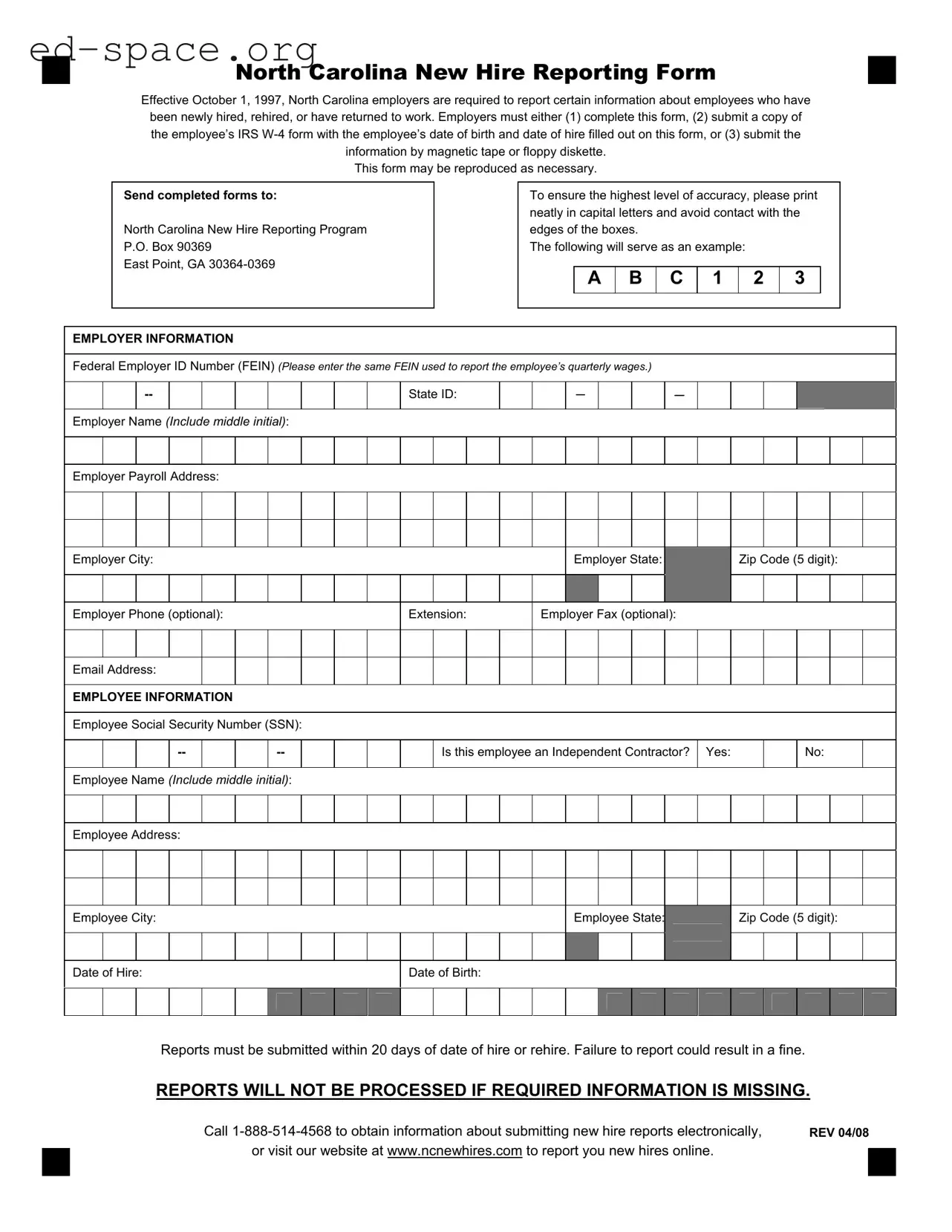
The North Carolina New Hire Reporting Form plays a crucial role in ensuring compliance with state regulations aimed at tracking employment status. Since its implementation on October 1, 1997, this requirement mandates that employers report specific information about newly hired, rehired, or returning employees. Employers have several options for submitting the required information: they can either complete the designated form, provide a copy of the employee’s IRS W-4 form with essential details filled in, or utilize electronic means such as magnetic tape or floppy diskette. To maintain clarity and accuracy, it is important to fill out the form using capital letters and avoid any contact with the edges of the boxes. The form collects vital employer and employee information, including the Federal Employer ID Number, employee Social Security Number, and dates of hire and birth. Timeliness is essential, as reports must be submitted within 20 days of hiring or rehiring an employee. Failure to comply can result in fines, emphasizing the importance of thoroughness in the reporting process. For those needing assistance, resources are available to facilitate electronic submissions, ensuring a smooth and efficient reporting experience.
North Carolina New Hire Reporting Form
Effective October 1, 1997, North Carolina employers are required to report certain information about employees who have been newly hired, rehired, or have returned to work. Employers must either (1) complete this form, (2) submit a copy of the employee’s IRS
This form may be reproduced as necessary.
Send completed forms to:
North Carolina New Hire Reporting Program
P.O. Box 90369
East Point, GA
To ensure the highest level of accuracy, please print neatly in capital letters and avoid contact with the edges of the boxes.
The following will serve as an example:
A B C 1 2 3
EMPLOYER INFORMATION
Federal Employer ID Number (FEIN) (Please enter the same FEIN used to report the employee’s quarterly wages.)
|
|
|
|
|
|
|
|
|
State ID: |
|
|
- |
|
|
- |
|
|
|
|
|
|
|
|
|
|
|
|
|
|
|
|
|
|
|
|
|
|
|
|
|
|
Employer Name (Include middle initial):
Employer Payroll Address:
Employer City:
Employer State:
Zip Code (5 digit):
Employer Phone (optional):
Extension:
Employer Fax (optional):
Email Address:
EMPLOYEE INFORMATION
Employee Social Security Number (SSN):
Is this employee an Independent Contractor?
Yes:
No:
Employee Name (Include middle initial):
Employee Address:
Employee City:
Employee State:
Zip Code (5 digit):
Date of Hire:
Date of Birth:
Reports must be submitted within 20 days of date of hire or rehire. Failure to report could result in a fine.
REPORTS WILL NOT BE PROCESSED IF REQUIRED INFORMATION IS MISSING.
|
Call |
REV 04/08 |
|
|
or visit our website at www.ncnewhires.com to report you new hires online. |
|
|
|
|
|
|
|
|
|
|
| Fact Name | Details |
|---|---|
| Effective Date | The North Carolina New Hire Reporting Form became effective on October 1, 1997. |
| Reporting Requirement | Employers must report information about newly hired, rehired, or returning employees. |
| Submission Methods | Employers can complete the form, submit an IRS W-4 form, or use magnetic tape/floppy diskette. |
| Submission Deadline | Reports must be submitted within 20 days of the employee's hire or rehire date. |
| Consequences of Non-Compliance | Failure to report may result in a fine for the employer. |
| Required Information | Reports will not be processed if any required information is missing. |
| Contact Information | For assistance, call 1-888-514-4568 or visit www.ncnewhires.com. |
Filling out the North Carolina Reporting form is a straightforward process that requires careful attention to detail. Once you have completed the form, you will need to send it to the designated address. Make sure to follow each step closely to ensure that all required information is accurately provided.
Once you have filled out the form, make sure to send it to the North Carolina New Hire Reporting Program at the address provided. Keeping a copy for your records is also a good practice. Timely submission is crucial, as failure to report can lead to fines. If you have any questions or need assistance, don't hesitate to reach out to the provided contact number or visit the official website.
What is the purpose of the North Carolina New Hire Reporting Form?
The North Carolina New Hire Reporting Form is designed to help the state keep track of newly hired, rehired, or returning employees. Employers must report certain information about these employees to assist with child support enforcement and other state programs. This helps ensure that support payments are collected efficiently and that the workforce is accurately documented.
Who is required to submit this form?
All employers in North Carolina are required to submit the form for any new hires or employees who have been rehired or returned to work. This includes businesses of all sizes and types. Compliance is crucial, as failure to report can lead to penalties.
What information is needed to complete the form?
Employers must provide specific details, including their Federal Employer ID Number (FEIN), the employee's Social Security Number (SSN), names, addresses, dates of hire, and dates of birth. Additionally, employers should indicate whether the employee is an independent contractor. It's important to fill out the form accurately and completely to avoid processing delays.
How can I submit the form?
Employers have several options for submitting the form. They can either complete the form and send it to the North Carolina New Hire Reporting Program by mail, submit a copy of the employee’s IRS W-4 form with the required dates, or provide the information electronically via magnetic tape or floppy diskette. For those who prefer online submission, the website www.ncnewhires.com offers an electronic reporting option.
What is the deadline for submitting the form?
Reports must be submitted within 20 days of the employee's date of hire or rehire. Timely reporting is essential to avoid fines and ensure compliance with state regulations. Employers should keep this deadline in mind to maintain good standing.
What happens if the form is not completed correctly?
If the form is missing required information or is filled out incorrectly, it will not be processed. This can lead to delays in reporting and potential fines. Employers should take care to print neatly in capital letters and avoid contact with the edges of the boxes when completing the form.
Where can I find more information about the reporting process?
For additional information, employers can call the North Carolina New Hire Reporting Program at 1-888-514-4568. They can also visit the program's website at www.ncnewhires.com for resources and guidance on submitting new hire reports electronically.
Neglecting to report within the required timeframe: Employers must submit the reporting form within 20 days of the employee's date of hire or rehire. Missing this deadline can lead to penalties.
Incomplete information: Reports will not be processed if any required information is missing. Ensure all sections are filled out completely, including both employer and employee details.
Using incorrect identification numbers: Employers should enter the correct Federal Employer ID Number (FEIN) and State ID. Mistakes here can cause delays in processing.
Failing to print neatly: The form should be filled out in capital letters. Illegible handwriting can lead to misinterpretation of the information provided.
Forgetting to include middle initials: When entering names, include middle initials for both the employer and the employee. This helps avoid confusion with similar names.
Not indicating independent contractor status: Clearly mark whether the employee is an independent contractor or not. This distinction is important for accurate reporting.
Ignoring optional contact information: While providing phone and fax numbers is optional, including them can facilitate communication if there are questions about the submitted report.
In addition to the North Carolina Reporting Form, there are several other important documents and forms that employers may need to complete or submit when hiring new employees. Each of these documents serves a specific purpose and helps ensure compliance with state and federal regulations.
Each of these documents plays a crucial role in the hiring process. By ensuring that all necessary forms are completed and submitted, employers can maintain compliance with legal requirements while also fostering a transparent and organized workplace. Proper documentation ultimately benefits both the employer and the employee.
The North Carolina Reporting Form shares similarities with several other documents used for employment and tax purposes. Below is a list of those documents and their similarities:
These documents are crucial for compliance and maintaining accurate records within the employment landscape.
When filling out the North Carolina Reporting form, there are important guidelines to follow. Here are eight things to keep in mind:
Following these guidelines will help ensure that your reporting is accurate and timely.
Misconceptions about the North Carolina Reporting Form can lead to confusion for employers. Here are six common misunderstandings:
Filling out the North Carolina Reporting Form is an important task for employers. Here are some key takeaways to keep in mind:
By following these guidelines, employers can ensure compliance and facilitate a smooth reporting process.