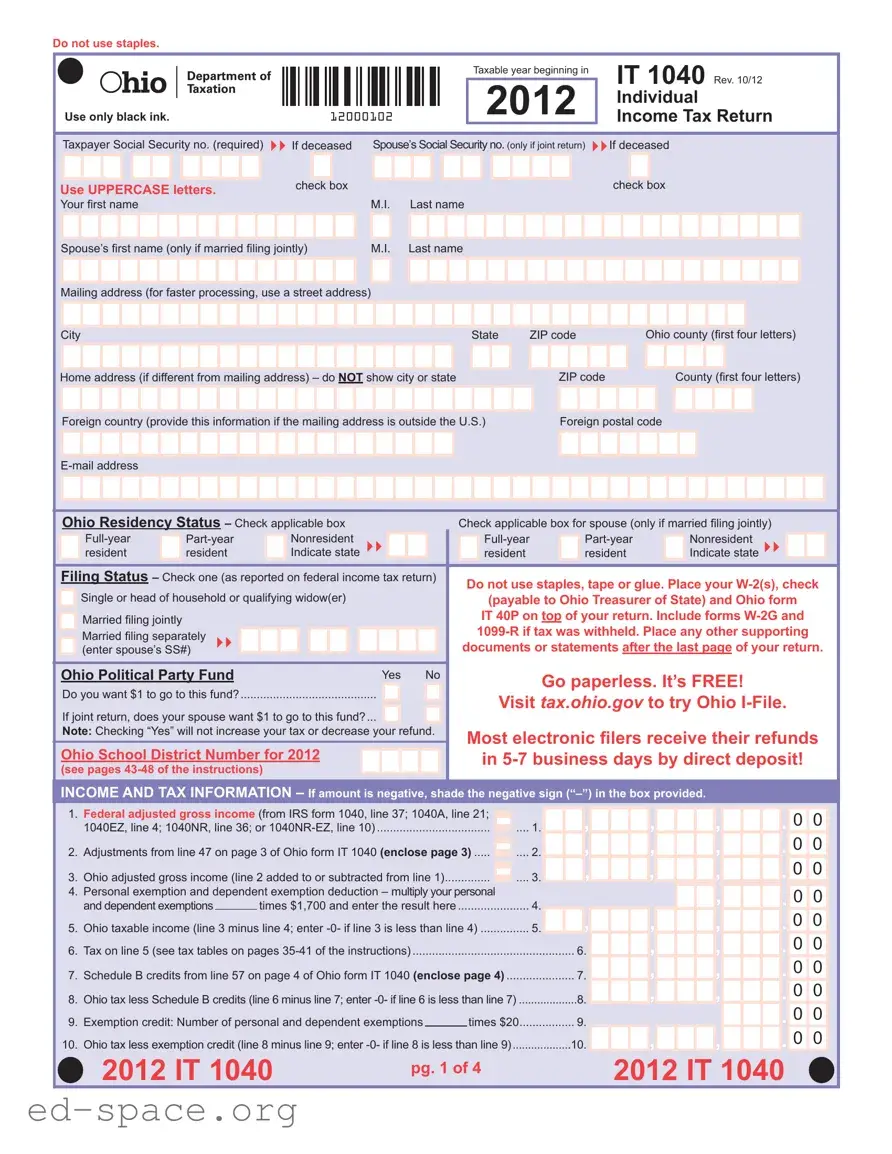
The IT 1040 Ohio form is an essential document for residents who need to file their individual income tax returns. This form captures vital information such as taxpayer and spouse Social Security numbers, residency status, and filing status. It requires you to provide your name, mailing address, and Ohio county, ensuring your return is processed efficiently. When filling out the form, it is crucial to use black ink and uppercase letters, as well as to avoid staples or tape. The form includes sections for reporting your federal adjusted gross income, Ohio adjusted gross income, and applicable deductions and credits. You will also need to calculate your total Ohio tax liability and provide information about any taxes withheld. If applicable, you can contribute to the Ohio Political Party Fund and select various charitable donations. Completing the IT 1040 accurately is vital to ensure compliance with state tax laws and to avoid any potential penalties.

Do not use staples.
Use only black ink. |
12000102 |
Taxable year beginning in
2012
IT 1040 Rev. 10/12
Individual
Income Tax Return
Taxpayer Social Security no. (required) |
If deceased |
Spouse’s Social Security no. (only if joint return) |
If deceased |
Use UPPERCASE letters. |
check box |
check box |
|
|
Your first name |
M.I. |
|
Last name |
||||||||||||||||||||||||||||||||||
|
|
|
|
|
|
|
|
|
|
|
|
|
|
|
|
|
|
|
|
|
|
|
|
|
|
|
|
|
|
|
|
|
|
|
|
|
|
Spouse’s fi rst name (only if married filing jointly) |
M.I. |
|
Last name |
||||||||||||||||||||||||||||||||||
|
|
|
|
|
|
|
|
|
|
|
|
|
|
|
|
|
|
|
|
|
|
|
|
|
|
|
|
|
|
|
|
|
|
|
|
|
|
|
|
|
|
|
|
|
|
|
|
|
|
|
|
|
|
|
|
|
|
|
|
|
|
|
|
|
|
|
|
|
|
|
|
|
|
|
|
Mailing address (for faster processing, use a street address)
|
City |
|
|
|
|
|
|
|
|
|
|
|
|
|
|
|
|
|
|
|
|
|
|
|
|
|
|
State |
ZIP code |
Ohio county (fi rst four letters) |
|||||||||||||||||||||||||||||||||
|
|
|
|
|
|
|
|
|
|
|
|
|
|
|
|
|
|
|
|
|
|
|
|
|
|
|
|
|
|
|
|
|
|
|
|
|
|
|
|
|
|
|
|
|
|
|
|
|
|
|
|
|
|
|
|
|
|
|
|
|
|
|
|
|
Home address (if different from mailing address) – do NOT show city or state |
|
|
|
|
|
|
|
ZIP code |
|
|
County (fi rst four letters) |
|||||||||||||||||||||||||||||||||||||||||||||||||||
|
|
|
|
|
|
|
|
|
|
|
|
|
|
|
|
|
|
|
|
|
|
|
|
|
|
|
|
|
|
|
|
|
|
|
|
|
|
|
|
|
|
|
|
|
|
|
|
|
|
|
|
|
|
|
|
|
|
|
|
|
|
|
|
|
Foreign country (provide this information if the mailing address is outside the U.S.) |
|
|
Foreign postal code |
|||||||||||||||||||||||||||||||||||||||||||||||||||||||||||
|
|
|
|
|
|
|
|
|
|
|
|
|
|
|
|
|
|
|
|
|
|
|
|
|
|
|
|
|
|
|
|
|
|
|
|
|
|
|
|
|
|
|
|
|
|
|
|
|
|
|
|
|
|
|
|
|
|
|
|
|
|
|
|
|
|
|
|
|
|
|
|
|
|
|
|
|
|
|
|
|
|
|
|
|
|
|
|
|
|
|
|
|
|
|
|
|
|
|
|
|
|
|
|
|
|
|
|
|
|
|
|
|
|
|
|
|
|
|
|
||||||||
|
|
|
|
|
|
|
|
|
|
|
|
|
|
|
|
|
|
|
|
|
|
|
|
|
|
|
|
|
|
|
|
|
|
|
|
|
|
|
|
|
|
|
|
|
|
|
|
|
|
|
|
|
|
||||||||||
|
|
|
|
|
|
|
|
|
|
|
|
|
|
|
|
|
|
|
|
|
|
|
|
|
|
|
|
|
|
|
|
|
|
|
|
|
|
|
|
|
|
|
|
|
|
|
|
|
|
|
|
|
|
|
|
|
|
|
|
|
|
|
|
|
|
|
|
|
|
|
|
|
|
|
|
|
|
|
|
|
|
|
|
|
|
|
|
|
|
|
|
|
|
|
|
|
|
|
|
|
|
|
|
|
|
|
|
|
|
|
|
|
|
|
|
|
|
|
|
|
|
|
|
|
|
|
|
|
Ohio Residency Status – Check applicable box |
Check applicable box for spouse (only if married filing jointly) |
|||||||||||||||||||||||||||||||||||||||||||||||||||||||||||||
|
|
|
|
|
|
|
Nonresident |
|
|
|
|
|
|
|
|
|
|
|
|
|
|
|
|
Nonresident |
|
|
|
||||||||||||||||||||||||||||||||||||
|
|
|
|
|
|
|
|
|
|
|
|
|
|
|
|
|
|
|
|||||||||||||||||||||||||||||||||||||||||||||
|
|
|
resident |
|
|
resident |
|
|
Indicate state |
|
|
|
|
|
|
|
|
|
|
resident |
|
|
|
|
resident |
|
|
Indicate state |
|
|
|
||||||||||||||||||||||||||||||||
|
|
|
|
|
|
|
|
|
|
|
|
|
|
|
|
|
|
|
|
|
|
|
|
|
|
|
|
|
|
|
|
|
|
|
|
|
|
|
|
|
|
|
|
|
|
|
|
|
|
|
|
|
|
|
|
|
|
|
|
|
|
|
|
|
Filing Status – Check one (as reported on federal income tax return) |
|
|
|
Do not use staples, tape or glue. Place your |
||||||||||||||||||||||||||||||||||||||||||||||||||||||||||
|
|
|
|
|
|
|
|
|
|
|
|
|
|
|
|
|
|
|
|
|
|
|
|
|
|
|
|
|
|
|
|
|
|
||||||||||||||||||||||||||||||
|
|
|
Single or head of household or qualifying widow(er) |
|
|
|
|
|
(payable to Ohio Treasurer of State) and Ohio form |
||||||||||||||||||||||||||||||||||||||||||||||||||||||
|
|
|
Married filing jointly |
|
|
|
|
|
|
|
|
|
|
|
|
|
|
|
|
|
|
|
|
|
|
|
|
|
|
|
IT 40P on top of your return. Include forms |
||||||||||||||||||||||||||||||||
|
|
|
|
|
|
|
|
|
|
|
|
|
|
|
|
|
|
|
|
|
|
|
|
|
|
|
|
|
|||||||||||||||||||||||||||||||||||
|
|
|
|
|
|
|
|
|
|
|
|
|
|
|
|
|
|
|
|
|
|
|
|
|
|
|
|
|
|||||||||||||||||||||||||||||||||||
|
|
|
Married filing separately |
|
|
|
|
|
|
|
|
|
|
|
|
|
|
|
|
|
|
|
|
|
|
|
|||||||||||||||||||||||||||||||||||||
|
|
|
|
|
|
|
|
|
|
|
|
|
|
|
|
|
|
|
|
|
|
|
|
|
documents or statements after the last page of your return. |
||||||||||||||||||||||||||||||||||||||
|
|
|
(enter spouse’s SS#) |
|
|
|
|
|
|
|
|
|
|
|
|
|
|
|
|
|
|
|
|
|
|
||||||||||||||||||||||||||||||||||||||
|
|
|
|
|
|
|
|
|
|
|
|
|
|
|
|
|
|
|
|
|
|
|
|
|
|
|
|
|
|
|
|
|
|
|
|
|
|
|
|
|
|
|
|
|
|
|
|
|
|
|
|
|
|
|
|
|
|
|
|
|
|
|
|
|
Ohio Political Party Fund |
|
|
|
|
|
|
|
|
|
Yes No |
|
|
|
|
|
|
|
|
Go paperless. It’s FREE! |
|||||||||||||||||||||||||||||||||||||||||||
|
Do you want $1 to go to this fund? |
|
|
|
|
|
|
|
|
|
|
|
|
|
|
||||||||||||||||||||||||||||||||||||||||||||||||
|
|
|
|
|
|
|
|
|
|
|
|
|
Visit tax.ohio.gov to try Ohio |
||||||||||||||||||||||||||||||||||||||||||||||||||
|
If joint return, does your spouse want $1 to go to this fund?... |
|
|
|
|
|
|
|
|
|
|
|
|
||||||||||||||||||||||||||||||||||||||||||||||||||
|
|
|
|
|
|
|
|
|
|
|
|
|
|||||||||||||||||||||||||||||||||||||||||||||||||||
|
|
|
|
|
|
|
|
|
|
|
|
|
|
|
|
|
|
|
|
|
|
|
|
|
|
|
|
|
|
|
|
|
|
|
|
|
|
|
|
||||||||||||||||||||||||
|
Note: Checking “Yes” will not increase your tax or decrease your refund. |
|
|
|
Most electronic fi lers receive their refunds |
||||||||||||||||||||||||||||||||||||||||||||||||||||||||||
|
|
|
|
|
|
|
|
|
|
|
|
|
|
|
|
|
|
|
|
|
|
|
|
|
|
|
|
|
|
|
|
|
|
||||||||||||||||||||||||||||||
|
|
|
|
|
|
|
|
|
|
|
|
|
|
|
|
|
|
|
|
|
|
|
|
|
|
|
|
|
|
|
|
|
|
||||||||||||||||||||||||||||||
|
Ohio School District Number for 2012 |
|
|
|
|
|
|
|
|
|
|
|
|
|
in |
||||||||||||||||||||||||||||||||||||||||||||||||
|
(see pages |
|
|
|
|
|
|
|
|
|
|
|
|
|
|
|
|
|
|
|
|
|
|
|
|
|
|
|
|
|
|
|
|
|
|
|
|
|
|
|
|
|
|
|
|
|
|
|
|
|
|||||||||||||
|
|
|
|
|
|
|
|
|
|
|
|
|
|
|
|
|
|
|
|
|
|
|
|
|
|
|
|
|
|
|
|
|
|
|
|
|
|
|
|
|
|
|
|
|
|
|
|
|
|
|
|
|
|
|
|
|
|
|
|
|
|
|
|
|
INCOME AND TAX INFORMATION – If amount is negative, shade the negative sign |
||||||||||||||||||||||||||||||||||||||||||||||||||||||||||||||
|
|
|
|
|
|
|
|
|
|
|
|
|
|
|
|
|
|
|
|
|
|
|
|
|
|
|
|
|
|
|
|
|
|
|
|
|
|
|
|
|
|
|
|
|
|
|
|
|
|
|
|
|
|
|
|
|
|
|
|
|
|
|
|
1. |
Federal adjusted gross income (from IRS form 1040, line 37; 1040A, line 21; |
|
, |
, |
, |
. 0 0 |
||
|
1040EZ, line 4; 1040NR, line 36; or |
.... 1. |
||||||
2. |
Adjustments from line 47 on page 3 of Ohio form IT 1040 (enclose page 3) |
.... 2. |
, |
, |
, |
. 0 0 |
||
3. |
Ohio adjusted gross income (line 2 added to or subtracted from line 1) |
.... 3. |
, |
, |
, |
. 0 0 |
||
4. |
Personal exemption and dependent exemption deduction – multiply your personal |
|
|
|
, |
. 0 0 |
||
|
and dependent exemptions |
times $1,700 and enter the result here |
4. |
|
|
|||
5. |
Ohio taxable income (line 3 minus line 4; enter |
5. |
, |
, |
, |
. 0 0 |
||
6. |
Tax on line 5 (see tax tables on pages |
|
6. |
, |
, |
. 0 0 |
||
7. |
Schedule B credits from line 57 on page 4 of Ohio form IT 1040 (enclose page 4) |
7. |
, |
, |
. 0 0 |
|||
8. |
Ohio tax less Schedule B credits (line 6 minus line 7; enter |
8. |
, |
, |
. 0 0 |
|||
9. |
Exemption credit: Number of personal and dependent exemptions |
times $20 |
9. |
|
|
. 0 0 |
||
10. |
Ohio tax less exemption credit (line 8 minus line 9; enter |
10. |
, |
, |
. 0 0 |
|||
2012 IT 1040
pg. 1 of 4 |
2012 IT 1040 |
|
| Fact Name | Fact Description |
|---|---|
| Tax Year | The IT 1040 form is for the taxable year beginning in 2012. |
| Filing Status | Taxpayers can check their filing status as single, married filing jointly, married filing separately, head of household, or qualifying widow(er). |
| Residency Status | Taxpayers must indicate their residency status: full-year resident, part-year resident, or nonresident. |
| Social Security Number | Providing a Social Security number is required for the taxpayer and spouse if filing jointly. |
| Political Party Fund | Taxpayers can choose to donate $1 to the Ohio Political Party Fund, which does not affect their tax amount. |
| Income Reporting | Taxpayers must report their federal adjusted gross income from IRS form 1040 or other specified forms. |
| Credits | The form allows for various credits, including retirement income and child care credits, to reduce tax liability. |
| Mailing Instructions | Taxpayers must mail the form to the Ohio Department of Taxation, with different addresses for payments and no payments. |
Completing the IT 1040 Ohio form requires careful attention to detail. This form is essential for filing your individual income tax return in Ohio. Follow the steps below to ensure that your form is filled out correctly.
After filling out the form, review it carefully to ensure all sections are complete. Make sure to include any necessary supporting documents, such as W-2 forms, on top of your return. Keep a copy for your records before sending it to the Ohio Department of Taxation.
What is the IT 1040 Ohio form?
The IT 1040 Ohio form is the Individual Income Tax Return for residents of Ohio. It is used to report income earned during the tax year and calculate the amount of tax owed to the state. This form is essential for individuals who reside in Ohio and need to file their state income taxes. It collects various personal information, including your name, address, and Social Security number, as well as details about your income and any applicable deductions or credits.
Who needs to file the IT 1040 Ohio form?
What information do I need to complete the IT 1040 Ohio form?
How do I submit the IT 1040 Ohio form?
Using incorrect ink color: It is crucial to fill out the IT 1040 Ohio form using only black ink. Using any other color can lead to processing delays or even rejection of the form.
Not using UPPERCASE letters: The instructions specify that all entries should be made in UPPERCASE letters. Failing to do so may result in misinterpretation of the information provided.
Omitting required Social Security numbers: Each taxpayer must include their Social Security number. If filing jointly, the spouse's number is also necessary. Forgetting this step can significantly hinder the processing of the return.
Incorrectly checking residency status: Taxpayers must accurately check the box that reflects their Ohio residency status. This includes whether they are a full-year resident, part-year resident, or nonresident. An error here can lead to incorrect tax calculations.
Failing to include supporting documents: All relevant documents, such as W-2 forms and other supporting statements, should be included with the return. Neglecting to do this can delay processing and affect any potential refunds.
When filing your Ohio IT 1040 form, several other documents and forms may be necessary to complete your tax return accurately. These documents can provide essential information about your income, deductions, and credits. Below is a list of common forms that are often used alongside the IT 1040.
Gathering these documents can simplify the filing process and ensure that your tax return is complete and accurate. Each form plays a specific role in reporting your financial situation, so it’s crucial to review your circumstances and include the necessary paperwork with your IT 1040 form.
When filling out the IT 1040 Ohio form, it is essential to follow specific guidelines to ensure accuracy and compliance. Here are some important dos and don'ts to consider:
Misconceptions about the IT 1040 Ohio Form
Key Takeaways for Filling Out and Using the IT 1040 Ohio Form: