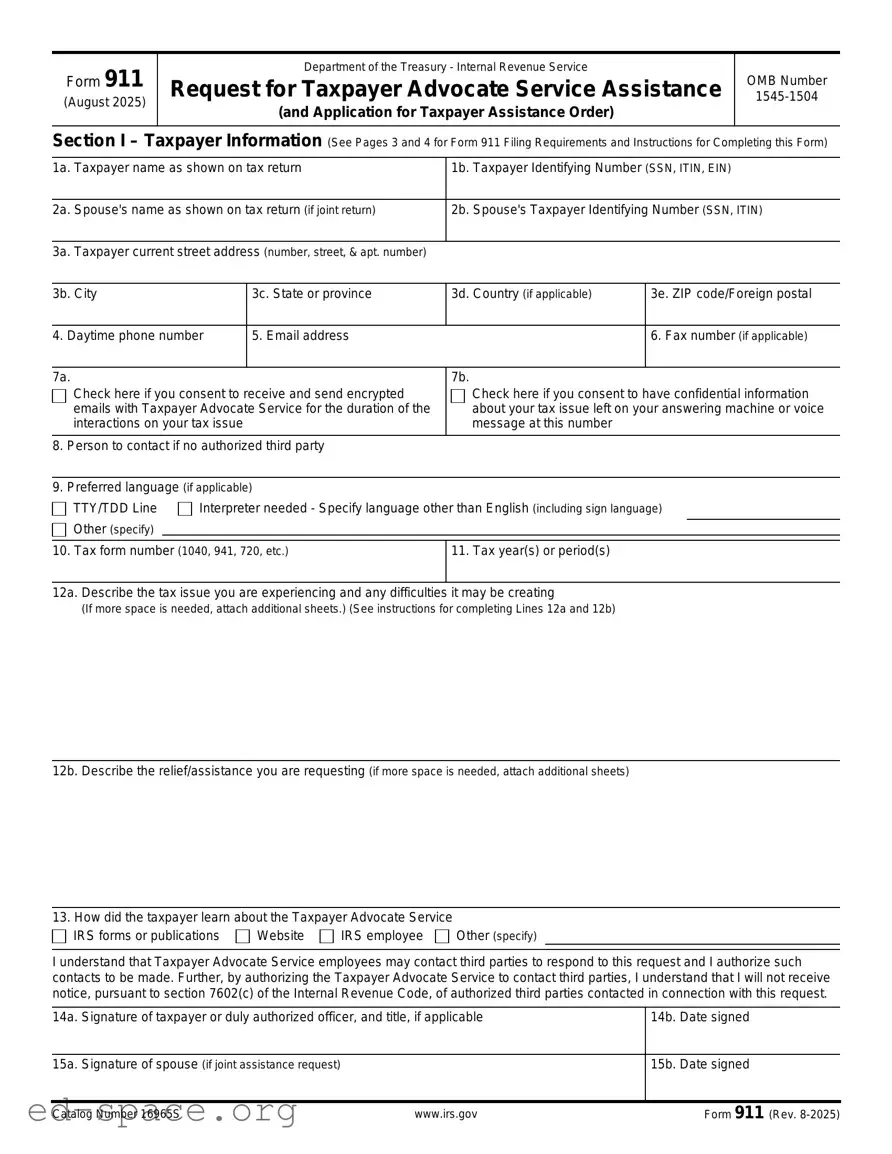
The IRS 911 form plays a crucial role for individuals and businesses facing financial difficulties when dealing with tax obligations. This form allows taxpayers to request assistance from the Internal Revenue Service, particularly when they encounter hardships that hinder their ability to pay taxes on time. By using the IRS 911 form, taxpayers can seek various forms of relief, including payment plans, an offer in compromise, or even a temporary delay in collection actions. Understanding the specifics of this form is essential for anyone looking to navigate the complexities of tax issues. It provides a structured way to communicate your situation to the IRS and seek the necessary support. Whether you're facing unexpected medical expenses, job loss, or other financial challenges, knowing how to properly complete and submit the IRS 911 form can significantly ease your tax-related stress.

Form 911
(August 2025)
Department of the Treasury - Internal Revenue Service
Request for Taxpayer Advocate Service Assistance
(and Application for Taxpayer Assistance Order)
OMB Number
Section I – Taxpayer Information (See Pages 3 and 4 for Form 911 Filing Requirements and Instructions for Completing this Form)
1a. Taxpayer name as shown on tax return |
1b. Taxpayer Identifying Number (SSN, ITIN, EIN) |
2a. Spouse's name as shown on tax return (if joint return)
2b. Spouse's Taxpayer Identifying Number (SSN, ITIN)
3a. |
Taxpayer current street address (number, street, & apt. number) |
|
|
|
|
|
|
|
|
3b. |
City |
3c. State or province |
3d. Country (if applicable) |
3e. ZIP code/Foreign postal |
|
|
|
|
|
4. Daytime phone number |
5. Email address |
|
6. Fax number (if applicable) |
|
|
|
|
|
|
7a. |
|
|
7b. |
|
|
Check here if you consent to receive and send encrypted |
Check here if you consent to have confidential information |
||
|
emails with Taxpayer Advocate Service for the duration of the |
about your tax issue left on your answering machine or voice |
||
|
interactions on your tax issue |
|
message at this number |
|
8.Person to contact if no authorized third party
9.Preferred language (if applicable)
TTY/TDD Line |
Interpreter needed - Specify language other than English (including sign language) |
||
Other (specify) |
|
|
|
|
|
|
|
|
|
|
|
10. Tax form number (1040, 941, 720, etc.) |
11. Tax year(s) or period(s) |
||
|
|
|
|
12a. Describe the tax issue you are experiencing and any difficulties it may be creating
(If more space is needed, attach additional sheets.) (See instructions for completing Lines 12a and 12b)
12b. Describe the relief/assistance you are requesting (if more space is needed, attach additional sheets)
13. How did the taxpayer learn about the Taxpayer Advocate Service
IRS forms or publications
Website
IRS employee
Other (specify)
I understand that Taxpayer Advocate Service employees may contact third parties to respond to this request and I authorize such contacts to be made. Further, by authorizing the Taxpayer Advocate Service to contact third parties, I understand that I will not receive notice, pursuant to section 7602(c) of the Internal Revenue Code, of authorized third parties contacted in connection with this request.
14a. |
Signature of taxpayer or duly authorized officer, and title, if applicable |
14b. Date signed |
||
|
|
|
|
|
15a. |
Signature of spouse (if joint assistance request) |
|
15b. Date signed |
|
|
|
|
|
|
Catalog Number 16965S |
www.irs.gov |
Form 911 (Rev. |
|
|

Page 2
Section II – Third Party Information (See instructions before completing this section)
A. Form 2848, Power of Attorney
1. Name of authorized third party
2. Centralized Authorization File (CAF) number
3a. Current mailing address (number, street, & apt. number)
3b. City
3c. State or province
3d. Country (if applicable)
3e. ZIP code/Foreign postal
4. Daytime phone number
5. Fax number
6. Signature of third party (representative only)
7. Date signed (representative only)
B. Form 8821, Authorization to Receive Notices
Form 8821 does not authorize your appointee to advocate your position with respect to the federal tax laws, to execute waivers, consents, or closing agreements, or to otherwise represent you before the IRS. Form 8821 authorizes anyone you designate to inspect and/or receive your confidential tax information in any office of the IRS, for the type of tax and tax periods you list on Form 8821.
1. Name of authorized third party
2. Centralized Authorization File (CAF) number
3a. Current mailing address (number, street, & apt. number)
3b. City
3c. State or province
3d. Country (if applicable)
3e. ZIP code/Foreign postal
4. Daytime phone number
5. Fax number
6. Signature of third party (representative only)
7. Date signed (representative only)
Catalog Number 16965S |
www.irs.gov |
Form 911 (Rev. |

Page 3
Instructions for Form 911, Request for Taxpayer Advocate Service Assistance
(and Application for Taxpayer Assistance Order)
Important Things You Should Know
•Remember to submit any documentation you believe would assist us in resolving the issue, as this may result in a quicker resolution of your issue.
•The Taxpayer Advocate Service will let you know if your request for assistance has been accepted and may contact you to discuss your tax issue. If unable to reach you by phone, the employee will mail you a letter or leave a voicemail if you provided consent on line 7b. Email is not available as a method of communication until a case has been created, and you have consented to receive and send encrypted email during the duration of your case.
•If you are a
Information About the Taxpayer Advocate Service
The Taxpayer Advocate Service (TAS) is an independent organization within the Internal Revenue Service (IRS) that helps taxpayers resolve federal tax issues and protects taxpayers' rights. TAS may be able to assist if your federal tax problem is causing a financial difficulty, you’ve tried and been unable to resolve your issue with the IRS, or if an IRS system, process, or procedure just isn't working as it should. If you qualify for our assistance, which is always free, we will do everything possible to help you. Visit www.taxpayeradvocate.irs.gov for more information.
How to Send this Form:
•Mail: 7940 Kentucky Dr, MS 11 G, Florence, KY 41042
•Fax: (855)
•
•Sending the form from overseas:
-Fax: 1 (304)
-
Disclaimer Notice: Email submissions to TAS of Form 911 and attachments are not encrypted for security. If you submit a Form 911 through email TAS will not reply to your email. Instead, you will be contacted by a TAS employee by either phone or letter about your request for assistance.
What Happens Next?
If you don't receive a response within 30 days of submitting Form 911, call
Caution: TAS will not consider frivolous arguments raised on this form. You can find examples of frivolous arguments in Publication 2105, Why do I have to Pay Taxes?, or the Truth About Frivolous Arguments at
Paperwork Reduction Act Notice: We ask for the information on this form to carry out the Internal Revenue laws of the United States. Your response is voluntary. You are not required to provide the information requested on a form that is subject to the Paperwork Reduction Act unless the form displays a valid OMB control number. Books or records relating to a form, or its instructions must be retained if their contents may become material in the administration of any Internal Revenue law. Generally, tax returns and return information are confidential, as required by Code section 6103. Although the time needed to complete this form may vary depending on each taxpayer’s circumstances, the estimated average time is 30 minutes.
Should you have comments concerning the accuracy of this time estimate or suggestions for making this form simpler, send us comments through www.IRS.gov/FormsComments.
Instructions for Section I
1a. Enter the taxpayer's name as shown on the tax return relating to this request for assistance.
1b. Enter the Taxpayer Identifying Number. If you're an individual this will be either a Social Security Number (SSN) or Individual Taxpayer Identification Number (ITIN). If you're a business entity this will be your Employer Identification Number (EIN) (e.g., a partnership, corporation, trust or
2a. Enter the spouse's name (if applicable) if this request relates to a jointly filed return.
2b. Enter the spouse's Taxpayer Identifying Number (SSN or ITIN) if this request relates to a jointly filed return.
Instructions for Section I ► continue on the next page
Catalog Number 16965S |
www.irs.gov |
Form 911 (Rev. |

Page 4
4.Enter your daytime telephone number, including the area code.
5.Enter your email address. TAS may use email to receive and share information with you if you checked the box in 7a consenting to receive and send encrypted email with the TAS for the duration of the interactions on your tax issue. See line 7(a).
6.Enter your fax number, including area code. (If applicable)
7a. Check the box if you consent to receive and send encrypted email with the Taxpayer Advocate Service for the duration of the interactions on your tax issue. You are not obligated to receive or send encrypted email with the Taxpayer Advocate Service.
7b. Check the box If you have an answering machine or voice mail at this number and you consent to TAS leaving confidential information about your tax issue at this number. You are not obligated to have information about your tax issue left at this number. If other individuals have access to the answering machine or the voice mail and you do not wish for them to receive any confidential information about your tax issue, please do not check the box.
8.For an entity (partnerships, corporations, trusts, estates,
For an individual taxpayer you will need an authorized third party as discussed in Section II and its instructions before TAS can share your information with someone else. Information can be shared between married taxpayers as long as both were included on the return(s) at issue and a filing status of married filing a joint return was used.
9.Indicate any special communication needs (such as sign language). Specify any language other than English.
10.Enter the number of the federal tax return or form relating to this request. For example, an individual taxpayer with an income tax issue would enter Form 1040.
11.Enter the quarterly, annual, or other tax year or period relating to this request. For example, if this request involves an income tax issue, enter the calendar or fiscal year. If in involves an employment tax issue, enter the calendar quarter.
12a. Describe the federal tax issue you are experiencing and any difficulties it may be creating. Specify the actions the IRS has taken (or not taken) to resolve the issue. If the issue involves an IRS delay of more than 30 days in resolving your issue, indicate the date you first contacted the IRS for assistance. For further information on the services TAS provides, see Publication 1546, The Taxpayer Advocate Service Is Your Voice at the IRS, available at
12b. Describe the relief/assistance you are requesting. Specify the action you want taken and believe necessary to resolve the issue. Submit any documentation you believe would assist TAS in resolving the issue.
13.Specify how you learned about the Taxpayer Advocate Service.
Note: The signing of this request is not a substitute for any legal or administrative action applicable to your situation and does not suspend any applicable periods for you to perform acts related to assessment or collection, such as petitioning the Tax Court for redetermination of a deficiency or requesting a Collection Due Process hearing.
Instructions for Section II
Taxpayers: If you wish to have a representative act on your behalf, you must give him/her power of attorney via a Form 2848, Power of Attorney and Declaration of Representative. If you wish to only have someone receive tax notices on your tax account, you must have the third party sign a Form 8821, Tax Information Authorization. Read through the instructions on both forms carefully.
•Complete this section only if you have a representative acting on your behalf. Leave any field blank if you don’t know the requested information. Only representatives sign in this section. This is for information purposes only to assist TAS in the case creation process. Include a copy of the Form 2848 or 8821, if available.
Representatives: If you are an authorized representative submitting this request on behalf of the taxpayer identified in Section I, complete Blocks 1 through 7 of Section II. Attach a copy of Form 2848, Form 8821, or other power of attorney. Enter your Centralized Authorization File (CAF) number in Block 2 of Section II. The CAF number is the unique number the IRS assigns to a representative after Form 2848 or Form 8821 is filed with an IRS office. Sign the Form 911 in this section. The taxpayer does not need to sign the Form 911 if it is being submitted by an authorized representative.
Catalog Number 16965S |
www.irs.gov |
Form 911 (Rev. |
| Fact Name | Description |
|---|---|
| Purpose | The IRS 911 form is used to request assistance from the IRS in resolving tax-related issues or concerns. |
| Eligibility | Any taxpayer facing financial difficulties or urgent tax matters may submit this form for help. |
| Submission Method | The form can be submitted via fax or mail, depending on the urgency and nature of the request. |
| State-Specific Forms | Some states may have their own forms for tax assistance, governed by state tax laws, such as California Revenue and Taxation Code. |
Filling out the IRS 911 form is an important step in addressing your tax-related concerns. After completing the form, you will need to submit it to the IRS for consideration. This process can help you find relief from tax issues. Follow these steps carefully to ensure that your form is filled out correctly.
What is the IRS 911 form?
The IRS 911 form, officially known as the Request for Taxpayer Advocate Service Assistance, is a tool designed to help individuals and businesses resolve issues with the IRS. If you find yourself facing significant tax problems or experiencing undue hardship due to IRS actions, this form allows you to seek assistance from the Taxpayer Advocate Service (TAS). The TAS is an independent organization within the IRS that helps taxpayers navigate complex situations and ensures their rights are protected.
Who can use the IRS 911 form?
Any taxpayer who feels they are not receiving proper assistance from the IRS can use the IRS 911 form. This includes individuals, businesses, and even tax professionals acting on behalf of clients. If you are experiencing delays, errors, or issues that have not been resolved through standard IRS channels, this form can be a valuable resource.
What types of issues can the IRS 911 form help with?
The IRS 911 form can assist with a variety of tax-related issues. Common situations include unresolved tax debts, delays in processing returns, problems with refunds, and issues related to audits or collections. If your situation is causing financial hardship or emotional distress, the Taxpayer Advocate Service can step in to help find a resolution.
How do I fill out the IRS 911 form?
Filling out the IRS 911 form is straightforward. You will need to provide your personal information, including your name, address, and Social Security number. Additionally, you should describe the issue you are facing clearly and concisely. Be sure to include any relevant documentation or correspondence from the IRS to support your case. After completing the form, it can be submitted online or sent via mail to the appropriate TAS office.
What happens after I submit the IRS 911 form?
Once you submit the IRS 911 form, a representative from the Taxpayer Advocate Service will review your case. They will reach out to you to confirm receipt and may request additional information if necessary. The TAS aims to resolve your issue as quickly as possible, but the timeline can vary depending on the complexity of your situation and the current workload of the service.
Is there a fee to use the IRS 911 form?
No, there is no fee associated with using the IRS 911 form. The Taxpayer Advocate Service provides its assistance free of charge to taxpayers. This ensures that everyone has access to help when facing difficulties with the IRS, regardless of their financial situation.
Can I still contact the IRS while my IRS 911 request is pending?
Yes, you can still contact the IRS while your IRS 911 request is being processed. However, it is important to keep the Taxpayer Advocate Service informed of any communications with the IRS. This will help avoid confusion and ensure that everyone is on the same page regarding your case.
How can I follow up on my IRS 911 form submission?
To follow up on your IRS 911 form submission, you can contact the Taxpayer Advocate Service directly. They will provide you with a case number when you submit your form, which you can use to inquire about the status of your request. It’s important to be patient, as resolving tax issues can take time, but staying in touch can help ensure progress is being made.
Not providing complete information: One of the most common mistakes is leaving out essential details. Ensure that all fields are filled in accurately, including your name, address, and Social Security number.
Incorrectly selecting the reason for the request: The IRS 911 form requires you to specify why you need assistance. Make sure to choose the correct category that reflects your situation to avoid delays.
Failing to sign and date the form: This may seem minor, but not signing or dating the form can lead to rejection. Always double-check that you’ve signed where required.
Submitting the form without supporting documents: Sometimes, additional documentation is necessary to support your request. Review the instructions carefully to see what you might need to include.
Using outdated forms: The IRS updates its forms periodically. Ensure you’re using the most current version of the IRS 911 form to avoid processing issues.
Ignoring deadlines: There are specific timelines for submitting the form based on your situation. Missing these deadlines can complicate your request for assistance.
Not keeping a copy of the submitted form: Always make a copy of your completed form and any attachments. This can be invaluable if you need to follow up or if there are questions later on.
The IRS Form 911 is used to request assistance from the IRS in resolving tax issues. When submitting this form, individuals may also need to provide additional documentation to support their request. Below is a list of other forms and documents that are often used in conjunction with Form 911.
Using these forms and documents can streamline the process when seeking assistance from the IRS. It is important to ensure that all information is accurate and complete to facilitate a timely response.
The IRS Form 911, also known as the Request for Taxpayer Advocate Service Assistance, serves as a vital tool for individuals facing tax-related issues. It allows taxpayers to seek help when they encounter problems with the IRS that they cannot resolve through normal channels. Below are seven documents that share similarities with Form 911, each serving a unique purpose in the realm of tax assistance and resolution.
Each of these documents plays a crucial role in the tax resolution process, offering different pathways for taxpayers to navigate their challenges with the IRS. Understanding their purposes can empower individuals to take informed steps toward resolving their tax issues.
When filling out the IRS Form 911, it is essential to approach the process carefully. Below are some important dos and don'ts to keep in mind.
Following these guidelines can help ensure that your submission is processed smoothly and efficiently.
The IRS Form 911, also known as the Request for Taxpayer Advocate Service Assistance, often generates misconceptions among taxpayers. Here are ten common misunderstandings about this form:
Form 911 is only for low-income taxpayers. This is not true. Any taxpayer facing a significant hardship can use Form 911, regardless of income level.
Filing Form 911 guarantees a resolution. While the form allows taxpayers to seek assistance, it does not guarantee that the IRS will resolve the issue in their favor.
You can only file Form 911 for issues related to audits. This form can be used for a variety of issues, including delays in processing refunds or other IRS-related problems.
Submitting Form 911 is the same as filing a formal appeal. Form 911 is a request for assistance, not an appeal. It does not replace the formal appeals process.
Once Form 911 is submitted, you will receive immediate help. There may be a waiting period before the Taxpayer Advocate Service can respond, depending on their caseload.
Form 911 can be used for any IRS-related issue. This form is specifically for cases where taxpayers are experiencing financial difficulty or significant hardship due to IRS actions.
Only individuals can file Form 911. Businesses and organizations can also submit this form if they are facing similar hardships with the IRS.
Filing Form 911 will delay the resolution of your case. In many instances, the Taxpayer Advocate Service can expedite the resolution of issues when they are involved.
You must have a tax attorney to file Form 911. While legal representation can be beneficial, individuals can file the form on their own without an attorney.
Form 911 is only useful for large tax debts. The form is applicable for any significant issue with the IRS, regardless of the amount owed.
Understanding these misconceptions can help taxpayers navigate their interactions with the IRS more effectively.
The IRS Form 911, also known as the Request for Taxpayer Advocate Service Assistance, is an important tool for taxpayers who need help with their tax issues. Here are some key takeaways to keep in mind when filling out and using this form:
Understanding these key points can help you navigate the process more effectively and ensure that you receive the assistance you need.