The Illinois UI-28 form serves as a critical tool for employers seeking refunds for overpayments made in unemployment insurance contributions. This form allows employers to request a refund either through direct deposit or a paper check, providing flexibility in how they receive their funds. To streamline the process, the Illinois Department of Employment Security (IDES) encourages submissions via the MyTax Illinois online platform, which simplifies the request procedure. Employers can easily navigate the website to find the "Request a Refund" link and follow the prompts to complete their submission. Additionally, the UI-28 form requires specific information, including the employer's name, account number, and details of the overpayment. Each claim must be submitted for a separate calendar year, and if adjustments to individual worker wages are necessary, another form, the UI-40C, must be included. Understanding the instructions for completing the UI-28 is essential, as incomplete information can lead to delays or denials of the refund request. Employers have three years from the date of the overpayment to apply for a refund, ensuring they have ample time to address any discrepancies in their contributions.

IDES has updated your refund options. You can now receive your refund either through direct deposit or as a paper check.
The best way to submit your
through MyTax Illinois.
To submit your
•Log on to the MyTax Illinois website at http://mytax.illinois.gov
•Click on the Unemployment Insurance link
•Click on the “Request a Refund” link under the “I Want To” section
•It’s quick and easy to do
Other features available online at MyTax Illinois:
✓Submit your quarterly contribution and wage reports
✓Make all your payments easily and securely
✓View your tax letters and correspondence
✓Request interest and penalty waivers
✓View your new annual tax rates
✓Maintain Power of Attorney relationships
AND MUCH MORE…
Visit our IDES Employer Update website, at www.ides.illinois.gov/MyTaxUI for additional information. Contact the IDES Employer Hotline at
Instructions for completing the
Direct Deposit.
Page 1 of 4

INFORMATION AND GENERAL INSTRUCTIONS
If there is currently an overpayment on your account, you may apply the overpayment to contributions due in subsequent quarters or we will automatically apply it to any future underpayment. You may also apply for a refund online at mytax.illinois.gov or by completing this
DEPARTMENT OF EMPLOYMENT SECURITY
REFUND UNIT, 10TH FLOOR
33 SOUTH STATE STREET
CHICAGO, ILLINOIS, 60603
You have three years from the date of the overpayment to use the credit or to request a refund, except in the case of an overpayment that occurred on or after January 1, 2015 and prior to the effective date of House Bill 2699 of the 100th General Assembly, in which case you have until June 30, 2018 or 3 years from the date of the overpayment, whichever is later.
A separate form
“EMPLOYERS CORRECTION REPORT FOR THE QUARTERENDING
All claims for adjustments/refund are subject to field investigation and audit at the discretion of the Director.
INSTRUCTIONS FOR PREPARATION OF
FORM
Enter your name and account number exactly as it appears on your contribution report. Enter your current address. However, entering an address on this form that is different than the address currently contained in our records will not be considered an official change of address request. If this is a new address, you must update your address with the Department in one of the following ways: through MyTax Illinois (mytax.illinois.gov), by mailing a
ITEM A. BASIS OF CLAIM
Explain in detail the nature of the overpayment. State fully the facts which you believe entitle you to an adjustment/refund. If more space is required, continue on your own letterhead, which will then become a part of this claim. FAILURE TO GIVE COMPLETE INFORMATION WILL DELAY THE PROCESSING OF YOUR CLAIM AND MAY RESULT IN A DENIAL.
ITEM B. FOR THE YEAR
Enter the year applicable to your claim.
ITEM C. DESCRIPTION OF PAYMENTS
Each line represents a quarter, per year.
Enter the date of payment, original amount of payment and amount to be refunded.
Total Amount of This Claim – Enter the total amount of claim for the calendar year. Amount shown in this item must equal the sum of the totals in the Amount to be Refunded column.
*** The
Page 2 of 4
|
Refund Request Form |
|
33 South State Street, Refund Unit, 10th Floor |
Fax: |
Chicago, Illinois, 60603 |
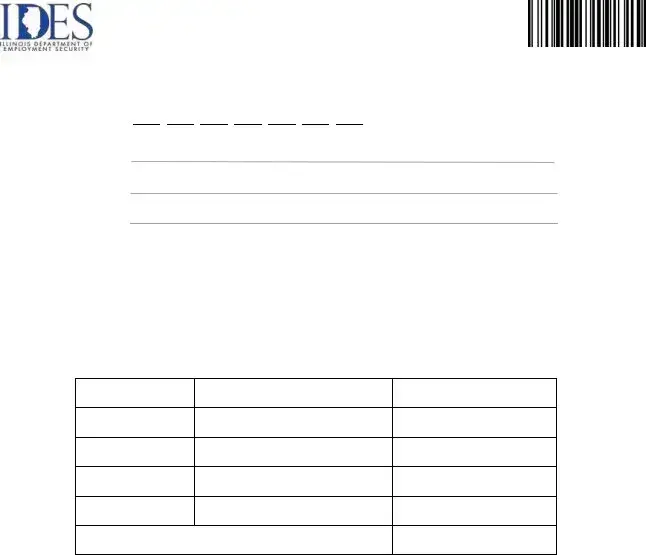
UI Account Number
Employer Name
Mailing Address
City - State - Zip Code
A.BASIS FOR CLAIM. (If more space is required, attach additional sheets)
____________________________________________________________________________
B.FOR THE YEAR: _______ (Enter year applicable to this claim. Prepare a separate claim for each year)
C.DESCRIPTION OF PAYMENTS. Please list the payments for which a refund is requestedbelow:
DATE OF PAYMENT
ORIGINAL AMOUNT OF PAYMENT
AMOUNT TO BE REFUNDED
TOTAL AMOUNT OF THIS CLAIM:
Your refund may be sent to you either in the form of Direct Deposit or a Paper Check.
If you choose Direct Deposit, complete page 4 and return it with this page 3.
Payment Method (Select One): |
|
Direct Deposit |
|
Paper Check |
I, the undersigned, certify that the information contained in this claim, including any other attachments, is true and correct to the best of my knowledge and belief, that I have authority to act on behalf of the abovenamed employer, and that no claim for this erroneous payment has previously been made.
Printed Name __________________________________ |
Signed by ____________________________________ |
|
Official Title __________________________________ |
Date |
____________________________________ |
Note: This claim for refund must be signed by an owner, partner, officer or authorized agent within the employing enterprise. If signed by another person, a Power of Attorney must be on file. This state agency is requesting disclosure of information that is necessary to accomplish the statutory purpose as outlined under 820 ILCS 405/2201. Disclosure of this information is voluntary. However, failure to supply the information required by this form will result in your refund request being denied.
Page 3 of 4

Direct Deposit Authorization
(Complete and return with Page 3 only if electing Direct Deposit)
Employer Name:
Employer UI Account Number (7 Digits):
If Direct Deposit is Chosen, Please Provide the Employer’s Bank Information Below
Employer FEIN Number (9 Digits):
Bank Name: |
____________________________________________ |
Bank Routing Number: |
____________________________________________ |
Bank Account Number: |
____________________________________________ |
Bank Account Number
Name on Bank Account: |
____________________________________________ |
||||
Type of Bank Account: |
|
Business Checking |
|
Checking |
|
|
|
||||
|
|
|
|
||
(Select Only One) |
|
|
Business Savings |
|
Savings |
|
|
|
|||
|
|
|
|
|
|
Printed Name __________________________________ |
Signed by ____________________________________ |
If you elected to receive a Paper Check, fax only Page 3 to the fax number below.
If you elected Direct Deposit, fax both Pages 3 and 4 (in that order)
to the fax number below.
Fax:
Page 4 of 4
| Fact Name | Fact Description |
|---|---|
| Form Purpose | The UI-28 form is used to request a refund for overpayments made in unemployment insurance contributions. |
| Submission Method | Applicants can submit the UI-28 form online through MyTax Illinois or by faxing or mailing the completed form. |
| Direct Deposit Option | Refunds can be received via direct deposit or as a paper check, depending on the applicant's choice. |
| Governing Law | The UI-28 form is governed by the Illinois Unemployment Insurance Act, specifically under 820 ILCS 405. |
| Deadline for Refund Requests | Applicants have three years from the date of overpayment to request a refund, with specific exceptions for certain overpayments. |
| Separate Claims | A separate UI-28 form must be submitted for each calendar year for which a refund is requested. |
| Contact Information | For questions, individuals can contact the IDES Employer Hotline at 1-800-247-4984. |
| Signature Requirement | The form must be signed by an owner, partner, officer, or authorized agent of the employing enterprise. |
Completing the Illinois UI-28 form requires careful attention to detail to ensure that your refund request is processed efficiently. Follow these steps to fill out the form correctly. After completing the form, you will need to submit it online or via fax or mail as specified in the instructions.
Once the form is completed, it can be submitted online through MyTax Illinois or sent via fax or mail to the appropriate address. Make sure to keep a copy of the completed form for your records.
What is the Illinois UI-28 form?
The Illinois UI-28 form is a Refund Request Form used by employers to request a refund for any overpayments made towards unemployment insurance contributions. It allows employers to apply for a refund online or by submitting a completed form via fax or mail to the Illinois Department of Employment Security (IDES).
How can I submit the UI-28 Refund Request?
You can submit the UI-28 Refund Request online through MyTax Illinois for a quick and easy process. Simply log onto the MyTax Illinois website, navigate to the Unemployment Insurance section, and click on “Request a Refund.” Alternatively, you can complete the form and either fax it to 217-557-1948 or mail it to the IDES Refund Unit at their Chicago address.
What are the options for receiving my refund?
You have two options for receiving your refund: Direct Deposit or a Paper Check. If you choose Direct Deposit, you will need to complete an additional page of the UI-28 form that collects your bank information. If you prefer a Paper Check, you only need to submit the main page of the form.
How long do I have to request a refund for an overpayment?
You have three years from the date of the overpayment to either use the credit or request a refund. However, for overpayments that occurred between January 1, 2015, and the effective date of House Bill 2699, you have until June 30, 2018, or three years from the date of the overpayment, whichever is later.
What if I need to correct individual worker’s wages?
If you need to adjust individual worker’s wages that were not previously corrected, you must complete Form UI-40C, which is the Employer's Correction Report. This form must be submitted along with your UI-28 form to ensure that all necessary adjustments are made accurately.
What happens if I provide incomplete information on the UI-28 form?
Providing incomplete information can delay the processing of your claim and may even lead to a denial of your refund request. It’s crucial to fill out all sections of the form completely and accurately to avoid any issues.
Who needs to sign the UI-28 form?
The UI-28 form must be signed by an owner, partner, officer, or authorized agent of the employing enterprise. If someone else signs the form, a Power of Attorney must be on file to validate that person’s authority to act on behalf of the employer.
Incomplete Information: Failing to provide detailed explanations in the BASIS OF CLAIM section can lead to delays. It’s essential to fully outline the reasons for the refund request.
Incorrect Year: Entering the wrong year in the FOR THE YEAR section is a common mistake. Each claim must correspond to the correct calendar year, requiring separate submissions for different years.
Mismatch of Amounts: The total amount claimed must match the sum of the individual refund amounts listed. A discrepancy here can result in rejection of the claim.
Failure to Sign: Neglecting to sign the form or provide an official title can lead to processing delays. The claim must be signed by an authorized individual associated with the employer.
Incorrect Address: Providing an outdated address without updating it through the appropriate channels can complicate communication and affect the refund process.
Direct Deposit Errors: If opting for direct deposit, ensure that all bank information is accurate. Mistakes in routing or account numbers can result in funds being sent to the wrong account.
The Illinois UI-28 form is used to request a refund for overpayments made to the unemployment insurance system. When submitting this form, there are several other documents that may be required or helpful in processing your request. Below is a list of these forms and documents, along with a brief description of each.
These documents play an important role in ensuring that the refund request is processed smoothly and efficiently. It is advisable to have all necessary forms completed and submitted as required to avoid delays.
The Illinois UI-28 form serves a specific purpose related to refund requests for unemployment insurance overpayments. However, it shares similarities with several other forms that are used in various contexts for similar purposes. Here are six documents that are comparable to the UI-28 form:
Understanding these forms can help employers navigate their responsibilities effectively. Each serves a unique purpose but shares the common goal of ensuring accurate reporting and facilitating any necessary adjustments or refunds.
When filling out the Illinois UI-28 form, there are important guidelines to follow. Here’s a list of things you should and shouldn’t do:
Understanding the Illinois UI-28 form is crucial for employers seeking refunds for overpayments. However, several misconceptions can lead to confusion and delays in processing. Here are eight common misunderstandings:
By dispelling these misconceptions, employers can navigate the refund process more effectively and avoid unnecessary complications. Taking prompt action and ensuring accuracy can make all the difference in receiving your refund in a timely manner.
Key Takeaways for Filling Out and Using the Illinois UI-28 Form
For additional assistance, you can contact the IDES Employer Hotline at 1-800-247-4984.