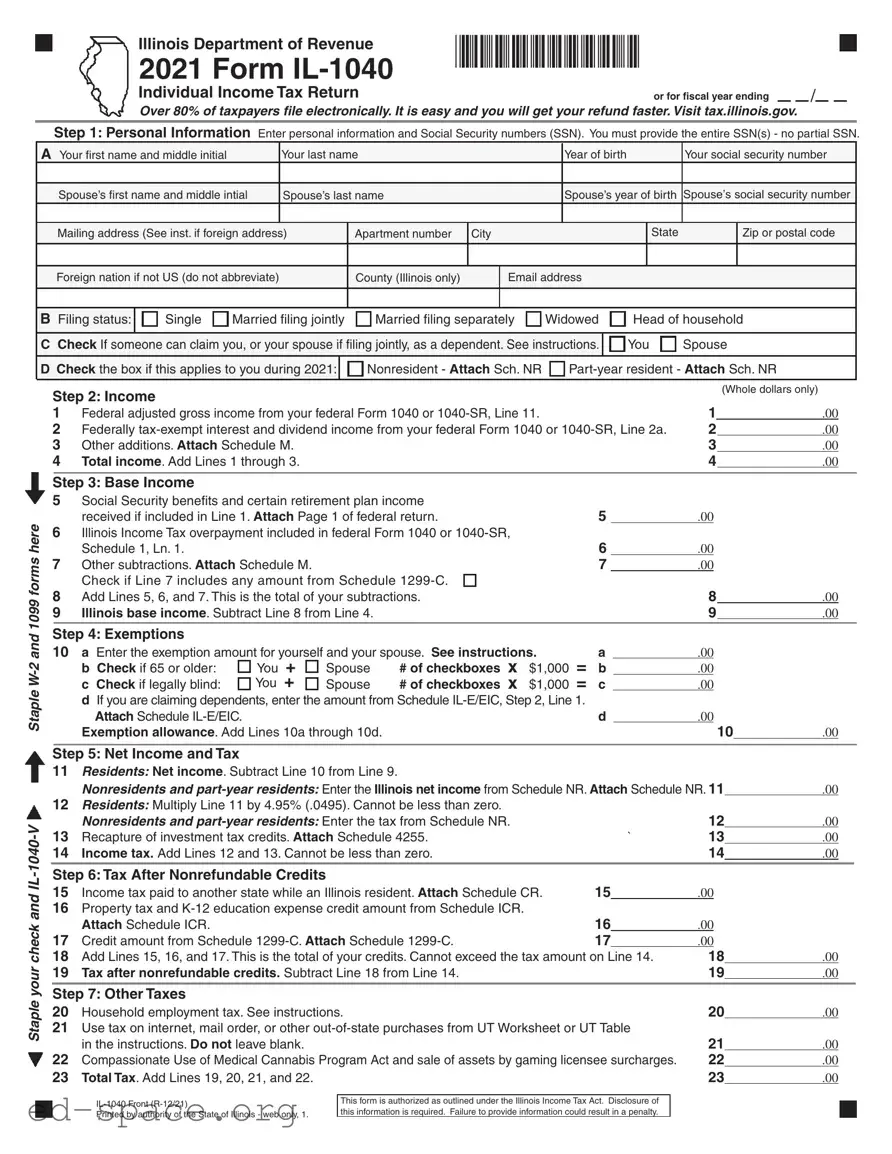
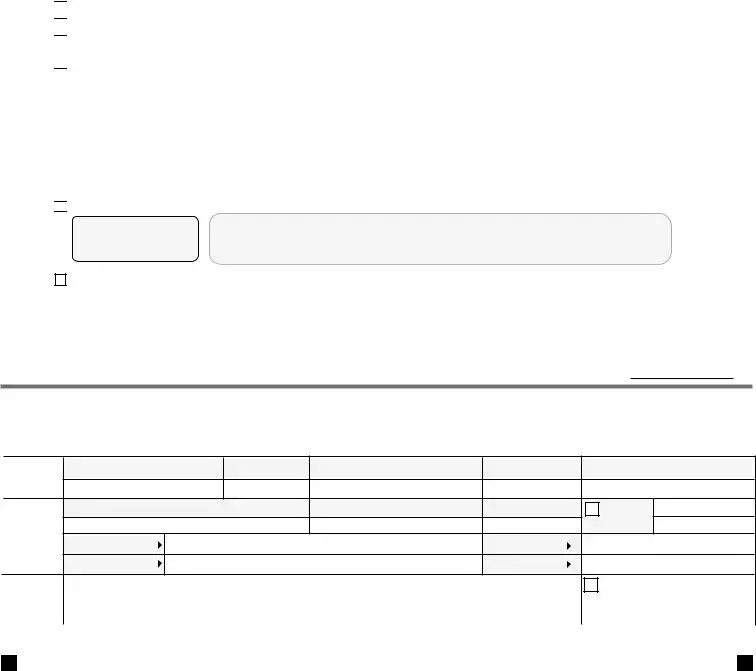
The Illinois Tax Form, specifically the IL-1040, serves as a crucial document for residents and part-year residents of Illinois to report their individual income tax. This form requires taxpayers to provide essential personal information, including Social Security numbers for both the taxpayer and their spouse, if applicable. It also prompts individuals to indicate their filing status, which can range from single to married filing jointly, among others. Income reporting is a significant component of the form, where taxpayers must disclose their federal adjusted gross income, as well as any federally tax-exempt interest and other additions. After establishing total income, the form guides users through the calculation of base income, allowing for specific subtractions such as Social Security benefits and other eligible deductions. Exemptions are also addressed, providing taxpayers the opportunity to reduce their taxable income based on age, blindness, or dependents. Once these calculations are complete, the form leads individuals through determining their net income, tax obligations, and any applicable credits that may reduce their overall tax liability. Finally, the form includes sections for payments made, any potential refunds, and amounts owed, ensuring that all aspects of an individual’s tax situation are comprehensively covered.
|
Illinois Department of Revenue |
*60012211W* |
|
|
|
|
|||||
|
2021 Form |
|
|
|
|
|
|
|
|
|
|
|
Individual Income Tax Return |
or for fiscal year ending |
|
|
|
/ |
|
|
|
|
|
Over 80% of taxpayers file electronically. It is easy and you will get your refund faster. Visit tax.illinois.gov.
Step 1: Personal Information Enter personal information and Social Security numbers (SSN). You must provide the entire SSN(s) - no partial SSN.
A Your first name and middle initial |
|
Your last name |
|
|
|
Year of birth |
|
|
Your social security number |
|||||
|
|
|
|
|
|
|
|
|
|
|
|
|
|
|
Spouse’s first name and middle intial |
Spouse’s last name |
|
|
|
Spouse’s year of birth |
Spouse’s social security number |
||||||||
|
|
|
|
|
|
|
|
|
|
|
|
|
|
|
Mailing address (See inst. if foreign address) |
Apartment number |
City |
|
|
|
|
State |
|
Zip or postal code |
|||||
|
|
|
|
|
|
|
|
|
|
|
|
|
|
|
Foreign nation if not US (do not abbreviate) |
|
|
County (Illinois only) |
|
Email address |
|
|
|
|
|||||
|
|
|
|
|
|
|
|
|
|
|
|
|
|
|
|
|
|
|
|
|
|
|
|
|
|
|
|
|
|
B Filing status: |
Single |
Married filing jointly |
Married filing separately |
Widowed |
Head of household |
|||||||||
|
|
|
|
|
|
|
|
|
|
|
|
|
||
C Check If someone can claim you, or your spouse if filing jointly, as a dependent. See instructions. |
|
You |
Spouse |
|||||||||||
D Check the box if this applies to you during 2021: |
|
Nonresident - Attach Sch. NR |
|
|||||||||||
Staple
Staple your check and
Step 2: Income |
|
|
|
|
(Whole dollars only) |
|
|
|
|
|
|
|
|
||
1 |
Federal adjusted gross income from your federal Form 1040 or |
|
|
1 |
.00 |
|
|
2 |
Federally |
2 |
.00 |
|
|||
3 |
Other additions. Attach Schedule M. |
|
|
3 |
.00 |
|
|
4 |
Total income. Add Lines 1 through 3. |
|
|
4 |
.00 |
|
|
|
|
|
|
|
|
|
|
Step 3: Base Income |
|
|
|
|
|
|
|
5 |
Social Security benefits and certain retirement plan income |
|
|
|
|
|
|
|
received if included in Line 1. Attach Page 1 of federal return. |
5 |
|
.00 |
|
|
|
6Illinois Income Tax overpayment included in federal Form 1040 or
|
Schedule 1, Ln. 1. |
|
|
|
|
|
|
6 |
.00 |
|
|
|
|
7 |
Other subtractions. Attach Schedule M. |
|
|
|
|
7 |
.00 |
|
|
|
|||
|
Check if Line 7 includes any amount from Schedule |
|
|
|
|
|
|
|
|
||||
8 |
Add Lines 5, 6, and 7. This is the total of your subtractions. |
|
|
|
8 |
.00 |
|
||||||
9 |
Illinois base income. Subtract Line 8 from Line 4. |
|
|
|
|
9 |
.00 |
|
|||||
|
|
|
|
|
|
|
|
|
|
|
|
|
|
Step 4: Exemptions |
|
|
|
|
|
|
|
|
|
|
|
|
|
10 |
a Enter the exemption amount for yourself and your spouse. See instructions. |
|
a |
|
.00 |
|
|
|
|||||
|
b Check if 65 or older: |
You |
+ |
Spouse |
# of checkboxes x |
$1,000 |
= |
b |
|
.00 |
|
|
|
|
c Check if legally blind: |
You |
+ |
Spouse |
# of checkboxes x |
$1,000 |
= |
c |
|
.00 |
|
|
|
dIf you are claiming dependents, enter the amount from Schedule
Attach Schedule |
d |
.00 |
|
|
|
Exemption allowance. Add Lines 10a through 10d. |
|
10 |
.00 |
|
|
|
|
|
|
|
|
Step 5: Net Income and Tax
11Residents: Net income. Subtract Line 10 from Line 9.
|
Nonresidents and |
.00 |
|
||||
12 |
Residents: Multiply Line 11 by 4.95% (.0495). Cannot be less than zero. |
|
|
|
|
|
|
|
Nonresidents and |
|
|
12 |
.00 |
|
|
13 |
Recapture of investment tax credits. Attach Schedule 4255. |
` |
13 |
.00 |
|
||
14 |
Income tax. Add Lines 12 and 13. Cannot be less than zero. |
|
|
14 |
.00 |
|
|
|
|
|
|
|
|
|
|
Step 6: Tax After Nonrefundable Credits |
|
|
|
|
|
|
|
15 |
Income tax paid to another state while an Illinois resident. Attach Schedule CR. |
15 |
|
.00 |
|
|
|
16Property tax and
|
Attach Schedule ICR. |
16 |
|
.00 |
|
|
|
17 |
Credit amount from Schedule |
17 |
|
.00 |
|
|
|
18 |
Add Lines 15, 16, and 17. This is the total of your credits. Cannot exceed the tax amount on Line 14. |
18 |
.00 |
|
|||
19 |
Tax after nonrefundable credits. Subtract Line 18 from Line 14. |
|
|
19 |
.00 |
|
|
|
|
|
|
|
|
|
|
Step 7: Other Taxes |
|
|
|
|
|
|
|
20 |
Household employment tax. See instructions. |
|
|
20 |
.00 |
|
|
21Use tax on internet, mail order, or other
|
in the instructions. Do not leave blank. |
21 |
.00 |
22 |
Compassionate Use of Medical Cannabis Program Act and sale of assets by gaming licensee surcharges. |
22 |
.00 |
23 |
Total Tax. Add Lines 19, 20, 21, and 22. |
23 |
.00 |
Printed by authority of the State of Illinois - web only, 1.
This form is authorized as outlined under the Illinois Income Tax Act. Disclosure of this information is required. Failure to provide information could result in a penalty.
|
|
*60012212W* |
|
|
|
|
|
||
24 |
24 |
|
|
|
|||||
Total tax from Page 1, Line 23. |
|
|
.00 |
|
|||||
|
|
|
|
|
|
|
|
|
|
|
Step 8: Payments and Refundable Credit |
|
|
|
|
|
|
|
|
25 |
Illinois Income Tax withheld. Attach Schedule |
25 |
|
.00 |
|
|
|
|
|
26 |
Estimated payments from Forms |
|
|
|
|
|
|
|
|
|
|
including any overpayment applied from a prior year return. |
26 |
|
.00 |
|
|
|
|
27 |
27 |
|
.00 |
|
|
|
|
||
28 |
28 |
|
.00 |
|
|
|
|
||
29 |
Earned Income Credit from Schedule |
29 |
|
.00 |
|
|
|
|
|
30 |
Total payments and refundable credit. Add Lines 25 through 29. |
30 |
.00 |
|
|
|
|
|
|
Step 9: Total |
|
|
|
|
31 |
If Line 30 is greater than Line 24, subtract Line 24 from Line 30. |
31 |
.00 |
|
32 |
If Line 24 is greater than Line 30, subtract Line 30 from Line 24. |
32 |
.00 |
|
|
|
|
|
|
Step 10: Underpayment of Estimated Tax Penalty and Donations - Only complete Step 10 for
33 |
33 |
|
.00 |
a Check if at least
b Check if you or your spouse are 65 or older and permanently living in a nursing home.
c Check if your income was not received evenly during the year and you annualized your income on Form
d Check if you were not required to file an Illinois Individual Income Tax return in the previous tax year.
34 |
Voluntary charitable donations. Attach Schedule G. |
34 |
|
.00 |
|
|
35 |
Total penalty and donations. Add Lines 33 and 34. |
|
35 |
.00 |
|
|
|
|
|
|
|
|
|
Step 11: Refund
36If you have an amount on Line 31 and this amount is greater than Line 35, subtract Line 35 from Line 31.
This is your overpayment. |
36 |
.00 |
37 Amount from Line 36 you want refunded to you. Check one box on Line 38. See instructions. |
37 |
.00 |
38I choose to receive my refund by
a direct deposit - Complete the information below if you check this box.
You may also contribute |
Routing number |
|
|
|
|
|
|
|
|
|
|
|
|
|
Checking or |
|
Savings |
||||
to college savings funds |
|
|
|
|
|
|
|
|
|
|
|
|
|
|
|
|
|
|
|
|
|
|
|
|
|
|
|
|
|
|
|
|
|
|
|
|
|
|
|
|
|
|
|
here. See instructions! |
Account number |
|
|
|
|
|
|
|
|
|
|
|
|
|
|
|
|
|
|
|
|
|
|
|
|
|
|
|
|
|
|
|
|
|
|
|
|
|
|
|
|
|
|
b
paper check.
39 Amount to be credited forward. Subtract Line 37 from Line 36. See instructions. |
39 |
.00 |
|
|
|
|
|
Step 12: Amount You Owe
40 If you have an amount on Line 32, add Lines 32 and 35. - or - |
|
|
If you have an amount on Line 31 and this amount is less than Line 35, |
|
|
subtract Line 31 from Line 35. This is the amount you owe. See instructions. |
40 |
.00 |
Step 13: If this is a joint return, both you and your spouse must sign below.
Under penalties of perjury, I state that I have examined this return and, to the best of my knowledge, it is true, correct, and complete.
Sign |
Your signature |
Date (mm/dd/yyyy) Spouse’s signature |
Date (mm/dd/yyyy) Daytime phone number |
|||
Here |
|
|
|
( |
) |
|
|
|
|
|
|
||
Paid |
Print/Type paid preparer’s name |
Paid preparer’s signature |
Date (mm/dd/yyyy) |
|
Check if |
Paid Preparer’s PTIN |
|
|
|
|
|||
Preparer |
Firm’s name |
|
Firm’s FEIN |
|
|
|
Use Only |
|
|
|
|
||
|
|
|
( |
) |
|
|
|
Firm’s address |
|
Firm’s phone |
|
||
Third |
Designee’s name (please print) |
Designee’s phone number |
|
Check if the Department may |
|
|||
Party |
|
|
|
|
discuss this return with the third |
|
||
|
|
( |
) |
|
||||
Designee |
|
party designee shown in this step. |
|
|||||
|
|
|
|
|
|
|
|
|
Refer to the 2021
.
DR |
|
AP |
|
RR DC IR ID |
| Fact Name | Details |
|---|---|
| Form Type | The Illinois Form IL-1040 is the Individual Income Tax Return form used by residents and nonresidents for filing state income taxes. |
| Filing Method | Over 80% of taxpayers in Illinois file their returns electronically, which is encouraged for faster refunds. |
| Governing Law | This form is authorized under the Illinois Income Tax Act, which outlines the requirements for income tax reporting and payment. |
| Personal Information Requirement | Taxpayers must provide complete personal information, including full Social Security numbers for themselves and their spouses. |
Completing the Illinois Tax form is a straightforward process, but it requires attention to detail to ensure accuracy. Follow the steps carefully to fill out the form correctly. After completing the form, you will need to gather any required attachments, such as W-2 and 1099 forms, and submit it to the Illinois Department of Revenue.
What information do I need to provide when filling out the Illinois Tax form?
When completing the Illinois Tax form, you must provide personal information for yourself and your spouse, if applicable. This includes full names, Social Security numbers, dates of birth, and your mailing address. Ensure that you do not submit partial Social Security numbers. Additionally, you will need to indicate your filing status, which can be single, married filing jointly, married filing separately, widowed, or head of household. If applicable, check the box if someone can claim you or your spouse as a dependent.
How do I calculate my total income on the Illinois Tax form?
Total income is calculated by adding your federal adjusted gross income, federally tax-exempt interest and dividend income, and any other additions as indicated on the form. The total is found by summing the amounts listed on Lines 1 through 3. Ensure that all amounts are entered in whole dollars only to avoid calculation errors.
What are exemptions, and how do I claim them on the Illinois Tax form?
Exemptions reduce your taxable income and can be claimed for yourself, your spouse, and any dependents. On the form, you will find specific lines to enter exemption amounts. For yourself and your spouse, you will enter the exemption amount based on your age and whether you are legally blind. If you have dependents, you will also need to complete and attach Schedule IL-E/EIC to claim those exemptions. The total exemption allowance is calculated by adding all applicable amounts.
What should I do if I overpaid my taxes?
If you find that you have overpaid your taxes, you can claim a refund on your Illinois Tax form. This is done by calculating the difference between your total payments and the total tax owed. If your total payments exceed the tax amount, the form will guide you to the section where you can specify the amount you wish to have refunded. You may choose to receive your refund via direct deposit or a paper check.
How do I file my Illinois Tax form?
You have the option to file your Illinois Tax form electronically or by mail. Over 80% of taxpayers choose electronic filing because it is typically faster and more efficient, allowing for quicker refunds. If you prefer to file by mail, ensure that you staple your W-2 and 1099 forms to the front of your completed IL-1040. Follow the instructions provided on the form for the correct mailing address based on your situation.
Incomplete Personal Information: Ensure that all names, Social Security numbers, and birth years are complete and accurate for both you and your spouse.
Incorrect Filing Status: Double-check your filing status. Choosing the wrong status can affect your tax rate and exemptions.
Missing Attachments: Remember to attach required documents, such as W-2 and 1099 forms, as well as any necessary schedules.
Errors in Income Reporting: Report your federal adjusted gross income accurately. Mistakes can lead to penalties or delays.
Neglecting Exemptions: Don’t forget to claim exemptions for yourself, your spouse, and any dependents. This can significantly lower your taxable income.
Ignoring Tax Credits: Make sure to include any tax credits you qualify for, such as credits for property taxes or K-12 education expenses.
Incorrect Calculation of Tax: Double-check your math. An error in calculating your total tax can lead to underpayment or overpayment.
Missing Signatures: If filing a joint return, both spouses must sign. An unsigned return may be considered invalid.
Failure to Review Instructions: Always read the instructions carefully. They contain crucial information that can help you avoid mistakes.
Late Filing: Submit your return on time to avoid penalties. If you need more time, consider filing for an extension.
When filing taxes in Illinois, several forms and documents often accompany the Illinois Tax Form IL-1040. These documents help provide additional information, support claims, and ensure compliance with state tax regulations. Below is a list of commonly used forms that taxpayers may need to include with their Illinois tax return.
Understanding these forms can simplify the tax filing process and help ensure that taxpayers accurately report their income and claim all eligible credits. By preparing the necessary documentation, individuals can navigate their tax obligations more effectively.
When filling out the Illinois Tax form, it is essential to follow certain guidelines to ensure accuracy and compliance. Here are four things you should and shouldn't do: