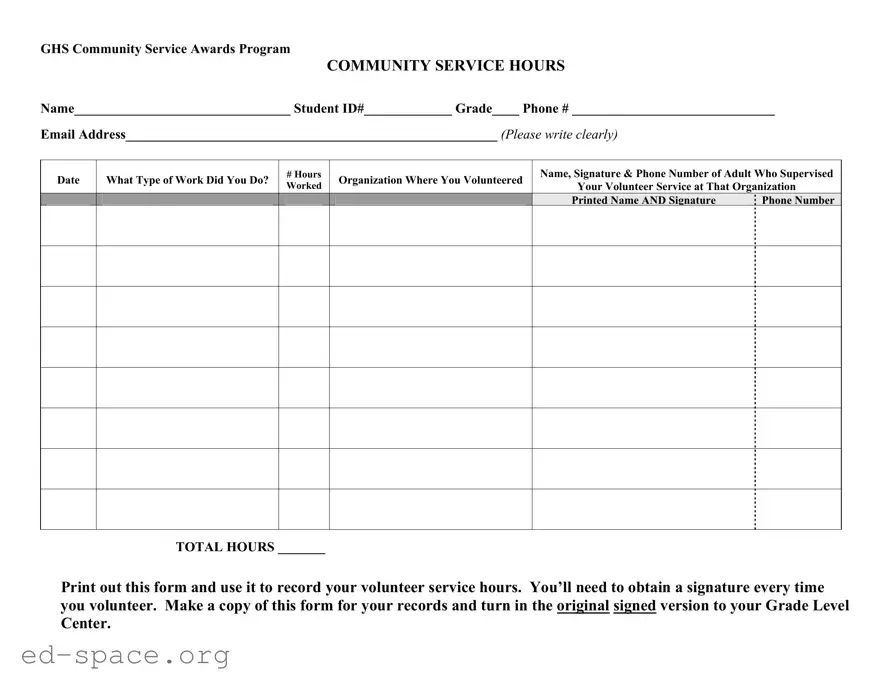
The Community Service form is an essential tool for students participating in the GHS Community Service Awards Program. It serves as a record-keeping document for volunteer hours, ensuring that students can accurately track their contributions to the community. The form requires basic information, including the student's name, student ID number, grade, phone number, and email address. Each entry on the form captures details about the type of work performed, the number of hours volunteered, and the organization where the service took place. Additionally, it mandates that students obtain the signature of an adult supervisor from the organization, which confirms the authenticity of the volunteer hours claimed. Students must print out the form to record their service hours and are advised to keep a copy for their records. Finally, the original signed form must be submitted to the Grade Level Center, ensuring that all volunteer efforts are officially recognized and documented.

GHS Community Service Awards Program
|
|
|
|
|
|
|
|
COMMUNITY SERVICE HOURS |
|
|
|
|
|||||
Name________________________________ Student ID#_____________ Grade____ Phone # ______________________________ |
|||||||||||||||||
Email Address_______________________________________________________ (Please write clearly) |
|
|
|
|
|||||||||||||
|
|
|
|
|
|
|
|
|
|
|
|
|
|
|
|
|
|
|
Date |
|
|
What Type of Work Did You Do? |
|
|
# Hours |
|
|
Organization Where You Volunteered |
|
|
Name, Signature & Phone Number of Adult Who Supervised |
||||
|
|
|
|
|
Worked |
|
|
|
|
Your Volunteer Service at That Organization |
|||||||
|
|
|
|
|
|
|
|
|
|
|
|
||||||
|
|
|
|
|
|
|
|
|
|
|
|
|
Printed Name AND Signature |
|
|
Phone Number |
|
|
|
|
|
|
|
|
|
|
|
|
|
|
|
|
|
|
|
|
|
|
|
|
|
|
|
|
|
|
|
|
|
|
|
|
|
|
|
|
|
|
|
|
|
|
|
|
|
|
|
|
|
|
|
|
|
|
|
|
|
|
|
|
|
|
|
|
|
|
|
|
|
|
|
|
|
|
|
|
|
|
|
|
|
|
|
|
|
|
|
|
|
|
|
|
|
|
|
|
|
|
|
|
|
|
|
|
|
|
|
|
|
|
|
|
|
|
|
|
|
|
|
|
|
|
|
|
|
|
|
|
|
|
|
|
|
|
|
|
|
|
|
|
|
|
|
|
|
|
|
|
|
|
|
|
|
|
|
|
|
|
|
|
|
|
|
|
|
|
|
|
|
|
|
|
|
|
|
|
|
|
|
|
|
|
|
|
|
|
|
|
|
|
|
|
|
|
|
|
|
|
|
|
|
|
|
|
|
|
|
|
|
|
|
|
|
|
|
|
|
|
|
|
|
|
|
|
|
|
|
|
|
|
|
|
|
|
|
|
|
|
|
|
|
|
|
|
|
|
|
|
|
|
|
|
|
|
|
|
|
|
|
|
|
|
|
|
|
|
|
|
|
|
|
|
|
|
|
|
|
|
|
|
|
|
|
|
|
|
|
|
|
|
|
|
|
|
|
|
|
|
|
|
|
|
|
|
|
|
|
|
|
|
|
|
|
|
|
|
|
|
|
|
|
|
|
|
|
|
|
|
|
|
|
|
|
|
|
|
|
|
|
|
|
|
|
|
|
|
|
|
|
|
|
|
|
|
|
|
|
|
|
|
|
|
|
|
|
|
|
|
|
|
|
|
|
|
|
|
|
|
|
|
|
|
|
|
|
|
|
|
|
|
|
|
|
|
|
|
|
|
|
|
|
|
|
|
|
|
|
|
|
|
|
|
|
|
|
|
|
|
|
|
|
|
|
|
|
|
|
|
|
|
|
|
|
|
|
|
|
|
|
|
|
|
|
|
|
|
|
|
|
|
|
|
|
|
|
|
|
|
|
|
|
|
|
|
|
|
|
|
|
|
|
|
|
|
|
|
|
|
|
|
|
|
|
|
|
|
|
|
|
|
|
|
|
|
|
|
|
|
|
|
|
|
|
|
|
|
|
|
|
|
|
|
|
|
|
|
|
|
|
|
|
|
|
|
|
|
|
|
|
|
|
|
|
|
|
|
|
|
|
|
|
|
|
|
|
|
|
|
|
|
|
|
|
|
|
TOTAL HOURS _______
Print out this form and use it to record your volunteer service hours. You’ll need to obtain a signature every time you volunteer. Make a copy of this form for your records and turn in the original signed version to your Grade Level Center.
| Fact Name | Description |
|---|---|
| Purpose | The GHS Community Service Awards Program encourages students to engage in volunteer work, promoting community involvement and personal growth. |
| Required Information | Students must provide their name, student ID number, grade, phone number, and email address on the form. Clear handwriting is essential for accurate processing. |
| Volunteer Hours | Students should record the type of work performed, the number of hours volunteered, and the organization where the service took place. |
| Adult Supervision | A supervising adult must sign the form, confirming the student's volunteer hours. Their printed name, signature, and phone number are required. |
| Submission Process | After completing the form, students should keep a copy for their records and submit the original signed version to their Grade Level Center. |
Completing the Community Service form is a straightforward process. Make sure to gather all necessary information before you begin. Once filled out, you will need to obtain the required signatures and submit the form to your Grade Level Center.
What is the purpose of the Community Service form?
The Community Service form is designed to track and verify volunteer hours for students participating in the GHS Community Service Awards Program. It helps ensure that students receive recognition for their contributions to the community.
How should I fill out the Community Service form?
Begin by entering your name, student ID number, grade, phone number, and email address at the top of the form. Clearly document the type of work you did, the number of hours volunteered, and the organization where you served. Finally, make sure to include the printed name, signature, and phone number of the adult who supervised your work.
How do I obtain the required signature?
You need to have an adult supervisor sign the form each time you complete volunteer work. This adult should be someone affiliated with the organization where you volunteered. Their signature serves as proof of your participation and the hours you worked.
What should I do with the completed form?
After filling out the form and obtaining the necessary signatures, print it out. Keep a copy for your records, and then turn in the original signed version to your Grade Level Center. This ensures that your volunteer hours are officially recorded.
Is there a specific format for reporting hours?
Yes, you should report your hours in whole numbers. For example, if you volunteered for three and a half hours, you would record it as 3 hours. Make sure to accurately reflect the time spent volunteering to maintain the integrity of your submission.
Can I use the same form for multiple volunteer activities?
Absolutely! You can use the same Community Service form to record multiple volunteer activities. Just make sure to fill out a new section for each activity, including the type of work, hours, and supervisor's information.
What happens if I lose the form?
If you lose the Community Service form, you will need to recreate it. Fill out a new form with the same information and obtain the necessary signatures again. It’s a good practice to keep a digital copy or take a photo of the completed form for your records before submitting it.
Illegible Writing: One of the most common mistakes is not writing clearly. When filling out the form, ensure that all information is legible. If the details are difficult to read, it can lead to confusion or delays in processing.
Missing Information: People often forget to fill in all required fields. Make sure to include your name, student ID, grade, phone number, and email address. Omitting any of this information can result in your form being incomplete.
Incorrect Dates: Entering the wrong date for your volunteer work can create issues. Double-check the dates to ensure they match the actual days you volunteered. Accuracy is key!
Not Documenting Hours: Some individuals forget to record the number of hours worked. It’s essential to keep track of your hours accurately, as this is a requirement for the program.
Missing Supervisor Information: Always include the name, signature, and phone number of the adult who supervised your work. Failing to provide this information can lead to complications in verifying your service.
Not Keeping a Copy: After submitting the form, many forget to keep a copy for their records. Always make a photocopy of the signed form before turning it in. This will help you track your volunteer hours and provide proof if needed.
When participating in community service programs, there are several important forms and documents that may be needed alongside the Community Service form. Each of these documents serves a specific purpose to ensure that the volunteer experience is well-documented and recognized.
Having these forms ready can streamline the volunteer process and ensure that all necessary information is collected. Each document plays a vital role in creating a positive and organized community service experience.
The Community Service form shares similarities with several other documents commonly used in educational and volunteer settings. Here are eight documents that are comparable:
When filling out the Community Service form, attention to detail is crucial. Here are some important dos and don’ts to keep in mind:
Misconceptions about the Community Service form can lead to confusion and incomplete submissions. Here are seven common misconceptions:
Filling out the Community Service form is an essential step for students participating in the GHS Community Service Awards Program. Here are some key takeaways to keep in mind:
By following these guidelines, you can ensure that your community service hours are accurately recorded and recognized. Your contributions are valuable, and this process helps highlight your commitment to serving others.