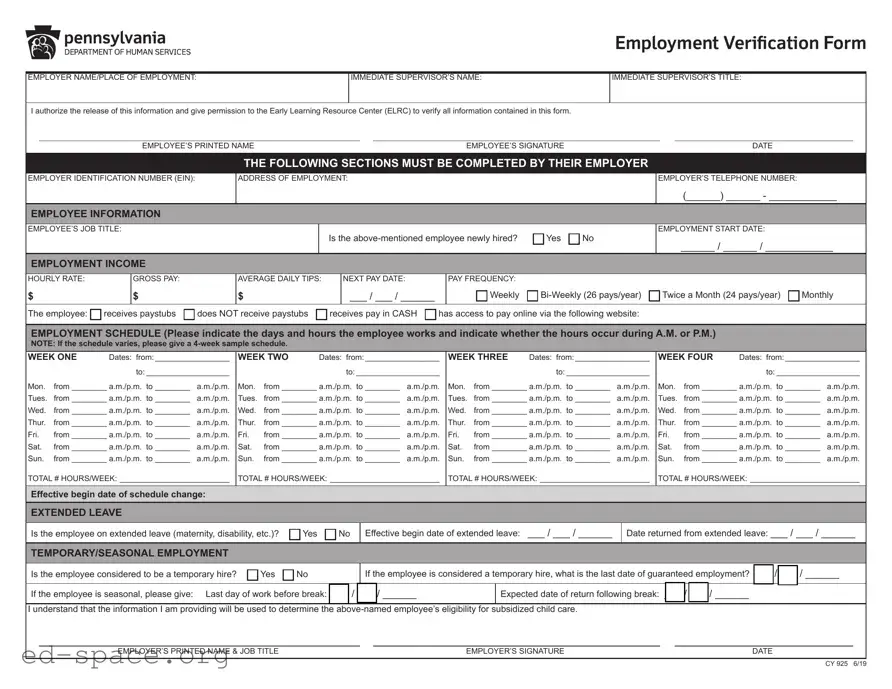
The CCIS Employment Verification Form plays a crucial role in determining an employee's eligibility for subsidized child care assistance. This form requires employers to provide essential information about their employees, including the employee's job title, employment start date, and income details such as hourly rate and gross pay. Employers must also indicate whether the employee is newly hired and provide a comprehensive work schedule that outlines the days and hours worked. If the employee is on extended leave or considered a temporary hire, this information must be noted as well. The form emphasizes the importance of accuracy, as it directly impacts the employee's ability to receive financial support for child care. An authorized company representative, rather than the employee, must complete and sign the form, ensuring that the data provided is reliable. This verification process not only helps employees access necessary resources but also aids the Early Learning Resource Center in managing its programs effectively.
|
|
|
|
|
Employment Verification Form |
|||
|
|
|
||||||
EMPLOYER NAME/PLACE OF EMPLOYMENT: |
IMMEDIATE SUPERVISOR’S NAME: |
IMMEDIATE SUPERVISOR’S TITLE: |
||||||
|
|
|
|
|
|
|
|
|
I authorize the release of this information and give permission to the Early Learning Resource Center (ELRC) to verify all information contained in this form. |
|
|
|
|
||||
|
|
|
|
|
|
|
|
|
|
EMPLOYEE’S PRINTED NAME |
|
|
EMPLOYEE’S SIGNATURE |
|
|
DATE |
|
THE FOLLOWING SECTIONS MUST BE COMPLETED BY THEIR EMPLOYER
EMPLOYER IDENTIFICATION NUMBER (EIN):
ADDRESS OF EMPLOYMENT:
EMPLOYER’S TELEPHONE NUMBER:
(______) ______ - ____________
EMPLOYEE INFORMATION
EMPLOYEE’S JOB TITLE:
Is the |
Yes |
No |
EMPLOYMENT START DATE:
______ / ______ / ____________
EMPLOYMENT INCOME
HOURLY RATE: |
GROSS PAY: |
AVERAGE DAILY TIPS: |
NEXT PAY DATE: |
PAY FREQUENCY: |
|
|
|
$ |
$ |
$ |
___ / ___ / ______ |
Weekly |
Twice a Month (24 pays/year) |
Monthly |
The employee: receives paystubs does NOT receive paystubs receives pay in CASH has access to pay online via the following website:
EMPLOYMENT SCHEDULE (Please indicate the days and hours the employee works and indicate whether the hours occur during A.M. or P.M.)
NOTE: If the schedule varies, please give a
WEEK ONE |
Dates: from:__________________ |
||
|
|
to:____________________ |
|
Mon. |
from_________ a.m./p.m. to_________ |
a.m./p.m. |
|
Tues. |
from_________ a.m./p.m. to_________ |
a.m./p.m. |
|
Wed. |
from_________ a.m./p.m. to_________ |
a.m./p.m. |
|
Thur. |
from_________ a.m./p.m. to_________ |
a.m./p.m. |
|
Fri. |
from_________ a.m./p.m. to_________ |
a.m./p.m. |
|
Sat. |
from_________ a.m./p.m. to_________ |
a.m./p.m. |
|
Sun. |
from_________ a.m./p.m. to_________ |
a.m./p.m. |
|
TOTAL # HOURS/WEEK: _________________________
WEEK TWO |
Dates: from:__________________ |
||
|
|
to:____________________ |
|
Mon. |
from_________ a.m./p.m. to_________ |
a.m./p.m. |
|
Tues. |
from_________ a.m./p.m. to_________ |
a.m./p.m. |
|
Wed. |
from_________ a.m./p.m. to_________ |
a.m./p.m. |
|
Thur. |
from_________ a.m./p.m. to_________ |
a.m./p.m. |
|
Fri. |
from_________ a.m./p.m. to_________ |
a.m./p.m. |
|
Sat. |
from_________ a.m./p.m. to_________ |
a.m./p.m. |
|
Sun. |
from_________ a.m./p.m. to_________ |
a.m./p.m. |
|
TOTAL # HOURS/WEEK: _________________________
WEEK THREE |
Dates: from:__________________ |
||
|
|
to:____________________ |
|
Mon. |
from_________ a.m./p.m. to_________ |
a.m./p.m. |
|
Tues. |
from_________ a.m./p.m. to_________ |
a.m./p.m. |
|
Wed. |
from_________ a.m./p.m. to_________ |
a.m./p.m. |
|
Thur. |
from_________ a.m./p.m. to_________ |
a.m./p.m. |
|
Fri. |
from_________ a.m./p.m. to_________ |
a.m./p.m. |
|
Sat. |
from_________ a.m./p.m. to_________ |
a.m./p.m. |
|
Sun. |
from_________ a.m./p.m. to_________ |
a.m./p.m. |
|
TOTAL # HOURS/WEEK: _________________________
WEEK FOUR |
Dates: from:__________________ |
||
|
|
to:____________________ |
|
Mon. |
from_________ a.m./p.m. to_________ |
a.m./p.m. |
|
Tues. |
from_________ a.m./p.m. to_________ |
a.m./p.m. |
|
Wed. |
from_________ a.m./p.m. to_________ |
a.m./p.m. |
|
Thur. |
from_________ a.m./p.m. to_________ |
a.m./p.m. |
|
Fri. |
from_________ a.m./p.m. to_________ |
a.m./p.m. |
|
Sat. |
from_________ a.m./p.m. to_________ |
a.m./p.m. |
|
Sun. |
from_________ a.m./p.m. to_________ |
a.m./p.m. |
|
TOTAL # HOURS/WEEK: _________________________
Effective begin date of schedule change:
EXTENDED LEAVE
Is the employee on extended leave (maternity, disability, etc.)? |
Yes |
No |
Effective begin date of extended leave: ___ / ___ / ______
Date returned from extended leave: ___ / ___ / ______
TEMPORARY/SEASONAL EMPLOYMENT
Is the employee considered to be a temporary hire? |
Yes |
No |
If the employee is considered a temporary hire, what is the last date of guaranteed employment? ___ / ___ / ______
If the employee is seasonal, please give: Last day of work before break: ___ / ___ / ______ |
|
Expected date of return following break: ___ / ___ / ______ |
|
|
|||||
|
|
|
|
||||||
I understand that the information I am providing will be used to determine the |
subsidized child care. |
|
|
||||||
|
|
|
|
|
|
|
|
|
|
|
EMPLOYER’S PRINTED NAME & JOB TITLE |
|
|
EMPLOYER’S SIGNATURE |
|
|
DATE |
|
|
CY 925 6/19
Employment Verification Form
Dear Employer:
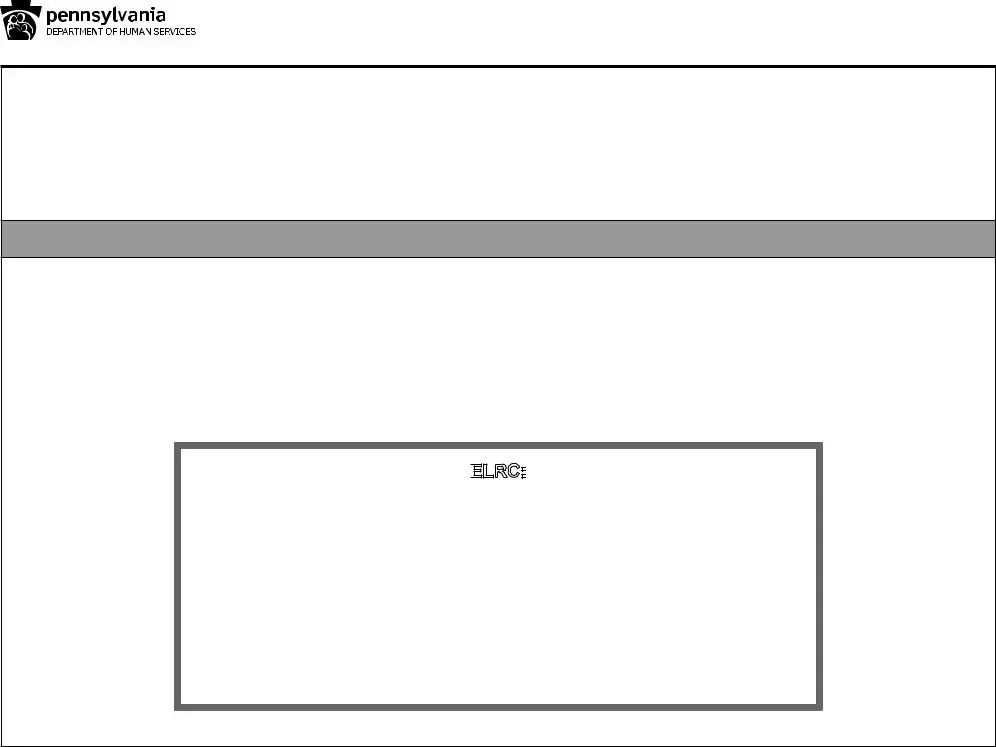
One of your employees has requested assistance paying his/her child care costs. We must verify his/her employment with you. This information will help us determine if this employee is eligible for the subsidized child care program. The form must be mailed directly to the Early Learning Resource Center (ELRC).
An authorized COMPANY REPRESENTATIVE (not the employee) must complete this form.
We must have an accurate record of your employee’s work schedule and employment income. Please complete the information on the back of this page. It is very important that the hours shown are specific and defined as either A.M. or P.M. (For example, 7:30 a.m. - 3:30 p.m.). If the employee’s schedule varies, please give a
Thank you for your time and assistance. If you have any questions about how to complete this form, please contact the ELRC listed below.
ELRC:
Early Learning Resource Center Region 17
PO Box 311
1430 DeKalb Street
Norristown, PA
(610)
CY 925 6/19
| Fact Name | Description |
|---|---|
| Purpose | The Ccis Employment Verification form is used to verify an employee's employment status for subsidized child care assistance. |
| Completion Requirement | Only an authorized company representative, not the employee, can complete and sign the form. |
| Information Required | The form requires details such as employer identification number, employee job title, income, and work schedule. |
| Governing Law | This form is governed by state-specific laws regarding child care assistance programs, which may vary by state. |
Filling out the CCIS Employment Verification form is a straightforward process, but it requires careful attention to detail. This form is essential for confirming an employee's job status and income, which will help determine eligibility for subsidized child care assistance. Follow the steps below to complete the form accurately.
Once you have completed the form, ensure that all sections are filled out accurately. The form must be sent directly to the Early Learning Resource Center (ELRC) by the employer. Make sure to keep a copy for your records. If you have any questions during the process, don’t hesitate to reach out to the ELRC for assistance.
What is the purpose of the CCIS Employment Verification Form?
The CCIS Employment Verification Form is designed to verify an employee's work status and income. This information is crucial for determining eligibility for subsidized child care assistance. By completing this form, employers help ensure that their employees can access financial support for child care, which can significantly ease the burden of child-rearing expenses.
Who is responsible for filling out the form?
An authorized company representative, not the employee, must complete the CCIS Employment Verification Form. This ensures that the information provided is accurate and reliable. The representative should be someone familiar with the employee's job status, such as a supervisor or HR personnel, to provide the necessary details regarding employment and income.
What information is required from the employer?
The employer needs to provide several key details, including the employer identification number (EIN), address of employment, and the employee's job title. Additionally, the employer must specify the employee's work schedule, income details, and whether the employee is on extended leave or is considered a temporary hire. This comprehensive information is essential for evaluating the employee's eligibility for child care assistance.
How should the completed form be submitted?
The completed CCIS Employment Verification Form must be mailed directly to the Early Learning Resource Center (ELRC). It is important that the form is sent promptly to avoid delays in the employee's application for subsidized child care. Employers should ensure that all sections are filled out accurately before submission to facilitate a smooth verification process.
What should an employer do if they have questions about the form?
If an employer has questions regarding how to complete the CCIS Employment Verification Form, they should reach out to the ELRC for assistance. Contact information is provided on the form, including phone numbers and a fax number. The ELRC staff can offer guidance and clarify any uncertainties to ensure the form is filled out correctly.
Failing to provide the employer identification number (EIN). This number is essential for proper identification.
Omitting the immediate supervisor’s name. This information is crucial for verification purposes.
Not indicating whether the employee is newly hired. This detail helps assess the employee's status.
Incorrectly filling out the employment income section. Ensure that gross pay, hourly rate, and average daily tips are accurate.
Providing an incomplete employment schedule. All days and hours worked must be specified clearly.
Neglecting to indicate if the employee is on extended leave. This affects their eligibility for benefits.
Forgetting to sign the form. An authorized company representative must provide their signature.
Using ambiguous time formats for the work schedule. Clearly specify A.M. or P.M. for each entry.
Not providing a 4-week sample schedule when the employee's hours vary. This is necessary for accurate assessment.
Failing to submit the form directly to the Early Learning Resource Center (ELRC). Ensure it reaches the correct destination.
The CCIS Employment Verification form plays a crucial role in verifying an employee's work details for subsidized child care assistance. However, it is often accompanied by other documents that provide additional information or context. Below is a list of commonly used forms and documents that may be required alongside the CCIS Employment Verification form.
Gathering these documents can help ensure a smooth verification process. Each document serves a specific purpose and collectively provides a clearer picture of the employee's work situation and financial standing. If you have questions about any of these documents or how they relate to the CCIS Employment Verification form, it is advisable to consult with the Early Learning Resource Center or a qualified professional for guidance.
When filling out the CCIS Employment Verification form, it is essential to ensure accuracy and clarity. Here are some important do's and don'ts to keep in mind:
Misconceptions about the CCIS Employment Verification form can lead to confusion and errors in the verification process. Below are seven common misconceptions, along with clarifications for each.
Understanding these misconceptions can help streamline the verification process and ensure that employees receive the assistance they need for their child care costs.
Filling out the Ccis Employment Verification form is crucial for employees seeking assistance with child care costs. Here are key takeaways to keep in mind:
Following these guidelines ensures a smooth verification process and helps the employee access the support they need.