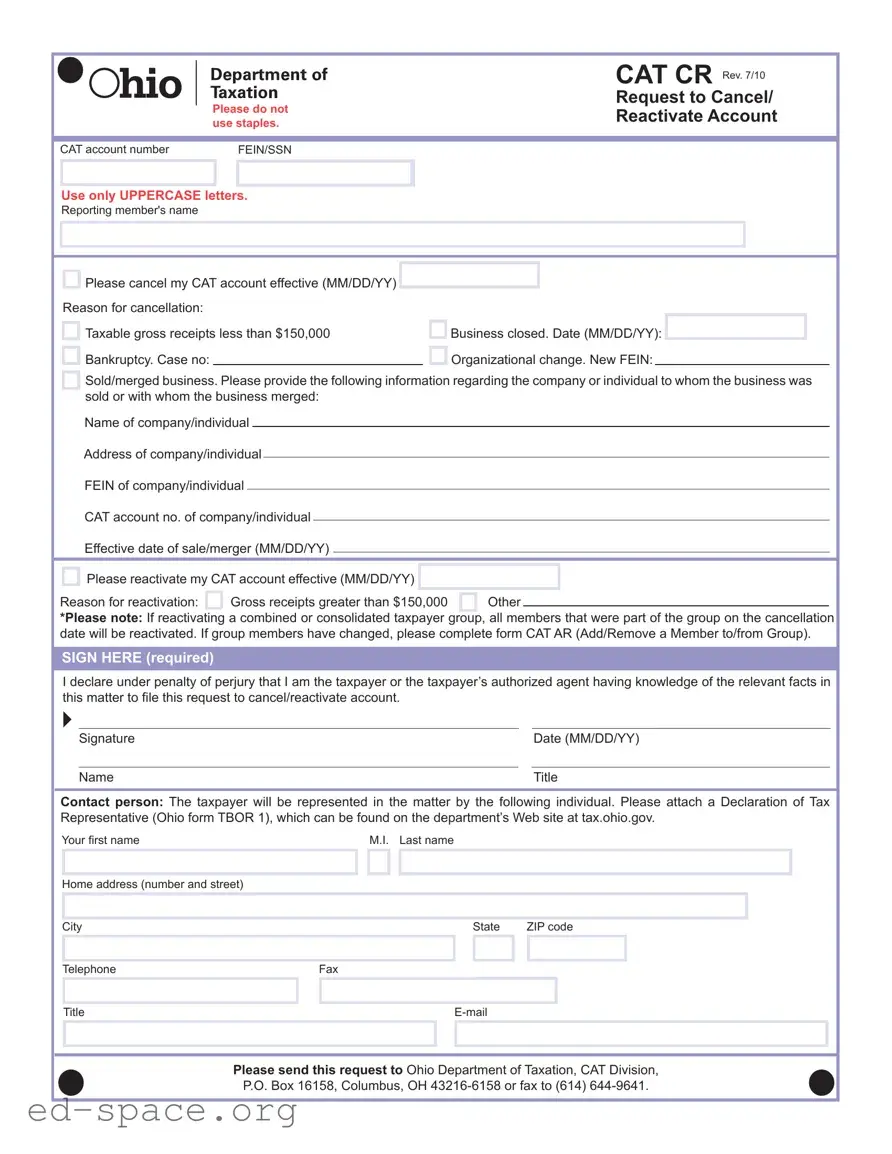
The CAT Cr Ohio form serves as a critical tool for businesses and individuals looking to manage their Commercial Activity Tax (CAT) accounts in Ohio. This form facilitates the cancellation or reactivation of CAT accounts, allowing taxpayers to communicate their current status effectively to the Ohio Department of Taxation. Key elements of the form include the requirement to provide an account number, the taxpayer's Federal Employer Identification Number (FEIN) or Social Security Number (SSN), and the name of the reporting member. When cancelling an account, taxpayers must indicate the effective date and select a reason for cancellation, such as having taxable gross receipts less than $150,000 or the closure of the business. In cases of reactivation, the form requires similar details, including the effective date and a justification for the reactivation, typically related to an increase in gross receipts. Furthermore, if a business has undergone significant changes, such as a merger or sale, additional information about the new entity must be provided. The form also emphasizes the importance of signatures and declarations, ensuring that the request is filed by the appropriate taxpayer or their authorized agent. By following the outlined procedures and providing the necessary information, taxpayers can navigate their CAT obligations with greater ease.
|
|
|
|
|
|
|
CAT CR Rev. 7/10 |
|
|
Please do not |
|
|
Request to Cancel/ |
||
|
|
|
|
Reactivate Account |
|||
|
|
use staples. |
|
|
|||
|
|
|
|
|
|||
|
|
|
|
|
|
|
|
|
|
|
|
|
|
|
|
|
CAT account number |
|
|
FEIN/SSN |
|
|
|
|
|
|
|
|
|
|
|
|
|
|
|
|
|
|
|
Use only UPPERCASE letters.
Reporting member's name
Please cancel my CAT account effective (MM/DD/YY)
Reason for cancellation:
Taxable gross receipts less than $150,000 Bankruptcy. Case no:
/
Business closed. Date (MM/DD/YY): Organizational change. New FEIN:
Sold/merged business. Please provide the following information regarding the company or individual to whom the business was sold or with whom the business merged:
Name of company/individual
Address of company/individual
FEIN of company/individual
CAT account no. of company/individual
Effective date of sale/merger (MM/DD/YY)
|
|
Please reactivate my CAT account effective (MM/DD/YY) |
/ |
|
|
|
|
||
|
|
|
|
|
|
||||
|
|
|
|
|
|
|
|
|
|
Reason for reactivation: |
|
Gross receipts greater than $150,000 |
|
Other |
|
|
|||
|
|
|
|
|
|
|
|
|
|
*Please note: If reactivating a combined or consolidated taxpayer group, all members that were part of the group on the cancellation date will be reactivated. If group members have changed, please complete form CAT AR (Add/Remove a Member to/from Group).
SIGN HERE (required)
I declare under penalty of perjury that I am the taxpayer or the taxpayer’s authorized agent having knowledge of the relevant facts in this matter to fi le this request to cancel/reactivate account.
Signature |
|
Date (MM/DD/YY) |
|
|
|
Name |
|
Title |
Contact person: The taxpayer will be represented in the matter by the following individual. Please attach a Declaration of Tax Representative (Ohio form TBOR 1), which can be found on the department’s Web site at tax.ohio.gov.
Your fi rst name |
|
|
|
M.I. Last name |
|
|
|
|
|
|
|||||
|
|
|
|
|
|
|
|
|
|
|
|
|
|
|
|
Home address (number and street) |
|
|
|
|
|
|
|
|
|
|
|
|
|
|
|
|
|
|
|
|
|
|
|
|
|
|
|
|
|
|
|
|
|
|
|
|
|
|
|
|
|
|
|
|
|
|
|
City |
|
|
|
|
|
|
|
|
State |
ZIP code |
|
|
|
||
|
|
|
|
|
|
|
|
|
|
|
|
|
|
|
|
Telephone |
|
Fax |
|
|
|
|
|
|
|||||||
|
|
|
|
|
|
|
|
|
|
|
|
|
|
|
|
Title |
|
|
|
|
|
|
|
|
|
|
|
|
|
||
|
|
|
|
|
|
|
|
|
|
|
|
|
|
|
|
|
|
|
|
|
|
|
|
|
|
|
|
|
|
|
|
Please send this request to Ohio Department of Taxation, CAT Division,
P.O. Box 16158, Columbus, OH
| Fact Name | Description |
|---|---|
| Form Title | The form is titled "CAT CR" and is used for cancellation or reactivation of a CAT account. |
| Governing Law | This form is governed by Ohio Revised Code Chapter 5751, which outlines the Commercial Activity Tax (CAT) regulations. |
| Account Number Requirement | Users must provide their CAT account number and either FEIN or SSN when submitting the form. |
| Cancellation Reasons | Reasons for cancellation include gross receipts less than $150,000, bankruptcy, business closure, or organizational changes. |
| Reactivation Criteria | Reactivation is permitted if gross receipts exceed $150,000 or for other specified reasons. |
| Submission Instructions | Requests should be sent to the Ohio Department of Taxation, CAT Division, or faxed to (614) 644-9641. |
Filling out the CAT CR Ohio form is a straightforward process, but it requires careful attention to detail. This form is essential for individuals or businesses that need to cancel or reactivate their CAT account. Follow these steps to ensure that your submission is accurate and complete.
What is the CAT CR Ohio form?
The CAT CR Ohio form is used to cancel or reactivate a Commercial Activity Tax (CAT) account in Ohio. This form allows businesses to officially notify the Ohio Department of Taxation about changes in their tax status, such as closing a business or exceeding the gross receipts threshold.
Who needs to fill out the CAT CR Ohio form?
Any business or individual that has a CAT account in Ohio and wishes to cancel or reactivate it must complete this form. This includes businesses that have closed, merged, or have had significant changes in their financial situation.
What information is required on the form?
You will need to provide your CAT account number, FEIN or SSN, and the name of the reporting member. Additionally, you must indicate the reason for cancellation or reactivation and provide relevant dates. If applicable, information about the new owner or merged entity must also be included.
Can I cancel my CAT account for any reason?
No, you can only cancel your CAT account for specific reasons listed on the form. These include having taxable gross receipts less than $150,000, bankruptcy, business closure, or organizational changes. Make sure to select the appropriate reason for your situation.
What happens if I want to reactivate my CAT account?
If you wish to reactivate your CAT account, you must indicate this on the form and provide the effective date of reactivation. You must also specify the reason for reactivation, such as gross receipts exceeding $150,000. If you were part of a combined taxpayer group, all members will be reactivated unless changes have occurred.
How should I submit the CAT CR Ohio form?
You can send the completed form to the Ohio Department of Taxation, CAT Division, by mail or fax. The mailing address is P.O. Box 16158, Columbus, OH 43216-6158. If you choose to fax it, use the number (614) 644-9641.
Is there a signature required on the form?
Yes, a signature is required. You must sign the form to declare under penalty of perjury that you are the taxpayer or the authorized agent. This ensures that the information provided is accurate and truthful.
What if I need assistance filling out the form?
If you need help, consider reaching out to a tax professional or contacting the Ohio Department of Taxation directly. They can provide guidance on how to complete the form correctly and answer any specific questions you may have.
Not using UPPERCASE letters for the reporting member's name. This can lead to processing errors.
Forgetting to provide the correct CAT account number or FEIN/SSN. This information is crucial for identifying the account.
Neglecting to sign the form. A signature is required to validate the request.
Failing to include the effective date of cancellation or reactivation in the correct format (MM/DD/YY). This can cause delays in processing.
Using staples to attach documents. The form specifically requests that staples not be used.
Providing incomplete information about the company or individual involved in a sale or merger. All requested details must be filled out.
Not indicating a reason for cancellation or reactivation. This information is necessary for proper processing.
Overlooking the requirement to attach a Declaration of Tax Representative if applicable. This document is essential for representation.
Sending the form to the wrong address. Ensure it is sent to the Ohio Department of Taxation, CAT Division, as specified.
The CAT CR Ohio form is an essential document for businesses in Ohio to manage their Commercial Activity Tax (CAT) accounts. However, several other forms and documents are often used in conjunction with this form to ensure proper compliance and communication with the Ohio Department of Taxation. Below is a list of these forms, each serving a unique purpose.
Each of these documents plays a significant role in the overall tax management process for businesses in Ohio. Understanding their purpose and ensuring timely submission can help businesses maintain compliance and avoid potential penalties.
The CAT CR Ohio form is a specific document used for canceling or reactivating a Commercial Activity Tax (CAT) account in Ohio. Several other documents serve similar purposes in different contexts. Here’s a list of nine documents that share similarities with the CAT CR Ohio form:
When filling out the CAT Cr Ohio form, it is crucial to ensure accuracy and completeness. Here are eight essential do's and don'ts to guide you through the process:
Understanding the CAT CR Ohio form can be challenging. Here are some common misconceptions that people often have:
This is incorrect. The form specifically instructs not to use staples when submitting your request. This helps ensure that the form is processed smoothly without any issues.
In fact, the instructions clearly state that only UPPERCASE letters should be used. This requirement aids in clarity and reduces the chance of errors during processing.
The form specifies particular reasons for cancellation, such as taxable gross receipts being less than $150,000 or business closure. It’s important to select the appropriate reason to ensure compliance.
While reactivation is possible, it requires the submission of the form with proper reasons and adherence to guidelines. If your business structure has changed, additional forms may be necessary.
When filling out and using the CAT Cr Ohio form, consider the following key takeaways:
Timely submission is crucial to ensure your account status reflects your current business situation. Review all entries carefully before sending.