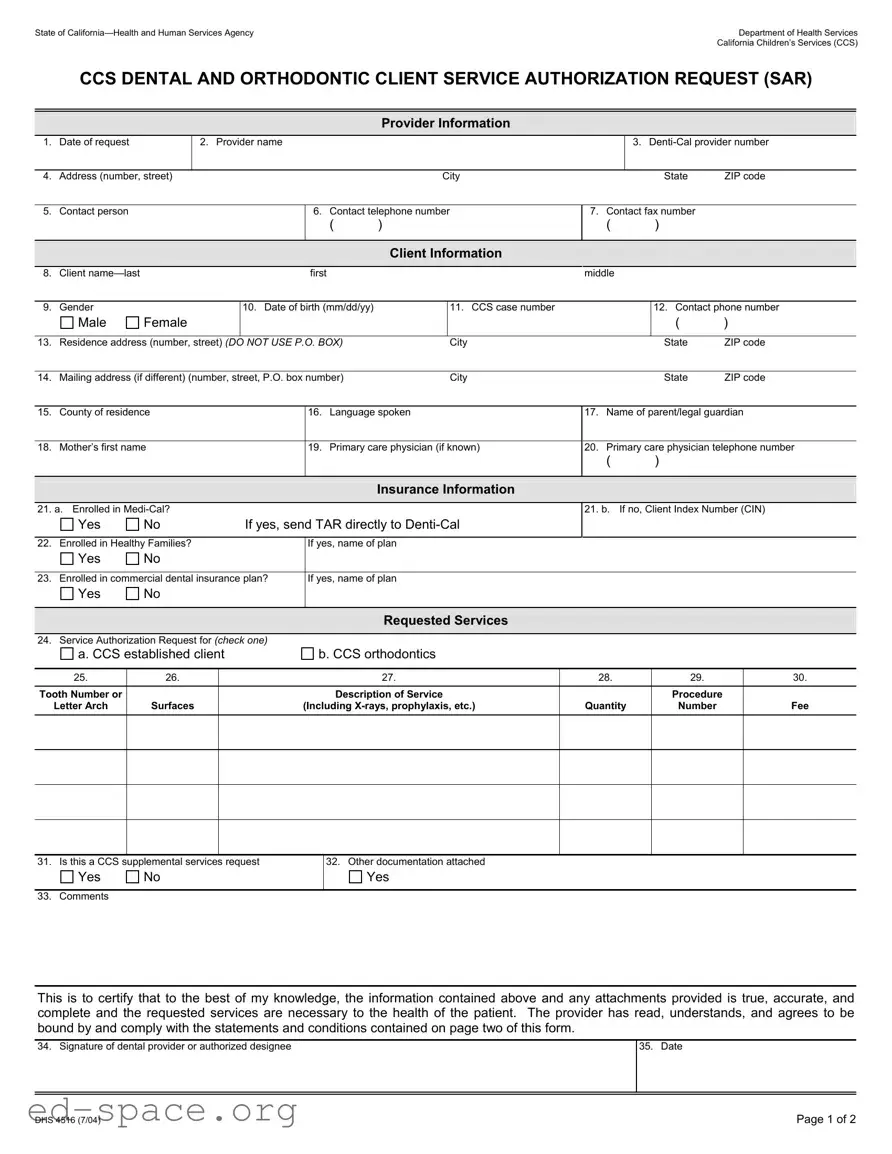
The California DHS 4516 form serves a critical function within the California Children’s Services (CCS) program, specifically for dental and orthodontic services. This form is essential for healthcare providers seeking authorization for specific client services. It requires detailed information about the provider, including their name, contact information, and Denti-Cal provider number. Additionally, it collects comprehensive client information such as the client’s name, gender, date of birth, and residence address. Insurance details are also crucial, as the form asks whether the client is enrolled in Medi-Cal or other insurance plans. The requested services section allows providers to specify the type of services needed, whether for established CCS clients or for orthodontic procedures. Each service must be clearly detailed, including tooth numbers, descriptions, and associated fees. Lastly, the form mandates a signature from the dental provider, ensuring that all information provided is accurate and that the requested services are necessary for the client’s health. Understanding the nuances of this form is vital for providers to navigate the authorization process effectively.
State of |
|
|
|
|
|
|
|
Department of Health Services |
||||||
|
|
|
|
|
|
|
|
|
|
|
|
|
California Children’s Services (CCS) |
|
|
CCS DENTAL AND ORTHODONTIC CLIENT SERVICE AUTHORIZATION REQUEST (SAR) |
|||||||||||||
|
|
|
|
|
|
|
|
|
|
|
|
|
|
|
|
|
|
|
|
|
|
|
|
|
|
|
|
|
|
|
|
|
|
|
|
|
Provider Information |
|
|
|
|
|
|
|
1. |
Date of request |
|
2. Provider name |
|
|
|
|
3. |
||||||
|
|
|
|
|
|
|
|
|
|
|
|
|
|
|
4. |
Address (number, street) |
|
|
|
|
City |
|
|
|
State |
ZIP code |
|||
|
|
|
|
|
|
|
|
|
|
|
|
|
||
5. |
Contact person |
|
|
|
6. |
Contact telephone number |
7. Contact fax number |
|
|
|||||
|
|
|
|
|
|
( |
) |
|
( |
|
) |
|
|
|
|
|
|
|
|
|
|
|
|
|
|
|
|
|
|
|
|
|
|
|
|
|
Client Information |
|
|
|
|
|
|
|
|
|
|
|
|
|
|
|
|
|
|
|
|
|
|
8. |
Client |
|
|
|
first |
|
|
|
middle |
|
|
|
|
|
|
|
|
|
|
|
|
|
|
|
|
|
|||
9. |
Gender |
|
|
10. Date of birth (mm/dd/yy) |
|
11. CCS case number |
|
|
|
12. Contact phone number |
||||
|
Male |
Female |
|
|
|
|
|
|
|
|
|
( |
) |
|
|
|
|
|
|
|
|
|
|
|
|
|
|||
13. |
Residence address (number, street) (DO NOT USE P.O. BOX) |
|
City |
|
|
|
State |
ZIP code |
||||||
|
|
|
|
|
|
|
|
|
|
|
|
|||
14. |
Mailing address (if different) (number, street, P.O. box number) |
|
City |
|
|
|
State |
ZIP code |
||||||
|
|
|
|
|
|
|
|
|||||||
15. |
County of residence |
|
16. |
Language spoken |
17. Name of parent/legal guardian |
|||||||||
|
|
|
|
|
|
|||||||||
18. |
Mother’s first name |
|
19. |
Primary care physician (if known) |
20. Primary care physician telephone number |
|||||||||
|
|
|
|
|
|
|
|
|
( |
|
) |
|
|
|
|
|
|
|
|
|
|
|
|
|
|
|
|
|
|
Insurance Information
21. a. Enrolled in
Yes |
No |
If yes, send TAR directly to |
21. b. If no, Client Index Number (CIN)
22. |
Enrolled in Healthy Families? |
If yes, name of plan |
|
|
|
Yes |
No |
|
|
|
|
|
|
|
23. |
Enrolled in commercial dental insurance plan? |
If yes, name of plan |
|
|
|
Yes |
No |
|
|
|
|
|
|
|
|
|
|
Requested Services |
|
|
|
|
|
|
24. |
Service Authorization Request for (CHECK ONE) |
|
|
|
a. CCS established client
b. CCS orthodontics
25. |
26. |
27. |
28. |
29. |
30. |
|
|
|
|
|
|
Tooth Number or |
|
Description of Service |
|
Procedure |
|
Letter Arch |
Surfaces |
(Including |
Quantity |
Number |
Fee |
|
|
|
|
|
|
|
|
|
|
|
|
|
|
|
|
|
|
|
|
|
|
|
|
|
|
|
|
|
|
31. Is this a CCS supplemental services request
Yes |
No |
32.Other documentation attached
Yes
33. Comments
This is to certify that to the best of my knowledge, the information contained above and any attachments provided is true, accurate, and complete and the requested services are necessary to the health of the patient. The provider has read, understands, and agrees to be bound by and comply with the statements and conditions contained on page two of this form.
34. Signature of dental provider or authorized designee
35. Date
DHS 4516 (7/04) |
Page 1 of 2 |
Instructions
1.Date of the request: Date the request is being made.
Provider Information
2.Provider’s name: Enter the name of the provider who is requesting services.
3.
4.Address: Enter the requesting provider’s address.
5.Contact person: Enter the name of the person who can be contacted regarding the request; all authorizations should be addressed to the contact person.
6.Contact telephone number: Enter the phone number of the contact person.
7.Contact fax number: Enter the fax number for the provider’s office or contact person.
Client Information
8.Client name: Enter the client’s
9.Gender: Check the appropriate box.
10.Date of birth: Enter the client’s date of birth.
11.CCS case number: Enter the client’s CCS number. If not known, leave blank.
12.Contact phone number: Enter the phone number where the client or client’s legal guardian can be reached.
13.Residence address: Enter the address of the client. Do not use a P.O. Box number.
14.Mailing address: Enter the mailing address if it is different than number 13.
15.County of residence: Enter residential county of the client.
16.Language spoken: Enter the client’s language spoken.
17.Name of parent/legal guardian: Enter the name of client’s parent/legal guardian.
18.Mother’s first name: Enter the client’s mother’s first name.
19.Primary care physician: Enter the client’s primary care physician’s name. If it is not known, enter NK (not known).
20.Primary care physician telephone number: Enter the client’s primary care physician phone number.
Insurance Information
21.a. Enrolled in
b. If the answer is no, enter the Client Index Number (CIN).
22.Enrolled in Healthy Families? Mark the appropriate box. If the answer is yes, enter the name of the plan.
23.Enrolled in a commercial dental insurance plan? Mark the appropriate box. If the answer is yes, enter the name of the commercial dental insurance plan.
Requested Services
24.a. CCS established client: Check if requesting approval for an established CCS client.
b. CCS Orthodontics: Check if requesting approval for orthodontic services.
25.Tooth number or letter; arch; quadrant: Enter the universal tooth code numbers 1 thru 32 or letters A thru T for tooth reference. Use arch codes U (upper), L (lower). Use quadrant codes UR (upper right), UL (upper left), LR (lower right), and LL (lower left).
26.Tooth surfaces: Use M (mesial), D (distal), O (occlusal), I (incisal), L (lingual or palatal), B (buccal), and F (facial).
27.Description of service: Furnish a brief description for each service. Standard abbreviations are acceptable.
28.Quantity: For the procedures having multiple occurrences, indicate the number of occurrences of the procedure, e.g., multiple radiographs (procedure 111), units for prosthetic procedures (procedure 716), or number of pins (procedure 648).
29.Procedure numbers: Use a
NOTE: Do not mix different types of codes when completing a claim or TAR form.
30.Fee: Enter your usual and customary fee for the procedure rather than the
31.Check yes or no box if this is a CCS Supplemental Services Request.
32.Check the box if there is other documentation attached.
33.Comments. Enter any additional comments.
Signature
34.Signature of dental provider: Form must be signed by the dentist, orthodontist, or authorized representative.
35.Date: Enter the date the request is signed.
DHS 4516 (7/04) |
Page 2 of 2 |
| Fact Name | Details |
|---|---|
| Form Title | California Children's Services (CCS) Dental and Orthodontic Client Service Authorization Request (SAR) |
| Governing Law | California Welfare and Institutions Code Section 14000 et seq. |
| Request Date | The date on which the service request is made must be provided. |
| Provider Information | Includes the provider's name, Denti-Cal provider number, and contact details. |
| Client Identification | Requires the client's name, gender, date of birth, and CCS case number. |
| Insurance Verification | Questions regarding enrollment in Medi-Cal, Healthy Families, or commercial dental plans are included. |
| Requested Services | Providers must specify the type of service authorization requested, including CCS established clients or orthodontics. |
| Documentation Requirement | Providers must certify that the information is true and may attach additional documentation. |
| Signature Requirement | The form must be signed by the dental provider or an authorized designee to be valid. |
Completing the California DHS 4516 form involves providing detailed information about the client, the requesting provider, and the specific services needed. Following these steps will ensure that all necessary information is accurately captured for processing.
What is the California DHS 4516 form used for?
The California DHS 4516 form is a Service Authorization Request (SAR) specifically for dental and orthodontic services under the California Children’s Services (CCS) program. It is used by healthcare providers to request authorization for necessary dental procedures for eligible clients.
Who should fill out the DHS 4516 form?
The form should be completed by dental providers who are seeking approval for services on behalf of their clients. This includes orthodontists and general dentists who are part of the Denti-Cal network.
What information is required on the form?
Essential information includes the provider's details (name, Denti-Cal number, contact information), client information (name, date of birth, address, CCS case number), and insurance details. Additionally, the specific services requested and any relevant documentation must be provided.
How do I know if my client is eligible for services?
Eligibility is typically determined by whether the client is enrolled in Medi-Cal or another qualifying insurance plan. The form includes sections to indicate the client's insurance status, which helps establish eligibility for CCS services.
What should I do if the client is not enrolled in Medi-Cal?
If the client is not enrolled in Medi-Cal, you must provide their Client Index Number (CIN) on the form. This information is crucial for processing the authorization request through the appropriate channels.
Is there a deadline for submitting the DHS 4516 form?
While there is no specific deadline stated, it is advisable to submit the form as soon as possible to avoid delays in service authorization. Timely submission helps ensure that clients receive the necessary care without interruption.
What happens after the form is submitted?
Once submitted, the request will be reviewed by the appropriate authority. You will receive notification regarding the approval or denial of the requested services. Ensure that all information is accurate to facilitate a smooth review process.
When filling out the California DHS 4516 form, it is crucial to be thorough and accurate. Here are nine common mistakes that people often make:
By avoiding these common mistakes, you can help ensure that the California DHS 4516 form is completed correctly and processed smoothly. Attention to detail is vital in this process.
The California DHS 4516 form is a crucial document used for requesting dental and orthodontic services for clients under the California Children's Services (CCS) program. Along with this form, several other documents may be necessary to ensure a smooth authorization process. Here are ten commonly used forms and documents that often accompany the DHS 4516:
Having these documents ready can facilitate a more efficient authorization process for dental and orthodontic services. Each form plays a specific role in ensuring that clients receive the necessary care while complying with program requirements.
When filling out the California DHS 4516 form, attention to detail is crucial. Here are five things you should and shouldn't do to ensure a smooth process:
The California DHS 4516 form is a critical document used for requesting dental and orthodontic services for clients enrolled in California Children's Services (CCS). However, several misconceptions exist regarding this form. Below are five common misconceptions, along with clarifications.
Filling out the California DHS 4516 form correctly is essential for obtaining authorization for dental and orthodontic services under the California Children’s Services (CCS) program. Here are key takeaways to consider:
By adhering to these guidelines, providers can facilitate a smoother authorization process for their clients.