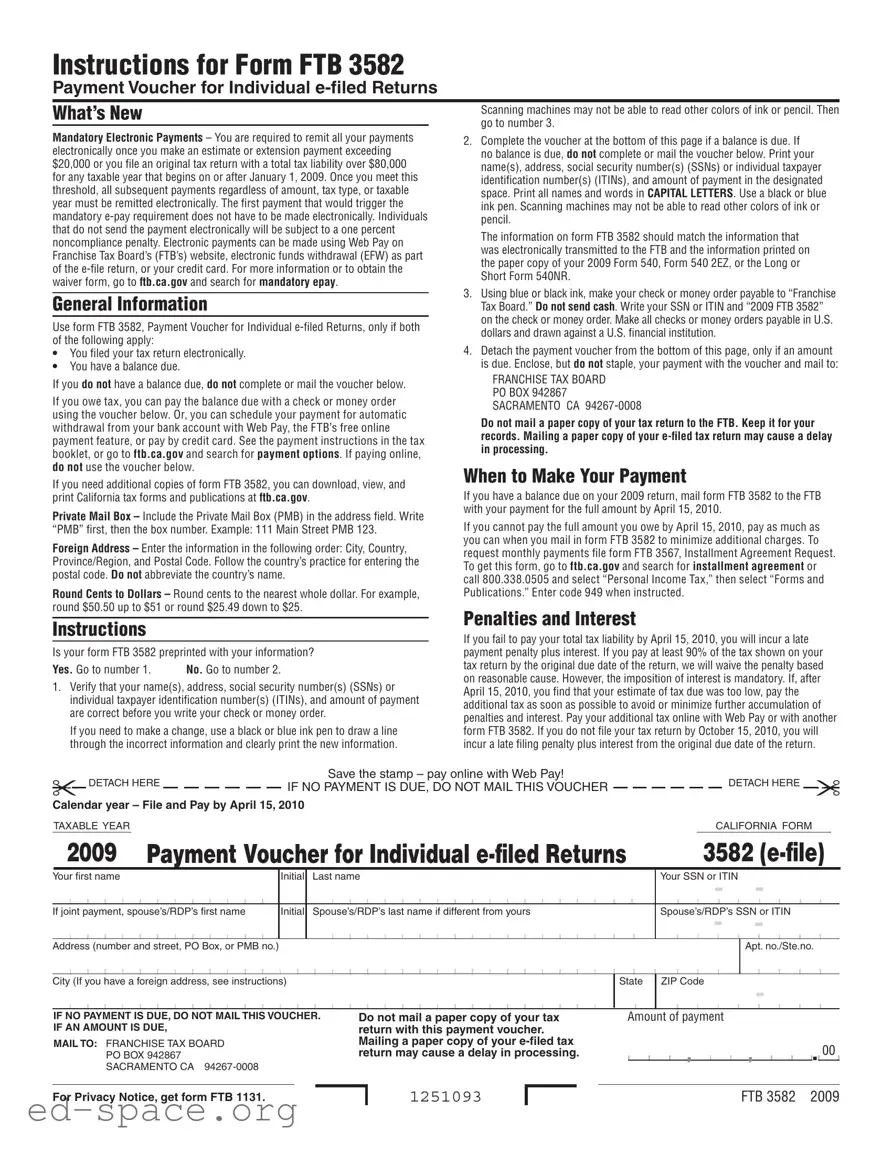
The California FTB 3582 form serves as a payment voucher specifically designed for individuals who have e-filed their tax returns and find themselves with a balance due. Understanding this form is crucial for timely and accurate tax payments. If you owe taxes, you have the option to remit your payment via check or money order, or you can schedule an automatic withdrawal through the Franchise Tax Board's online feature, Web Pay. It's important to note that once your estimated or extension payments exceed $20,000, or if your total tax liability surpasses $80,000, all future payments must be made electronically. Failure to comply can result in penalties. The form requires you to verify your personal information, ensuring it matches what was electronically submitted, and to use specific ink colors for clarity. Additionally, if you cannot pay the full amount by the due date, you can still submit a partial payment to minimize penalties. Understanding the nuances of the FTB 3582 form not only helps in avoiding unnecessary fees but also streamlines the payment process, making tax season a bit less daunting.
Instructions for Form FTB 3582
Payment Voucher for Individual
What’s New |
Scanning machines may not be able to read other colors of ink or pencil. Then |
|
go to number 3. |
||
|
Mandatory Electronic Payments – You are required to remit all your payments electronically once you make an estimate or extension payment exceeding $20,000 or you file an original tax return with a total tax liability over $80,000 for any taxable year that begins on or after January 1, 2009. Once you meet this threshold, all subsequent payments regardless of amount, tax type, or taxable year must be remitted electronically. The first payment that would trigger the mandatory
General Information
Use form FTB 3582, Payment Voucher for Individual
•You filed your tax return electronically.
•You have a balance due.
If you do not have a balance due, do not complete or mail the voucher below.
If you owe tax, you can pay the balance due with a check or money order using the voucher below. Or, you can schedule your payment for automatic withdrawal from your bank account with Web Pay, the FTB’s free online payment feature, or pay by credit card. See the payment instructions in the tax booklet, or go to ftb.ca.gov and search for payment options. If paying online, do not use the voucher below.
If you need additional copies of form FTB 3582, you can download, view, and print California tax forms and publications at ftb.ca.gov.
Private Mail Box – Include the Private Mail Box (PMB) in the address field. Write “PMB” first, then the box number. Example: 111 Main Street PMB 123.
Foreign Address – Enter the information in the following order: City, Country, Province/Region, and Postal Code. Follow the country’s practice for entering the postal code. Do not abbreviate the country’s name.
Round Cents to Dollars – Round cents to the nearest whole dollar. For example, round $50.50 up to $51 or round $25.49 down to $25.
Instructions
Is your form FTB 3582 preprinted with your information?
Yes. Go to number 1. |
No. Go to number 2. |
1.Verify that your name(s), address, social security number(s) (SSNs) or individual taxpayer identification number(s) (ITINs), and amount of payment are correct before you write your check or money order.
If you need to make a change, use a black or blue ink pen to draw a line through the incorrect information and clearly print the new information.
2.Complete the voucher at the bottom of this page if a balance is due. If no balance is due, do not complete or mail the voucher below. Print your name(s), address, social security number(s) (SSNs) or individual taxpayer identification number(s) (ITINs), and amount of payment in the designated space. Print all names and words in CAPITAL LETTERS. Use a black or blue ink pen. Scanning machines may not be able to read other colors of ink or pencil.
The information on form FTB 3582 should match the information that was electronically transmitted to the FTB and the information printed on the paper copy of your 2009 Form 540, Form 540 2EZ, or the Long or Short Form 540NR.
3.Using blue or black ink, make your check or money order payable to “Franchise Tax Board.” Do not send cash. Write your SSN or ITIN and “2009 FTB 3582” on the check or money order. Make all checks or money orders payable in U.S. dollars and drawn against a U.S. financial institution.
4.Detach the payment voucher from the bottom of this page, only if an amount is due. Enclose, but do not staple, your payment with the voucher and mail to:
FRANCHISE TAX BOARD
PO BOX 942867
SACRAMENTO CA
Do not mail a paper copy of your tax return to the FTB. Keep it for your records. Mailing a paper copy of your
When to Make Your Payment
If you have a balance due on your 2009 return, mail form FTB 3582 to the FTB with your payment for the full amount by April 15, 2010.
If you cannot pay the full amount you owe by April 15, 2010, pay as much as you can when you mail in form FTB 3582 to minimize additional charges. To request monthly payments file form FTB 3567, Installment Agreement Request. To get this form, go to ftb.ca.gov and search for installment agreement or call 800.338.0505 and select “Personal Income Tax,” then select “Forms and Publications.” Enter code 949 when instructed.
Penalties and Interest
If you fail to pay your total tax liability by April 15, 2010, you will incur a late payment penalty plus interest. If you pay at least 90% of the tax shown on your tax return by the original due date of the return, we will waive the penalty based on reasonable cause. However, the imposition of interest is mandatory. If, after April 15, 2010, you find that your estimate of tax due was too low, pay the additional tax as soon as possible to avoid or minimize further accumulation of penalties and interest. Pay your additional tax online with Web Pay or with another form FTB 3582. If you do not file your tax return by October 15, 2010, you will incur a late filing penalty plus interest from the original due date of the return.
|
DETACH HERE |
Save the stamp – pay online with Web Pay! |
|
IF NO PAYMENT IS DUE, DO NOT MAIL THIS VOUCHER |
|||
|
Calendar year – File and Pay by April 15, 2010
TAXABLE YEAR
DETACH HERE
CALIFORNIA FORM
2009 Payment Voucher for Individual |
|
|
3582 |
|||||||||||||||||||||||||||||||||||||||||||||
Your first name |
Initial |
Last name |
|
|
|
|
|
Your SSN |
- |
|
|
|
||||||||||||||||||||||||||||||||||||
|
|
|
|
|
|
|
|
|
|
|
|
|
|
|
|
|
|
|
|
|
|
|
|
|
|
|
|
|
|
|
|
|
|
|
|
|
|
|
|
|
|
|
|
|
|
|
|
|
If joint payment, spouse’s/RDP’s first name |
Initial |
Spouse’s/RDP’s last name if different from yours |
|
|
|
|
|
Spouse’s/RDP’s SSN or ITIN |
||||||||||||||||||||||||||||||||||||||||
|
|
|
|
|
|
|
|
|
|
|
|
|
|
|
|
|
|
|
|
|
|
|
|
|
|
|
|
|
|
|
|
|
|
|
|
|
|
|
|
|
|
- |
- |
|
|
|
||
|
|
|
|
|
|
|
|
|
|
|
|
|
|
|
|
|
|
|
|
|
|
|
|
|
|
|
|
|
|
|
|
|
|
|
|
|
|
|
|
|
|
|
|
|
|
|
|
|
Address (number and street, PO Box, or PMB no.) |
|
|
|
|
|
|
|
|
|
|
|
|
|
|
|
|
|
|
|
|
|
|
|
|
|
|
|
|
|
|
|
Apt. no./Ste.no. |
||||||||||||||||
|
|
|
|
|
|
|
|
|
|
|
|
|
|
|
|
|
|
|
|
|
|
|
|
|
|
|
|
|
|
|
|
|
|
|
|
|
|
|
|
|
|
|
|
|
|
|
|
|
City (If you have a foreign address, see instructions) |
|
State |
ZIP Code |
- |
|
|
|
|||||||||||||||||||||||||||||||||||||||||
|
|
|
|
|
|
|
|
|
|
|
|
|
|
|
|
|
|
|
|
|
|
|
|
|
|
|
|
|
|
|
|
|
|
|
|
|
|
|
|
|
|
|
|
|
|
|
||
|
|
|
|
|
|
|
|
|
|
|
|
|
|
|
|
|
|
|
|
|
|
|
|
|
|
|
|
|
|
|
|
|
|
|
|
|
|
|
|
|
|
|
|
|
|
|
|
|
IF NO PAYMENT IS DUE, DO NOT MAIL THIS VOUCHER. IF AN AMOUNT IS DUE,
MAIL TO: FRANCHISE TAX BOARD PO BOX 942867 SACRAMENTO CA
Do not mail a paper copy of your tax return with this payment voucher. Mailing a paper copy of your
Amount of payment
|
|
|
|
|
, |
|
|
|
, |
|
|
|
|
00 |
|
|
|
|
|
|
|
|
|
|
|
|
|
|
|
|
. |
|
|
For Privacy Notice, get form FTB 1131.
1251093
FTB 3582 2009
| Fact Name | Details |
|---|---|
| Form Purpose | The California FTB 3582 form is a payment voucher specifically for individuals who have filed their tax returns electronically and have a balance due. |
| Mandatory Electronic Payments | Since January 1, 2009, if your estimated or extension payment exceeds $20,000 or your total tax liability is over $80,000, all subsequent payments must be made electronically. |
| Noncompliance Penalty | Individuals who do not make their payments electronically when required will face a one percent penalty for noncompliance. |
| Payment Methods | Payments can be made via check, money order, or electronically through the FTB’s Web Pay, electronic funds withdrawal, or credit card options. |
| Governing Law | This form is governed by California Revenue and Taxation Code Section 18621.6, which outlines the requirements for electronic payments and penalties for noncompliance. |
Filling out the California 3582 form is a straightforward process, but attention to detail is crucial. This form is used to submit a payment voucher when you have a balance due on your electronically filed tax return. Following the steps carefully will ensure that your payment is processed correctly and promptly.
After mailing the form, keep a copy for your records. If you have a balance due, ensure that your payment is sent by the deadline to avoid penalties and interest. If you cannot pay the full amount, consider making a partial payment to minimize additional charges. For any further assistance, refer to the Franchise Tax Board’s website or contact their support.
What is the purpose of the California 3582 form?
The California 3582 form, also known as the Payment Voucher for Individual e-filed Returns, is used by individuals who have filed their tax returns electronically and owe a balance. This form allows taxpayers to submit their payment for any tax due. If you do not have a balance due, there is no need to complete or send this form.
When do I need to use the California 3582 form?
You should use the California 3582 form if you filed your tax return electronically and have a balance due. If your tax return shows that you owe money, this form is essential for submitting your payment. Remember, if you do not owe any taxes, skip this form entirely.
How do I complete the California 3582 form?
To fill out the California 3582 form, ensure that all your information is accurate. If your form is preprinted with your details, verify that your name, address, and Social Security Number (SSN) or Individual Taxpayer Identification Number (ITIN) are correct. If you need to make any changes, use a black or blue ink pen to cross out the incorrect information and write the correct details. If your form is not preprinted, complete the voucher by filling in your information in capital letters and using the appropriate ink color.
What happens if I don’t pay my taxes by the deadline?
If you fail to pay your total tax liability by the deadline, which is typically April 15, you will incur a late payment penalty along with interest. To avoid these additional charges, try to pay at least 90% of the tax shown on your return by the original due date. If you find that your estimate of tax due was too low, pay the additional amount as soon as possible to minimize further penalties and interest.
Can I pay my taxes electronically instead of using the California 3582 form?
Yes, you can pay your taxes electronically without using the California 3582 form. The Franchise Tax Board offers several options for electronic payments, such as Web Pay, electronic funds withdrawal (EFW) during e-filing, or using a credit card. If you choose to pay online, do not send the voucher. Instead, follow the instructions on the FTB website for making electronic payments.
Failing to verify personal information. Always check that your name, address, and Social Security Number (SSN) or Individual Taxpayer Identification Number (ITIN) are correct. Mistakes here can lead to processing delays.
Using the wrong ink color. Remember to use black or blue ink. Scanning machines may not read other colors, which can cause issues.
Not rounding payment amounts correctly. Round cents to the nearest whole dollar. For example, $50.50 should be rounded up to $51.
Ignoring the electronic payment requirement. If your payment exceeds $20,000 or your tax liability exceeds $80,000, you must pay electronically. Failing to do so may result in a penalty.
Completing the voucher when no balance is due. If you do not owe any tax, do not fill out or mail the voucher.
Forgetting to include the Private Mail Box (PMB) in your address. Always write “PMB” followed by the box number to ensure proper delivery.
Not detaching the payment voucher. Make sure to detach the voucher from the bottom of the form if you have a payment due.
Mailing a paper copy of your tax return with the voucher. This can cause delays in processing. Keep your tax return for your records instead.
Missing the payment deadline. If you owe tax, ensure that you mail your voucher and payment by April 15 to avoid penalties and interest.
When dealing with tax payments in California, the FTB 3582 form is just one piece of the puzzle. Several other forms and documents often accompany it, helping to ensure that your tax matters are handled smoothly and correctly. Below is a brief overview of five essential documents that may be relevant to your situation.
Being familiar with these forms and documents can make your tax filing experience much smoother. Each serves a specific purpose, ensuring that you comply with California tax regulations while also protecting your interests. Understanding these elements can help you navigate your tax responsibilities with confidence.
The California Form FTB 3582 is a payment voucher specifically for individuals who have e-filed their tax returns and owe a balance. Several other forms share similarities with FTB 3582 in purpose and function. Below is a list of nine such documents:
When filling out the California Form FTB 3582, it’s essential to follow specific guidelines to ensure your submission is processed smoothly. Here’s a helpful list of dos and don’ts to keep in mind:
Following these guidelines will help ensure that your payment voucher is processed efficiently and accurately. Take your time to review your information and adhere to the instructions provided.
The 3582 form is specifically for individuals who have e-filed their tax returns and have a balance due. It should not be used for other types of tax returns.
If your payments exceed certain thresholds, you are required to remit them electronically. The 3582 form is only a payment voucher and does not replace the need for electronic payment.
It is important to use black or blue ink when completing the form. Other colors may not be read properly by scanning machines.
You should not send a paper copy of your e-filed tax return with the payment voucher. This could delay processing.
The form must be mailed to the specific address provided by the Franchise Tax Board, which is designated for processing these payments.
Even if you cannot pay the full amount, you should still submit the 3582 form by the deadline to minimize penalties and interest.
You must round cents to the nearest whole dollar when indicating the payment amount on the form.
The form is only applicable for the taxable year specified, in this case, 2009. Each year may have its own requirements and forms.
Payments should be made via check, money order, or electronically. Cash is not an acceptable form of payment.
It is crucial to use a black or blue ink pen to complete the form. Pencil may not be legible to scanning machines.