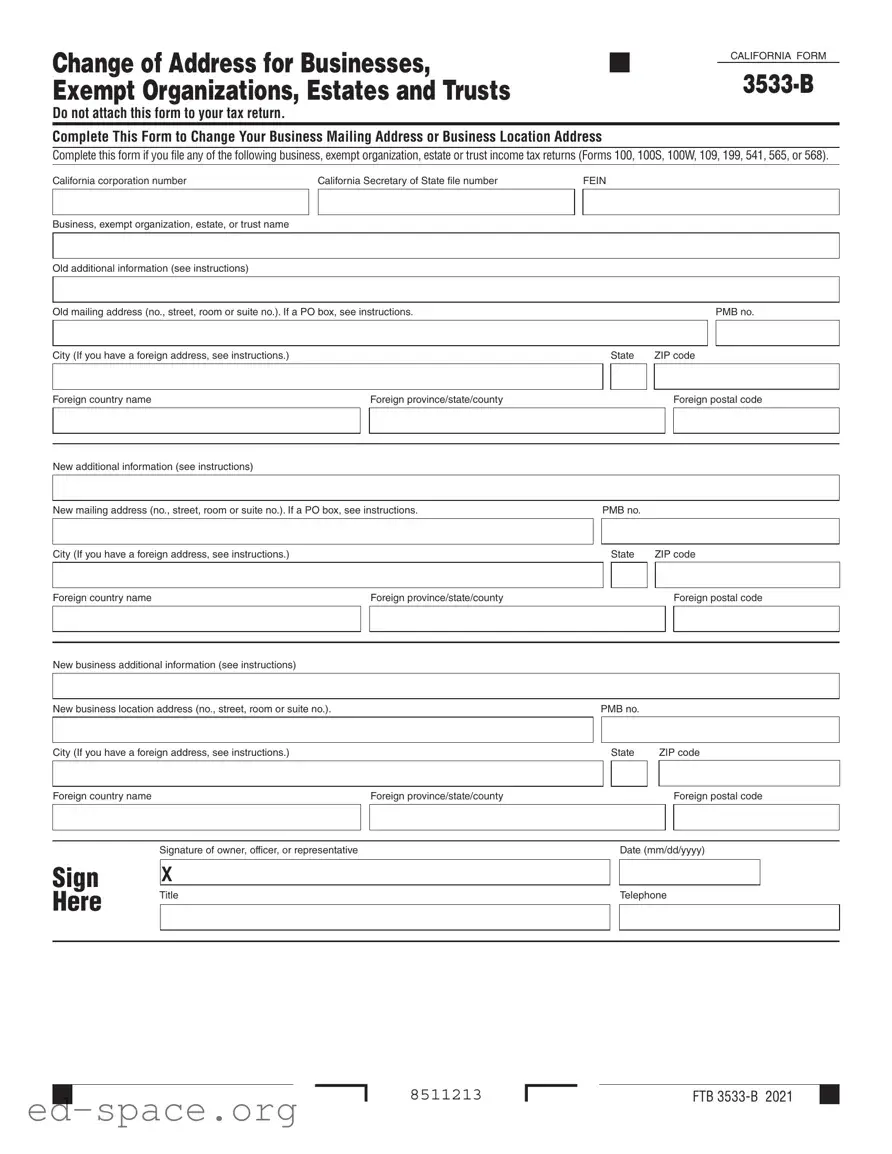
The California 3533 B form serves as a crucial tool for businesses, exempt organizations, estates, and trusts looking to update their mailing or physical addresses. This form is essential for those filing various tax returns, including Forms 100, 100S, 100W, 109, 199, 541, 565, or 568. It allows entities to officially notify the California tax authorities of any changes in their contact information, ensuring that all correspondence is directed to the correct location. The form requires basic information such as the California corporation number, Secretary of State file number, and the Federal Employer Identification Number (FEIN). Additionally, it asks for the entity's name and both old and new addresses, including specific details for foreign addresses if applicable. To complete the process, a signature from an owner, officer, or authorized representative is necessary, along with the date of submission. Importantly, this form should not be attached to your tax return, highlighting its specific purpose in maintaining accurate records with the state.

Change of Address for Businesses, |
|
|
CALIFORNIA FORM |
|
|
|
|
Exempt Organizations, Estates and Trusts |
|
|
|
|
|
Do not attach this form to your tax return.
Complete This Form to Change Your Business Mailing Address or Business Location Address
Complete this form if you file any of the following business, exempt organization, estate or trust income tax returns (Forms 100, 100S, 100W, 109, 199, 541, 565, or 568).
California corporation number |
California Secretary of State file number |
|
FEIN |
|
|
|
|
|
||||||
|
|
|
|
|
|
|
|
|
|
|
|
|
|
|
|
|
|
|
|
|
|
|
|
|
|
|
|
|
|
Business, exempt organization, estate, or trust name |
|
|
|
|
|
|
|
|
|
|
|
|
|
|
|
|
|
|
|
|
|
|
|
|
|
|
|
|
|
|
|
|
|
|
|
|
|
|
|
|
|
|
|
|
Old additional information (see instructions) |
|
|
|
|
|
|
|
|
|
|
|
|
|
|
|
|
|
|
|
|
|
|
|
|
|
|
|
||
|
|
|
|
|
|
|
|
|
|
|
|
|
|
|
Old mailing address (no., street, room or suite no.). If a PO box, see instructions. |
|
|
|
|
|
|
|
|
|
PMB no. |
||||
|
|
|
|
|
|
|
|
|
|
|
|
|
|
|
|
|
|
|
|
|
|
|
|
|
|
|
|
|
|
City (If you have a foreign address, see instructions.) |
|
|
|
|
|
|
|
State |
ZIP code |
|||||
|
|
|
|
|
|
|
|
|
|
|
|
|
|
|
Foreign country name |
|
|
|
Foreign province/state/county |
|
|
|
|
|
|
|
Foreign postal code |
||
|
|
|
|
|
|
|
|
|
|
|
|
|
|
|
|
|
|
|
|
|
|
|
|
|
|
|
|
|
|
|
|
|
|
|
|
|
|
|
|
|
|
|
|
|
New additional information (see instructions)
New mailing address (no., street, room or suite no.). If a PO box, see instructions. |
|
PMB no. |
|
|
|
|
|
|
|||||
|
|
|
|
|
|
|
|
|
|
|
|
|
|
|
|
|
|
|
|
|
|
|
|
|
|
|
|
City (If you have a foreign address, see instructions.) |
|
|
|
State |
ZIP code |
||||||||
|
|
|
|
|
|
|
|
|
|
|
|
|
|
|
|
|
|
|
|
|
|
|
|
|
|
|
|
Foreign country name |
|
|
Foreign province/state/county |
|
|
|
|
|
|
|
|
Foreign postal code |
|
|
|
|
|
|
|
|
|
|
|
|
|
|
|
|
|
|
|
|
|
|
|
|
|
|
|
|
|
|
|
|
|
|
|
|
|
|
|
|
|
|
|
New business additional information (see instructions) |
|
|
|
|
|
|
|
|
|
|
|
||
|
|
|
|
|
|
|
|
|
|
|
|
||
|
|
|
|
|
|
|
|
|
|
|
|
|
|
New business location address (no., street, room or suite no.). |
|
PMB no. |
|
|
|
|
|
|
|||||
|
|
|
|
|
|
|
|
|
|
|
|||
|
|
|
|
|
|
|
|
|
|
|
|
|
|
City (If you have a foreign address, see instructions.) |
|
|
|
State |
|
|
ZIP code |
||||||
|
|
|
|
|
|
|
|
|
|
|
|
|
|
|
|
|
|
|
|
|
|
|
|
|
|
|
|
Foreign country name |
|
|
Foreign province/state/county |
|
|
|
|
|
|
|
|
Foreign postal code |
|
|
|
|
|
|
|
|
|
|
|
|
|
|
|
|
|
|
|
|
|
|
|
|
|
|
|
|
|
|
|
|
|
|
|
|
|
|
|
|
|
|
|
|
Signature of owner, officer, or representative |
|
|
|
|
Date (mm/dd/yyyy) |
|||||||
|
|
|
|
|
|
|
|
|
|
|
|
|
|
SIGN |
X |
|
|
|
|
|
|
|
|
|
|
|
|
|
|
|
|
|
|
|
|
|
|
|
|
|
|
|
|
|
|
|
|
|
|
|
|
|
|
|
|
HERE |
Title |
|
|
|
|
Telephone |
|||||||
|
|
|
|
|
|
|
|
|
|
|
|
|
|
|
|
|
|
|
|
|
|
|
|
|
|
|
|
|
|
|
|
|
|
|
|
|
|
|
|
|
|
|
|
|
|
|
|
|
|
|
|
|
|
|
|
|
|
8511213 |
FTB |
| Fact Name | Details |
|---|---|
| Purpose | This form is used to change the mailing address or business location address for various entities. |
| Applicable Entities | It applies to businesses, exempt organizations, estates, and trusts that file specific tax returns. |
| Tax Returns | Relevant tax returns include Forms 100, 100S, 100W, 109, 199, 541, 565, or 568. |
| Filing Instructions | Do not attach this form to your tax return when submitting. |
| Identification Numbers | Include your California corporation number, Secretary of State file number, and FEIN. |
| Old Address Information | Provide the old mailing address and location address, including city and state. |
| New Address Information | Fill out the new mailing address and location address, ensuring accuracy. |
| Signature Requirement | The form must be signed by an owner, officer, or representative of the entity. |
Filling out the California 3533 B form is a straightforward process that requires accurate information about your business's current and new addresses. This form is essential for ensuring that your business receives important correspondence at the correct location. Follow the steps below to complete the form efficiently.
What is the purpose of the California 3533 B form?
The California 3533 B form is used to change the mailing address or business location address for various entities, including businesses, exempt organizations, estates, and trusts. This form is essential for ensuring that the California Franchise Tax Board (FTB) has the correct address on file, which helps in receiving important tax-related correspondence. It is not to be attached to your tax return.
Who needs to fill out the California 3533 B form?
Any entity that files specific income tax returns in California must complete this form if they need to update their address. This includes those filing Forms 100, 100S, 100W, 109, 199, 541, 565, or 568. Ensuring the address is current is crucial for compliance with tax regulations and for receiving timely notifications from the FTB.
What information is required on the form?
When filling out the California 3533 B form, you will need to provide several key pieces of information. This includes your California corporation number, Secretary of State file number, and Federal Employer Identification Number (FEIN). You must also include the name of the business or organization, the old mailing address, and the new mailing address. If applicable, provide the new business location address as well. Additional instructions may guide you on how to fill out sections for foreign addresses or PO boxes.
How do I submit the California 3533 B form?
After completing the California 3533 B form, submit it directly to the California Franchise Tax Board. Do not attach it to your tax return. Check the FTB's website or contact their office for specific submission methods, such as by mail or electronically, if available. Ensure that the form is signed and dated by the owner, officer, or representative of the business to validate the changes.
Neglecting to provide the correct California corporation number. This number is crucial for identifying your business within state records. Double-check that you have the right number to avoid processing delays.
Failing to complete all required fields. The form has specific sections that must be filled out completely. Missing information can lead to rejection or additional requests for clarification.
Using a P.O. Box incorrectly. If you are providing a P.O. Box as your mailing address, ensure you follow the instructions provided in the form. Inaccurate entries can lead to miscommunication.
Not signing the form. It might seem simple, but forgetting to sign the form can result in it being deemed incomplete. Make sure the owner, officer, or representative signs and dates the form before submission.
The California 3533 B form is essential for businesses, exempt organizations, estates, and trusts that need to update their mailing or business location addresses. Along with this form, several other documents may be required to ensure compliance with state regulations. Below is a list of related forms and documents that are often used in conjunction with the California 3533 B form.
Understanding these forms can help streamline the process of updating your business information and maintaining compliance with California tax regulations. Always ensure that you have the correct forms ready when making changes to avoid any potential issues.
The California 3533 B form serves a specific purpose in changing the mailing or business location address for various entities. Several other documents share similarities with this form, particularly in their function and the type of information they collect. Here are four documents that are comparable to the California 3533 B form:
When filling out the California 3533 B form, it’s important to follow certain guidelines to ensure accuracy and compliance. Here’s a list of things to do and avoid:
Here are five common misconceptions about the California 3533 B form, which is used for changing a business mailing or location address.
When filling out the California 3533 B form, keep these key points in mind:
By following these guidelines, you can ensure a smooth process when updating your address.