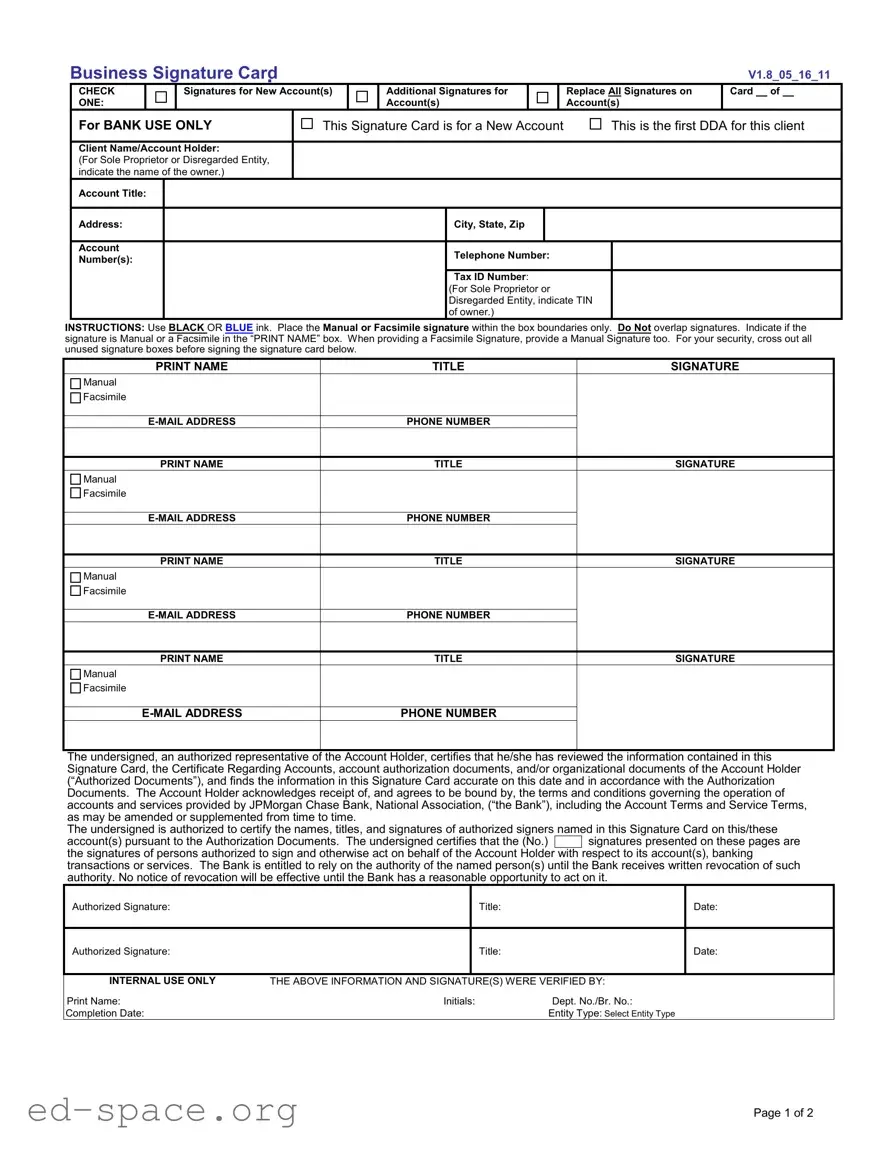
The Business Signature Card form plays a crucial role in establishing and managing business banking accounts. This essential document is utilized primarily when opening new accounts, ensuring that the bank has accurate and verified information about the account holders and authorized signers. Each section of the form is designed to capture key details, including the client’s name, account title, and tax identification number. It also outlines the requirements for signatures, specifying that they must be provided in black or blue ink and within designated boxes. Importantly, the form allows for both manual and facsimile signatures, but it requires a manual signature to accompany any facsimile submission for security purposes. Additionally, the form includes a certification section where an authorized representative confirms the accuracy of the information and acknowledges the terms and conditions set forth by the bank. By signing this document, the account holder grants the bank the authority to rely on the listed signatures until a formal revocation is provided. This streamlined process not only protects the interests of the bank but also ensures that businesses can operate smoothly with their financial transactions.
Business Signature Card
|
CHECK |
|
Signatures for New Account(s) |
|
|
ONE: |
|
|
|
Additional Signatures for Account(s)
|
|
V1.8_05_16_11 |
|
|
|
|
Replace All Signatures on |
Card __ of __ |
|
Account(s) |
|
For BANK USE ONLY |
This Signature Card is for a New Account |
This is the first DDA for this client |
Client Name/Account Holder:
(For Sole Proprietor or Disregarded Entity, indicate the name of the owner.)
Account Title:
Address:
Account
Number(s):
City, State, Zip
Telephone Number:
Tax ID Number:
(For Sole Proprietor or Disregarded Entity, indicate TIN of owner.)
INSTRUCTIONS: Use BLACK OR BLUE ink. Place the Manual or Facsimile signature within the box boundaries only. Do Not overlap signatures. Indicate if the signature is Manual or a Facsimile in the “PRINT NAME” box. When providing a Facsimile Signature, provide a Manual Signature too. For your security, cross out all unused signature boxes before signing the signature card below.
|
PRINT NAME |
TITLE |
SIGNATURE |
|
Manual |
|
|
|
Facsimile |
|
|
|
|
|
|
|
PHONE NUMBER |
|
|
|
|
|
|
|
PRINT NAME |
TITLE |
SIGNATURE |
|
Manual |
|
|
|
Facsimile |
|
|
|
|
|
|
|
PHONE NUMBER |
|
|
|
|
|
|
|
PRINT NAME |
TITLE |
SIGNATURE |
|
Manual |
|
|
|
Facsimile |
|
|
|
|
|
|
|
PHONE NUMBER |
|
|
|
|
|
|
|
PRINT NAME |
TITLE |
SIGNATURE |
|
Manual |
|
|
|
Facsimile |
|
|
|
|
|
|
|
PHONE NUMBER |
|
|
|
|
|
|
The undersigned, an authorized representative of the Account Holder, certifies that he/she has reviewed the information contained in this Signature Card, the Certificate Regarding Accounts, account authorization documents, and/or organizational documents of the Account Holder (“Authorized Documents”), and finds the information in this Signature Card accurate on this date and in accordance with the Authorization Documents. The Account Holder acknowledges receipt of, and agrees to be bound by, the terms and conditions governing the operation of accounts and services provided by JPMorgan Chase Bank, National Association, (“the Bank”), including the Account Terms and Service Terms, as may be amended or supplemented from time to time.
The undersigned is authorized to certify the names, titles, and signatures of authorized signers named in this Signature Card on this/these
account(s) pursuant to the Authorization Documents. The undersigned certifies that the (No.) signatures presented on these pages are the signatures of persons authorized to sign and otherwise act on behalf of the Account Holder with respect to its account(s), banking transactions or services. The Bank is entitled to rely on the authority of the named person(s) until the Bank receives written revocation of such authority. No notice of revocation will be effective until the Bank has a reasonable opportunity to act on it.
Authorized Signature:
Authorized Signature:
Title: |
Date: |
Title: |
Date: |
|
|
INTERNAL USE ONLY |
THE ABOVE INFORMATION AND SIGNATURE(S) WERE VERIFIED BY: |
|
Print Name: |
Initials: |
Dept. No./Br. No.: |
Completion Date: |
|
Entity Type: Select Entity Type |
Page 1 of 2

Client Name/Account Holder:
Account Title: |
|
Tax ID Number: |
|
Card __ of __ |
|
|
|
|
|
Account |
|
Telephone Number: |
Date: |
|
Number(s): |
|
|
|
|
|
|
|
|
|
ADDITIONAL SIGNATURES
|
PRINT NAME |
TITLE |
SIGNATURE |
|
Manual |
|
|
|
Facsimile |
|
|
|
|
|
|
|
PHONE NUMBER |
|
|
|
|
|
|
|
PRINT NAME |
TITLE |
SIGNATURE |
|
Manual |
|
|
|
Facsimile |
|
|
|
|
|
|
|
PHONE NUMBER |
|
|
|
|
|
|
|
PRINT NAME |
TITLE |
SIGNATURE |
|
Manual |
|
|
|
Facsimile |
|
|
|
|
|
|
|
PHONE NUMBER |
|
|
|
|
|
|
|
PRINT NAME |
TITLE |
SIGNATURE |
|
Manual |
|
|
|
Facsimile |
|
|
|
|
|
|
|
PHONE NUMBER |
|
|
|
|
|
|
|
PRINT NAME |
TITLE |
SIGNATURE |
|
Manual |
|
|
|
Facsimile |
|
|
|
|
|
|
|
PHONE NUMBER |
|
|
|
|
|
|
|
PRINT NAME |
TITLE |
SIGNATURE |
|
Manual |
|
|
|
Facsimile |
|
|
|
|
|
|
|
PHONE NUMBER |
|
|
|
|
|
|
|
PRINT NAME |
TITLE |
SIGNATURE |
|
Manual |
|
|
|
Facsimile |
|
|
|
|
|
|
|
PHONE NUMBER |
|
|
|
|
|
|
Page 2 of 2
| Fact Name | Description |
|---|---|
| Purpose | The Business Signature Card form is used to establish and verify the authorized signers for a new business account at the bank. |
| Signature Requirements | Signatures must be provided in either manual or facsimile form. Each signer must indicate their method of signing in the designated box. |
| Client Information | The form requires detailed information about the account holder, including the client name, account title, and tax identification number. |
| Verification | The undersigned representative certifies that the information on the form is accurate and that they are authorized to act on behalf of the account holder. |
| Crossing Out Unused Boxes | For security purposes, all unused signature boxes must be crossed out before signing the card. |
| Governing Laws | The form is governed by the banking laws of the state in which the account is opened, which may include regulations specific to financial institutions. |
| Internal Use | Bank staff must verify the information and signatures provided on the form before processing the account setup. |
Completing the Business Signature Card form is essential for establishing a new account. This process ensures that the bank has accurate information regarding authorized signers and their signatures. Follow the steps below to fill out the form correctly.
What is the purpose of the Business Signature Card form?
The Business Signature Card form is used to establish the authorized signers for a new business account. It ensures that the bank has accurate information regarding who can sign on behalf of the business for transactions and account management. This form is essential for maintaining security and proper authorization in banking activities.
Who should fill out the Business Signature Card form?
The form should be completed by an authorized representative of the business, such as an owner or a designated officer. For sole proprietors or disregarded entities, the owner’s name must be indicated. It is important that the person filling out the form has the authority to certify the information provided.
What information is required on the form?
You will need to provide details such as the client name, account title, address, account number(s), telephone number, and tax ID number. Additionally, the form requires the names, titles, and signatures of all authorized signers. Make sure to use black or blue ink and to follow the instructions regarding signature placement.
What should I do if I have unused signature boxes?
For your security, it’s important to cross out any unused signature boxes before signing the card. This helps prevent unauthorized use of those spaces and ensures that only the intended signers are recognized by the bank.
Can I use a facsimile signature?
Yes, you can use a facsimile signature, but you must also provide a manual signature on the form. Be sure to indicate in the “PRINT NAME” box whether the signature is manual or a facsimile. This dual requirement helps maintain the integrity of the signatures on file.
What happens after I submit the Business Signature Card form?
Once the form is submitted, the bank will verify the information and signatures provided. The authorized signers listed will then be recognized for transactions and account management. The bank will rely on this authority until it receives written notice of any changes or revocations. It's crucial to keep the bank informed of any updates to authorized signers.
Incomplete Information: Many individuals forget to fill out all required fields, such as the Client Name, Account Title, or Tax ID Number. Missing these details can delay the account opening process.
Signature Overlap: Some people do not pay attention to the instructions regarding signature placement. Overlapping signatures in the designated boxes can lead to confusion and may render the card invalid.
Failure to Cross Out Unused Boxes: For security reasons, it is crucial to cross out any unused signature boxes. Neglecting this step can raise concerns about unauthorized access to the account.
Not Indicating Signature Type: When signing, individuals often forget to specify whether their signature is Manual or Facsimile. This oversight can complicate verification and authorization processes.
The Business Signature Card form is an essential document for establishing and managing business accounts. However, it is often accompanied by several other forms and documents that further facilitate the banking process. Each of these documents serves a specific purpose, ensuring that the account is set up correctly and that all necessary information is recorded. Below is a list of commonly used forms alongside the Business Signature Card.
Each of these documents plays a vital role in the establishment and management of business accounts. By ensuring that all necessary forms are completed and submitted, businesses can maintain clarity and compliance in their banking relationships.
The Business Signature Card form serves a critical function in banking and business operations. Several other documents share similarities with it, particularly in terms of purpose and structure. Here are eight documents that are comparable:
When filling out the Business Signature Card form, it is important to follow specific guidelines to ensure accuracy and compliance. Below is a list of things you should and shouldn't do.
Following these guidelines will help ensure that your Business Signature Card form is completed correctly and efficiently.
This form is primarily designed for new accounts, but it can also be used to update signatures on existing accounts. If there are changes in authorized signers, this card should be filled out to reflect those updates.
Depending on the account setup, multiple signatures may be required for different transactions. The form allows for additional signatures to be added, ensuring that all authorized individuals are recognized by the bank.
While a facsimile signature can be used, the form requires that a manual signature be provided as well. This is for security reasons and helps verify the identity of the signers.
It is essential to submit a new Business Signature Card whenever there are changes to authorized signers. The bank will not make updates based on verbal requests or previous forms.
The instructions specify that either black or blue ink can be used. This flexibility allows for personal preference while maintaining clarity in documentation.
The bank takes signature verification seriously. They will verify the signatures against the records before allowing any transactions, ensuring that only authorized individuals can act on behalf of the account.
The Business Signature Card is not a permanent document. It can be updated or replaced as needed, particularly when there are changes in the account or the individuals authorized to sign.
Filling out the Business Signature Card form is a crucial step for establishing a new account with a financial institution. Here are some key takeaways to consider:
Completing the Business Signature Card correctly helps streamline the account opening process and ensures that all parties involved are properly authorized to conduct transactions.