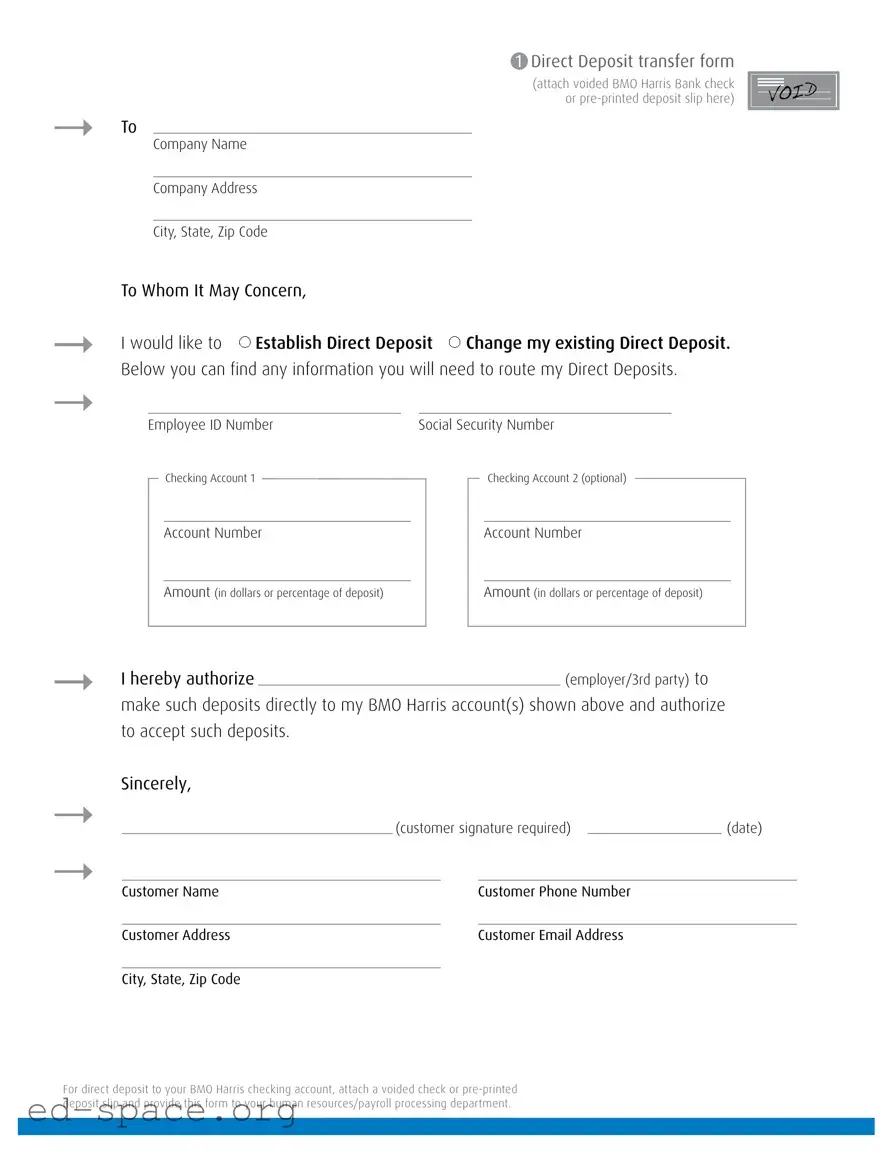
The BMO Direct Deposit form is a crucial document for individuals seeking to streamline their payment processes. This form facilitates the direct deposit of funds into a BMO Harris Bank account, ensuring timely and secure transactions. To initiate or modify direct deposit arrangements, users must provide essential details, including their employee ID number and Social Security number. The form also requires account information for one or two checking accounts, allowing flexibility in deposit allocation. Users can specify the amount to be deposited, either as a fixed dollar amount or a percentage of their paycheck. Additionally, the form mandates a customer signature, confirming authorization for the employer or third party to process these deposits. To complete the submission, individuals must attach a voided check or a pre-printed deposit slip, which serves as verification of the account details provided. This comprehensive approach simplifies the direct deposit setup, making it an efficient option for both employees and employers.
1 Direct Deposit transfer form
(attach voided BMO Harris Bank check or
To
Company Name
Company Address
City, State, Zip Code
To Whom It May Concern, |
|
|
|
|
||
I would like to |
Establish Direct Deposit |
Change my existing Direct Deposit. |
||||
Below you can find any information you will need to route my Direct Deposits. |
||||||
|
|
|
|
|
||
|
Employee ID Number |
|
Social Security Number |
|||
Checking Account 1
Checking Account 2 (optional)
Account Number
Account Number
Amount (in dollars or percentage of deposit)
Amount (in dollars or percentage of deposit)
I hereby authorize |
|
|
|
|
(employer/3rd party) to |
|
||
make such deposits directly to my BMO Harris account(s) shown above and authorize |
|
|||||||
to accept such deposits. |
|
|
|
|
|
|
|
|
Sincerely, |
|
|
|
|
|
|
|
|
|
|
(customer signature required) |
|
|
(date) |
|||
|
|
|
|
|
||||
Customer Name |
|
|
Customer Phone Number |
|
||||
|
|
|
|
|
||||
Customer Address |
|
|
Customer Email Address |
|
||||
|
|
|
|
|
|
|
|
|
City, State, Zip Code |
|
|
|
|
|
|
|
|
For direct deposit to your BMO Harris checking account, attach a voided check or
| Fact Name | Fact Description |
|---|---|
| Form Purpose | The BMO Direct Deposit form is used to establish or change direct deposit for payroll or other payments. |
| Required Attachments | A voided BMO Harris Bank check or a pre-printed deposit slip must be attached to the form. |
| Information Needed | Employees must provide their Employee ID Number, Social Security Number, and account details for deposits. |
| Authorization | By signing the form, the customer authorizes the employer or third party to deposit funds directly into their BMO Harris account(s). |
| State-Specific Forms | Some states may have specific laws governing direct deposit practices, such as California's Labor Code Section 213. |
| Submission Process | After completing the form, it should be submitted to the human resources or payroll department for processing. |
Completing the BMO Direct Deposit form is a straightforward process. Once you have filled it out, you will need to attach a voided check or a pre-printed deposit slip. After that, submit the form to your human resources or payroll processing department to ensure your direct deposits are set up correctly.
What is the purpose of the BMO Direct Deposit form?
The BMO Direct Deposit form allows individuals to authorize their employer or a third party to deposit funds directly into their BMO Harris Bank account. This can streamline payment processes, ensuring that salaries, benefits, or other payments are deposited quickly and securely without the need for paper checks.
What information do I need to provide on the form?
When filling out the BMO Direct Deposit form, you will need to include your employee ID number, Social Security number, and account details for your checking accounts. This includes account numbers and the amounts you wish to deposit into each account, whether as a dollar amount or a percentage of the total deposit.
How do I attach my banking information to the form?
To provide your banking information, you must attach a voided check or a pre-printed deposit slip from your BMO Harris Bank account. This attachment serves as verification of your account details and ensures accurate processing of your direct deposits.
Can I change my existing direct deposit information using this form?
Yes, the BMO Direct Deposit form can be used to change your existing direct deposit information. Simply indicate your intention to change your direct deposit on the form and provide the updated account details along with the necessary attachments.
Who should I submit the completed form to?
The completed BMO Direct Deposit form, along with the attached voided check or deposit slip, should be submitted to your human resources or payroll processing department. They will process the information and ensure that your direct deposits are routed correctly.
Is my personal information secure when using this form?
While submitting the BMO Direct Deposit form, it is crucial to ensure that you are providing your information to a secure and trusted source, such as your employer's HR department. Your personal information, including your Social Security number and banking details, should be handled with care to maintain privacy and security.
What happens if I make a mistake on the form?
If you notice an error after submitting the form, it is essential to contact your HR or payroll department immediately. They can guide you on how to correct the mistake and ensure that your direct deposits are set up accurately. Double-checking your information before submission can help prevent errors.
How long does it take for direct deposit to start after submitting the form?
The time it takes for direct deposit to begin can vary depending on your employer’s payroll schedule and processing times. Typically, it may take one or two pay cycles for the direct deposit to be fully implemented. It is advisable to confirm with your HR department for specific timelines.
Neglecting to Attach Required Documentation: Many individuals forget to include a voided check or a pre-printed deposit slip. This step is crucial for ensuring that deposits are routed correctly to the intended account.
Incorrect Account Information: Filling in the wrong account numbers can lead to funds being deposited into the wrong account. Double-checking the account numbers is essential.
Missing or Incorrect Personal Information: Failing to provide accurate personal details, such as the customer name or address, can delay processing. Ensure all information is complete and correct.
Omitting Employee ID or Social Security Number: These identifiers are often required for processing. Omitting them can result in rejection of the application.
Failing to Specify Deposit Amount: Not indicating how much of the paycheck should be deposited can create confusion. Be clear whether you want a specific dollar amount or a percentage.
Not Signing the Form: A signature is a necessary component of authorization. Many forget this step, which can lead to delays.
Submitting to the Wrong Department: Some individuals send the completed form to the wrong office. It’s important to ensure that it reaches the human resources or payroll department.
Ignoring Contact Information: Failing to provide a phone number or email address can hinder communication if there are questions or issues with the form.
The BMO Direct Deposit form is essential for setting up or changing direct deposit information with your employer. However, there are several other documents that often accompany this form to ensure a smooth process. Here’s a list of related forms and documents you might encounter.
Having these documents ready can streamline the direct deposit setup process. Make sure to check with your employer for any additional forms they may require.
The BMO Direct Deposit form shares similarities with several other documents used for banking and payroll purposes. Here are seven documents that are comparable:
When filling out the BMO Direct Deposit form, it is important to follow certain guidelines to ensure accuracy and efficiency. Here are some things you should and shouldn't do:
By adhering to these guidelines, you can help ensure that your direct deposit is set up smoothly and without delay.
Here are some common misconceptions about the BMO Direct Deposit form:
Here are some key takeaways about filling out and using the BMO Direct Deposit form: