The BMO electronic Business Account Deposit Slip is an essential tool for making deposits at branches and ATMs. It is crucial to complete this form accurately to ensure that your deposits are processed without delay. Key components of the form include mandatory fields such as the Name of Account, Date, and Transit and Account Number. When using the Around the Clock Deposit service, these fields must be filled out correctly, and the deposit slip must be cut to the specified size before submission. Additionally, the left side of the slip requires detailed information about each cheque being deposited, including the Cheque Identification and corresponding amounts. On the right side, users must tally the total amounts of cash, coins, and MasterCard transactions. The form conveniently calculates subtotal and total amounts automatically. After filling out the deposit slip, it is advisable to print two copies—one for your records and another to submit with the deposit. Initial both copies in the designated Depositor’s box to ensure proper processing. Overall, following these steps carefully will facilitate a smooth deposit experience.

BMO electronic Business Account Deposit Slip is for deposits made at branches and ATMs. Incomplete deposit slips can result in deposits not being processed.
IMPORTANT:
If this deposit slip is used for Around the Clock Deposit service:
•It must contain the Name of Account, Date, and Transit and Account Number and be completed, as indicated below.
•Once completed and printed, the deposit slip must be cut to the size indicated on the form, before depositing in the Around the Clock Depository.
How to complete your electronic Business Account Deposit Slip:
1.Complete ALL mandatory fields on the top left and right sides of Deposit Slip:
•Name of Account
•Date
•Transit and Account Number
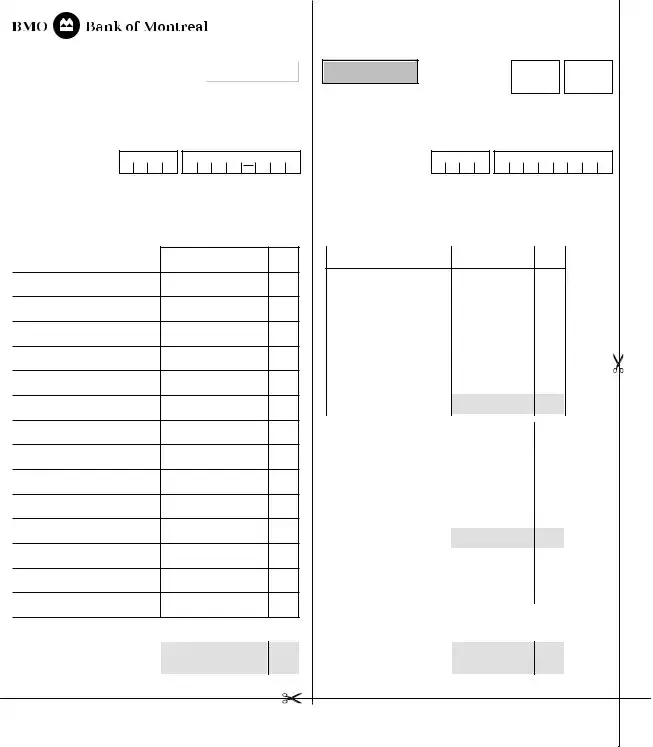
2.On the left side of the Deposit Slip, complete:
•The Cheque Identification (i.e. Name on Cheque and/or Cheque Number) with corresponding dollar amount
•Enter the total number of cheques listed on the deposit slip in the “# of Cheques field”
3.On the right side of the Deposit Slip, add the total amount of Cash, Coins, and MasterCard as it appears in the deposit
Note: The form will automatically calculate Subtotal and Total fields.
4.Print copies of the completed Deposit Slip, one for your records and one
to be submitted with the deposit. Initial both copies of the Deposit Slip in the Depositor’s box located at the top right corner.
163104 (01/16) 21/04/2016 4:29 pm
BUSINESS ACCOUNT DEPOSIT SLIP
|
|
Reset form |
NAME OF |
|
|
ACCOUNT |
|
|
DATE |
TRANSIT NO. ACCOUNT NO. |
|
Print Form
CREDIT
DATE
INITIALS
DEPOSITOR’S
TRANSIT NO. ACCOUNT NO.
TELLER’S
DD MMM YYYY
DD / MMM / YYYY
LIST OF CHEQUES
PLEASE LIST FOREIGN CHEQUES ON SEPARATE DEPOSIT SLIP
CHEQUE IDENTIFICATION |
AMOUNT |
1
2
3
4
5
6
7
8
9
10
11
12
13
14
15
# OF CHEQUES |
TOTAL |
$ |
0.00 |
0 |
DEPOSITED |
||
|
CHEQUES |
|
163104 (01/16) 21/04/2016 4:29 pm
DD MMM YYYY
DD / MMM / YYYY
CASH COUNT |
AMOUNT |
|
|
X 5 |
0.00 |
|
|
|
X 10 |
|
0.00 |
|
|
|
|
|
|
|
|
|
X 20 |
|
0.00 |
|
|
|
X 50 |
|
0.00 |
|
|
|
X 100 |
|
0.00 |
|
|
|
X |
|
0.00 |
|
|
|
X |
|
0.00 |
|
TOTAL CASH |
|
$ |
0.00 |
|
|
(NOTES) DEPOSITED |
||||
|
|
|
|
|
|
|
|
|
X $1 COIN |
|
0.00 |
|
|
|
X $2 COIN |
|
0.00 |
|
|
|
X |
|
0.00 |
|
|
|
X |
|
0.00 |
|
|
|
Loose Coin |
|
|
|
|
|
|
|
|
|
DEPOSITED |
|
$ |
0.00 |
|
|
TOTAL COIN |
|
|
|
|
|
MASTERCARD |
|
$ |
|
|
|
|
|
|
|
|
|
# OF |
|
TOTAL |
|
0.00 |
|
CHEQUES |
|
CHEQUES |
$ |
|
|
0 |
|
DEPOSITED |
|
|
|
|
|
|
|
|
|
TOTAL |
|
$ |
0.00 |
|
|
CHEQUES |
|
|||
|
DEPOSITED |
|
|
|
|
|
1 - Branch Copy |
|
2 - Customer Copy |
||
| Fact Name | Details |
|---|---|
| Purpose | The BMO electronic Business Account Deposit Slip is designed for deposits made at branches and ATMs. |
| Mandatory Fields | To ensure processing, complete all mandatory fields: Name of Account, Date, Transit Number, and Account Number. |
| Importance of Completeness | Incomplete deposit slips may lead to deposits not being processed, which can cause delays. |
| Around the Clock Deposit | For Around the Clock Deposit service, the slip must be printed, cut to size, and include all required information. |
| Calculation of Totals | The form automatically calculates subtotal and total amounts, simplifying the process for users. |
| Record Keeping | It is advisable to print two copies of the completed deposit slip: one for personal records and one to submit with the deposit. |
Completing the BMO Deposit form accurately is essential for ensuring that your deposit is processed without any issues. Follow these steps carefully to fill out the form correctly. Remember, any missing information may delay your deposit.
What is the purpose of the BMO Deposit form?
The BMO electronic Business Account Deposit Slip is designed for making deposits at BMO branches and ATMs. It ensures that all necessary information is provided to process deposits accurately. Without a complete deposit slip, there is a risk that the deposit may not be processed at all.
What information is required to complete the deposit slip?
To fill out the deposit slip correctly, you must complete all mandatory fields located on the top left and right sides. This includes the Name of Account, Date, and both the Transit and Account Number. Additionally, you need to provide details about the cheques being deposited, including the cheque identification and corresponding dollar amounts. On the right side, you will also need to enter the total amounts for cash, coins, and any MasterCard transactions.
What should I do if I am using the Around the Clock Deposit service?
If you plan to use the Around the Clock Deposit service, it is crucial to ensure that your deposit slip contains the Name of Account, Date, and Transit and Account Number. After completing the form, print it out and cut it to the specified size before placing it in the Around the Clock Depository. Failure to follow these steps may lead to processing issues.
How do I keep a record of my deposit?
To maintain a record of your deposit, print two copies of the completed Deposit Slip. One copy is for your records, while the other should accompany your deposit. Make sure to initial both copies in the Depositor’s box located at the top right corner of the slip. This practice helps ensure you have a reference for your transaction.
What happens if I forget to complete a mandatory field?
If you fail to complete any mandatory field on the deposit slip, there is a significant risk that your deposit will not be processed. Incomplete deposit slips can lead to delays or even rejection of the deposit. Therefore, it is essential to double-check that all required information is filled out before submitting the slip.
Omitting Mandatory Information: One common mistake is failing to complete all mandatory fields, such as the Name of Account, Date, and Transit and Account Number. Without this information, the deposit may not be processed.
Incorrect Cheque Identification: People often neglect to accurately fill out the Cheque Identification section, which includes the name on the cheque and/or cheque number. This can lead to confusion and delays in processing.
Missing Total Number of Cheques: It's essential to enter the total number of cheques in the designated field. Forgetting this step may result in an incomplete deposit slip.
Errors in Cash and Coin Amounts: Individuals frequently make mistakes when adding the total amounts of cash and coins. Ensure that these amounts are accurately reflected to avoid discrepancies.
Neglecting to Print Copies: Failing to print copies of the completed deposit slip can lead to issues. It's advisable to keep one for personal records and submit the other with the deposit.
Not Initialing Copies: Many forget to initial both copies of the deposit slip in the Depositor’s box. This step is crucial for verification purposes.
Improper Size for Deposit: After completing the deposit slip, it must be cut to the specified size before depositing. Ignoring this instruction can result in complications during the deposit process.
Using Incorrect Deposit Slip for Foreign Cheques: It’s important to remember that foreign cheques should be listed on a separate deposit slip. Mixing them with domestic cheques can cause processing delays.
The BMO Deposit form is essential for processing deposits at branches and ATMs. However, it is often accompanied by other important documents that help ensure the deposit is processed smoothly. Below is a list of these documents, each serving a specific purpose in the deposit process.
Having these additional documents ready can help facilitate a smooth deposit process. Always ensure that all forms are completed accurately to avoid any delays or issues with your deposits.
The BMO Deposit form shares similarities with several other financial documents. Each of these documents serves a specific purpose related to deposits, transactions, or account management. Here’s a list of documents that are similar to the BMO Deposit form:
When filling out the BMO Deposit form, it’s essential to follow certain guidelines to ensure your deposit is processed smoothly. Here’s a list of things you should and shouldn’t do:
Misconceptions about the BMO Deposit form can lead to confusion and mistakes during the deposit process. Here are four common misunderstandings:
Filling out the BMO Deposit form correctly is essential for ensuring that your deposits are processed without issues. Below are key takeaways to consider when using this form:
Initial both copies of the Deposit Slip in the Depositor’s box located at the top right corner of the form.