Homepage Blank Auto Repair Invoice PDF Form
Article Guide

When it comes to managing auto repairs, having a clear and organized invoicing system is essential for both service providers and customers. The Auto Repair Invoice form serves as a vital tool in this process, capturing all necessary details of the transaction in a structured manner. This form includes important elements such as the service provider's name, contact information, and invoice number, ensuring that every transaction is easily traceable. Additionally, it captures customer details, including insurance information, which can be crucial for claims processing. Each invoice outlines the specifics of the service performed, including the vehicle's make, model, and color, as well as a breakdown of the services rendered, quantities, unit prices, and totals. With features like tax calculations and a clear display of what the customer owes, this invoice template not only aids in financial clarity but also enhances customer satisfaction by providing a professional touch. The Auto Repair Invoice Template, available in PDF format, can be downloaded for free, making it accessible for all auto repair businesses, whether large or small.
Document Preview

Auto Repair Invoice Template in

PDF Format

Auto Repair Invoice Template was initially released on http://www.InvoicingTemplates.com on Wednesday, January 01, 2014, and is categorized as Service. As always Blank Vehicle Repair Invoice was published in two editions - one free Auto Repair Invoice Template, and another Uniform Invoice Software version that is able to turn Auto Repair Invoice Template into a complete invoicing system. This "Auto Repair Invoice Template in PDF Format" document includes brief description about the template, as well as a PDF invoice form exported from "autorepair.xls".

Like Auto Repair Invoice Template? Visit Auto Repair Invoice Template to download it for free.

Auto Repair Invoice Template Features and Facts

Auto Repair Invoice Template - PDF Format
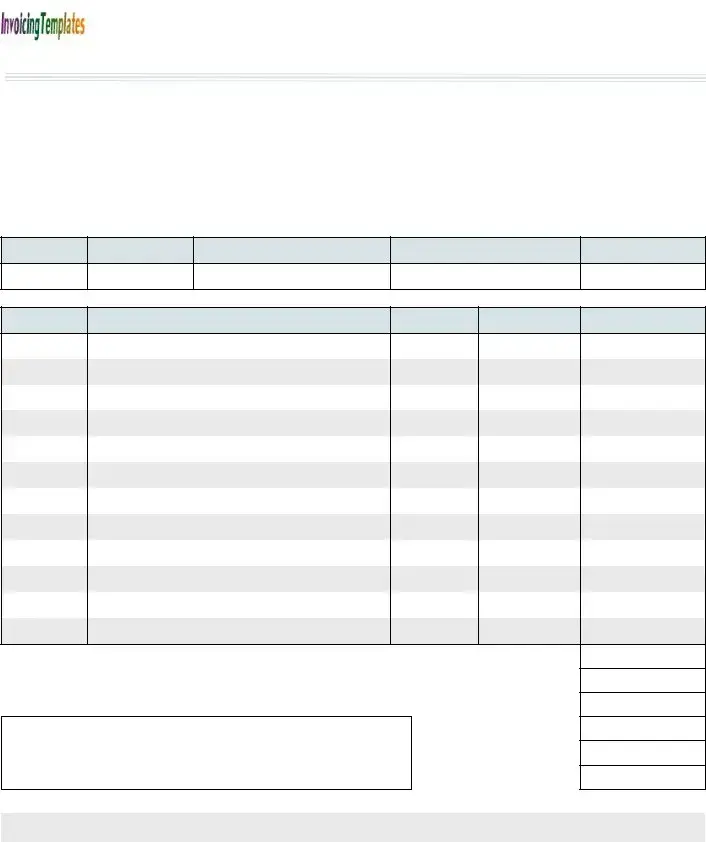
Auto Repair Service Name

INVOICE

address

DATE IN:

city, state ZIP

TIME IN:

phone, fax, web address etc.

INVOICE #:


INSURANCE INFORMATION:

Name

Company

Address

Claim #

City, ST ZIP


Cell Phone


Phone


R.O. #

YEAR

MAKE

MODEL

COLOR

#

Description

Quantity

Unit Price

Line Total

SUBTOTAL

TAX 5.00%

CUSTOMER OWES:

SUBLET

TOTAL

PAID

TOTAL DUE

-

-

-

-

-

-

THANK YOU FOR YOUR BUSINESS!

Form Specifications

Fact Name Description
Template Release Date The Auto Repair Invoice Template was first released on January 1, 2014.
Document Format This invoice template is available in PDF format, making it easy to print and share.
Free and Paid Versions There are two editions of the Auto Repair Invoice Template: a free version and a paid version that integrates with Uniform Invoice Software.
Included Information The template includes fields for service name, customer details, vehicle information, and billing amounts.
Tax Rate The template includes a section for calculating tax, which is set at a rate of 5.00%.
Customer Communication A "Thank You for Your Business!" note is included at the end of the invoice, promoting customer appreciation.

Auto Repair Invoice: Usage Guidelines

Filling out the Auto Repair Invoice form is a straightforward process that ensures all necessary details are captured for a complete record of services rendered. Follow the steps below to accurately complete the form.

  1. Start with the Auto Repair Service Name: Write the name of your auto repair business at the top of the invoice.
  2. Enter the invoice address: Fill in the address of your business, including city, state, and ZIP code.
  3. Record the date: Write the date when the service was performed.
  4. Fill in the time: Indicate the time the vehicle was brought in for service.
  5. Provide contact information: Include phone number, fax number, and website address.
  6. Assign an invoice number: Write a unique invoice number for tracking purposes.
  7. Input insurance information: Fill out the customer's insurance details, including name, company, address, claim number, city, state, ZIP code, cell phone, and phone number.
  8. Detail the vehicle information: Record the year, make, model, and color of the vehicle.
  9. List services provided: Under the description section, write down the services performed, along with quantity and unit price for each service.
  10. Calculate line totals: Multiply the quantity by the unit price for each service and write the line total.
  11. Sum up the subtotal: Add all line totals to get the subtotal amount.
  12. Calculate tax: Apply a 5.00% tax rate to the subtotal and write this amount down.
  13. Determine the total amount owed: Add the subtotal and tax to calculate the total amount the customer owes.
  14. Include additional charges: If applicable, list any sublet charges and total paid amounts.
  15. Final total due: Clearly indicate the total due amount at the bottom of the invoice.
  16. Express gratitude: End the invoice with a note thanking the customer for their business.

Your Questions, Answered

What is the Auto Repair Invoice form used for?

The Auto Repair Invoice form is designed for auto repair shops to provide detailed billing information to their customers. It outlines the services performed, parts used, and the total amount due. This invoice serves as a formal record of the transaction, helping both the service provider and the customer keep track of payments and services rendered.

What information is included in the Auto Repair Invoice?

The Auto Repair Invoice contains several key pieces of information. It includes the service name, invoice number, date, and customer details such as name, address, and contact information. Additionally, it lists the vehicle's make, model, and color, along with a description of the services performed, quantities, unit prices, and line totals. The invoice also summarizes the subtotal, applicable taxes, and the total amount due, ensuring clarity for the customer.

Is there a free version of the Auto Repair Invoice Template?

Yes, there is a free version of the Auto Repair Invoice Template available for download. This version allows auto repair shops to create invoices without any cost. For those seeking more advanced features, a paid version is also available through Uniform Invoice Software, which can transform the template into a complete invoicing system.

How can I download the Auto Repair Invoice Template?

You can easily download the Auto Repair Invoice Template by visiting the website http://www.InvoicingTemplates.com. Once there, you will find options to download both the free version and the paid version. Simply follow the prompts to get your template and start using it for your auto repair business.

Common mistakes

  1. Failing to include the service name. This is crucial for identifying the type of repair performed.

  2. Not providing accurate customer information. Ensure that the name, address, and contact details are correct.

  3. Leaving out the invoice number. Each invoice should have a unique identifier to avoid confusion.

  4. Incorrectly calculating the subtotal. Double-check all line items to ensure totals are accurate.

  5. Neglecting to include tax information. This can lead to discrepancies in payment.

  6. Forgetting to specify payment terms. Clearly outline when payment is due to avoid misunderstandings.

  7. Not thanking the customer. A simple thank you can enhance customer relations and encourage repeat business.

Documents used along the form

The Auto Repair Invoice form is an essential document used by auto repair businesses to itemize services provided and costs incurred. Alongside this invoice, several other forms and documents may be utilized to streamline the repair process and ensure accurate record-keeping. Below is a list of commonly used forms that complement the Auto Repair Invoice.

  • Repair Order (R.O.): This document outlines the specific services requested by the customer. It includes details such as the customer's information, vehicle details, and a description of the work to be performed. The repair order serves as a contract between the customer and the repair shop.
  • Estimate Form: Before any work begins, an estimate form provides the customer with a projected cost for the repairs. This document includes labor and parts costs, allowing the customer to approve the work based on the estimated total.
  • Parts Order Form: When specific parts need to be ordered for a repair, a parts order form is used. This document lists the required parts, their quantities, and the suppliers. It helps ensure that the correct parts are obtained in a timely manner.
  • Payment Receipt: After payment is made, a payment receipt is issued to the customer. This document confirms the transaction and details the amount paid, date of payment, and any remaining balance, if applicable.
  • Customer Satisfaction Survey: Following the completion of services, a customer satisfaction survey may be provided. This document gathers feedback on the quality of service and can help improve future customer experiences.

These documents work in tandem with the Auto Repair Invoice to create a comprehensive record of the repair process. Together, they facilitate clear communication between the repair shop and the customer, ensuring transparency and satisfaction throughout the service experience.

Similar forms

The Auto Repair Invoice form serves as an essential document in the automotive service industry. Several other documents share similarities with it, each serving a specific purpose in various transactions. Below are seven documents that have comparable features to the Auto Repair Invoice form:

  • Sales Invoice: Like the Auto Repair Invoice, a sales invoice details the products or services provided, including quantities and prices. Both documents serve as a formal request for payment from the customer.
  • Service Order Form: This document outlines the services requested by a customer, similar to how an auto repair invoice lists the services performed. Both documents are crucial for tracking customer requests and service history.
  • Estimate Form: An estimate provides a preliminary cost for services, much like the subtotal and total due sections of an auto repair invoice. Both documents help customers understand potential costs before committing to services.
  • Receipt: A receipt confirms payment has been made for services rendered. While the auto repair invoice requests payment, the receipt serves as proof of that payment, making both documents integral to financial transactions.
  • Work Order: A work order outlines tasks to be completed and often accompanies the auto repair invoice. Both documents ensure that the service provider and customer are aligned on the work to be done and the associated costs.
  • Warranty Registration Form: This document captures details about services covered under warranty, similar to how an auto repair invoice might include warranty information for parts or services. Both documents play a role in customer protection and service accountability.
  • Payment Agreement: A payment agreement outlines the terms under which a customer will pay for services, just as the auto repair invoice specifies the total amount due. Both documents establish clear expectations regarding financial obligations.

Dos and Don'ts

When filling out the Auto Repair Invoice form, attention to detail is crucial. Here are some guidelines to ensure accuracy and professionalism:

  • Do include all relevant vehicle information, such as year, make, model, and color.
  • Do clearly state the service performed and provide a detailed description.
  • Do list the quantity and unit price for each service or part provided.
  • Do calculate the subtotal, tax, and total amount owed accurately.
  • Do include your business name, address, and contact information at the top of the invoice.
  • Don't leave any fields blank; this can lead to confusion and delays in payment.
  • Don't use unclear language or abbreviations that may confuse the customer.
  • Don't forget to include the invoice number for tracking purposes.
  • Don't overlook the importance of thanking the customer for their business.

By following these guidelines, you can create a clear and professional Auto Repair Invoice that helps maintain good customer relations and facilitates timely payments.

Misconceptions

Misconceptions about the Auto Repair Invoice form can lead to confusion for both service providers and customers. Below are some common misunderstandings:

  • All auto repair invoices are the same. Many people believe that all invoices look alike, but each template can vary significantly in design and required information.
  • The form is only necessary for large repair shops. Smaller auto repair businesses also benefit from using an invoice to keep track of transactions and maintain professionalism.
  • Invoices are only for billing customers. Invoices serve multiple purposes, including documenting services rendered and providing a record for warranty claims.
  • Digital invoices are not as valid as paper ones. In the digital age, electronic invoices hold the same legal standing as their paper counterparts, provided they meet certain criteria.
  • All invoice templates are complicated to use. Many templates, including the Auto Repair Invoice Template, are designed for ease of use, making them accessible even for those unfamiliar with invoicing.
  • Invoices do not need to include tax information. Including tax details is crucial for compliance and transparency, regardless of the business size.
  • Customers do not need a copy of the invoice. Providing customers with an invoice is essential for their records and can help avoid disputes later on.
  • Only the total amount due is important. Customers often overlook the importance of itemized details, which clarify what services were performed and how costs were calculated.
  • Using an invoice template is unprofessional. On the contrary, utilizing a well-structured invoice template enhances professionalism and builds trust with customers.

Key takeaways

When filling out and using the Auto Repair Invoice form, consider the following key takeaways:

  • Accurate Information: Ensure all fields, such as service name, address, and invoice number, are filled out accurately to avoid confusion.
  • Insurance Details: Include the insurance information section, which is crucial for claims processing.
  • Clear Itemization: List each service or part with a description, quantity, unit price, and line total for transparency.
  • Tax Calculation: Remember to calculate the tax (5.00%) accurately to reflect the total amount owed by the customer.
  • Professional Presentation: Use the template to create a professional-looking invoice that enhances your business image.

These takeaways will help ensure that the invoice is completed correctly and serves its purpose effectively.