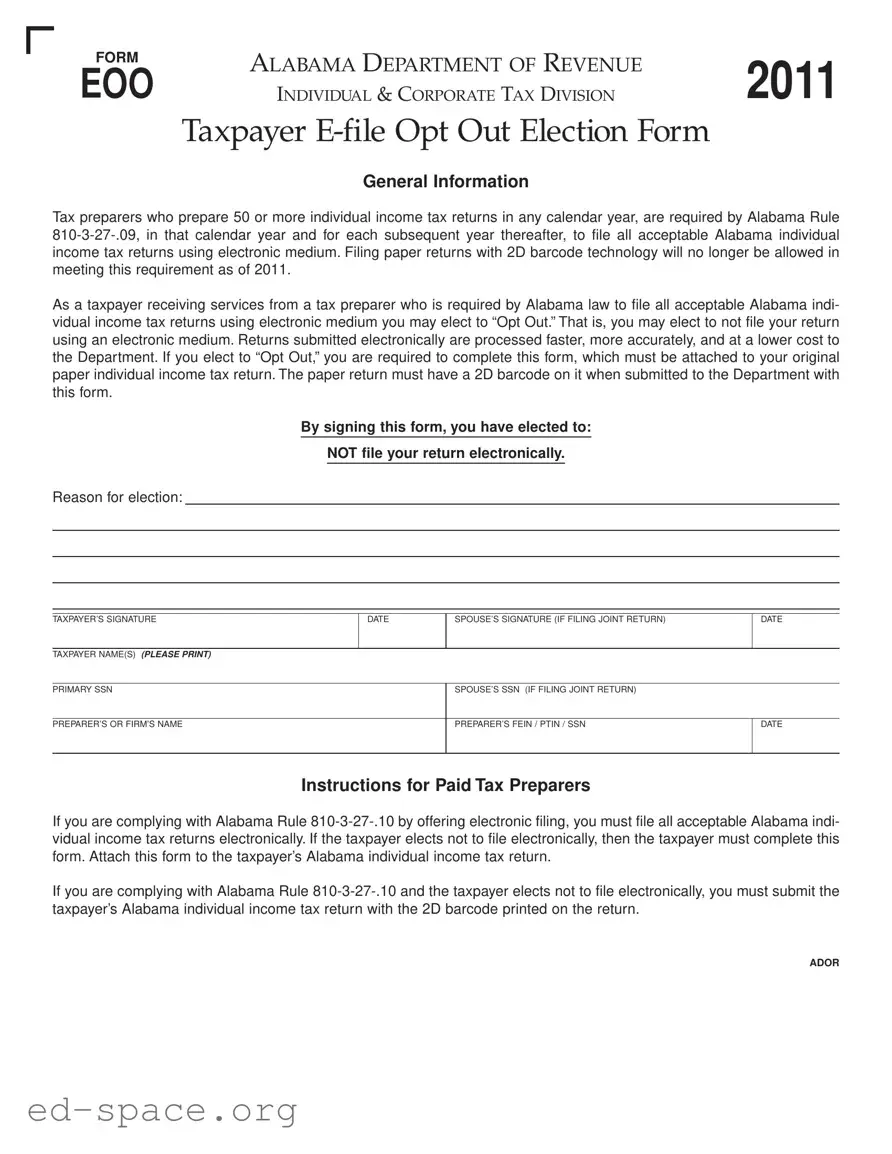
The Alabama EOO form serves as an essential tool for taxpayers who prefer to opt out of electronic filing for their individual income tax returns. Under Alabama law, specifically Alabama Rule 810-3-27-.09, tax preparers who handle 50 or more individual income tax returns in a calendar year are mandated to file these returns electronically. This requirement, effective since 2011, aims to streamline processing, enhance accuracy, and reduce costs for the Department of Revenue. However, taxpayers have the option to decline electronic filing by completing the EOO form, which must be submitted alongside their paper return that includes a 2D barcode. By signing this form, taxpayers formally indicate their choice not to file electronically and provide necessary details such as their names, Social Security numbers, and signatures. Additionally, tax preparers are instructed to adhere to Alabama Rule 810-3-27-.10, which emphasizes the importance of electronic filing, unless the taxpayer opts out. This form not only facilitates compliance but also empowers taxpayers to make decisions that best suit their filing preferences.

FORM |
ALABAMA DEPARTMENT OF REVENUE |
2011 |
|
EOO |
|||
INDIVIDUAL & CORPORATE TAX DIVISION |
|||
|
|
Taxpayer
General Information
Tax preparers who prepare 50 or more individual income tax returns in any calendar year, are required by Alabama Rule
As a taxpayer receiving services from a tax preparer who is required by Alabama law to file all acceptable Alabama indi- vidual income tax returns using electronic medium you may elect to “Opt Out.” That is, you may elect to not file your return using an electronic medium. Returns submitted electronically are processed faster, more accurately, and at a lower cost to the Department. If you elect to “Opt Out,” you are required to complete this form, which must be attached to your original paper individual income tax return. The paper return must have a 2D barcode on it when submitted to the Department with this form.
By signing this form, you have elected to:
NOT file your return electronically.
Reason for election:
TAXPAYER’S SIGNATURE
DATE
SPOUSE’S SIGNATURE (IF FILING JOINT RETURN)
DATE
TAXPAYER NAME(S) (PLEASE PRINT)
PRIMARY SSN
PREPARER’S OR FIRM’S NAME
SPOUSE’S SSN (IF FILING JOINT RETURN)
PREPARER’S FEIN / PTIN / SSN |
DATE |
|
|
Instructions for Paid Tax Preparers
If you are complying with Alabama Rule
If you are complying with Alabama Rule
ADOR
| Fact Name | Description |
|---|---|
| Governing Law | This form is governed by Alabama Rule 810-3-27-.09, which mandates that tax preparers who prepare 50 or more individual income tax returns must file electronically. |
| Opt-Out Election | Taxpayers may choose to opt out of electronic filing by completing this form and attaching it to their original paper tax return. |
| Processing Benefits | Returns submitted electronically are processed more quickly, accurately, and at a lower cost to the Alabama Department of Revenue. |
| 2D Barcode Requirement | Paper returns submitted with this form must include a 2D barcode to comply with submission requirements. |
| Signature Requirement | The form must be signed by the taxpayer and, if applicable, the spouse when filing a joint return. |
Filling out the Alabama EOO form is a straightforward process. This form is necessary for taxpayers who wish to opt out of electronic filing when their tax preparer is required to file electronically. After completing the form, it must be attached to your original paper income tax return, which should include a 2D barcode.
What is the Alabama Eoo form?
The Alabama Eoo form, officially known as the Taxpayer E-file Opt Out Election Form, allows taxpayers to opt out of electronic filing for their individual income tax returns. This form is necessary for individuals whose tax preparers are required to file electronically due to Alabama law. By completing this form, a taxpayer indicates their choice to file a paper return instead.
Who needs to complete the Alabama Eoo form?
What are the requirements for submitting the Alabama Eoo form?
When submitting the Alabama Eoo form, it must be attached to your original paper individual income tax return. The paper return must include a 2D barcode. This barcode is essential for the processing of your return. Additionally, both the taxpayer and the spouse (if filing jointly) must sign the form and provide their Social Security Numbers. Failure to meet these requirements may result in delays or issues with your tax return.
What are the benefits of electronic filing compared to paper filing?
Filing your tax return electronically offers several advantages. Electronic submissions are processed more quickly, reducing the time it takes to receive any refunds. They are also typically more accurate, which can minimize the risk of errors. Furthermore, electronic filing is more cost-effective for the Alabama Department of Revenue, which can lead to improved services for taxpayers. Opting out of electronic filing may lead to longer processing times and potential complications.
Failing to attach the EOO form to the original paper return. This step is crucial for the election to be valid.
Not including a 2D barcode on the paper return. The absence of this barcode can lead to processing delays.
Neglecting to provide both taxpayer and spouse signatures when filing a joint return. Both signatures are necessary to validate the submission.
Forgetting to print names clearly in the designated fields. Illegible handwriting can cause confusion and processing errors.
Incorrectly entering the Social Security Numbers (SSNs). Ensure that all numbers are accurate to avoid complications.
Leaving out the reason for opting out. This information is essential for the Department's records.
Failing to check for any updates or changes to the Alabama tax laws before completing the form. Regulations can change, affecting filing requirements.
Not keeping a copy of the submitted form for personal records. This can be helpful in case of future inquiries or disputes.
Submitting the form after the tax deadline. Timeliness is critical to ensure compliance with Alabama tax regulations.
The Alabama EOO form is an important document for taxpayers who wish to opt out of electronic filing for their income tax returns. However, there are several other forms and documents that often accompany this form to ensure compliance with state regulations. Below is a list of these additional documents, each serving a specific purpose in the tax filing process.
Understanding these accompanying documents can help streamline the filing process and ensure compliance with Alabama tax regulations. By preparing all necessary forms and documentation, taxpayers can alleviate potential issues and facilitate a smoother tax filing experience.
The Alabama EOO form is important for taxpayers who wish to opt out of electronic filing for their individual income tax returns. It shares similarities with several other documents that serve various purposes in tax filing and compliance. Below is a list of six documents that are similar to the Alabama EOO form, along with an explanation of how they are alike.
Understanding these forms can help taxpayers navigate their filing options and ensure compliance with state requirements. Each document plays a role in giving taxpayers the flexibility they need in managing their tax returns.
When filling out the Alabama EOO form, there are important guidelines to follow. Here are ten things to keep in mind:
Understanding the Alabama Eoo form can be a bit tricky, especially with all the information floating around. Here are ten common misconceptions that often arise regarding this form, along with clarifications to help you navigate the process more easily.
In reality, the Eoo form is mandatory for taxpayers whose preparers are required to file electronically. If your tax preparer processes 50 or more returns, you must complete this form if you choose to opt out of electronic filing.
This is not the case. The Eoo form must be attached to your original paper return. Submitting it separately will not fulfill the requirements set by the Alabama Department of Revenue.
While electronic filing is generally faster and more accurate, some taxpayers may prefer paper filing for various reasons, such as comfort with traditional methods. The Eoo form allows you to make that choice.
Only the taxpayer or their spouse (if filing jointly) can sign the Eoo form. This ensures that the decision to opt out is made with full consent from the parties involved.
Actually, even if you opt out, your paper return must still have a 2D barcode printed on it. This barcode is crucial for processing your return accurately.
While it primarily addresses individual income tax returns, it also applies to corporate returns in specific situations. Understanding the context of your filing is essential.
There are deadlines associated with submitting the Eoo form. It must be completed and attached to your return at the time of filing to be valid.
Once you opt out and submit the form, you cannot switch back to electronic filing for that tax year. It’s important to consider your decision carefully.
This form applies broadly to anyone whose tax preparer is mandated to file electronically. It’s not limited to certain income levels or tax circumstances.
On the contrary, the form is straightforward. It requires basic information about the taxpayer and their choice to opt out. With clear instructions, most individuals can complete it without difficulty.
By addressing these misconceptions, taxpayers can better understand their rights and responsibilities when it comes to filing their taxes in Alabama. Being informed empowers you to make the best decisions for your financial situation.
Filling out the Alabama EOO form is an important step for taxpayers who wish to opt out of electronic filing. Here are some key takeaways to keep in mind: