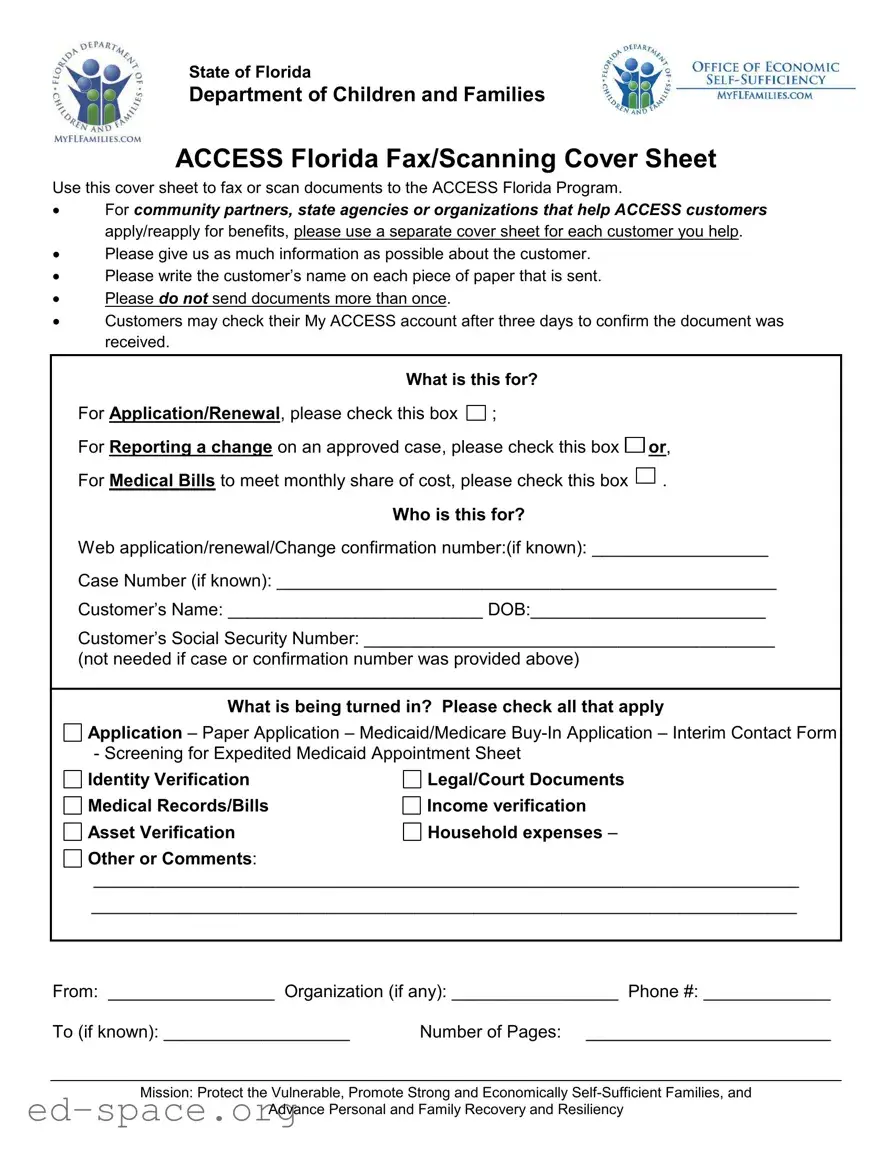
The Access Florida Fax form serves as an essential tool for individuals and organizations assisting customers in navigating the complexities of Florida's benefits system. Designed by the Florida Department of Children and Families, this form facilitates the submission of critical documents to the ACCESS Florida Program, ensuring that applications and renewals for various benefits are processed efficiently. Community partners and state agencies are encouraged to use a separate cover sheet for each customer, allowing for organized and clear communication. It is vital to include the customer’s name on every document submitted, as this helps streamline the identification process. The form also includes specific checkboxes to indicate the purpose of the submission, whether for application or renewal, reporting a change, or submitting medical bills. Additionally, customers can verify the receipt of their documents by checking their My ACCESS account after three days. With the mission of protecting vulnerable populations and promoting self-sufficiency, the Access Florida Fax form plays a critical role in supporting families and individuals in need of assistance.
State of Florida
Department of Children and Families
ACCESS Florida Fax/Scanning Cover Sheet
Use this cover sheet to fax or scan documents to the ACCESS Florida Program.
For community partners, state agencies or organizations that help ACCESS customers apply/reapply for benefits, please use a separate cover sheet for each customer you help.
Please give us as much information as possible about the customer.
Please write the customer’s name on each piece of paper that is sent.
Please do not send documents more than once.
Customers may check their My ACCESS account after three days to confirm the document was received.
What is this for? |
|
|
For Application/Renewal, please check this box |
; |
|
For Reporting a change on an approved case, please check this box |
or, |
|
For Medical Bills to meet monthly share of cost, please check this box |
. |
|
Who is this for? |
|
|
Web application/renewal/Change confirmation number:(if known): __________________
Case Number (if known): ___________________________________________________
Customer’s Name: __________________________ DOB:________________________
Customer’s Social Security Number: __________________________________________
(not needed if case or confirmation number was provided above)
What is being turned in? Please check all that apply
Application – Paper Application – Medicaid/Medicare
Identity Verification
Medical Records/Bills
Asset Verification
Legal/Court Documents
Income verification Household expenses –
Other or Comments:
________________________________________________________________________
________________________________________________________________________
From: _________________ Organization (if any): _________________ Phone #: _____________
To (if known): ___________________ |
Number of Pages: _________________________ |
Mission: Protect the Vulnerable, Promote Strong and Economically
Advance Personal and Family Recovery and Resiliency
| Fact Name | Description |
|---|---|
| Purpose of the Form | The ACCESS Florida Fax form is designed to facilitate the submission of documents to the ACCESS Florida Program, primarily for applying or renewing benefits. |
| Use by Community Partners | Community partners, state agencies, or organizations assisting ACCESS customers must use a separate cover sheet for each customer to ensure proper processing. |
| Customer Information Requirement | It is essential to provide comprehensive information about the customer, including their name on each document submitted. |
| Document Submission Guidelines | Documents should not be sent more than once. This helps prevent confusion and ensures efficient processing. |
| Confirmation of Receipt | Customers can verify if their documents were received by checking their My ACCESS account after three days. |
| Types of Submissions | The form allows for various submissions, including applications, medical bills, identity verification, and legal documents, among others. |
| Governing Laws | This form operates under the regulations set forth by the Florida Department of Children and Families, specifically regarding public assistance programs. |
| Mission Statement | The mission of the ACCESS Florida Program is to protect vulnerable populations, promote self-sufficiency, and support personal and family recovery. |
Filling out the Access Florida Fax form is straightforward. Follow these steps to ensure you provide all necessary information. Once completed, you can fax or scan the documents to the ACCESS Florida Program. Make sure to check your My ACCESS account after three days to confirm receipt of your documents.
What is the purpose of the Access Florida Fax form?
The Access Florida Fax form is designed to help individuals and organizations submit documents to the ACCESS Florida Program. This includes applications for benefits, renewals, and reporting changes to existing cases. It serves as a cover sheet to ensure that the submitted documents are properly attributed to the right customer.
Who should use this form?
This form is intended for community partners, state agencies, and organizations that assist ACCESS customers in applying for or reapplying for benefits. Each customer should have a separate cover sheet to ensure their information is processed correctly.
What information do I need to provide on the form?
You will need to provide the customer’s name, date of birth, and social security number, if not using a case or confirmation number. Additionally, indicate what documents you are submitting, such as applications, identity verification, or income verification. Providing as much detail as possible helps expedite processing.
How do I confirm that my documents were received?
Customers can check their My ACCESS account after three days to confirm that their documents have been received. This allows individuals to track the status of their submissions without needing to call or visit an office.
Can I send documents multiple times if I don’t receive confirmation?
No, you should not send documents more than once. Sending duplicates can cause confusion and delays in processing. If you have concerns about the status of your submission, it’s best to check your My ACCESS account first.
What types of documents can I submit using this form?
You can submit various types of documents, including applications for benefits, identity verification, medical records, and income verification. Make sure to check all applicable boxes on the form to indicate what you are turning in.
Is there a specific format I need to follow when faxing or scanning documents?
What should I do if I do not know the case or confirmation number?
If you do not know the case or confirmation number, you can still submit the documents by providing the customer’s name, date of birth, and social security number. This information will help the ACCESS Florida Program locate the correct case.
Not using a separate cover sheet for each customer: Community partners and organizations should remember to use a distinct cover sheet for every customer they assist. Failing to do this can lead to confusion and delays in processing.
Insufficient customer information: Providing as much information as possible about the customer is crucial. Incomplete details may result in processing delays or issues with the application.
Neglecting to write the customer’s name on every document: Each piece of paper sent should clearly display the customer’s name. Omitting this step can make it difficult for staff to match documents to the correct application.
Resending documents unnecessarily: It’s important not to send the same documents multiple times. Doing so can clutter the system and create confusion regarding what has already been submitted.
Failing to check the My ACCESS account: After three days, customers should check their My ACCESS account to confirm that their documents were received. Ignoring this step can lead to missed updates or further actions needed.
Incorrectly identifying the purpose of submission: Make sure to check the appropriate box for the reason for the submission, whether it’s for application/renewal, reporting a change, or submitting medical bills. Incorrect selections can lead to misrouting of documents.
The Access Florida Fax form is an essential tool for submitting various documents to the ACCESS Florida Program. Along with this form, several other documents may be required to ensure a complete application or renewal process. Below is a list of commonly used forms and documents that often accompany the Access Florida Fax form.
Understanding these forms and documents can help streamline the application process for assistance. If you have any questions about what to include or how to complete these forms, seeking guidance from a community partner or a knowledgeable representative can be beneficial. Remember, providing complete and accurate information is key to receiving the support you need.
When filling out the Access Florida Fax form, it’s important to follow some guidelines to ensure your submission is successful. Here’s a list of things you should and shouldn’t do:
Here are some common misconceptions about the Access Florida Fax form, along with clarifications to help you understand its purpose and usage better.
This form can be used for various purposes, including applications, renewals, and reporting changes on an approved case.
It is important to send each document only once. Sending duplicates can lead to confusion and delays.
Each piece of paper sent should include the customer’s name to ensure proper identification and processing.
Organizations and community partners can use the form to assist customers in applying or reapplying for benefits.
Customers can check their My ACCESS account after three days to confirm whether their documents were received.
A Social Security number is not necessary if you provide a case or confirmation number.
The form is specifically designed for certain documents related to applications, renewals, and verifications. Make sure to check the options provided on the form.
The cover sheet is essential for organizing and identifying the documents being submitted to the ACCESS Florida Program.
While you can send multiple pages, it’s important to keep the submission clear and concise. Always indicate the number of pages on the cover sheet.
Here are key takeaways for filling out and using the Access Florida Fax form: