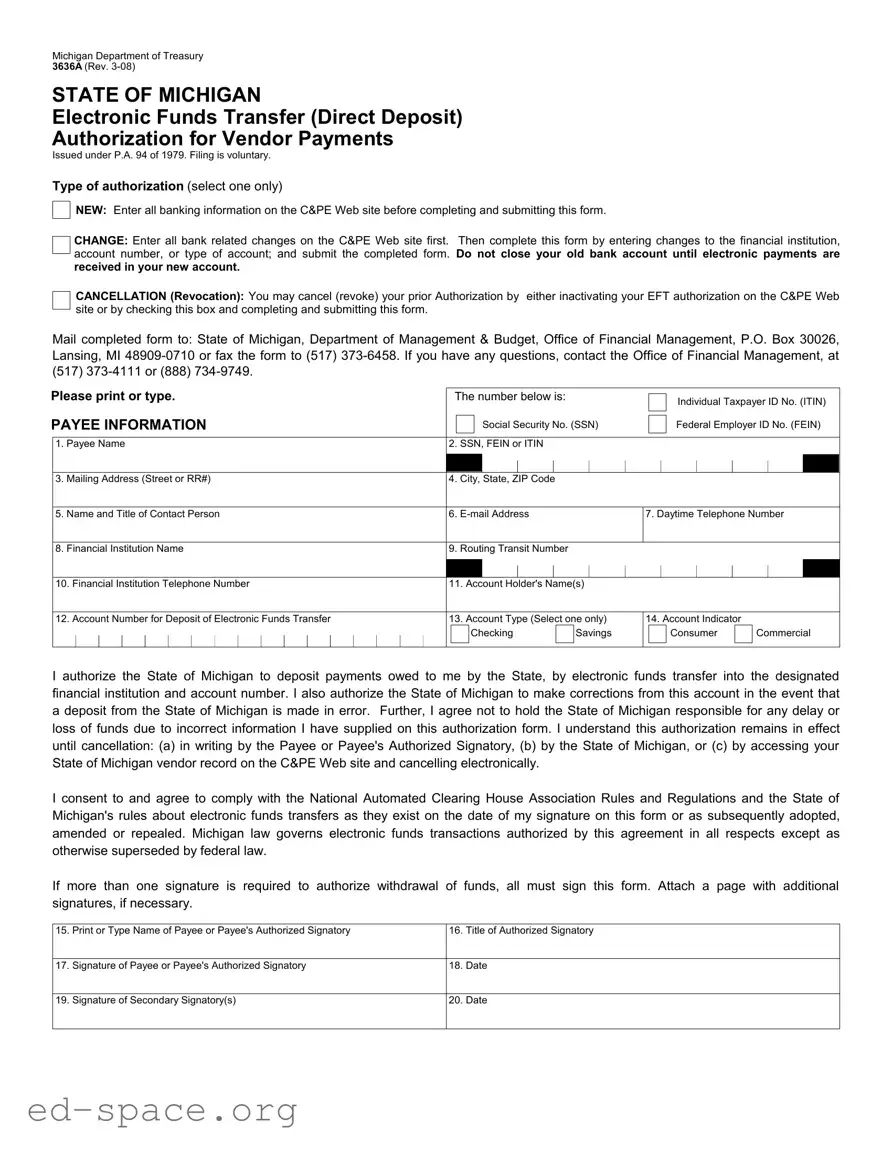
The Michigan Department of Treasury 3636A form serves as an essential tool for vendors seeking to authorize electronic funds transfers (EFT) for payments owed by the state. This form, which is filed voluntarily, allows vendors to establish, modify, or cancel their direct deposit arrangements. When initiating a new authorization, it is crucial for vendors to enter all banking information on the C&PE website prior to completing the form. If changes to existing banking details are necessary, vendors must first update their information online before submitting the form with the revised account details. The cancellation process is straightforward, allowing vendors to revoke prior authorizations either through the C&PE website or by submitting the completed form. This form also requires key payee information, including taxpayer identification numbers and banking details, ensuring that electronic payments are directed to the correct accounts. By signing the form, vendors authorize the state to deposit payments electronically and agree to abide by relevant rules and regulations. This process not only streamlines payment but also enhances financial efficiency for both the state and its vendors.

Michigan Department of Treasury 3636A (Rev.
STATE OF MICHIGAN
Electronic Funds Transfer (Direct Deposit)
Authorization for Vendor Payments
Issued under P.A. 94 of 1979. Filing is voluntary.
Type of authorization (select one only)
NEW: Enter all banking information on the C&PE Web site before completing and submitting this form.
CHANGE: Enter all bank related changes on the C&PE Web site first. Then complete this form by entering changes to the financial institution, account number, or type of account; and submit the completed form. Do not close your old bank account until electronic payments are received in your new account.
CANCELLATION (Revocation): You may cancel (revoke) your prior Authorization by either inactivating your EFT authorization on the C&PE Web site or by checking this box and completing and submitting this form.
Mail completed form to: State of Michigan, Department of Management & Budget, Office of Financial Management, P.O. Box 30026, Lansing, MI
Please print or type. |
The number below is: |
|
|
|
|
|
|
Individual Taxpayer ID No. (ITIN) |
||||||||||||||||||||||||||||||||||||||||||||
|
|
|
|
|
|
|||||||||||||||||||||||||||||||||||||||||||||||
|
|
|
|
|
|
|
|
|
|
|
|
|
|
|
|
|
|
|
|
|
|
|
|
|
|
|
|
|
|
|
|
|
|
|
|
|
|
|
|
|
|
|
|
|
|
|
||||||
PAYEE INFORMATION |
|
|
|
|
Social Security No. (SSN) |
|
|
|
Federal Employer ID No. (FEIN) |
|||||||||||||||||||||||||||||||||||||||||||
|
|
|
|
|
|
|
||||||||||||||||||||||||||||||||||||||||||||||
|
|
|
|
|
|
|
||||||||||||||||||||||||||||||||||||||||||||||
|
|
|
|
|
|
|
|
|
|
|
|
|
|
|
|
|
||||||||||||||||||||||||||||||||||||
1. |
Payee Name |
2. |
SSN, FEIN or ITIN |
|
|
|
|
|
|
|
|
|
|
|
|
|||||||||||||||||||||||||||||||||||||
|
|
|
|
|
|
|
|
|
|
|
|
|
|
|
|
|
||||||||||||||||||||||||||||||||||||
|
|
|
|
|
|
|
|
|
|
|
|
|
|
|
|
|
|
|
|
|
|
|
|
|
|
|
|
|
|
|
|
|
|
|
|
|
|
|
|
|
|
|
|
|
|
|
|
|
|
|
|
|
|
|
|
|
|
|
|
|
|
|
|
|
|
|
|
|
|
|
|
|
|
|
|
|
|
|
|
|
|
|
|
|
|
|
|
|
|
|
|
|
|
|
|
|
|
|
|
|
|
|
|
|
|
3. |
Mailing Address (Street or RR#) |
4. |
City, State, ZIP Code |
|
|
|
|
|
|
|
|
|
|
|
|
|||||||||||||||||||||||||||||||||||||
|
|
|
|
|
|
|
|
|
|
|||||||||||||||||||||||||||||||||||||||||||
5. |
Name and Title of Contact Person |
6. |
|
|
|
7. Daytime Telephone Number |
||||||||||||||||||||||||||||||||||||||||||||||
|
|
|
|
|
|
|
|
|
|
|
|
|
|
|
|
|
|
|
|
|
|
|
|
|
|
|
|
|
|
|
|
|
|
|
|
|
|
|
|
|
|
|
|
|
|
|
|
|
|
|
|
|
8. |
Financial Institution Name |
9. |
Routing Transit Number |
|
|
|
|
|
|
|
|
|
|
|
|
|||||||||||||||||||||||||||||||||||||
|
|
|
|
|
|
|
|
|
|
|
|
|
|
|
|
|
|
|
|
|
|
|
|
|
|
|
|
|
|
|
|
|
|
|
|
|
|
|
|
|
|
|
|
|
|
|
|
|
||||
|
|
|
|
|
|
|
|
|
|
|
|
|
|
|
|
|
|
|
|
|
|
|
|
|
|
|
|
|
|
|
|
|
|
|
|
|
|
|
|
|
|
|
|
|
|
|
|
|
|
|
|
|
|
|
|
|
|
|
|
|
|
|
|
|
|
|
|
|
|
|
|
|
|
|
|
|
|
|
|
|
|
|
|
|
|
|
|
|
|
|
|
|
|
|
|
|
|
|
|
|
|
|
|
|
|
10. Financial Institution Telephone Number |
11. Account Holder's Name(s) |
|
|
|
|
|
|
|
|
|
||||||||||||||||||||||||||||||||||||||||||
|
|
|
|
|
|
|
|
|
|
|
|
|
|
|
|
|
|
|
|
|
|
|
|
|
|
|
|
|
|
|
|
|
|
|
|
|
|
|
|
|
|
|
|
|
|
|
|
|
|
|
|
|
12. Account Number for Deposit of Electronic Funds Transfer |
13. Account Type (Select one only) |
14. Account Indicator |
|
|
|
|||||||||||||||||||||||||||||||||||||||||||||||
|
|
|
|
|
|
|
|
|
|
|
|
|
|
|
|
|
|
|
|
|
|
|
|
|
|
|
|
|
|
|
|
|
|
|
|
Checking |
|
Savings |
|
|
|
Consumer |
|
Commercial |
||||||||
I authorize the State of Michigan to deposit payments owed to me by the State, by electronic funds transfer into the designated financial institution and account number. I also authorize the State of Michigan to make corrections from this account in the event that a deposit from the State of Michigan is made in error. Further, I agree not to hold the State of Michigan responsible for any delay or loss of funds due to incorrect information I have supplied on this authorization form. I understand this authorization remains in effect until cancellation: (a) in writing by the Payee or Payee's Authorized Signatory, (b) by the State of Michigan, or (c) by accessing your State of Michigan vendor record on the C&PE Web site and cancelling electronically.
I consent to and agree to comply with the National Automated Clearing House Association Rules and Regulations and the State of Michigan's rules about electronic funds transfers as they exist on the date of my signature on this form or as subsequently adopted, amended or repealed. Michigan law governs electronic funds transactions authorized by this agreement in all respects except as otherwise superseded by federal law.
If more than one signature is required to authorize withdrawal of funds, all must sign this form. Attach a page with additional signatures, if necessary.
15. |
Print or Type Name of Payee or Payee's Authorized Signatory |
16. |
Title of Authorized Signatory |
|
|
|
|
17. |
Signature of Payee or Payee's Authorized Signatory |
18. |
Date |
|
|
|
|
19. |
Signature of Secondary Signatory(s) |
20. |
Date |
|
|
|
|
| Fact Name | Details |
|---|---|
| Form Purpose | The 3636A Michigan form is used for Electronic Funds Transfer (Direct Deposit) Authorization for vendor payments. |
| Governing Law | This form is issued under Public Act 94 of 1979, which governs electronic funds transactions in Michigan. |
| Filing Status | Filing this form is voluntary for vendors wishing to receive payments electronically. |
| Authorization Types | Vendors can select from three types of authorization: New, Change, or Cancellation. |
| Contact Information | For questions, vendors can contact the Office of Financial Management at (517) 373-4111 or (888) 734-9749. |
Filling out the Michigan Department of Treasury 3636A form requires careful attention to detail. This form facilitates the electronic transfer of funds to vendors. After completing the form, it must be submitted to the appropriate state department for processing.
What is the purpose of the Michigan 3636A form?
The Michigan 3636A form is used to authorize electronic funds transfers (EFT) for vendor payments from the State of Michigan. By completing this form, you allow the state to deposit payments directly into your designated bank account, streamlining the payment process and reducing the time it takes to receive funds. This form is issued under Public Act 94 of 1979, and while filing is voluntary, it can greatly enhance the efficiency of payment transactions.
How do I complete the 3636A form?
To complete the 3636A form, first select the type of authorization you need: NEW, CHANGE, or CANCELLATION. If you are setting up a new account, you must enter all banking information on the C&PE website before filling out this form. If you are making changes, update your banking information on the website first, then complete the form with the new details. For cancellation, you can either inactivate your EFT authorization online or check the cancellation box on the form. Ensure that all required fields are filled out accurately, and then submit the form by mail or fax as indicated.
What information do I need to provide on the form?
The form requires several key pieces of information. You will need to provide your payee name, Social Security Number (SSN), Federal Employer Identification Number (FEIN), or Individual Taxpayer Identification Number (ITIN). Additionally, you must include your mailing address, the name and title of a contact person, an email address, and a daytime telephone number. Banking details such as the financial institution's name, routing transit number, account holder's name, account number, and account type (checking or savings) are also necessary for processing your EFT request.
What should I do if I need to change my banking information?
If you need to change your banking information, you should first update your details on the C&PE website. After that, complete the 3636A form by entering the changes to your financial institution, account number, or account type. It is crucial to wait until electronic payments are successfully received in your new account before closing your old bank account to avoid any disruption in payments.
How can I cancel my electronic funds transfer authorization?
You can cancel your EFT authorization in two ways. One option is to access your vendor record on the C&PE website and inactivate your authorization electronically. Alternatively, you can check the cancellation box on the 3636A form, complete the necessary information, and submit it to the appropriate address or fax number. Ensure that you follow the required process to avoid any delays in the cancellation of your authorization.
Who can I contact if I have questions about the 3636A form?
If you have any questions or need assistance with the 3636A form, you can contact the Office of Financial Management at the State of Michigan. They can be reached at (517) 373-4111 or toll-free at (888) 734-9749. Their staff will be able to provide guidance and support to help you navigate the process smoothly.
Incorrect Authorization Type: Failing to select the correct type of authorization (new, change, or cancellation) can lead to processing delays.
Missing Banking Information: Not entering all required banking details on the C&PE Web site before submitting the form can result in rejected applications.
Old Account Closure: Closing the old bank account before confirming that electronic payments have been received in the new account can cause payment issues.
Incomplete Contact Information: Omitting essential contact details, such as the daytime telephone number or email address, may hinder communication regarding the authorization.
Incorrect Account Type: Selecting the wrong account type (checking or savings) could lead to funds being deposited incorrectly.
Signature Issues: Not providing all required signatures, especially when multiple signatures are necessary, can delay processing.
Failure to Review: Not reviewing the form for accuracy before submission can result in errors that affect payment processing.
Ignoring Cancellation Procedures: Not following proper procedures for cancellation can lead to continued electronic transfers to an unwanted account.
The Michigan Department of Treasury 3636A form is crucial for vendors seeking to set up electronic funds transfers for payments. To facilitate this process, several other documents may be needed. Here’s a brief overview of these forms and their purposes.
These documents play a vital role in ensuring a smooth payment process between vendors and the state of Michigan. Proper completion and submission of these forms can help avoid delays and ensure that payments are received promptly.
The Michigan Department of Treasury 3636A form is an important document for vendors who wish to authorize electronic funds transfers for payments. This form shares similarities with several other documents used in various financial and administrative contexts. Here are five documents that resemble the 3636A form, along with an explanation of their similarities:
Understanding these documents can help streamline financial transactions and ensure that payments are processed smoothly. Each form plays a vital role in facilitating electronic payments while ensuring that all parties involved have the necessary information to execute transactions safely and efficiently.
When filling out the 3636A Michigan form for Electronic Funds Transfer (Direct Deposit) Authorization, it is important to follow certain guidelines to ensure a smooth process. Below are four things you should and shouldn't do:
Following these guidelines can help prevent delays or issues with your electronic funds transfer authorization. Ensure that all information is accurate and complete before submission.
Here are five common misconceptions about the Michigan Department of Treasury 3636A form:
When filling out and using the Michigan Department of Treasury 3636A form for Electronic Funds Transfer (EFT) authorization, consider the following key takeaways: