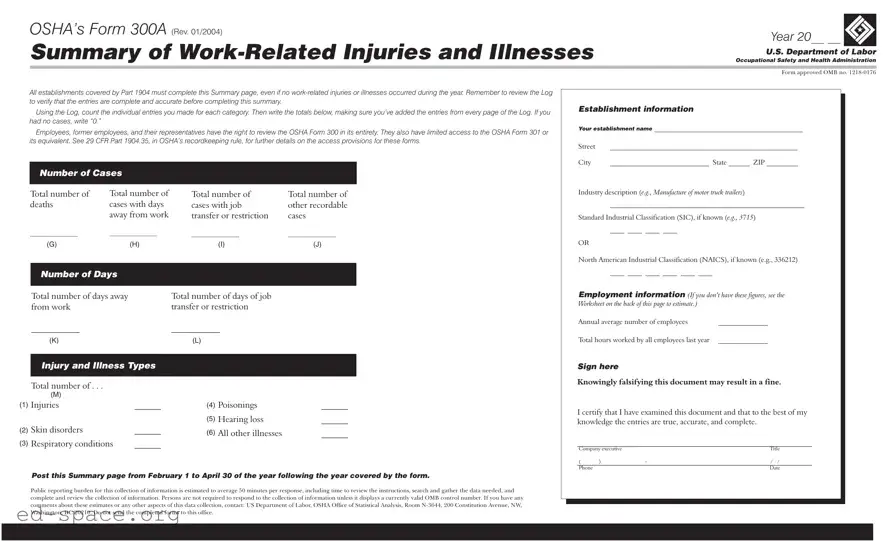
The OSHA Form 300A serves as a crucial summary of work-related injuries and illnesses that occur within a given establishment. Required by the Occupational Safety and Health Administration, this form must be completed by all workplaces covered under Part 1904, regardless of whether any incidents took place during the reporting year. It is essential to ensure that the Log of Work-Related Injuries and Illnesses is thoroughly reviewed to confirm that all entries are accurate before filling out the summary. The form collects vital information, including the total number of cases, the number of deaths, and various categories of injuries and illnesses, such as skin disorders and respiratory conditions. Additionally, it requires establishments to provide details like the average number of employees and the total hours worked over the year. Employers must post the completed summary in a visible location from February 1 to April 30 of the following year, allowing employees and their representatives to review it. Understanding the significance of the Form 300A helps promote workplace safety and accountability, ensuring that all incidents are documented and addressed appropriately.

OSHA’s Form 300A (REV. 01/2004) |
Year 20__ __ |
|
Summary of |
|
|
Occupational Safety and Health Administration |
||
|
U.S. Department of Labor |
|
|
|
|
|
|
|
|
Form approved OMB no. |
|
All establishments covered by Part 1904 must complete this Summary page, even if no
Using the Log, count the individual entries you made for each category. Then write the totals below, making sure you’ve added the entries from every page of the Log. If you had no cases, write “0.”
Employees, former employees, and their representatives have the right to review the OSHA Form 300 in its entirety. They also have limited access to the OSHA Form 301 or its equivalent. See 29 CFR Part 1904.35, in OSHA’s recordkeeping rule, for further details on the access provisions for these forms.
Number of Cases
Establishment information
Your establishment name __________________________________________
Street |
_____________________________________________________ |
City |
____________________________ State ______ ZIP _________ |
Total number of deaths
__________________
(G)
Total number of cases with days away from work
__________________
(H)
Total number of |
Total number of |
cases with job |
other recordable |
transfer or restriction |
cases |
__________________ |
__________________ |
(I) |
(J) |
Industry description (e.g., Manufacture of motor truck trailers)
_______________________________________________________
Standard Industrial Classification (SIC), if known (e.g., 3715)
____ ____ ____ ____
OR
North American Industrial Classification (NAICS), if known (e.g., 336212)
Number of Days
Total number of days away |
Total number of days of job |
from work |
transfer or restriction |
___________ |
___________ |
____ ____ ____ ____ ____ ____
Employment information (If you don’t have these figures, see the Worksheet on the back of this page to estimate.)
Annual average number of employees |
______________ |
(K)
Injury and Illness Types
Total number of . . .
|
(M) |
|
(1) |
Injuries |
______ |
(2) |
Skin disorders |
______ |
(3) |
Respiratory conditions |
______ |
(L)
(4) |
Poisonings |
______ |
(5) |
Hearing loss |
______ |
(6) |
All other illnesses |
______ |
Total hours worked by all employees last year ______________ |
Sign here
Knowingly falsifying this document may result in a fine.
I certify that I have examined this document and that to the best of my knowledge the entries are true, accurate, and complete.
___________________________________________________________
Company executive |
|
Title |
|
( |
) |
- |
/ / |
Phone |
|
|
Date |
Post this Summary page from February 1 to April 30 of the year following the year covered by the form.
Public reporting burden for this collection of information is estimated to average 50 minutes per response, including time to review the instructions, search and gather the data needed, and complete and review the collection of information. Persons are not required to respond to the collection of information unless it displays a currently valid OMB control number. If you have any comments about these estimates or any other aspects of this data collection, contact: US Department of Labor, OSHA Office of Statistical Analysis, Room
| Fact Name | Description |
|---|---|
| Mandatory Completion | All establishments covered by OSHA’s Part 1904 must complete Form 300A, even if no work-related injuries or illnesses occurred during the year. |
| Access Rights | Employees, former employees, and their representatives have the right to review the entire OSHA Form 300, as well as limited access to Form 301. |
| Posting Requirement | Employers must post the completed Form 300A summary from February 1 to April 30 of the year following the reporting year. |
| Data Accuracy | Before completing the summary, employers should verify that the entries in the Log are complete and accurate. |
| Legal Reference | Access provisions for these forms are detailed in 29 CFR Part 1904.35, which is part of OSHA’s recordkeeping rule. |
Completing the OSHA Form 300A is a straightforward process that requires careful attention to detail. This form summarizes work-related injuries and illnesses for a given year. Once filled out, it needs to be posted in a visible location from February 1 to April 30 of the following year. Follow these steps to ensure accurate completion of the form.
Once you have completed the form, it is essential to ensure it is displayed as required. This will fulfill your obligations under OSHA regulations and keep your employees informed about workplace safety statistics.
What is the OSHA Form 300A?
The OSHA Form 300A is a summary of work-related injuries and illnesses that employers must complete annually. It is part of the Occupational Safety and Health Administration's recordkeeping requirements. Every establishment covered by OSHA regulations must fill out this form, even if no injuries or illnesses occurred during the year. This summary helps track workplace safety and health trends over time.
Who is required to complete the OSHA Form 300A?
All employers who fall under OSHA’s recordkeeping regulations must complete the Form 300A. This includes businesses with ten or more employees, as well as those in certain industries that are required to keep records of work-related injuries and illnesses. If your establishment has no incidents to report, you still need to submit the form indicating that there were no cases.
When should the OSHA Form 300A be posted?
The completed OSHA Form 300A must be posted in a visible location in the workplace from February 1 to April 30 of the year following the year covered by the form. This ensures that employees and their representatives can see the summary of work-related injuries and illnesses. Posting it during this time helps promote awareness of workplace safety.
What information is required on the OSHA Form 300A?
The OSHA Form 300A requires various details, including the establishment name, total number of deaths, cases with days away from work, job transfer cases, and the total number of recordable injuries and illnesses. Employers must also provide the annual average number of employees and total hours worked by all employees in the previous year. Accurate and complete information is crucial for effective workplace safety management.
What are the consequences of falsifying the OSHA Form 300A?
Falsifying information on the OSHA Form 300A can lead to serious consequences, including fines. Employers must certify that the information provided is true, accurate, and complete. It is essential to take this responsibility seriously, as accurate reporting helps improve workplace safety and protects both employees and employers.
Failing to include the establishment name and address. This information is crucial for identifying the workplace.
Not reviewing the Log for accuracy before completing the summary. Errors in the Log can lead to incorrect totals.
Forgetting to count all entries from every page of the Log. Each entry contributes to the overall totals and must be accounted for.
Leaving the total number of cases blank. If there are no cases, write “0” to indicate this clearly.
Not including the correct industry description or classification codes. This information helps categorize the business type.
Neglecting to sign and date the form. A signature certifies the accuracy of the information provided.
Missing the posting deadline. The summary must be displayed from February 1 to April 30 of the following year.
Failing to provide the total hours worked by all employees. This figure is essential for calculating rates of injury and illness.
The OSHA Form 300A serves as a summary of work-related injuries and illnesses, but it is often accompanied by other important documents that provide a more comprehensive view of workplace safety and health. Each of these forms plays a critical role in ensuring compliance with safety regulations and facilitating better understanding of workplace incidents. Below is a list of documents commonly used alongside the OSHA Form 300A.
Each of these documents complements the OSHA Form 300A, contributing to a thorough understanding of workplace safety. Together, they help employers maintain compliance with safety regulations while fostering a culture of health and safety within the organization.
When filling out the OSHA Form 300A, it is essential to follow specific guidelines to ensure accuracy and compliance. Below are eight recommendations for what to do and what to avoid during this process.
Misconceptions about OSHA's Form 300A can lead to confusion and compliance issues. Here are ten common misconceptions:
Understanding these misconceptions is crucial for maintaining compliance and ensuring workplace safety. Accurate reporting can significantly impact the well-being of employees and the overall safety culture within an organization.
Filling out the OSHA Form 300A is an important process for any business that has employees. Here are some key takeaways to keep in mind:
Understanding these points can help ensure compliance and promote a safer workplace.